
SODSEA 02d962ee-bfc4-486f-a521-efb541980192
SODSEA 52"/72" Brushed Nickel Ceiling Fan User Manual
Model: 02d962ee-bfc4-486f-a521-efb541980192
Introduction
Thank you for choosing the SODSEA Brushed Nickel Ceiling Fan. This manual provides detailed instructions for the safe installation, operation, and maintenance of your new ceiling fan. Please read this manual thoroughly before installation and keep it for future reference. This fan is designed to provide efficient air circulation and lighting for your living room, bedroom, or other suitable indoor spaces.

Figure 1: SODSEA 52" and 72" Brushed Nickel Ceiling Fans
This image displays two models of the SODSEA ceiling fan: a larger 72-inch model with eight blades and a smaller 52-inch model with five blades. Both fans feature a sleek brushed nickel finish and an integrated LED light fixture, showcasing their modern design suitable for various room sizes.
Safety Information
Always follow basic safety precautions when installing and operating electrical appliances to reduce the risk of fire, electric shock, and personal injury.
- Read all instructions carefully before beginning installation.
- Ensure the power is turned off at the circuit breaker before installation or servicing.
- All wiring must be in accordance with national and local electrical codes. If you are unsure, consult a qualified electrician.
- The mounting structure must be capable of supporting the weight of the fan (minimum 35 lbs).
- Do not operate the fan with damaged wiring or if it is not functioning properly.
- Keep hands, hair, and clothing away from moving fan blades.
- Do not attempt to repair or replace parts unless specifically instructed in this manual.
Package Contents
Verify that all components are present before beginning installation. If any parts are missing or damaged, contact SODSEA customer service.
- Ceiling Fan Motor Assembly
- Fan Blades (Quantity varies by model: 5 for 52", 8 for 72")
- LED Light Kit
- Remote Control with Wall Mount
- Downrods (6-inch and 12-inch included)
- Mounting Bracket and Hardware
- Canopy and Coupling Cover
- Instruction Manual
Setup and Installation
Follow these steps carefully for proper installation. Professional installation is recommended if you are not familiar with electrical wiring.
1. Prepare for Installation
- Turn off power at the main circuit breaker.
- Ensure the mounting location can support the fan's weight and has proper electrical wiring.
2. Install Mounting Bracket
- Secure the mounting bracket to the ceiling junction box using the provided screws. Ensure it is firmly attached.
- This fan supports both flat roof and slanted ceiling installations (up to 15 degrees).
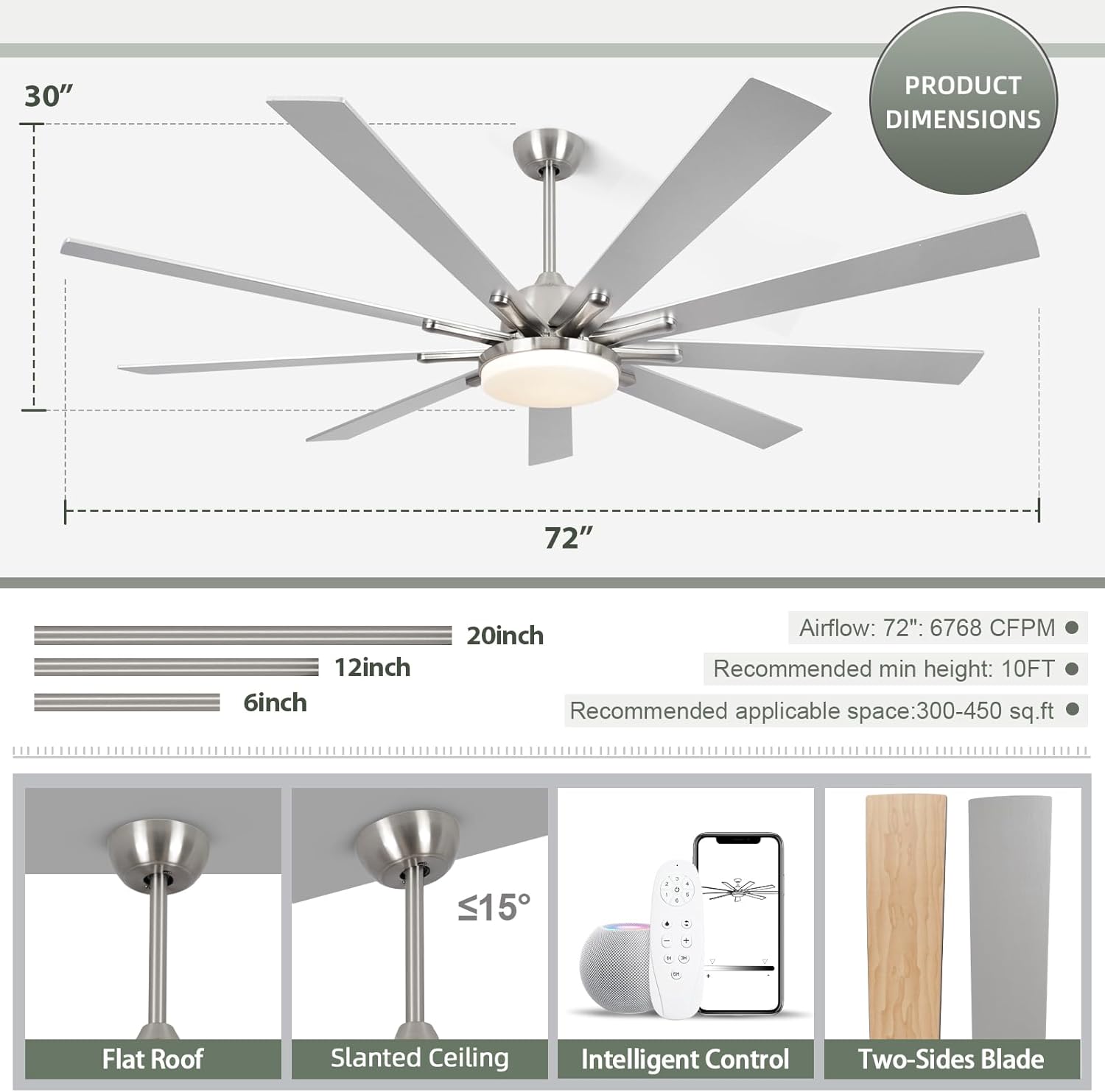
Figure 2: Product Dimensions and Installation Types
This diagram illustrates the dimensions of the 72-inch ceiling fan, including its 30-inch height and 72-inch width. It also shows the included 6-inch and 12-inch downrods, recommended minimum ceiling height of 10 feet, and applicable space of 300-450 sq. ft. Below, it depicts installation options for flat roofs and slanted ceilings (up to 15 degrees), along with icons for intelligent control and two-sided blades.
3. Assemble Fan Motor and Downrod
- Feed the fan wires through the chosen downrod (6-inch or 12-inch).
- Insert the downrod into the motor housing and secure it with the pin and screw.
4. Hang Fan and Make Electrical Connections
- Carefully lift the fan assembly and hang it on the mounting bracket hook.
- Connect the electrical wires according to the wiring diagram provided in the separate wiring guide (typically black to black, white to white, ground to ground).
- Ensure all connections are secure.
5. Install Fan Blades
- Attach the fan blades to the motor housing using the provided screws. Ensure they are tightly secured.
- The fan blades feature a double-sided finish (e.g., wood grain and silver) allowing for customization.

Figure 3: Double Finish Blades
This image highlights the versatility of the fan's blades, which offer a double-sided finish. One side is depicted as a dark wood texture (Side B), while the other is a solid color (Side A, labeled as black in the image, though the product is brushed nickel). This feature allows users to choose the blade finish that best matches their interior decor.
6. Install LED Light Kit
- Connect the LED light kit wires to the corresponding wires from the fan motor.
- Secure the light kit to the bottom of the fan motor housing.
7. Final Assembly
- Push the canopy up to the ceiling and secure it with the screws.
- Restore power at the circuit breaker.
Operating Instructions
Your SODSEA ceiling fan offers multiple control methods for convenience.
Control Methods
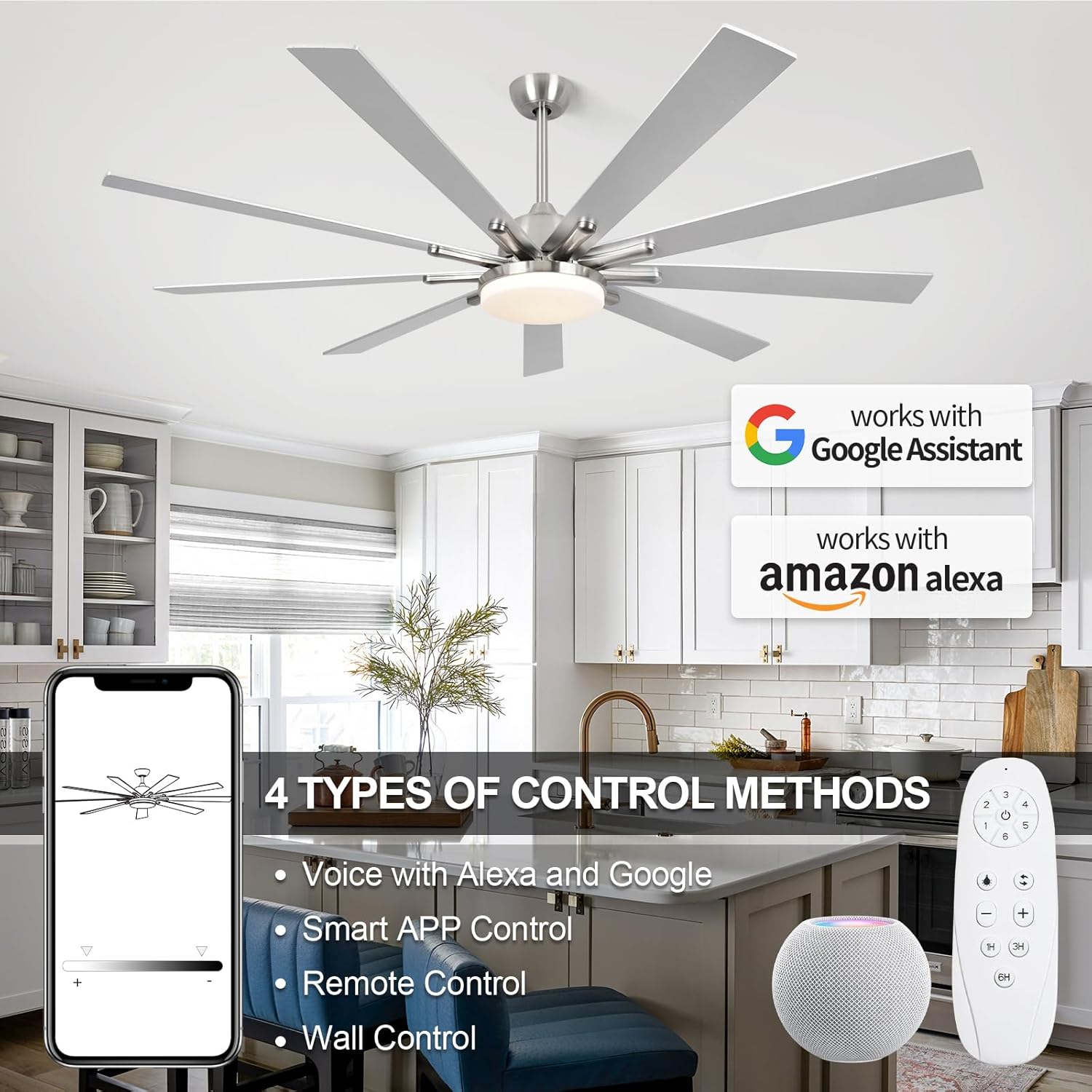
Figure 4: Multiple Control Methods
This image illustrates the four primary control methods for the SODSEA ceiling fan: voice control via Amazon Alexa and Google Assistant, smart APP control (Tuya APP), remote control, and traditional wall control (though wall control is not explicitly mentioned in product features, it's a common fan control method). This highlights the fan's smart home integration capabilities.
- Remote Control: Use the included remote to control fan speed, light settings, and timer functions.
- Smart APP Control ("Tuya" APP): Download the "Tuya" app on your smartphone to control the fan remotely, adjust settings, and schedule operations.
- Voice Control (Alexa, Google Assistant): Integrate your fan with Amazon Alexa or Google Assistant for hands-free voice commands.
Fan Speed Adjustment
The fan offers 6 adjustable speeds to meet various air circulation needs.
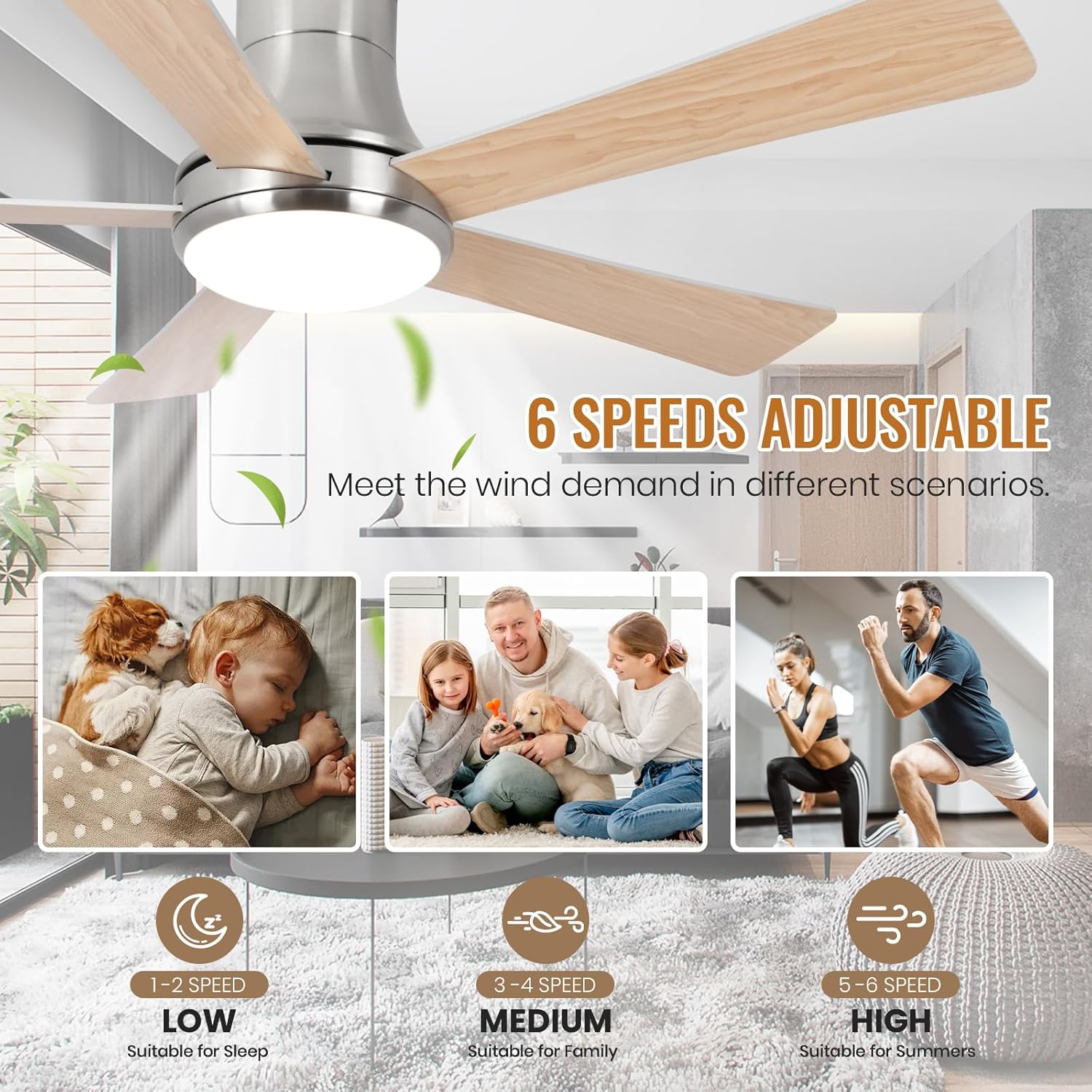
Figure 5: 6 Speeds Adjustable
This image demonstrates the fan's 6-speed adjustability, categorizing speeds for different scenarios: Speeds 1-2 are low, suitable for sleep; Speeds 3-4 are medium, suitable for family use; and Speeds 5-6 are high, suitable for summer cooling. This illustrates the fan's versatility in providing comfort.
- Speeds 1-2 (Low): Ideal for quiet operation and gentle air movement, suitable for sleeping.
- Speeds 3-4 (Medium): Provides comfortable air circulation for general family activities.
- Speeds 5-6 (High): Delivers strong airflow for maximum cooling, especially during warmer seasons.
Light Control
The integrated 24W LED light offers adjustable brightness and color temperature.

Figure 6: Adjustable Light Color Temperatures
This image demonstrates the LED light's ability to switch between three color temperatures: 3000K (Warm Light), 4500K (Natural Light), and 6000K (Cold White Light). It also indicates dimmable functionality from 1% to 100%, providing versatile lighting options for any mood or activity.
- Brightness Adjustment: Dimmable from 0% to 100% using the remote or app.
- Color Temperature: Choose from 3 settings:
- 3000K (Warm Light)
- 4000K (Natural Light)
- 6500K (Cold White Light)
Forward and Reverse Rotation
The fan features a reversible motor for year-round comfort.
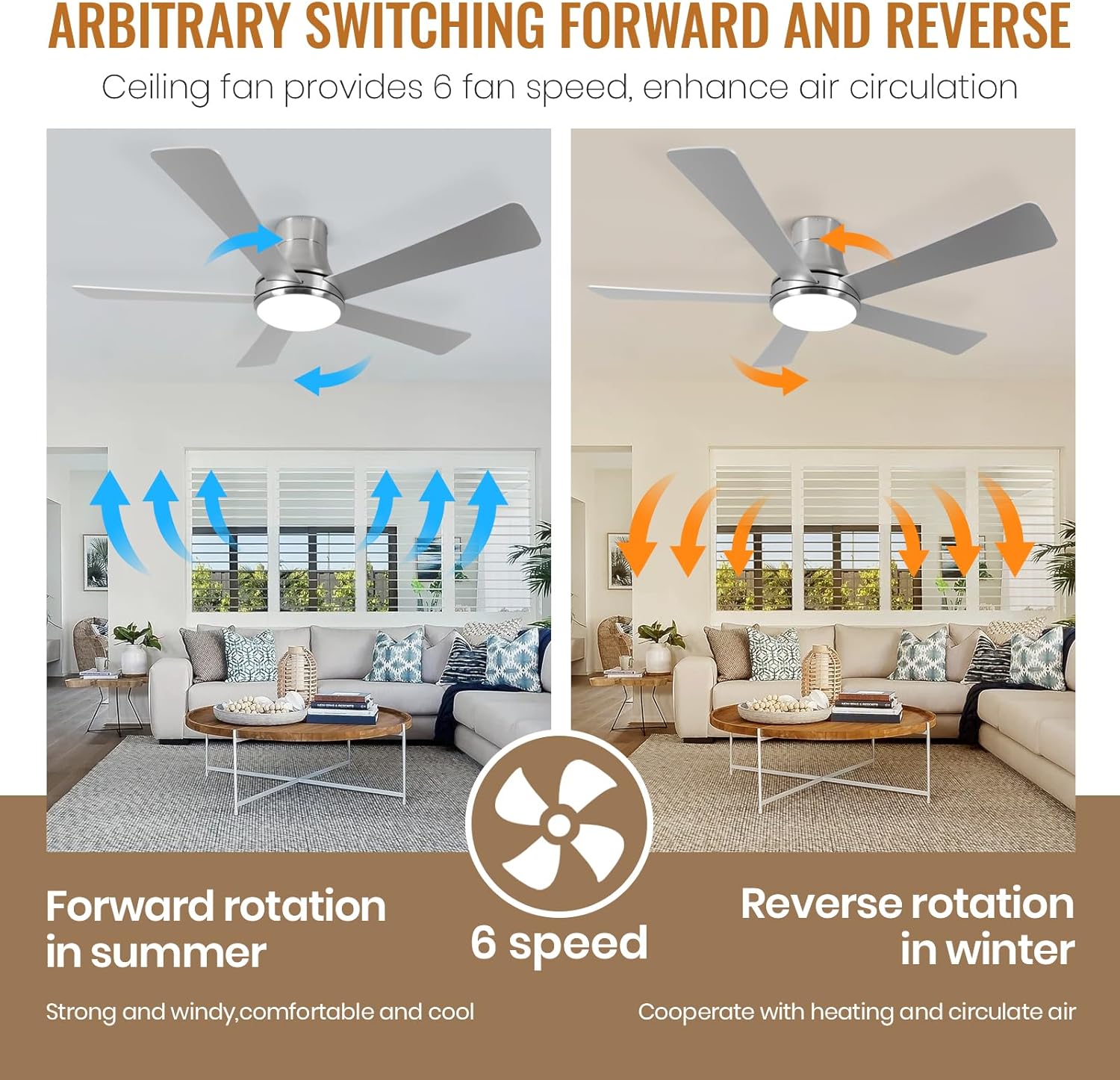
Figure 7: Forward and Reverse Rotation
This image illustrates the dual rotation capabilities of the ceiling fan. In summer, forward rotation (counter-clockwise) creates a downward breeze for cooling. In winter, reverse rotation (clockwise) circulates warm air trapped near the ceiling, helping to distribute heat more evenly. The fan offers 6 speeds for optimal air circulation in both modes.
- Forward Rotation (Summer Mode): Blades rotate counter-clockwise, creating a downward breeze for cooling.
- Reverse Rotation (Winter Mode): Blades rotate clockwise, drawing air upwards to circulate warm air trapped near the ceiling.
Timer Function
Set the fan to automatically turn off after a specified period.
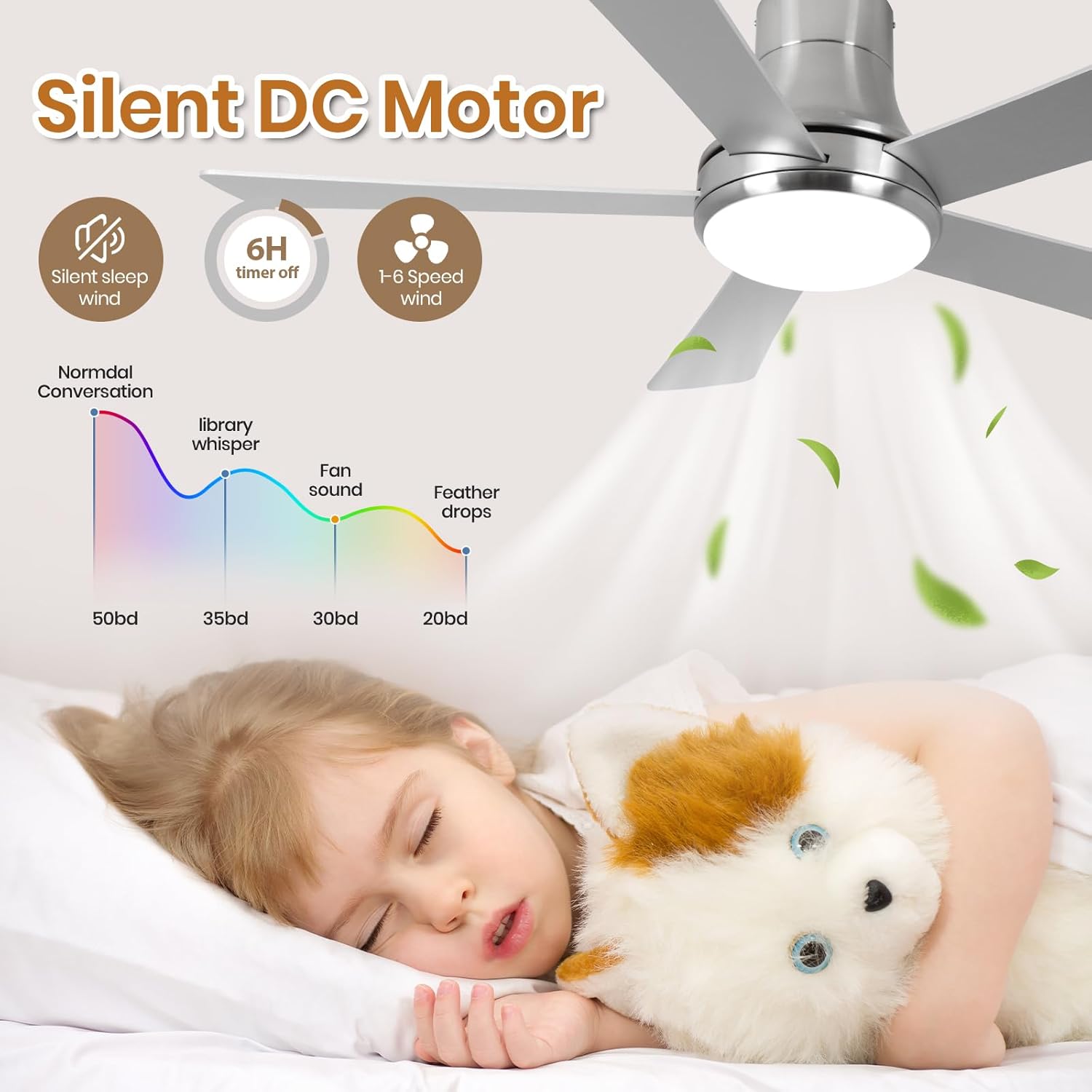
Figure 8: Silent DC Motor and Timer Function
This image emphasizes the fan's silent DC motor, which operates quietly, making it suitable for bedrooms and sleep. It also highlights the 6-hour timer function, allowing users to set the fan to automatically turn off. A sound level graph illustrates the low noise output compared to normal conversation, library whisper, and feather drops, indicating a very quiet operation.
- Available timer settings: 1 hour, 3 hours, 6 hours.
- Activate the timer via the remote control or the "Tuya" app.
Maintenance
Regular maintenance ensures optimal performance and longevity of your ceiling fan.
- Cleaning: Dust the fan blades and motor housing periodically with a soft, damp cloth. Do not use abrasive cleaners or solvents.
- Blade Balance: If the fan wobbles, check that all blade screws are tight and that blades are not warped. A balancing kit (not included) may be used if necessary.
- Light Kit: The LED light source is designed for long life and typically does not require replacement. If issues arise, contact customer support.
- Motor: The fan's DC motor is permanently lubricated and requires no oiling.
Troubleshooting
If you encounter issues with your fan, refer to the following common problems and solutions.
| Problem | Possible Cause | Solution |
|---|---|---|
| Fan does not start | No power to the fan; Loose wire connections; Remote control battery low. | Check circuit breaker; Verify all wire connections are secure; Replace remote control battery. |
| Fan wobbles | Loose blade screws; Unbalanced blades; Loose mounting bracket. | Tighten all blade screws; Use a balancing kit (if needed); Ensure mounting bracket is secure. |
| Light does not work | Loose wire connection to light kit; LED driver issue. | Check light kit wiring; Contact customer service if LED driver is suspected. |
| Remote control not working | Battery low or dead; Remote not paired with fan. | Replace battery; Refer to remote pairing instructions (usually in a separate guide or quick start). |
If the problem persists after trying these solutions, please contact SODSEA customer service for further assistance.
Specifications
| Feature | Detail |
|---|---|
| Brand | SODSEA |
| Model Name | Ceiling Fan |
| Item Model Number | 02d962ee-bfc4-486f-a521-efb541980192 |
| Color | Silver (Brushed Nickel Finish) |
| Electric Fan Design | Ceiling Fan |
| Room Type | Living Room, Bedroom, etc. |
| Special Features | Timer, Smart Control (App, Remote, Voice) |
| Recommended Uses | Air Circulation, Cooling, Ventilating |
| Wattage | 24 watts (LED Light) |
| Voltage | 120 Volts |
| Light Type | LED (Dimmable, 3 Color Temperatures) |
| Control Method | App, Remote |
| Indoor/Outdoor Usage | Indoor |
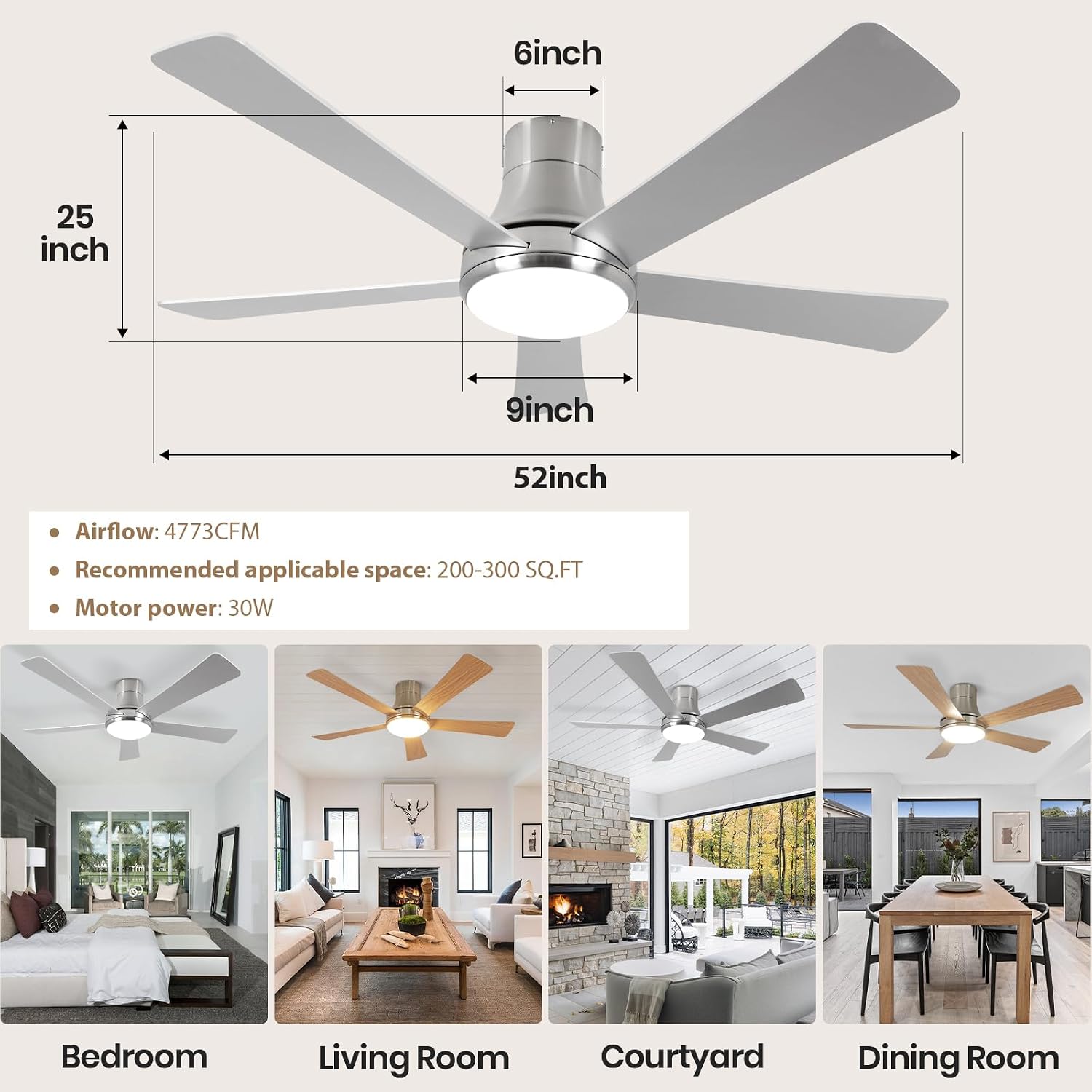
Figure 9: 52-inch Fan Dimensions and Room Suitability
This image provides specific dimensions for the 52-inch ceiling fan, including its 25-inch height and 52-inch width. It notes an airflow of 4773 CFM, recommended applicable space of 200-300 sq. ft., and a motor power of 30W. Below, it shows visual examples of the 52-inch fan installed in a bedroom, living room, courtyard, and dining room, demonstrating its versatility for various indoor spaces.
Warranty and Support
SODSEA provides a 12-month after-sales service for this ceiling fan.
- If you encounter any problems during the use or installation of your SODSEA ceiling fan, please do not hesitate to contact us.
- We are committed to replying and solving your problems within 24 hours.
- For support, please visit the SODSEA Store on Amazon or contact customer service through your purchase platform.
Ask a question about this manual
Ask about setup, troubleshooting, compatibility, parts, safety, or missing instructions. Manuals+ will review the question and use this page’s manual context to help answer it.