
1. Introduction
This manual provides essential information for the safe and effective operation, maintenance, and troubleshooting of your MYNTA 2025 Massage Chair. Please read this manual thoroughly before using the product and retain it for future reference.

Image 1.1: The MYNTA 2025 Massage Chair in Brown. This image displays the full chair from a front-side angle, highlighting its sleek design and brown upholstery.
2. Safety Information
To ensure safe operation, observe the following precautions:
- Do not allow children to operate the massage chair without adult supervision.
- The maximum weight capacity for this chair is 300 pounds. Exceeding this limit may cause damage to the chair or injury to the user.
- Ensure the chair is placed on a level surface and there is adequate space around it for reclining and movement.
- Keep hands and feet clear of moving parts during operation.
- If you experience discomfort or pain during a massage, discontinue use immediately.
- Consult a physician before use if you have pre-existing medical conditions, are pregnant, or have a pacemaker.
3. Product Components and Dimensions
Familiarize yourself with the main components and dimensions of your massage chair.
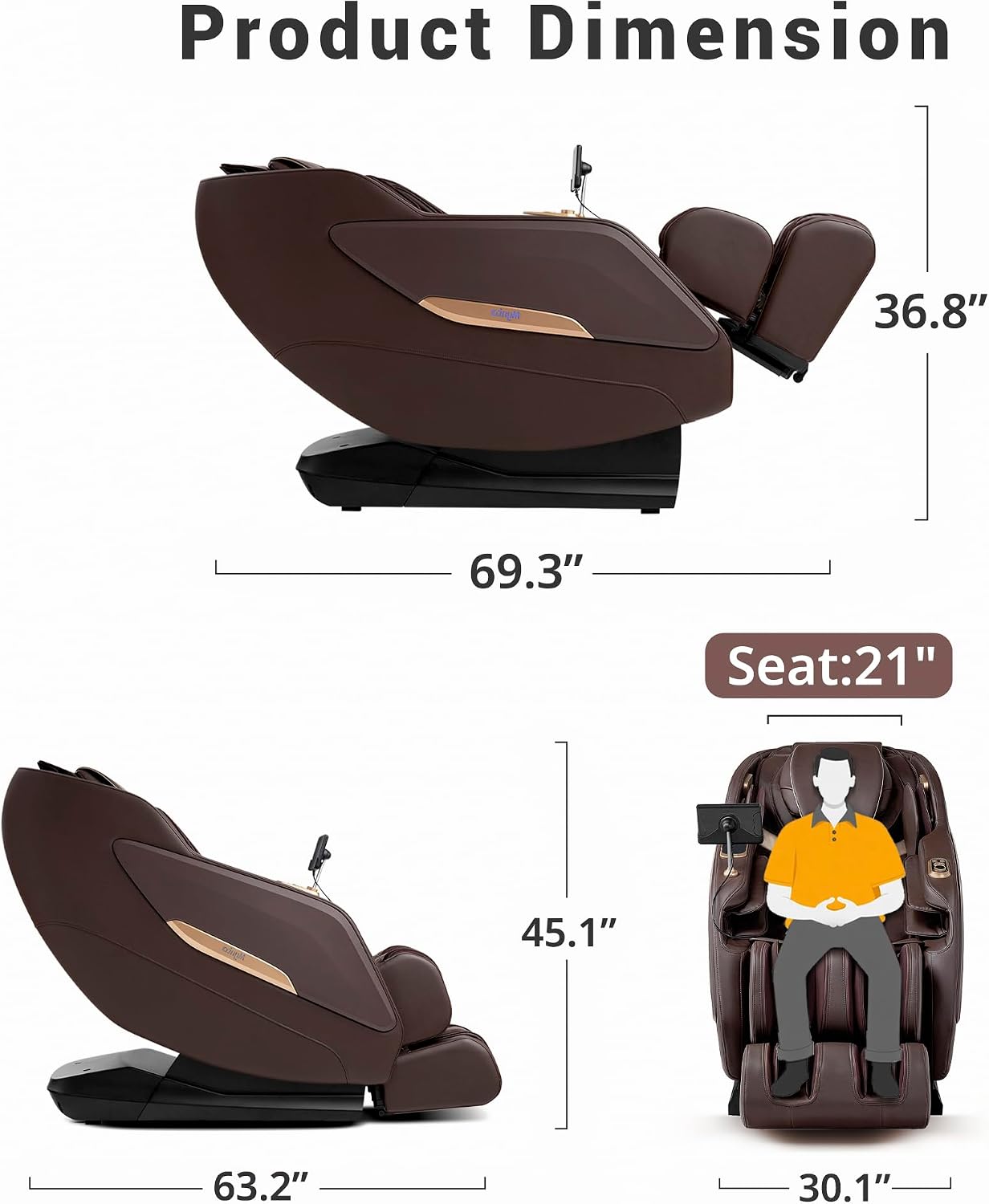
Image 3.1: Product dimensions of the MYNTA Massage Chair. The image illustrates the chair's depth (63.2" to 69.3" when reclined), width (30.1"), and height (45.1" to 36.8" when reclined), along with a seat depth of 21 inches.

Image 3.2: Diagram illustrating the full body massage features. This image highlights the locations of shoulder airbags, 3D massage rollers, lower back heating, arm airbags, calf airbags, calf heating, foot airbags, and foot rollers within the chair.
4. Setup and Installation
The MYNTA 2025 Massage Chair is designed for relatively easy setup. It arrives largely pre-assembled. Follow these guidelines for placement and initial setup:
- Unpacking: Carefully remove the chair from its packaging. Retain packaging materials for potential future transport or service.
- Placement: Position the chair on a flat, stable surface. Ensure there is sufficient clearance behind and in front of the chair for full recline.
- Doorway Clearance: The minimum doorway size required for the chair is 30.1 inches.
- Power Connection: Connect the power cord to the chair and then to a grounded electrical outlet.

Image 4.1: Illustration of minimum doorway size and chair mobility. This image shows the chair's width of 30.1 inches for doorway clearance and indicates the presence of wheels for easy relocation.
5. Operating Instructions
5.1 Control Panel
The chair is operated via an intuitive control panel, typically located on the armrest or a tethered remote.

Image 5.1: Close-up of the main control panel. This image displays the digital screen and various buttons for selecting massage programs, adjusting intensity, and controlling specific features.

Image 5.2: Close-up of the side control panel. This image shows a simplified set of buttons, including power, recline adjustments, and potentially quick access to common functions.
5.2 Power On/Off
Press the Power button on the control panel to turn the chair on or off.
5.3 Automatic Body Detection
Upon activation, the chair's sensors will perform an automatic body scan to identify your body position and target specific pressure points for a customized massage experience. This feature accommodates users up to 6.1 feet tall.

Image 5.3: Illustration of the Automatic Body Scan feature. This image depicts a user in the chair and a digital overlay showing the chair scanning the user's body to detect height and shape for personalized massage.
5.4 Zero Gravity Function
The Zero Gravity feature allows for three levels of reclining angles, distributing body weight evenly to reduce pressure on the spine and joints.
- Initial Step: A slight recline for initial comfort.
- Comfort Step: A deeper recline, elevating the legs above the heart.
- Deep Step: The deepest recline, maximizing the zero-gravity effect.
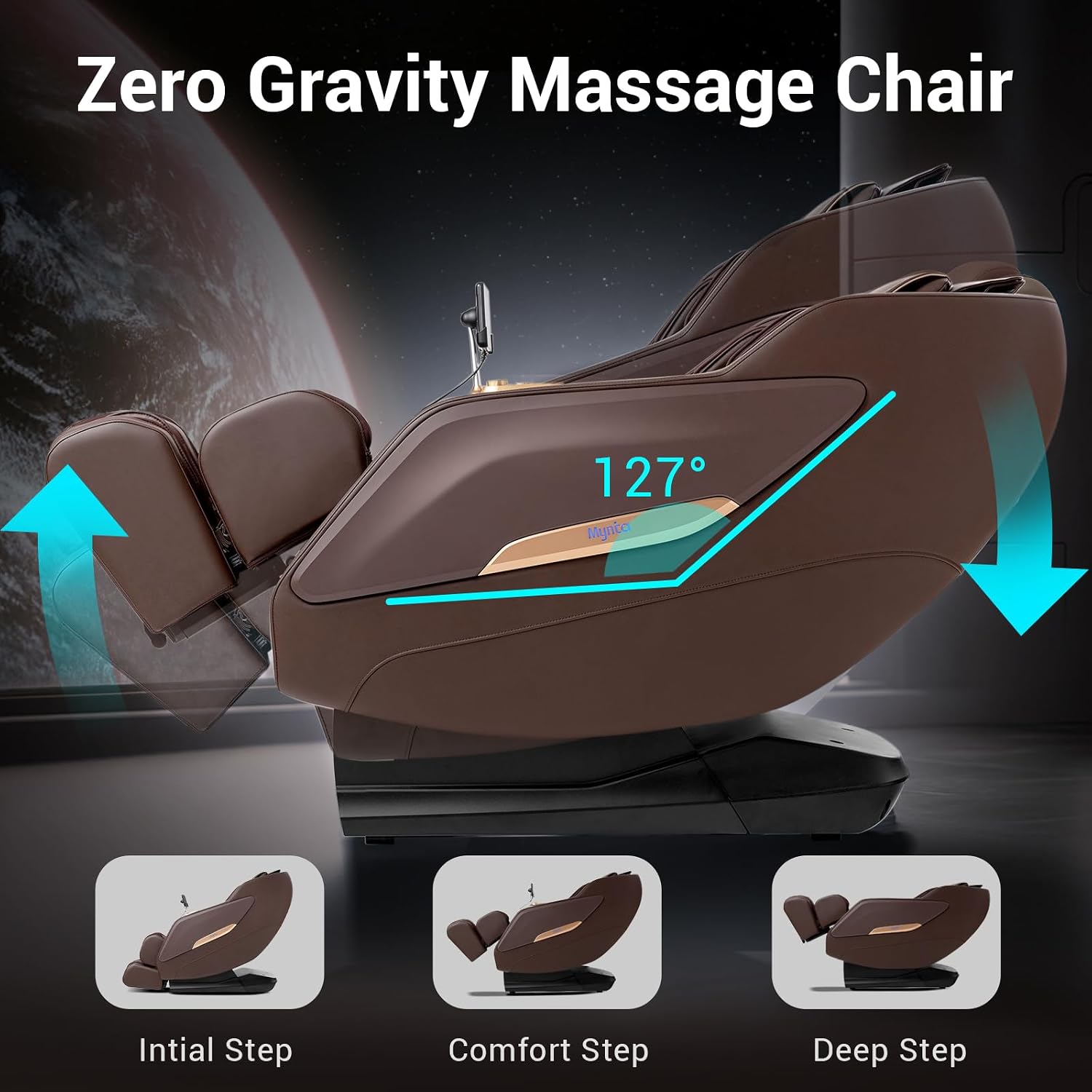
Image 5.4: Diagram showing the three Zero Gravity positions. This image illustrates the chair reclining from an initial position to a deeper, more elevated position, indicating the 127-degree angle for optimal zero gravity.
5.5 SL Track Technology
The SL track technology guides the massage rollers from the neck down to the hips, mimicking the natural curvature of the human spine for a comprehensive massage experience.

Image 5.5: Illustration of the 53.14" SL Track. This image shows the path of the massage rollers along the user's body, from neck to back, waist, hip, and thigh, following the natural curves.
5.6 Massage Programs and Techniques
The chair offers 8 pre-programmed massage modes and 6 massage techniques:
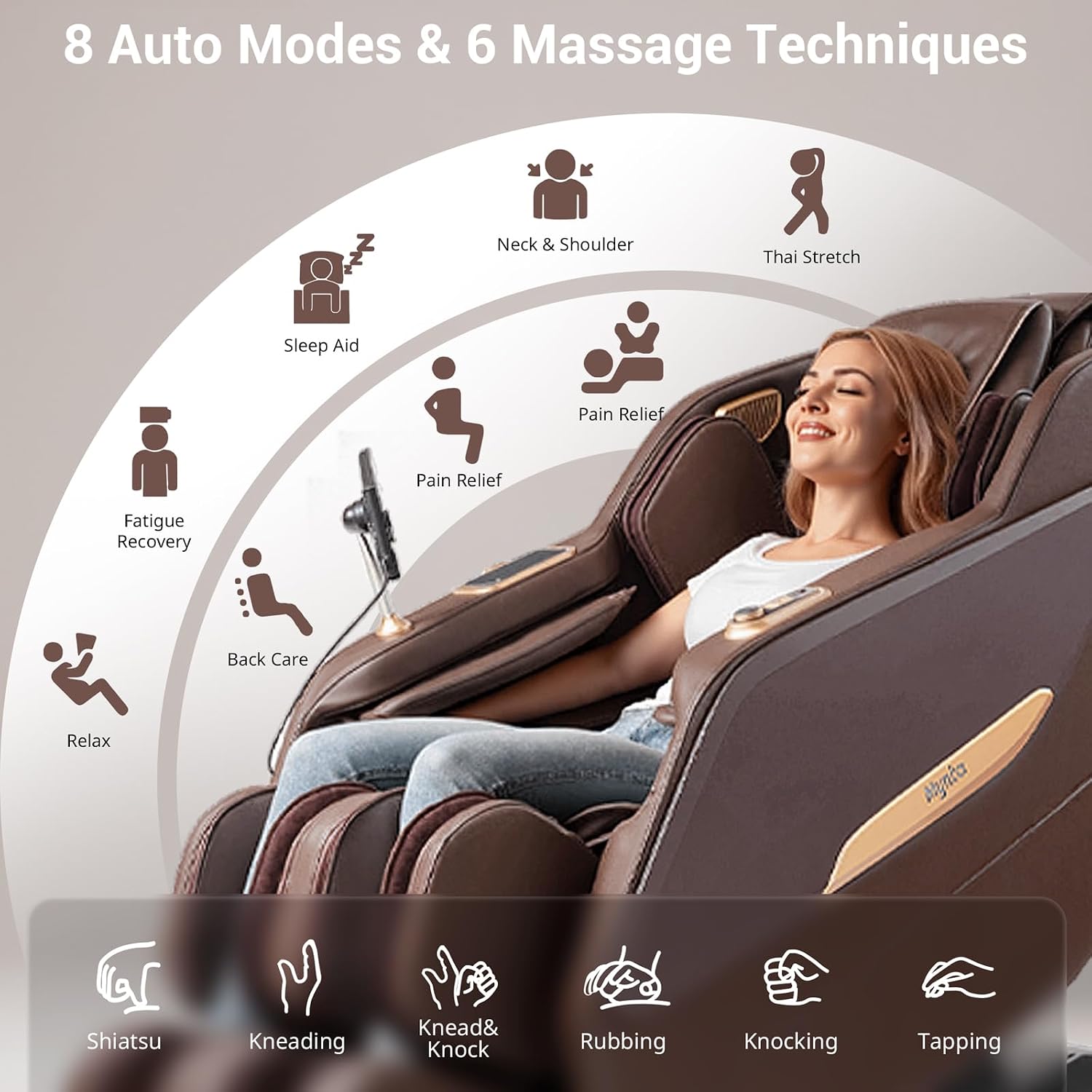
Image 5.6: Visual representation of the 8 auto massage modes and 6 massage techniques. The auto modes include Relax, Sleep Aid, Neck & Shoulder, Thai Stretch, Waist & Hip, Pain Relief, Deep Tissue, and Fatigue Recovery. The techniques are Shiatsu, Kneading, Knead & Knock, Rubbing, Knocking, and Tapping.
Auto Programs:
- Relax
- Sleep Aid
- Neck & Shoulder
- Thai Stretch
- Waist & Hip
- Pain Relief
- Deep Tissue
- Fatigue Recovery
Massage Techniques:
- Shiatsu
- Kneading
- Knead & Knock
- Rubbing
- Knocking
- Tapping
5.7 Calf and Waist Heating
Activate the built-in heating function for the calf and waist areas via the control panel for enhanced comfort and relaxation.

Image 5.7: A user seated in the massage chair with illuminated areas indicating the calf and waist heating zones.
5.8 Foot Roller and Airbag Massage
Rotating nodes apply deep kneading pressure to the soles of your feet, promoting circulation and relieving foot fatigue. Airbags provide compression massage to the shoulders, arms, back, calves, and feet, with adjustable intensity.

Image 5.8: Diagram illustrating the foot and calf massage features. This image shows air compression massage, calf heating, foot rollers, and a 7-inch stretch function for the leg rest.
5.9 Bluetooth Audio System
The chair features 3D surround sound speakers. To use, enable Bluetooth on your mobile device and connect to the chair's audio system.

Image 5.9: A smartphone displaying its Bluetooth settings, with the MYNTA massage chair's speaker visible in the background, indicating a successful connection.
5.10 Wireless Charging
A wireless charging pad is integrated into the chair, compatible with most smartphones, allowing you to charge your device during massage sessions.
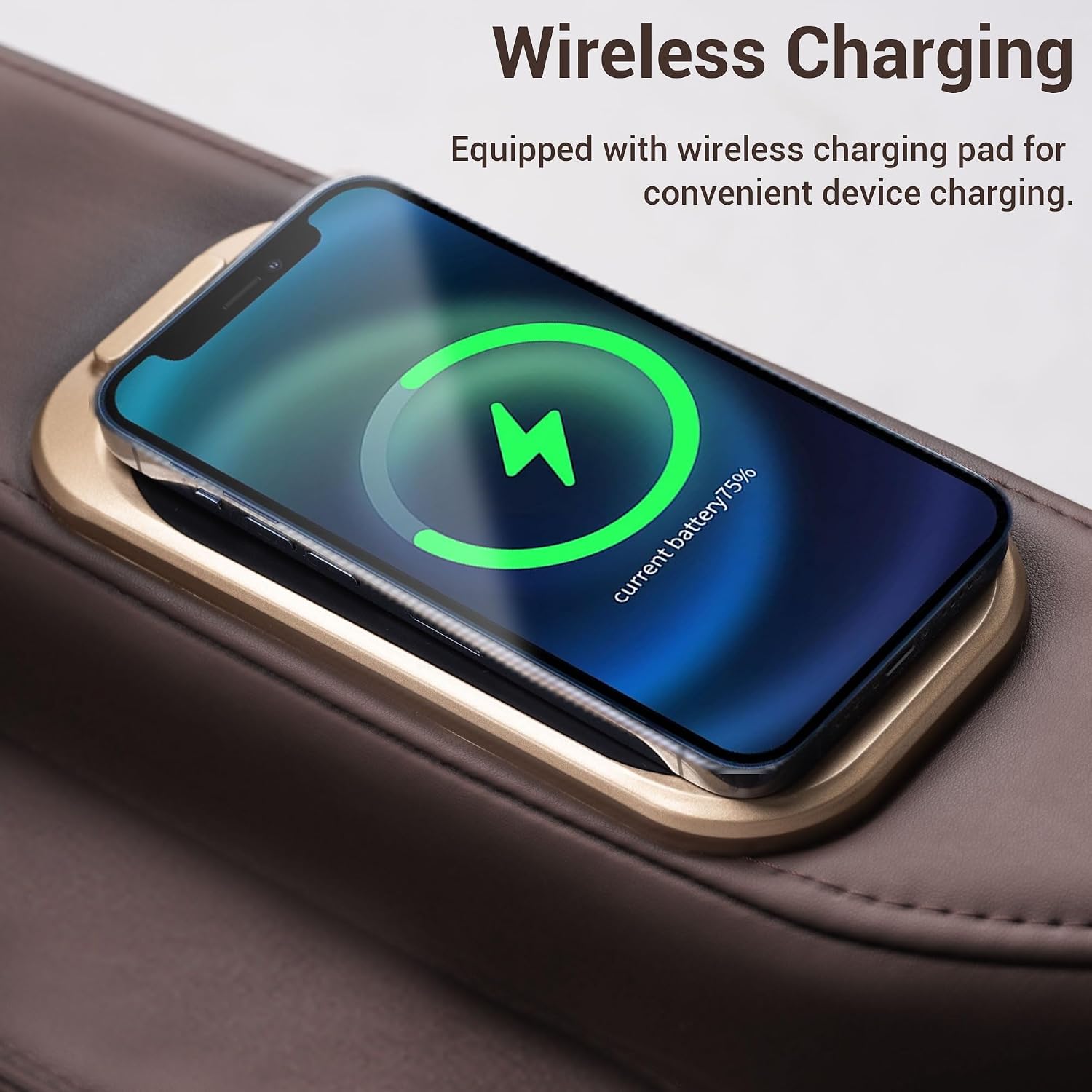
Image 5.10: A smartphone placed on the wireless charging pad of the massage chair, showing the charging indicator on the phone screen.
6. Maintenance
Proper maintenance ensures the longevity and optimal performance of your massage chair.
- Cleaning: Wipe clean the exterior surfaces with a soft, damp cloth. Avoid using abrasive cleaners or solvents.
- Storage: When not in use for extended periods, unplug the chair and cover it to protect from dust.
- Inspection: Periodically check the power cord for any damage. If damaged, contact customer support for assistance.
7. Troubleshooting
If you encounter issues with your massage chair, refer to the following common troubleshooting steps:
| Problem | Possible Cause | Solution |
|---|---|---|
| Chair does not power on. | Power cord not securely plugged in; power outlet malfunction. | Ensure power cord is fully inserted. Test outlet with another device. |
| Massage function not working. | Program not selected; safety feature engaged. | Select a massage program from the control panel. Ensure no obstructions. |
| Bluetooth not connecting. | Bluetooth on device is off; chair's Bluetooth not active. | Ensure Bluetooth is enabled on your device and the chair. Try restarting both. |
| Wireless charging not working. | Device not compatible; device not positioned correctly. | Ensure your device supports wireless charging. Reposition device on the pad. |
If the problem persists after attempting these solutions, please contact MYNTA customer support.
8. Specifications
Detailed technical specifications for the MYNTA 2025 Massage Chair M1820A.
| Feature | Detail |
|---|---|
| Brand | MYNTA |
| Model Name | M1820A |
| Color | Brown |
| Product Dimensions (D x W x H) | 63.18"D x 30.11"W x 45.08"H |
| Back Style | Continuous Back |
| Special Features | Calf and Waist Heating, Wireless Charging, Zero Gravity |
| Product Care Instructions | Wipe Clean |
| Maximum Weight Recommendation | 300 Pounds |
| Style | Modern |
| Room Type | Bedroom, Living Room, Office |
| Age Range (Description) | Adult |
| Included Components | Massage chair 1820 |
| Seat Depth | 21 inches |
| Fill Material | Foam |
| Reclining Position Count | 3 Position |
| Item Weight | 145 pounds |
| Date First Available | February 22, 2025 |
9. Warranty and Support
For warranty information, please refer to the documentation included with your purchase or visit the official MYNTA website. For technical support, product inquiries, or service requests, please contact MYNTA customer service through the contact information provided on the MYNTA brand store or product packaging.
You can visit the MYNTA Store for more information: MYNTA Store