
Introduction
This manual provides detailed instructions for the RIENOK S10 Bluetooth White Noise Speaker, covering setup, operation, maintenance, and safety guidelines. This device combines a HiFi Bluetooth 5.3 speaker with a white noise machine, offering adjustable brightness, 8 soothing sounds, and a timer function for various uses including relaxation, sleep, yoga, and meditation.
Product Overview
The RIENOK S10 is designed to enhance your environment with customizable soundscapes and lighting. It features intuitive controls for sound selection, volume, timer settings, and lighting modes.

Figure 1: RIENOK S10 Bluetooth White Noise Speaker. This image shows the top view of the speaker with its control buttons, sliders for sound mixing, a rotary knob, and a digital display. The speaker emits a warm glow from its sides.
Setup
Charging the Device
Before initial use, fully charge the RIENOK S10 speaker.
- Connect the provided data cable to the charging port on the speaker.
- Connect the other end of the data cable to a compatible USB power adapter (not included) or a computer's USB port.
- The charging indicator will show the charging status. Once fully charged, the indicator will change or turn off.

Figure 2: Package contents including the RIENOK S10 speaker, user manual, and USB data cable.
Operating Instructions
Power On/Off
- To turn on the device, press the power button.
- To turn off the device, press and hold the power button.
Sound Selection and Adjustment
The speaker offers eight different soothing sound effects.
- To select a sound, use the individual slider buttons corresponding to each sound.
- Multiple sounds can be activated simultaneously by adjusting their respective sliders.
- To adjust the overall volume, turn the main rotary knob: clockwise to increase, counter-clockwise to decrease.

Figure 3: Visual representation of the 8 soothing sounds available on the RIENOK S10 speaker. These include Rain, Birdsong, Ocean waves, Stream, Bonfire, Train, Insects, and Bells.
Bluetooth Pairing
Connect your mobile device to the RIENOK S10 via Bluetooth to play your preferred music or audio.
- Ensure the speaker is powered on.
- Activate Bluetooth on your mobile device.
- Search for "RIENOK S10" in your device's Bluetooth settings and select it to pair.
- A confirmation sound will indicate successful pairing.

Figure 4: The RIENOK S10 speaker wirelessly connected to a smartphone via Bluetooth 5.3, ready to stream audio.
Timer Function
Set a timer for automatic shutdown of the sound and light features.
- To set the timer, use the rotary knob.
- Rotate clockwise to increase the duration (in 5-minute increments).
- Rotate counter-clockwise to decrease the duration.
- The timer can be set from 5 to 180 minutes.

Figure 5: The RIENOK S10 speaker's timer function, allowing users to set a duration between 5 and 180 minutes for automatic shutdown, ideal for sleep.
Lighting Modes
The speaker features two main lighting modes: a warm night light and 11 colorful RGB lighting modes.
- To activate the lighting, press the dedicated light button.
- Use the rotary knob to select the desired lighting mode.
- Warm Night Light Mode: Adjustable brightness from F01 to F30.
- Colorful RGB Lighting Modes: 11 distinct modes, displayed as A01 to A11 on the screen.
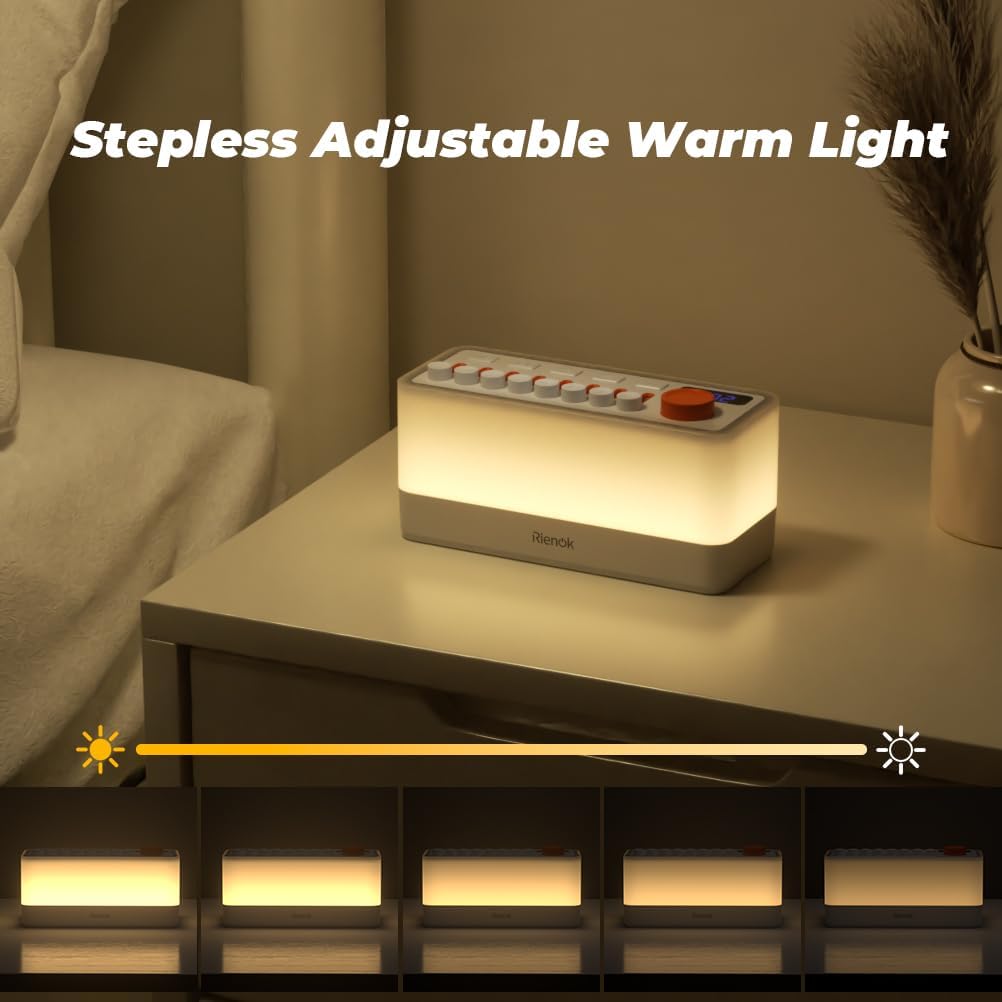
Figure 6: Examples of the 11 colorful RGB lighting modes available on the RIENOK S10 speaker, providing ambient light.

Figure 7: The RIENOK S10 speaker's warm night light mode, demonstrating its stepless adjustable brightness feature.
Maintenance
- Cleaning: Use a soft, dry cloth to clean the surface of the speaker. Do not use liquid cleaners or abrasive materials.
- Storage: Store the device in a cool, dry place away from direct sunlight and extreme temperatures.
- Battery Care: To prolong battery life, avoid fully discharging the battery frequently. Charge the device regularly, even if not in use for extended periods.
Troubleshooting
| Problem | Possible Cause | Solution |
|---|---|---|
| Device does not turn on. | Low battery or no power. | Charge the device using the provided USB cable. Ensure the power button is pressed correctly. |
| Cannot connect via Bluetooth. | Bluetooth not enabled on device, speaker not in pairing mode, or too far from speaker. | Ensure Bluetooth is active on your mobile device. Make sure the speaker is powered on. Move your device closer to the speaker. Try unpairing and re-pairing. |
| No sound or low volume. | Volume too low on speaker or connected device, or sound sliders are down. | Increase volume using the rotary knob on the speaker and on your connected device. Ensure individual sound sliders are adjusted upwards. |
| Lights are not working. | Light function not activated or brightness set to minimum. | Press the light button to activate. Adjust brightness using the rotary knob. |
Specifications
| Brand | RIENOK |
| Model Number | Rienok S10 |
| Dimensions (L x W x H) | 18 x 8 x 7.3 cm |
| Weight | 640 grams |
| Power Source | Battery Powered (1 D battery included) |
| Material | Plastic |
| Bluetooth Version | 5.3 |
| Playback Time | Up to 60 hours (varies with volume and music type) |
| Lighting Modes | Warm Night Light (F01-F30), 11 Colorful RGB Modes (A01-A11) |
| Soothing Sounds | 8 different ambient sounds |
| Timer Function | 5-180 minutes (5-minute increments) |

Figure 8: The RIENOK S10 speaker highlighting its long battery life of up to 60 hours, which may vary based on usage.

Figure 9: Detailed dimensions of the RIENOK S10 Bluetooth speaker, showing its length, width, and height.
Safety Warnings
- Do not allow children under 3 years of age to play with this product.
- Do not use the product if it is damaged or if the power outlet is defective.
- This product is intended for use by adults, children, and babies.
- Turn off the product during sleep to avoid any disturbance, unless using the timer function for specific sound/light duration.
- Keep the device away from water and excessive moisture.
- Do not disassemble, repair, or modify the device yourself. Contact customer support for assistance.
Warranty and Support
Specific warranty information is not provided in this manual. For details regarding warranty coverage, please refer to the product packaging or contact RIENOK customer support.
For technical support, troubleshooting assistance, or any inquiries about your RIENOK S10 speaker, please visit the official RIENOK website or contact their customer service department.
Online Support: www.rienok.com (This is a placeholder URL, please replace with actual support link if available)


