
1. Introduction
Thank you for choosing the itel Smart Watch ISW-O11. This manual provides essential information for setting up, operating, and maintaining your new smartwatch. Please read this manual thoroughly before using the device to ensure proper function and safety.
2. Package Contents
Ensure all items are present in the package:
- itel Smart Watch ISW-O11
- Charging Cable
- User Manual
3. Product Overview
The itel Smart Watch ISW-O11 features a 1.83-inch high-resolution display, supports Bluetooth calling, and offers comprehensive health and fitness tracking. It is designed for daily use with IP68 water and dust resistance.
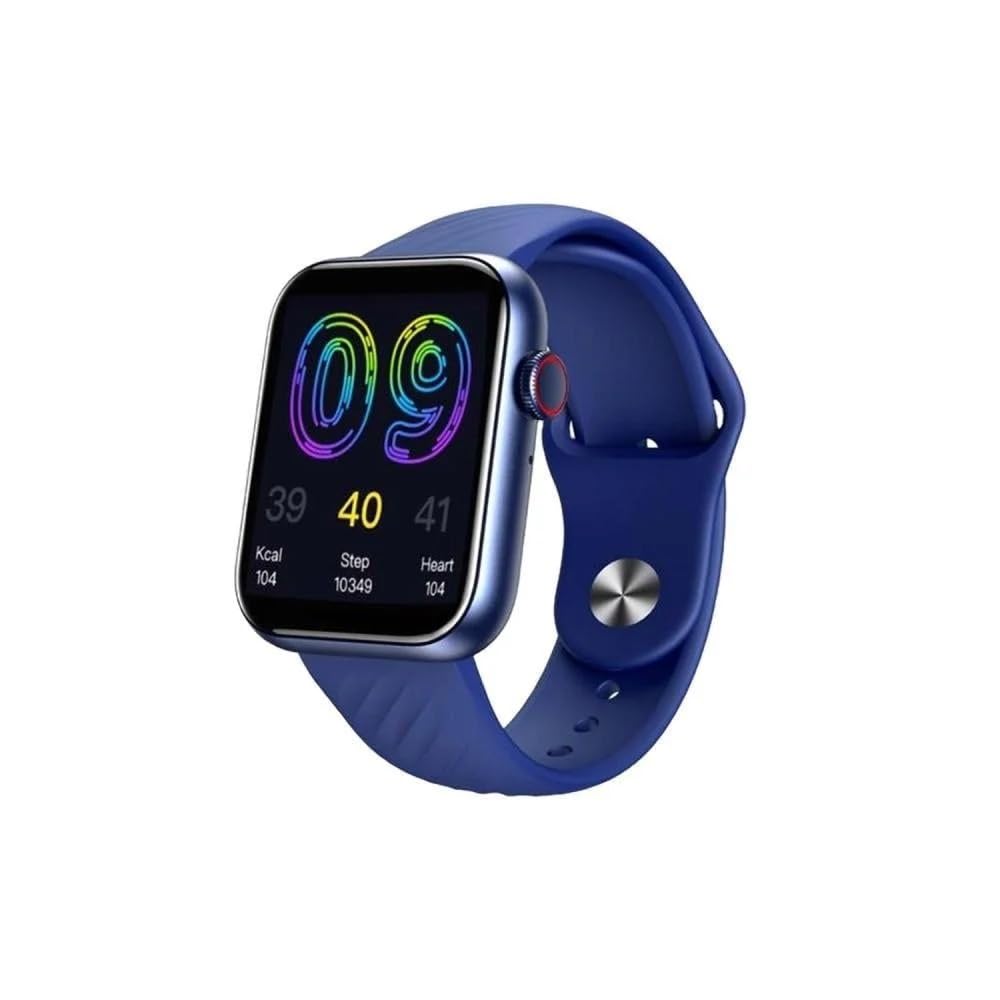
Figure 1: Front view of the itel Smart Watch ISW-O11, showcasing its rectangular display and sleek design.
Key Features:
- 1.83-inch High-Resolution Display
- Bluetooth Calling (Make and Receive Calls)
- Smart Notifications (Calls, Messages, Social Media, Email)
- 24-hour Health Monitoring (Heart rate, Sleep, etc.)
- Over 100 Sports Modes
- Voice Assistant Support
- Find Phone Feature
- Remote Camera Control
- Stopwatch Function
- Menstrual Cycle Reminder
- IP68 Water and Dust Resistance
- Long Battery Life: Up to 30 days standby, 7 days typical use
4. Setup
4.1. Charging the Device
Before initial use, fully charge your smartwatch. Connect the charging cable to the charging port on the back of the watch and plug the other end into a USB power adapter (not included) or a computer's USB port. The watch display will indicate charging status.
4.2. Power On/Off
- Power On: Press and hold the side button for a few seconds until the screen lights up.
- Power Off: Press and hold the side button, then select the 'Power Off' option on the screen.
4.3. App Installation and Pairing
- Scan the QR code in the manual or on the watch screen, or search for the companion app (e.g., 'itel Smart') in your phone's app store.
- Download and install the app on your smartphone.
- Ensure Bluetooth is enabled on your smartphone.
- Open the app and follow the on-screen instructions to create an account or log in.
- In the app, navigate to 'Device' or 'Add Device' and select your ISW-O11 smartwatch from the list of available devices.
- Confirm the pairing request on both your phone and the watch.
Once paired, the watch will synchronize data with your phone, and you can customize settings through the app.
5. Operating the Smart Watch
5.1. Basic Navigation
- Swipe Up/Down: Scroll through menus and notifications.
- Swipe Left/Right: Access quick widgets or different functions.
- Tap: Select an item or confirm an action.
- Side Button: Press to return to the home screen or wake the display. Long press for power options.
5.2. Making and Receiving Calls
After successful Bluetooth pairing, you can make and receive calls directly from your watch.
- Making a Call: Access the 'Dialer' or 'Contacts' feature on the watch, then dial a number or select a contact.
- Receiving a Call: When a call comes in, the watch will display the caller ID. Tap the green icon to answer or the red icon to reject.
5.3. Notifications
Once connected to your smartphone, the watch will display notifications for incoming calls, messages, emails, and social media apps. Ensure notification permissions are enabled in the companion app and your phone's settings.
5.4. Health Monitoring
The ISW-O11 provides 24-hour health monitoring features:
- Heart Rate: Access the heart rate monitor to measure your current heart rate. The watch can track heart rate continuously.
- Sleep Tracking: Wear the watch to bed to monitor your sleep patterns, including deep sleep, light sleep, and wake times.
- Other Metrics: Depending on the model, other metrics like blood oxygen or step count may be available. Refer to the watch interface for details.
5.5. Sports Modes
The watch supports over 100 sports modes. Select your desired activity from the 'Workout' or 'Sports' menu to track duration, calories burned, heart rate, and other relevant data.
5.6. Voice Assistant
Activate the voice assistant feature on your watch to control functions using simple voice commands. Ensure your phone's voice assistant is enabled and connected.
5.7. Additional Features
- Find Phone: Use this feature on your watch to make your paired phone ring, helping you locate it.
- Remote Camera: Control your phone's camera remotely from your watch to take photos.
- Stopwatch: Access the stopwatch function for timing activities.
- Menstrual Cycle Reminder: For female users, set up and receive reminders for menstrual cycles through the companion app.
6. Maintenance
6.1. Cleaning
Regularly clean your watch and strap with a soft, dry cloth. If necessary, use a slightly damp cloth and mild soap, then rinse and dry thoroughly. Avoid harsh chemicals or abrasive materials.
6.2. Water Resistance (IP68)
The ISW-O11 is IP68 water and dust resistant, meaning it can withstand immersion in water up to 1.5 meters for 30 minutes. It is suitable for daily use, rain, and shallow water activities. However, it is not recommended for hot showers, saunas, or deep diving, as steam and high pressure can compromise the seals.
6.3. Battery Care
To prolong battery life, avoid fully discharging the watch frequently. Charge it regularly, and if storing for an extended period, charge it to about 50%.
7. Troubleshooting
| Problem | Solution |
|---|---|
| Watch does not power on. | Ensure the watch is fully charged. Connect it to the charger for at least 30 minutes. |
| Cannot pair with smartphone. | Ensure Bluetooth is enabled on both devices. Restart both the watch and phone. Make sure the watch is not already paired with another device. Check app permissions. |
| No notifications received. | Check if the watch is connected to the app. Verify notification permissions in the app and your phone's settings. Ensure 'Do Not Disturb' mode is off on both devices. |
| Inaccurate health data. | Ensure the watch is worn snugly on your wrist, not too tight or too loose. Clean the sensor on the back of the watch. Avoid excessive movement during measurements. |
8. Specifications
| Feature | Detail |
|---|---|
| Brand | itel |
| Model Number | ISW-O11 |
| Display Size | 1.83 inches |
| Shape | Rectangular |
| Connectivity | Bluetooth |
| GPS | No GPS |
| Special Features | Notifications, Bluetooth Calling, Health Monitoring, Sports Modes, Voice Assistant |
| Water Resistance | IP68 |
| Battery Life (Standby) | Up to 30 days |
| Battery Life (Typical Use) | Up to 7 days |
9. Warranty and Support
The itel Smart Watch ISW-O11 comes with a 1-year manufacturer's warranty from the date of purchase. This warranty covers manufacturing defects under normal use. It does not cover damage caused by misuse, accidents, unauthorized modifications, or normal wear and tear.
For warranty claims or technical support, please contact your local retailer or the itel customer service center. Keep your proof of purchase for warranty validation.
For the latest information and support resources, please visit the official itel website.


