
Introduction
Thank you for choosing the Blonbar Bedside Lamp with Wake-up Light, Model AJ300. This device combines a bedside lamp, a dual alarm clock with wake-up light simulation, 10 soothing natural sounds, and a convenient 10W USB charging port. Designed for ease of use and to enhance your daily routine, this manual provides detailed instructions for setup, operation, and maintenance.
Key features include:
- 3-level touch brightness control with a breathing light option.
- Dual alarm system with snooze function and sunrise simulation.
- 10 natural sounds for sleep aid and alarm tones.
- Adjustable clock display brightness (3 levels or off) and 12/24H format.
- Integrated 10W USB charging port for electronic devices.
Safety Information
- Ensure the product is placed on a stable, flat surface.
- Do not expose the device to water or excessive humidity.
- Use only the provided power cable or a compatible 5V power adapter.
- Keep out of reach of children.
- Do not attempt to disassemble or repair the device yourself. Contact qualified personnel for service.
- Avoid placing the lamp near heat sources or in direct sunlight for extended periods.
Setup
- Unboxing: Carefully remove the lamp and all accessories from the packaging.
- Power Connection: Connect the provided power cable to the DC 5V input port on the back of the lamp, then plug the adapter into a standard wall outlet. The display will illuminate.
- Initial Time Setting: Upon first power-on, the clock display may flash. Refer to the 'Operating Instructions - Clock Display' section to set the correct time and 12/24H format.

Operating Instructions
1. Power On/Off and Light Control
- Power Button: Press the power button (usually indicated by a circle with a vertical line) to turn the lamp on or off.
- Brightness Adjustment: The lamp features 3 levels of brightness. Touch the light tube or the designated touch area to cycle through the brightness levels (Level 1, Level 2, Level 3).
- Breathing Light: A breathing light mode provides a soft, pulsating glow, ideal as a night light. This mode can typically be activated by a specific touch or button press, as detailed in the product's quick start guide.

2. Alarm Settings (Dual Alarm & Snooze)
The lamp features two independent alarms (Alarm 1 and Alarm 2).
- Setting an Alarm: Press the 'Alarm 1' or 'Alarm 2' button. The hour display will flash. Use the '+' and '-' buttons (or a rotary knob if present) to set the desired hour, then press the alarm button again to confirm. Repeat for minutes.
- Alarm Sound/Light: After setting the time, you can typically choose between a natural sound, a buzzer, or a wake-up light simulation. Follow the on-screen prompts or refer to the quick start guide for specific button presses.
- Activating/Deactivating Alarm: Press the respective alarm button briefly to toggle the alarm on or off. An icon on the display will indicate if the alarm is active.
- Snooze Function: When an alarm sounds, press the 'Snooze' button to temporarily silence it for 10 minutes. The alarm will sound again after the snooze period.
3. Natural Sounds & Countdown Timer
The device offers 10 natural sounds to aid sleep or serve as alarm tones.
- Selecting Sounds: Press the 'Sound' button (often indicated by a music note icon) to cycle through the 10 natural sounds: birdsong, ocean waves, flowing water, bonfire, summer night, thunderstorm, fan, rain, music box, and clock ticking.
- Volume Adjustment: Use the volume control buttons (or rotary knob) to adjust the sound level.
- Countdown Timer: To use the sleep aid function, activate a natural sound and then press the 'Timer' button (or similar). You can typically set a countdown for 30, 60, or 90 minutes, after which the sound will automatically turn off.

4. Clock Display
- Time Format: Press the '12/24H' button (or hold the 'Time Set' button) to switch between 12-hour and 24-hour time formats.
- Display Brightness: The clock display has 3 adjustable brightness levels, or it can be turned off completely. Use the 'Display Brightness' button (often indicated by a sun icon) to cycle through the options. This prevents disturbance during sleep.
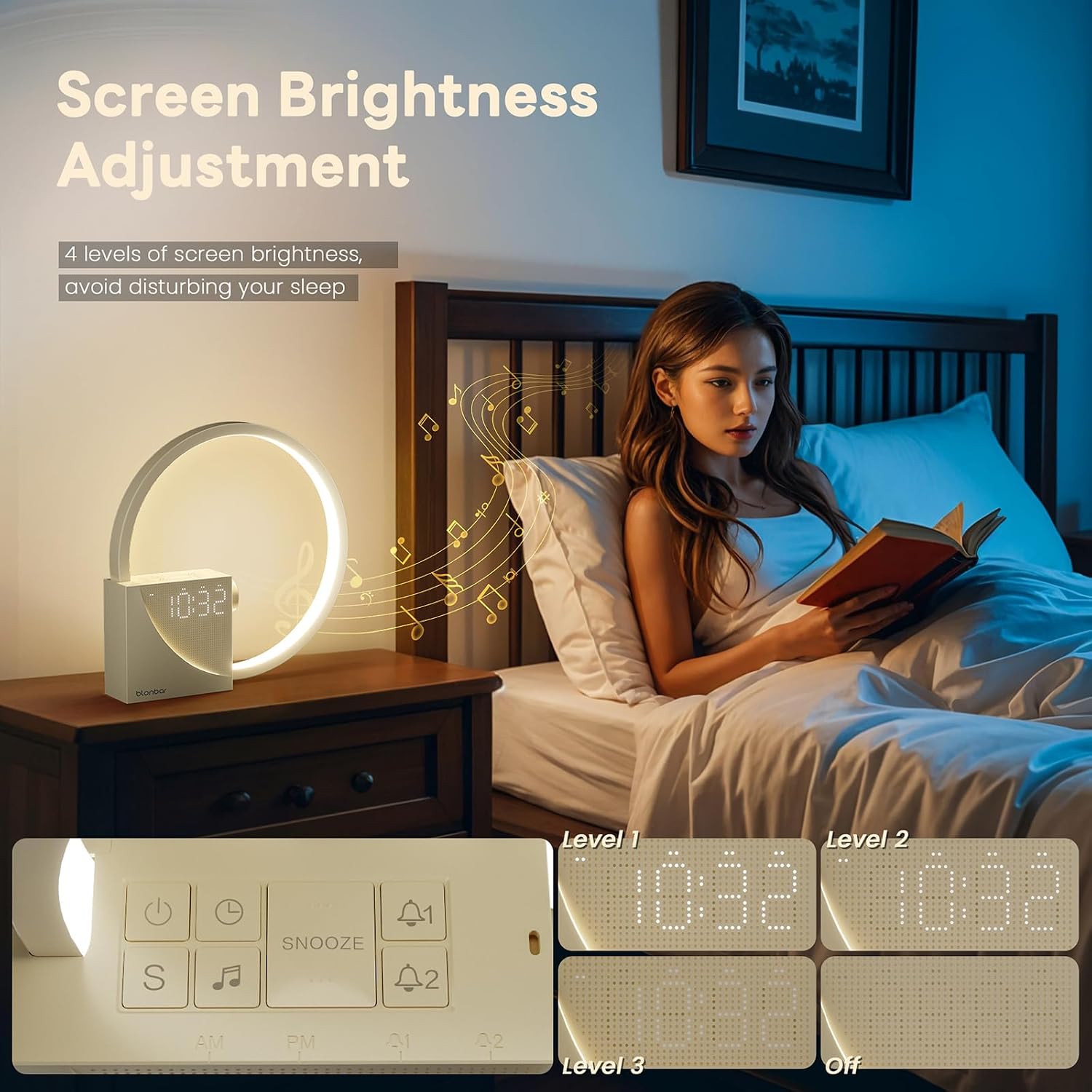
5. 10W USB Charging
The integrated USB port allows you to charge compatible electronic devices.
- Connect Device: Plug your device's USB charging cable into the USB port located on the back of the lamp.
- Charging: The lamp must be powered on for the USB charging function to work. The port provides up to 10W of power.

Maintenance
- Cleaning: Disconnect the power before cleaning. Use a soft, dry cloth to wipe the surface of the lamp. Do not use abrasive cleaners, solvents, or harsh chemicals.
- Storage: If storing the lamp for an extended period, ensure it is clean and dry. Store it in a cool, dry place away from direct sunlight.
Troubleshooting
| Problem | Possible Solution |
|---|---|
| Lamp does not turn on. | Check if the power cable is securely connected to both the lamp and the power outlet. Ensure the outlet is functional. |
| Clock display is too bright/dim. | Press the 'Display Brightness' button to cycle through the 3 brightness levels or turn the display off. |
| Alarm does not sound. | Verify that the alarm is activated (check for the alarm icon on the display) and that the volume is not set to zero. Re-set the alarm time. |
| USB charging is not working. | Ensure the lamp is powered on. Check the USB cable and the device being charged for proper connection and compatibility. |
| Natural sounds do not play. | Ensure a sound is selected and the volume is adjusted above zero. |
Specifications
| Brand | Blonbar |
| Model Number | AJ300 |
| Dimensions (L x W x H) | 23 x 4.5 x 23 cm |
| Weight | 465 grams |
| Material | Plastic main body + Aluminum alloy lamp |
| Power | 10 Watts |
| Voltage | 5 Volts |
| Light Type | LED with natural light |
| Color Temperature | 4000 Kelvin |
| Switch Style | Touch |
| Components Included | Power cable |
Warranty Information
Specific warranty details for the Blonbar AJ300 Bedside Lamp are typically provided with your purchase documentation or on the product packaging. Please refer to these resources for information regarding warranty duration and coverage. In general, Blonbar products are designed for reliability and performance. For any warranty claims or service inquiries, please retain your proof of purchase.
Customer Support
If you encounter any issues or have questions regarding your Blonbar AJ300 Bedside Lamp that are not addressed in this manual, please contact Blonbar customer support. Contact information can usually be found on the product packaging, the official Blonbar website, or through your retailer.
When contacting support, please have the following information ready:
- Product Model: AJ300
- Date of Purchase
- Description of the issue


