
VidalKraft VK131
VidalKraft VK131 Quantum PAR Meter Instruction Manual
Model: VK131
1. Introduction
The VidalKraft VK131 Quantum PAR Meter is a precision instrument designed to measure photosynthetically active radiation (PAR) within the 400-700 nm spectrum. It provides accurate readings for Photosynthetic Photon Flux Density (PPFD) and Daily Light Integral (DLI), essential for optimizing plant growth in various environments such as greenhouses, indoor vertical farms, and for scientific research.
2. Product Overview
2.1 Items in the Box

Figure 1: Contents of the VidalKraft VK131 Quantum PAR Meter package.
The package includes the following components:
- PAR Meter Main Unit
- PAR Meter Remote Sensor
- 5ft Coiled Cable
- 12ft Straight Cable
- User Manual
- 2 AAA batteries
3. Setup
3.1 Battery Installation
The device requires 2 AAA batteries (included). Open the battery compartment on the back of the main unit and insert the batteries, observing the correct polarity as indicated inside the compartment. Close the battery cover securely.
3.2 Connecting the Sensor

Figure 2: Connecting the remote sensor to the main unit.
Connect the remote quantum sensor to the main unit using either the 5ft coiled cable for dynamic measurements or the 12ft straight cable for extended reach, especially useful for accessing hard-to-reach areas or taller plants. The sensor also features a 1/4-inch screw mount for easy attachment to tripods or extension wands (not included).
3.3 Product Introduction and Basic Operations Video
Video 1: This video provides a general introduction to the PAR meter, demonstrates its usage in various scenarios, and covers basic operational steps.
4. Operating Instructions
4.1 Power On/Off
Press the power button located on the main unit to turn the device on or off. The LCD screen will illuminate upon activation.
4.2 PPFD Measurement

Figure 3: Real-time PPFD measurement on the display.
The device displays real-time Photosynthetic Photon Flux Density (PPFD) in µmol/m²/s. Position the sensor at the plant canopy level or desired measurement point for accurate readings. The meter operates within a spectral range of 400-700 nm.
4.3 Daily Light Integral (DLI) Function
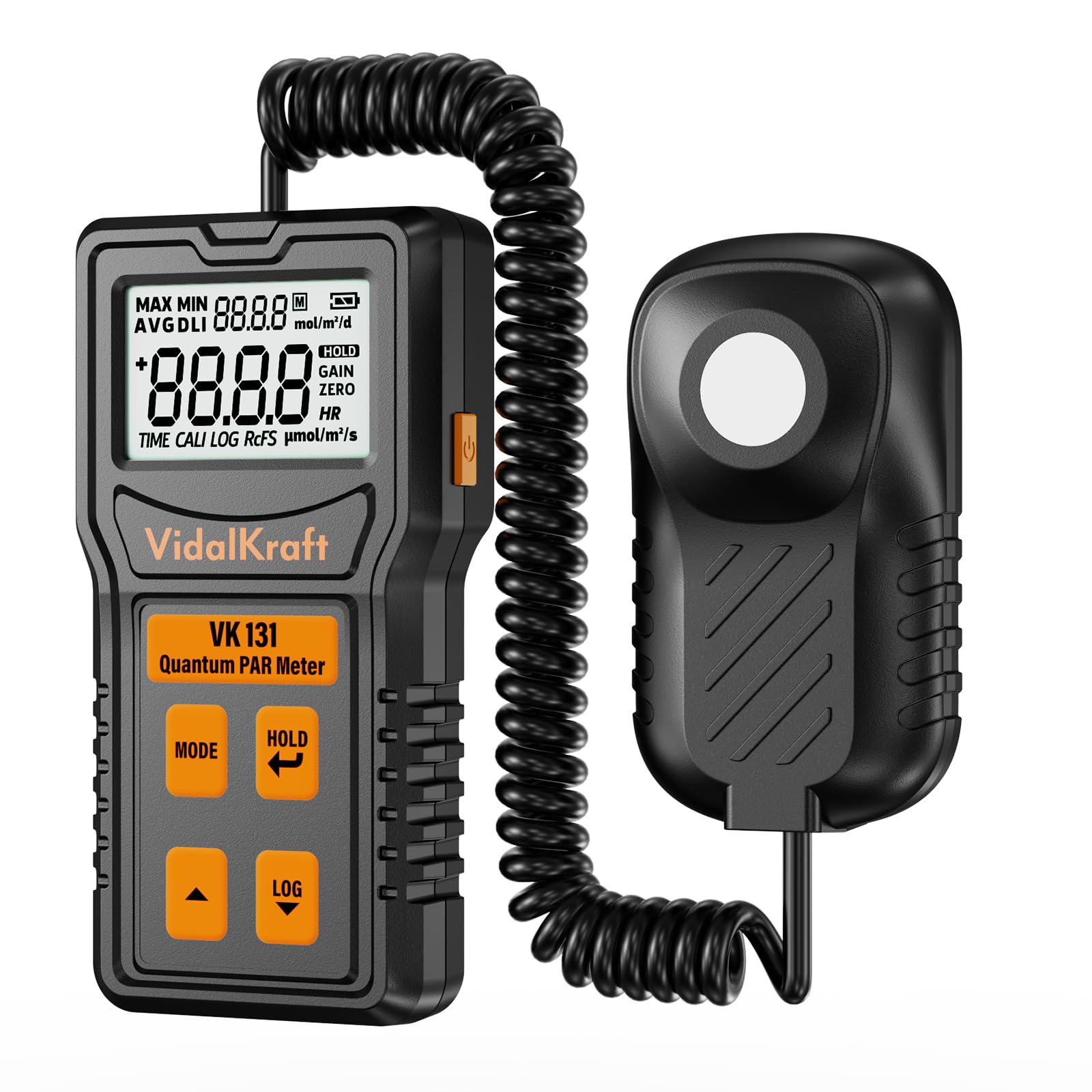
Figure 4: DLI reading displayed on the meter.
The DLI feature measures the total amount of PAR received by plants over a 24-hour period, expressed in moles per square meter per day (mol/m²/d). This helps ensure your plants receive the right amount of light for optimal growth and yield. The DLI reading is automatically calculated based on the set time and real-time PPFD measurements.
4.4 Data Logging

Figure 5: Data logging screen on the meter.
The data logging function enables you to save up to 100 historical readings of PPFD and DLI. Press the 'LOG' button to record the current measurement. Use the arrow buttons to navigate through saved records. This feature is invaluable for tracking changes over time and comparing data points for better light management.
4.5 Hold Function
Press the 'HOLD' button to freeze the current measurement on the display. This allows for easier manual recording of values without them changing. Press 'HOLD' again to release the measurement.
4.6 Max/Min/Avg Data

Figure 6: Display showing Max, Min, and Avg DLI values.
The meter can display maximum, minimum, and average PPFD and DLI values over a measurement period. Use the 'MODE' button to cycle through these display options.
4.7 Quantum PAR Meter Device Overview Video
Video 2: An overview video showcasing the Quantum PAR Meter device and its primary functions for light measurement.
5. Maintenance
5.1 Cleaning
Wipe the device and sensor with a soft, dry cloth. Do not use abrasive cleaners, solvents, or immerse the unit in water.
5.2 Storage
Store the meter in a cool, dry place when not in use. Remove batteries if storing for extended periods to prevent leakage and damage.
6. Troubleshooting
6.1 No Display
- Check battery installation and ensure batteries are not depleted. Replace if necessary.
- Ensure the power button is pressed firmly.
6.2 Inaccurate Readings
- Ensure the sensor is clean and free from dust or debris.
- Position the sensor correctly at the desired measurement point.
- Verify the device is operating within specified environmental conditions (temperature, humidity).
7. Specifications
| Feature | Detail |
|---|---|
| Manufacturer | VidalKraft |
| Model Number | VK131 |
| Item Weight | 130 g |
| Product Dimensions | 11.43 x 6.1 x 2.29 cm |
| Batteries | 2 AAA batteries required (included) |
| Included Components | PAR Meter Remote Sensor, Coiled Cable, Straight Cable, 2 AAA batteries |
| Measurement Range | Up to 4000 µmol/m²/sec |
| Spectral Range | 400-700 nm (± 10 nm) |
| Data Logging Capacity | Up to 100 historical readings |
8. Warranty and Support
For detailed warranty information, technical support, or to inquire about replacement parts, please refer to the contact details provided in the product packaging or visit the official VidalKraft website. Keep your purchase receipt as proof of purchase for warranty claims.
Related Documents - VK131
 |
VidalKraft MIC10 Wireless Neckband Microphone Kit User Manual This user manual provides comprehensive instructions for the VidalKraft MIC10 Wireless Neckband Microphone Kit, covering its features, setup, operation in live streaming and Bluetooth headphone modes, recording capabilities, specifications, and troubleshooting. Designed for content creators, it offers high-quality audio capture, noise cancellation, voice effects, and background music playback. |
Ask a question about this manual
Ask about setup, troubleshooting, compatibility, parts, safety, or missing instructions. Manuals+ will review the question and use this page’s manual context to help answer it.