
Product Overview
This manual provides detailed instructions for the assembly, operation, and maintenance of your Linique Full Size Gaming Loft Bed. This bed frame is designed to maximize space, offering an elevated sleeping area, an integrated desk with LED lighting, and under-bed storage.

Image: The Linique Full Size Gaming Loft Bed, showcasing the elevated bed, integrated desk with LED lighting, and a gaming setup.

Image: A diagram illustrating the distinct sleeping area, gaming area, and spacious under-bed storage area of the loft bed.
Safety Information
WARNING: Failure to follow these safety instructions could result in serious injury.
- Ensure the bed frame is properly assembled according to the instructions.
- Check for any potential hazards such as sharp edges or instability before use.
- Do not exceed the maximum weight capacity of the bed. (Specific weight capacity not provided, general safety advice).
- Regularly inspect all bolts and connections to ensure they remain tight.
- Keep children away from the assembly area until the bed is fully constructed.
- Use only the mattress size specified for a full-size bed.
Package Contents
Before beginning assembly, verify that all parts listed below are present and undamaged. All hardware is included and parts are numbered for easy identification.
- Metal Bed Frame Components (various beams, rails, and supports)
- Staircase Components
- Desk Surface (MDF desktop)
- LED Light Strip and Power Adapter
- Vented Mesh Undercarriage Storage Unit
- Assembly Hardware (screws, bolts, washers, Allen wrench)
- Instruction Manual
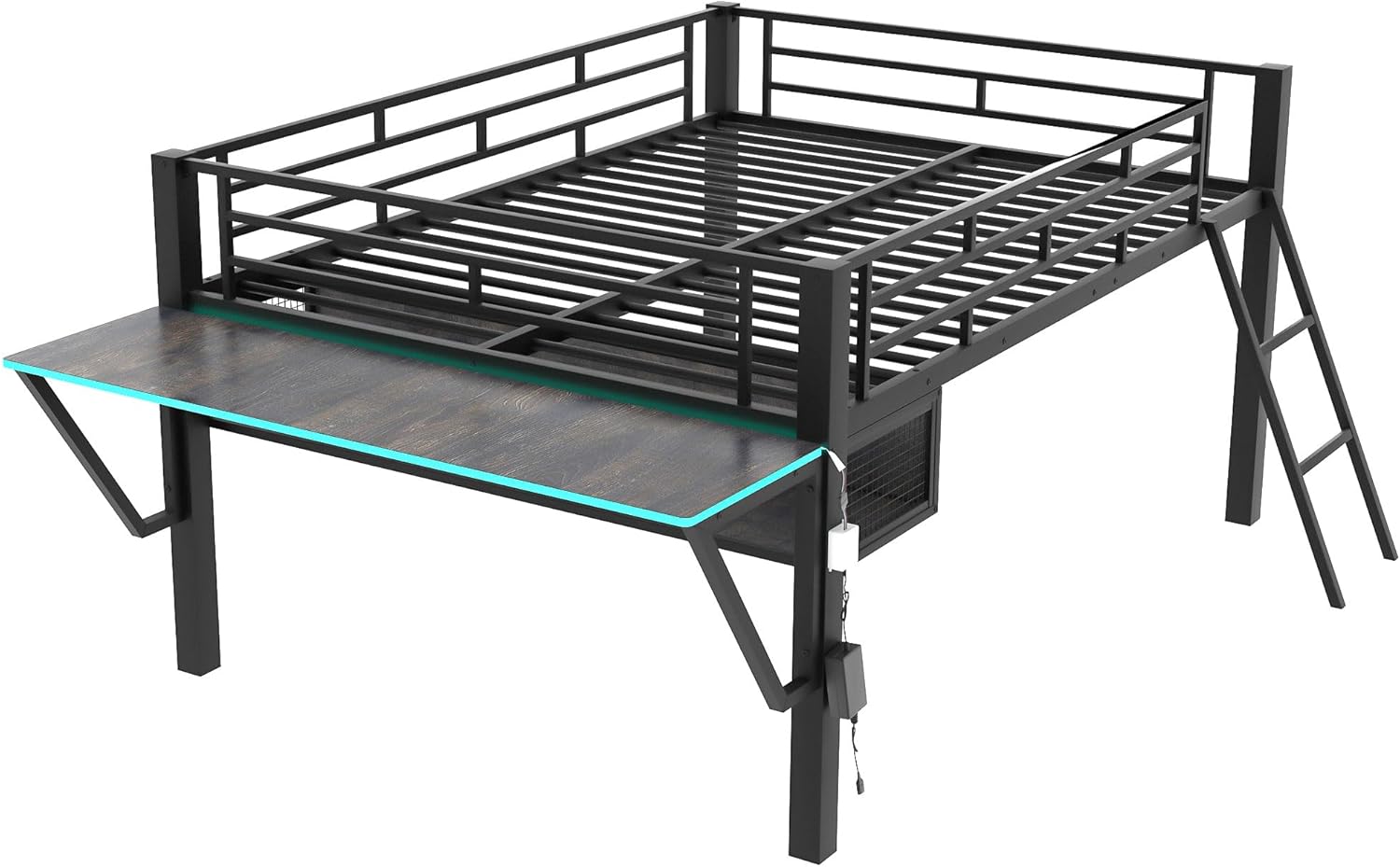
Image: A full view of the bed frame, desk, and staircase components, representing the package contents before assembly.
Assembly Instructions
Assembly is estimated to take approximately 30 minutes with two adults. Follow these steps carefully. Refer to the numbered parts for correct identification.
- Unpack and Identify Parts: Lay out all components on a clean, soft surface to prevent scratches. Identify each part using the provided numbering.
- Assemble the Main Bed Frame: Connect the main metal beams (A, B, C, D) to form the rectangular bed frame. Secure with bolts and washers (Hardware Pack 1). Do not fully tighten bolts until all sections are aligned.
- Attach Support Legs: Secure the support legs (E, F) to the main bed frame using the designated hardware (Hardware Pack 2).
- Install Bed Slats: Place and secure the metal bed slats (G) across the bed frame. Ensure they are evenly spaced and firmly attached.
- Assemble and Attach Staircase: Connect the staircase steps (H) to the side rails (I). Attach the completed staircase to the designated side of the bed frame.
- Install Desk Frame: Assemble the desk support frame (J) and attach it to the bed frame.
- Place Desk Surface: Carefully place the MDF desk surface (K) onto the desk support frame and secure it.
- Attach Vented Mesh Storage: Secure the vented mesh undercarriage storage unit (L) beneath the desk area.
- Install LED Lights: Adhere the LED light strip along the designated edge of the desk. Connect the LED strip to its power adapter.
- Final Tightening: Once all components are in place and aligned, fully tighten all bolts and screws using the provided Allen wrench.

Image: A side view of the assembled loft bed, showing the staircase and the desk structure.
Operating Instructions
LED Lights Operation
The integrated LED lights on the desk provide ambient lighting. To operate:
- Power On/Off: Plug the LED light power adapter into a standard electrical outlet. Use the inline switch on the LED strip cable to turn the lights on or off.
- Color Selection: If your LED strip includes a remote control or button, use it to cycle through available colors and lighting modes.

Image: A close-up view of the desk area, highlighting the LED lights and the vented mesh undercarriage storage.
Maintenance
Regular maintenance ensures the longevity and safety of your loft bed.
- Cleaning: Wipe metal surfaces with a soft, damp cloth. Avoid abrasive cleaners. For the MDF desk surface, use a mild wood cleaner if necessary.
- Hardware Check: Periodically (e.g., every 3-6 months) check all bolts, screws, and connections to ensure they are tight. Retighten as needed.
- LED Lights: Ensure the LED strip and power adapter are free from damage. If any part is damaged, discontinue use and contact support.
Troubleshooting
| Problem | Possible Cause | Solution |
|---|---|---|
| Bed feels wobbly or unstable. | Loose hardware. | Check and tighten all bolts and screws. Ensure all connections are secure. |
| LED lights not turning on. | Power adapter unplugged; faulty connection; damaged LED strip. | Ensure the power adapter is securely plugged into an outlet. Check the inline switch. Inspect the LED strip for visible damage. |
| Difficulty assembling a part. | Incorrect orientation; missing hardware. | Refer to the assembly instructions and part numbers. Ensure parts are oriented correctly. Verify all hardware is present. |
Specifications
| Feature | Detail |
|---|---|
| Brand | Linique |
| Model | Full Size Gaming Loft Bed |
| Color | Black |
| Size | Full |
| Frame Material | MDF + Metal (Engineered Wood, Metal) |
| Special Features | Integrated Desk, LED Lighting, Staircase, Vented Mesh Undercarriage Storage |
| Included Components | Desk, LED, Staircase |
| Required Assembly | Yes |
| Item Weight | 100 Pounds |
| Item Dimensions (L x W x H) | 77.4"L x 56.5"W x 40.4"H |

Image: A detailed diagram showing the dimensions of the Linique Full Size Gaming Loft Bed in inches.
Warranty Information
This Linique Full Size Gaming Loft Bed comes with a Limited Warranty. Please retain your proof of purchase for any warranty claims. For specific terms and conditions of the limited warranty, refer to the documentation included in your product packaging or contact customer support.
Customer Support
If you have any questions, require assistance with assembly, or need to report missing/damaged parts, please contact Linique customer support:
- Website: Visit Linique on Amazon
- Email: [Insert Customer Support Email Here]
- Phone: [Insert Customer Support Phone Number Here]
Please have your model number (Full Size Gaming Loft Bed) and purchase date ready when contacting support.