
1. Introduction
Thank you for choosing the Slypadan Porch Light with GFCI Outlet and Motion Sensor. This outdoor light fixture is designed to provide reliable illumination and convenient power access for your home's exterior. It features a durable aluminum construction, three adjustable lighting modes, and an integrated Ground Fault Circuit Interrupter (GFCI) outlet for enhanced safety and functionality.

Image 1.1: The Slypadan Porch Light with GFCI Outlet and Motion Sensor, showcasing its design and integrated outlet.
2. Safety Information
Please read all instructions carefully before installation and use. Failure to follow these instructions may result in electric shock, fire, or other hazards.
- Electrical Safety: Always turn off power at the circuit breaker before installing, servicing, or cleaning the fixture. Consult a qualified electrician if you are unsure about wiring procedures.
- Grounding: Ensure the fixture is properly grounded to prevent electrical shock.
- GFCI Outlet: The integrated GFCI outlet provides additional protection against electrical hazards. It must be tested after installation and regularly thereafter to ensure proper function.
- Bulb Type: Use only E26 base dimmable LED or incandescent bulbs, with a maximum wattage of 60W.
- Installation Height: Install the porch light with the GFCI outlet at least 4 feet (1.2 meters) from the ground to protect the outlets from rain and ensure safe access.
- Water Resistance: While waterproof, avoid direct high-pressure water spray on the GFCI outlets.
3. Package Contents
Verify that all components are present before beginning installation.
- Slypadan Porch Light Fixture with GFCI Outlet
- Mounting Hardware (screws, wire nuts, mounting plate)
- Instruction Manual
Note: E26 bulb is NOT included and must be purchased separately.
4. Specifications
| Brand | Slypadan |
| Model Name | WH-0399-SEGF03-1PUS |
| Material | Aluminum, Clear Glass |
| Color | Black |
| Product Dimensions | 4"L x 4"W x 12"H (approx. 10.16cm L x 10.16cm W x 30.48cm H) |
| Voltage | 120 Volts |
| Max Wattage | 60 Watts |
| Bulb Base | E26 (Bulb not included) |
| Switch Type | Motion Sensor, Dusk to Dawn Sensor |
| Water Resistance Level | Waterproof (IP23) |
| GFCI Outlet Max Load | 1740W (14.5AWG) |
| Special Features | Anti-Rust, Built-in GFCI Outlet, Dusk to Dawn Sensor, Motion Sensor, Waterproof |

Image 4.1: Detailed dimensions of the light fixture and bulb requirements.
5. Setup and Installation
Follow these steps for safe and proper installation.
- Turn Off Power: Before starting, ensure the power to the installation area is turned off at the main circuit breaker.
- Prepare Mounting Surface: Ensure the wall surface is clean, dry, and structurally sound. The fixture should be installed at least 4 feet (1.2 meters) above the ground.
- Attach Mounting Plate: Secure the mounting plate to the junction box on your wall using the provided screws.
- Wire Connections: Connect the fixture's wires to your household wiring according to standard electrical codes (typically black to black, white to white, and ground to ground). Use the provided wire nuts to secure connections.
- Mount Fixture: Carefully align the fixture with the mounting plate and secure it with the provided screws.
- Install Bulb: Insert an E26 base dimmable LED or incandescent bulb (max 60W) into the ceramic socket. The bottom of the fixture is open for easy access.
- Restore Power: Once the fixture is securely installed and the bulb is in place, restore power at the circuit breaker.
- Test GFCI Outlet: Immediately after restoring power, press the 'TEST' button on the GFCI outlet. The 'RESET' button should pop out, and power to the outlet should be cut. Then, press the 'RESET' button to restore power. This confirms the GFCI is functioning correctly. Repeat this test regularly.

Image 5.1: The built-in GFCI outlet, showing the 'TEST' and 'RESET' buttons for safety verification.
6. Operating Instructions
The Slypadan Porch Light offers three distinct lighting modes and a convenient GFCI outlet.
6.1 Lighting Modes
The light fixture features a motion sensor and a dusk-to-dawn sensor. The operating mode is typically selected via a switch on the fixture or by cycling power. Refer to the specific instructions included in your package for exact mode selection method.
- PC Mode (Dusk to Dawn): In this mode, the light will automatically turn on at night (when ambient light falls below a certain level) and turn off during the daytime. The motion sensor is inactive in this mode.
- Auto Mode (Motion Sensor): In Auto Mode, the light remains off or at 0% brightness when no movement is detected at night. Upon detecting movement, the light will illuminate to 100% brightness. After 60 seconds (adjustable up to 180 seconds) without further movement, the light will return to its off state.
- Manual Override (if applicable): Some models may allow for a manual override to keep the light on continuously. Consult your specific product documentation.

Image 6.1: Visual representation of the PC Mode (Dusk to Dawn) and Auto Mode (Motion Sensor) functionalities.


Image 6.2: PC Mode operation, showing automatic turn-off during daytime and turn-on at night.


Image 6.3: Auto Mode operation, demonstrating full brightness upon motion detection and returning to off after a set time.
6.2 GFCI Outlet Usage
The integrated GFCI outlet provides convenient and safe power for outdoor devices. It is suitable for both two-pronged and three-pronged plugs.
- Maximum Load: Do not exceed the maximum load of 1740W (14.5AWG) for the GFCI outlets.
- Downward Design: The outlets are designed to face downwards to protect against rain and moisture.
- Regular Testing: Always test the GFCI outlet after installation and regularly (e.g., monthly) to ensure it is functioning correctly. Press the 'TEST' button, then the 'RESET' button.

Image 6.4: The GFCI outlet can power various outdoor devices such as decorative lights, garden tools, or security cameras.
7. Maintenance
Regular maintenance ensures optimal performance and longevity of your light fixture.
- Cleaning: Turn off power before cleaning. Wipe the fixture with a soft, damp cloth. Avoid abrasive cleaners or solvents that could damage the finish or glass.
- Bulb Replacement: Turn off power before replacing the bulb. Allow the old bulb to cool completely. Unscrew the old bulb and screw in a new E26 base dimmable LED or incandescent bulb (max 60W).
- GFCI Testing: Test the GFCI outlet monthly by pressing the 'TEST' button, then the 'RESET' button.
- Inspection: Periodically inspect the fixture for any signs of wear, damage, or loose connections. Address any issues promptly.
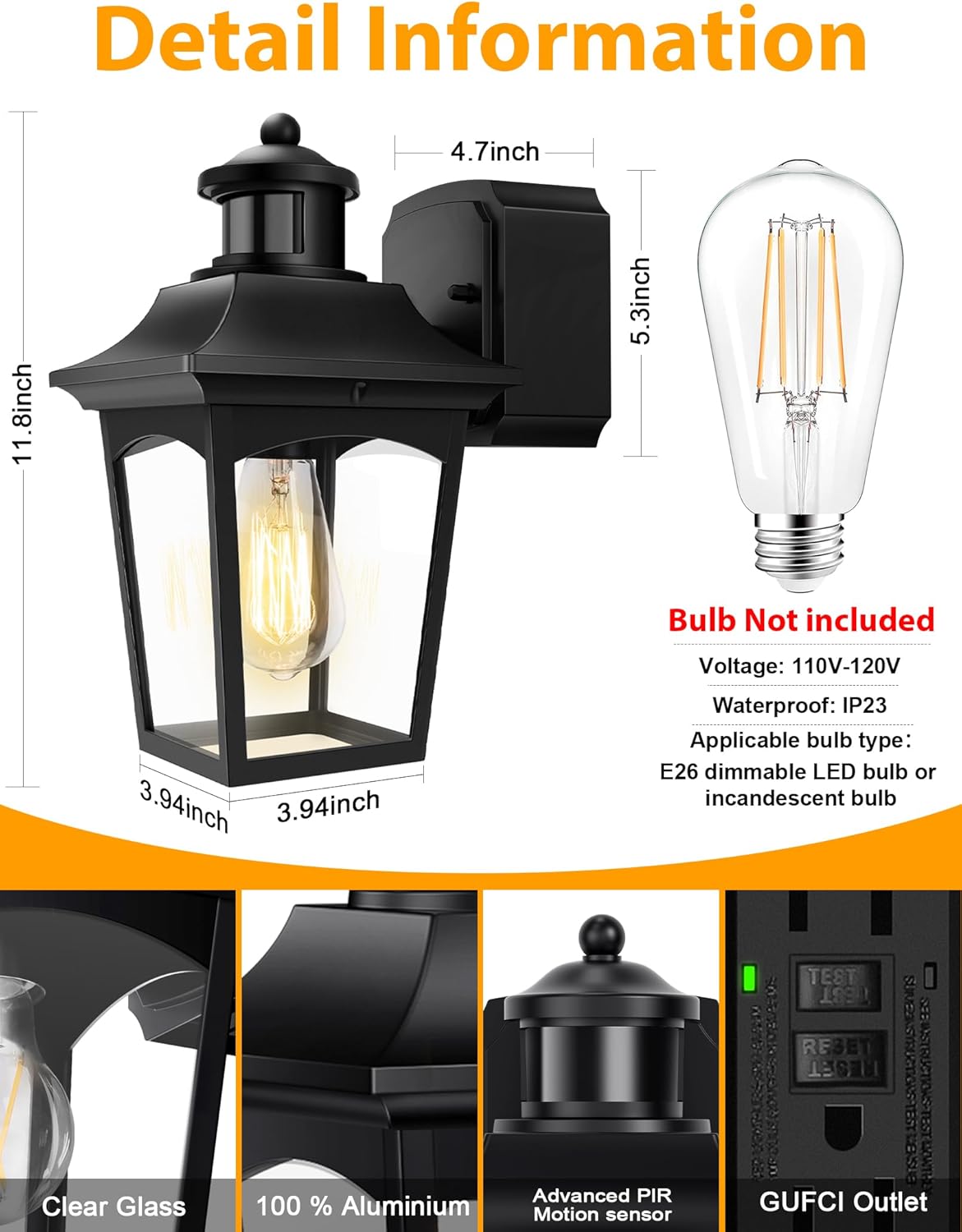
Image 7.1: The fixture's weather-resistant design ensures durability in various outdoor conditions.
8. Troubleshooting
If you encounter issues, refer to the following common problems and solutions.
| Problem | Possible Cause | Solution |
|---|---|---|
| Light does not turn on. | No power, faulty bulb, incorrect wiring, GFCI tripped. | Check circuit breaker. Replace bulb. Verify wiring connections. Reset GFCI outlet. |
| GFCI outlet has no power. | GFCI tripped, incorrect wiring, overload. | Press 'RESET' button on GFCI. Ensure proper wiring. Reduce load on outlet (max 1740W). |
| Motion sensor not working correctly. | Incorrect mode selected, sensor obstructed, sensitivity setting. | Ensure 'Auto Mode' is selected. Clear any obstructions from sensor. Adjust sensor sensitivity if possible (refer to specific product instructions). |
| Light stays on during the day. | PC Mode not selected, ambient light sensor obstructed, light reflecting into sensor. | Ensure 'PC Mode' is selected. Clear obstructions from the dusk-to-dawn sensor. Reposition fixture if strong light sources are interfering. |
9. Warranty and Support
The Slypadan Porch Light with GFCI Outlet and Motion Sensor comes with a Lifetime Warranty, as specified in the product details.
For technical support, warranty claims, or any questions regarding your product, please contact Slypadan customer service through the retailer where the product was purchased or visit the official Slypadan brand store online.
Online Store: Slypadan Store on Amazon