
Introduction
This manual provides essential instructions for the proper setup, operation, and maintenance of your SPEDWHEL Exway R1 Remote Control. This remote is designed as a replacement or spare part for various Exway electric skateboard models, including the X1 Series, Flex, Flex ER, Wave, and Atlas. Please read this manual thoroughly before using the remote control to ensure safe and optimal performance.
Product Overview
The Exway R1 Remote Control is a compact and ergonomic device designed for intuitive control of your electric skateboard. It features a throttle wheel for acceleration and braking, and buttons for mode selection and power.

Figure 1: Top view of the Exway R1 Remote Control, highlighting the main control elements and wrist strap.
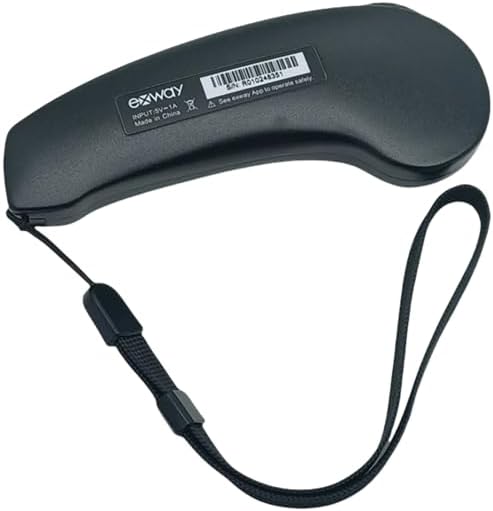
Figure 2: Bottom view of the Exway R1 Remote Control, displaying product information and serial number.
Setup
1. Charging the Remote
Before initial use, fully charge the remote control. Connect a standard USB charging cable (not included) to the charging port on the remote and to a compatible USB power source (e.g., computer, USB wall adapter). The charging indicator light will typically show charging status and turn off or change color when fully charged.
2. Pairing with Your Skateboard
To pair the R1 remote with your Exway electric skateboard, follow these general steps. Specific pairing procedures may vary slightly by skateboard model. Refer to your skateboard's manual for detailed instructions if needed.
- Ensure both the skateboard and the remote control are powered off.
- Turn on your Exway electric skateboard.
- Turn on the Exway R1 Remote Control.
- Initiate pairing mode on both the skateboard and the remote. This usually involves pressing and holding a specific button on each device until an indicator light flashes, signaling pairing mode.
- Once successfully paired, the indicator lights on both devices will typically become solid or flash in a synchronized pattern.
- Test the connection by gently moving the throttle and checking for a response from the skateboard's motors.
Note: Always ensure a secure connection before riding. If pairing fails, repeat the steps or consult the Exway app for troubleshooting.
Operating Instructions
Basic Controls
- Power Button: Press and hold to turn the remote on or off. A short press may display battery status.
- Throttle Wheel: Push forward to accelerate, pull back to brake. The sensitivity and maximum speed are determined by the selected riding mode.
- Mode Button: Press to cycle through different riding modes (e.g., Eco, Sport, Pro). Each mode offers varying levels of acceleration and top speed.
- Display Screen: Provides real-time information such as speed, battery level (remote and skateboard), and riding mode.

Figure 3: Side view of the Exway R1 Remote Control, illustrating the throttle wheel for speed control.
Safety Guidelines
- Always wear appropriate safety gear, including a helmet, knee pads, and elbow pads.
- Operate the skateboard in safe environments, away from traffic and pedestrians.
- Familiarize yourself with the remote's controls and your skateboard's response in a safe, open area before riding at higher speeds.
- Regularly check the remote's battery level and the skateboard's battery level before each ride.
- Avoid using the remote in wet conditions or extreme temperatures.
Maintenance
Cleaning
Wipe the remote control with a soft, dry, or slightly damp cloth. Do not use harsh chemicals, solvents, or abrasive cleaners, as these can damage the surface and internal components. Ensure no moisture enters the charging port or button crevices.
Storage
Store the remote control in a cool, dry place, away from direct sunlight and extreme temperatures. If storing for an extended period, ensure the battery is charged to approximately 50-70% to prolong its lifespan.
Battery Care
Avoid fully discharging the remote's battery frequently. Recharge it when the battery indicator is low. Do not leave the remote connected to a charger indefinitely after it is fully charged.
Troubleshooting
- Remote not turning on: Ensure the battery is charged. Connect to a charger and try again.
- Remote not pairing with skateboard:
- Ensure both devices are fully charged.
- Power cycle both the remote and the skateboard.
- Repeat the pairing procedure carefully as outlined in the "Setup" section.
- Ensure no other wireless devices are causing interference.
- Unresponsive controls:
- Check if the remote is still paired with the skateboard.
- Verify the remote's battery level.
- Ensure there are no physical obstructions to the throttle wheel or buttons.
- Short battery life:
- Ensure the remote is fully charged before use.
- Avoid extreme temperatures during operation and storage.
- Battery degradation is normal over time.
If issues persist, contact customer support or refer to the official Exway resources.
Specifications
| Brand | SPEDWHEL |
| Model Number | R1 |
| Material | Plastic |
| Color | Black |
| Product Dimensions (L x W) | 5" x 2" |
| UPC | 744612999535 |
| Compatibility | Exway X1 Series, Flex, Flex ER, Wave, Atlas Electric Skateboards |
Warranty and Support
Warranty Information
Specific warranty terms for the SPEDWHEL Exway R1 Remote Control may vary. Please refer to the warranty documentation provided with your purchase or contact the seller directly for detailed information regarding warranty coverage and duration.
Customer Support
For technical assistance, troubleshooting beyond this manual, or inquiries about replacement parts, please contact the retailer from whom you purchased the product or the manufacturer, SPEDWHEL. Keep your purchase receipt and product serial number (found on the back of the remote, see Figure 2) handy when contacting support.