
1. Product Overview
The OffiGo Electric Height-Adjustable Standing Desk is designed to enhance your workspace ergonomics, reducing fatigue during extended periods of work or study. This desk features an electric lift system, integrated storage, and convenient power options to support a productive environment.
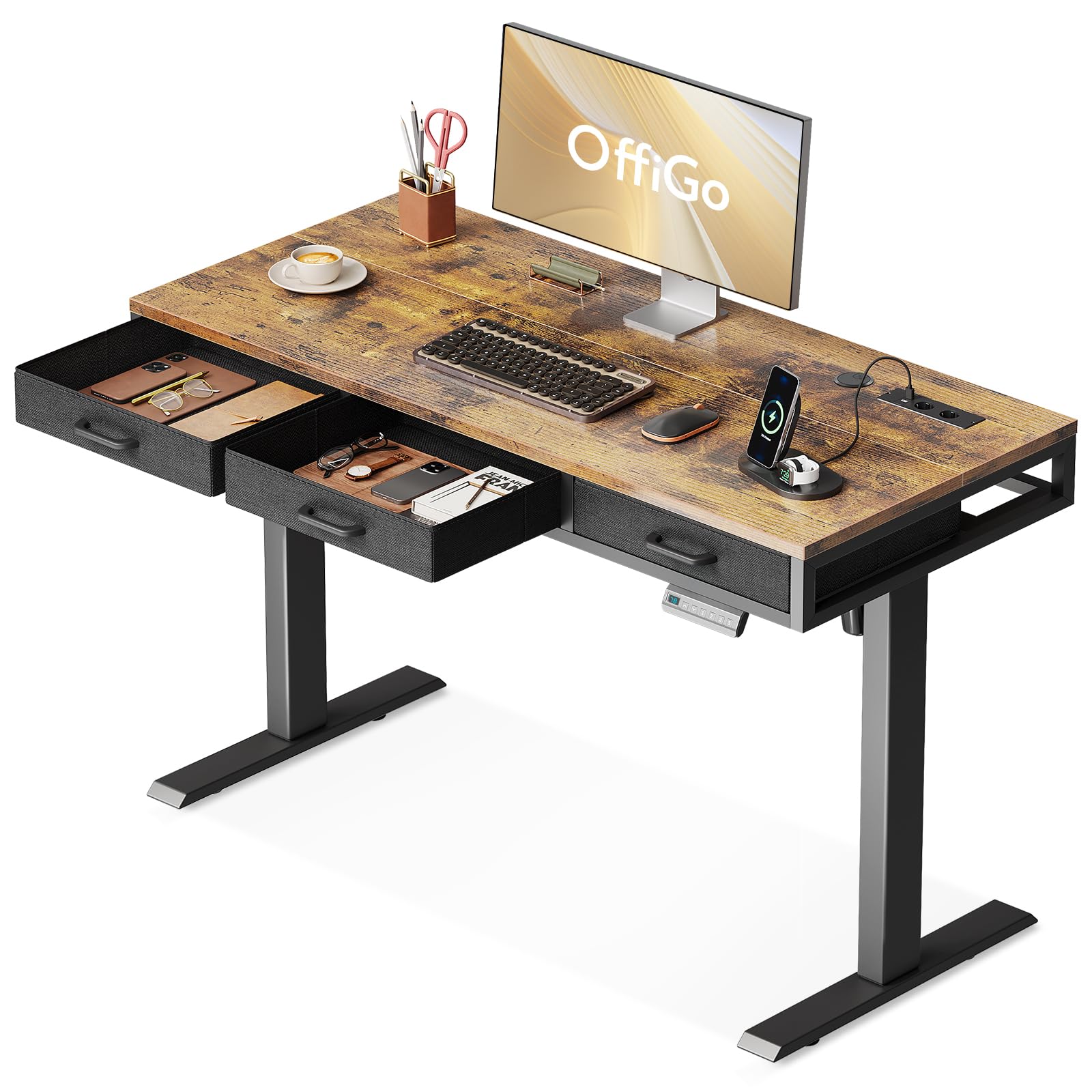
Image: A person standing comfortably at the OffiGo electric height-adjustable desk, which is set to a standing height. The desk features a wooden top and dark frame, with a monitor and other office accessories.
2. Safety Information
- Ensure all components are securely fastened before use.
- Keep children and pets away from the desk during height adjustments.
- Do not overload the desk beyond its specified weight capacity.
- Avoid placing liquids directly on the control panel or power outlets.
- Disconnect power before cleaning or performing maintenance.
- Use only the provided power adapter and cables.
3. Package Contents
Verify that all parts are present before beginning assembly. Refer to the detailed parts list in your assembly guide for specific component identification.
- Desktop sections
- Desk legs and feet
- Electric motor and control box
- Control panel
- Fabric drawers (3 units)
- Power adapter and cables
- Assembly hardware (screws, bolts, tools)
- Instruction manual
4. Setup and Assembly
Detailed and comprehensive installation instructions are provided to assist with identifying accessories and completing assembly efficiently. Follow the step-by-step guide included in your package.
- Unpack Components: Carefully remove all parts from the packaging and lay them out on a clean, soft surface to prevent scratches.
- Assemble Desk Frame: Attach the desk legs to the crossbar and feet using the provided hardware. Ensure all connections are tight.
- Attach Desktop: Secure the desktop sections to the assembled frame.
- Install Control Box and Motor: Mount the electric motor and control box according to the instructions, ensuring all cables are connected correctly.
- Connect Control Panel: Attach the control panel to the designated area on the desk.
- Insert Drawers: Place the three fabric drawers into their respective compartments.
- Connect Power: Plug the power adapter into the control box and then into a wall outlet.

Image: Diagram illustrating the product dimensions of the OffiGo desk, including its length, width, and adjustable height range.
5. Operating Instructions
5.1 Height Adjustment
The standing desk offers three height memory presets, allowing adjustment between 78 cm and 121 cm. Set your preferred height with a single click for studying, working, or gaming.
- Adjusting Height: Use the UP and DOWN buttons on the control panel to manually adjust the desk to your desired height.
- Setting Memory Presets:
- Adjust the desk to your desired height.
- Press the M button, then press one of the numbered preset buttons (1, 2, or 3) within 3 seconds. The height is now saved.
- Recalling Memory Presets: Press the corresponding numbered preset button (1, 2, or 3) to automatically move the desk to the saved height.

Image: Two desks shown side-by-side, illustrating the minimum (78cm) and maximum (121cm) height settings of the electric standing desk.
5.2 Integrated Charging Station
The desk includes USB ports and 2 AC outlets to power your electronic devices. A cable management system helps keep your workspace organized and clutter-free.
- USB Ports: Two USB ports (5V/2A) are available for charging smartphones, tablets, and other USB-powered devices.
- AC Outlets: Two standard AC outlets (110-240V/15A) are provided for laptops, monitors, and other electrical appliances.
- Cable Management: Utilize the integrated cable management tray located under the desk to route and organize power cords and data cables, maintaining a clean desktop.

Image: A detailed view of the desk's built-in power strip, featuring two USB ports and two AC outlets, ready for device charging.

Image: The underside of the desk revealing the cable management system, designed to keep wires tidy and out of sight.
5.3 Fabric Drawers
Three fabric drawers provide ample storage for notebooks, pens, books, and other items, helping to maintain a tidy and spacious desktop.
- Usage: Pull the fabric handles to open the drawers. Push them gently to close.
- Storage: Organize small office supplies, documents, or personal items within the drawers to keep your desktop clear.

Image: A close-up view of the three fabric drawers, showcasing their capacity for storing office essentials and maintaining a clutter-free workspace.
6. Maintenance
- Cleaning: Wipe the desktop and frame with a soft, damp cloth. Avoid abrasive cleaners or harsh chemicals.
- Drawer Care: The fabric drawers can be spot cleaned with a mild detergent if necessary. Allow to air dry completely.
- Cable Inspection: Periodically check all power cables for any signs of wear or damage. Replace immediately if damage is found.
- Fastener Check: Every few months, inspect all screws and bolts to ensure they remain tight.
7. Troubleshooting
| Problem | Possible Cause | Solution |
|---|---|---|
| Desk does not move | Power cable disconnected; Motor error | Check power connections; Unplug and replug power after 30 seconds. |
| Uneven height adjustment | Obstruction; Overload | Remove any obstructions; Reduce weight on desk. |
| Memory presets not working | Incorrect saving procedure | Re-save presets following the instructions in Section 5.1. |
| Charging ports not working | Desk not powered; Device incompatibility | Ensure desk is plugged in; Try a different device or cable. |
8. Specifications
| Feature | Detail |
|---|---|
| Brand | OffiGo |
| Model | B0DDSZRVBS |
| Color | Brown |
| Product Dimensions (L x W x H) | 120 x 54 x 78.5 cm (adjustable to 121 cm) |
| Item Weight | 27 kg |
| Material | Metal (Base), Wood (Top) |
| Height Adjustment Range | 78 cm to 121 cm |
| Special Features | Ergonomic, Integrated USB Port, Electric Height Adjustment, 3 Fabric Drawers, Cable Management |
| USB Output | 5V/2A (2 ports) |
| AC Outlets | 110-240V/15A (2 outlets) |
9. Warranty and Support
For warranty information or technical support, please refer to the contact details provided with your purchase documentation or visit the official OffiGo website. Spare parts availability information is currently unavailable.
Contact Information:
- Website: www.offigo.com (Example, please refer to actual product documentation)
- Email: support@offigo.com (Example, please refer to actual product documentation)