
OYIB S75
User Manual
OYIB Wireless Earbuds Model S75
Product Overview
The OYIB S75 Wireless Earbuds are designed for an immersive audio experience with advanced features for daily use and sports activities. They incorporate Bluetooth 5.4 technology for stable connectivity, ENC noise reduction for clear calls, and an IP7 waterproof rating for durability.
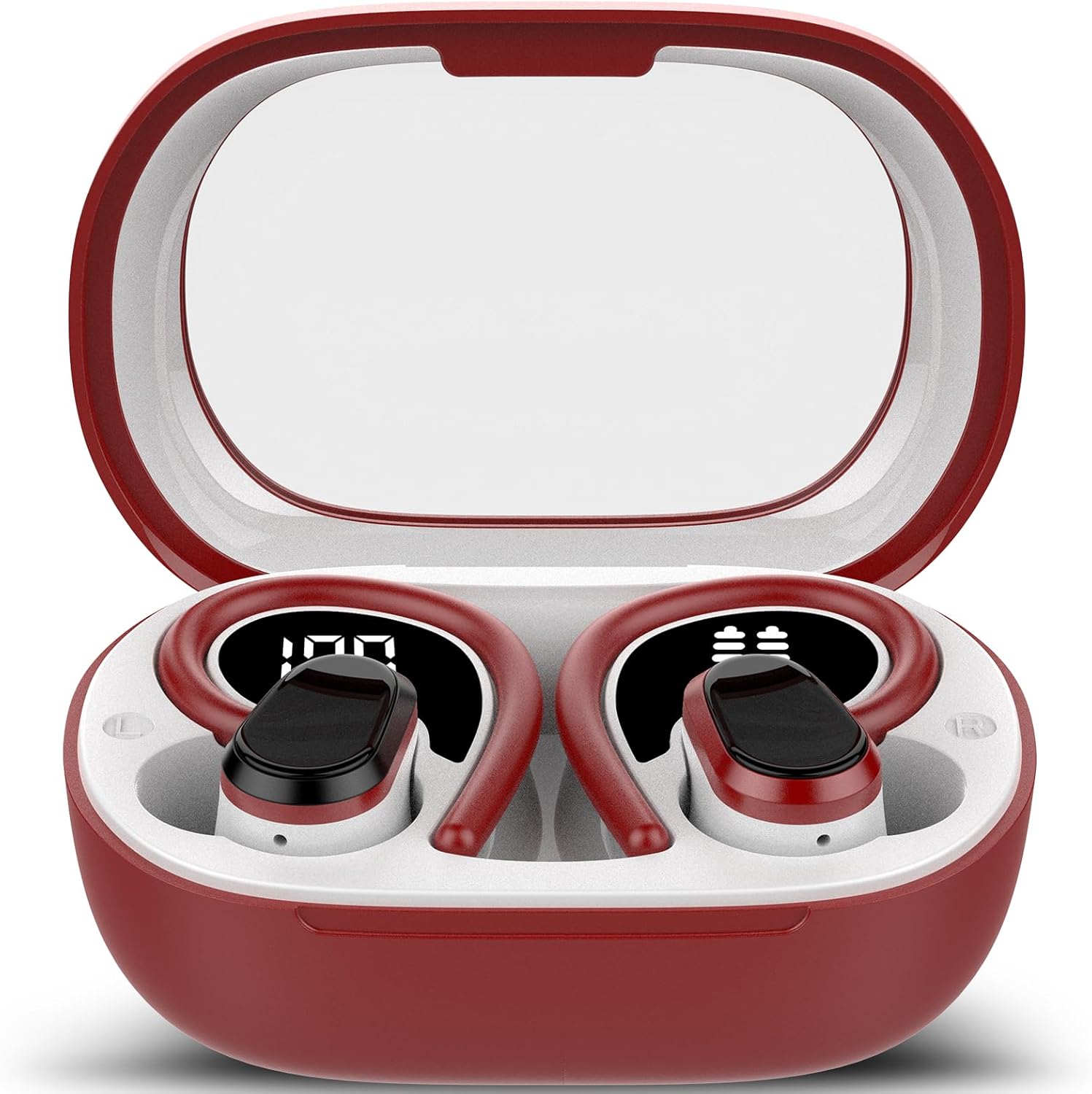
Image: OYIB S75 Wireless Earbuds in their open charging case, showcasing the red and white design. The digital displays on the earbuds indicate battery levels, with the left earbud showing '100' and the right showing a battery icon, confirming their charge status.
Key Features
- Bluetooth 5.4 Technology: Ensures stable connection, low latency, and high-fidelity audio. Features Hall effect technology for quick pairing.
- Immersive Stereo Sound: Equipped with 13mm three-layer graphene TPU diaphragm drivers for rich audio.
- ENC Noise Reduction: Effectively filters background noise for clear calls.
- Comfortable & Secure Fit: Ergonomic design with soft silicone ear hooks, suitable for various ear shapes and activities.
- IP7 Waterproof: Resistant to sweat and rain, ideal for sports and outdoor use.
- Extended Playback: Up to 10 hours on a single charge, 50 hours total with charging case.
- Dual Real-Time LED Display: Shows battery status of both earbuds and the charging case.
- Intuitive Touch Controls: Easy management of music, calls, and volume.
- Broad Compatibility: Connects seamlessly with Android and iOS devices.
Setup Guide
- Initial Charge: Before first use, place both earbuds into the charging case and connect the case to a power source using a USB-C cable. Ensure the LED display indicates charging. A full charge is recommended for optimal battery life.
- Power On: The earbuds will automatically power on when removed from the charging case.
- Pairing:
- Open the charging case. The earbuds will enter pairing mode automatically.
- On your device (smartphone, tablet, etc.), enable Bluetooth.
- Search for "OYIB S75" or similar in the list of available Bluetooth devices.
- Select "OYIB S75" to connect. A voice prompt will confirm successful pairing.
- The earbuds utilize Hall effect technology, allowing them to quickly pair and connect to the last connected device when you open the charging case.
- Wearing the Earbuds: Gently place the earbuds into your ears, adjusting the silicone ear hooks to fit securely around your ear for maximum comfort and stability.
Operating Instructions
Touch Controls:
The OYIB S75 earbuds feature high-sensitivity touch sensors for easy control.
| Action | Left Earbud | Right Earbud |
|---|---|---|
| Play/Pause | Single Tap | Single Tap |
| Next Track | Double Tap | Double Tap |
| Previous Track | Triple Tap | Triple Tap |
| Volume Up | N/A | Long Press |
| Volume Down | Long Press | N/A |
| Answer/End Call | Single Tap | Single Tap |
| Reject Call | Long Press | Long Press |
| Activate Voice Assistant | Quadruple Tap | Quadruple Tap |
Battery Display:
The charging case features a dual LED display that shows the remaining battery percentage of the charging case and the individual charge status of each earbud. This allows for convenient monitoring of power levels.
Power On/Off:
- Power On: Earbuds automatically power on when removed from the charging case.
- Power Off: Place earbuds back into the charging case to automatically power off and begin charging.
Maintenance
- Cleaning: Regularly clean the earbuds and charging case with a soft, dry, lint-free cloth. Do not use abrasive cleaners or solvents. Gently wipe the charging contacts on both the earbuds and the case to ensure proper connection.
- Water Resistance (IP7): The earbuds are IP7 waterproof, meaning they are protected against immersion in water up to 1 meter for up to 30 minutes. While they are resistant to sweat and rain, avoid prolonged submersion in water or exposure to strong water jets. Ensure earbuds are dry before placing them back into the charging case to prevent damage.
- Storage: When not in use, store the earbuds in their charging case to protect them from dust, dirt, and physical damage. Store in a cool, dry place away from direct sunlight and extreme temperatures.
- Battery Care: To prolong battery life, avoid fully depleting the battery frequently. Charge the earbuds and case regularly, even if not in constant use.
Troubleshooting
| Problem | Possible Solution |
|---|---|
| Earbuds not pairing/connecting. |
|
| No sound or low volume. |
|
| Earbuds not charging. |
|
| One earbud not working. |
|
Specifications
| Feature | Detail |
|---|---|
| Model Name | S75 |
| Brand | OYIB |
| Connectivity Technology | Wireless (Bluetooth 5.4) |
| Ear Placement | In Ear |
| Form Factor | In Ear |
| Control Type | Touch Control |
| Water Resistance Level | IP7 Waterproof |
| Frequency Range | 20 Hz - 20,000 Hz |
| Battery Average Life (Earbuds) | 8 Hours (single charge) |
| Total Playback Time | Up to 50 Hours (with charging case) |
| Battery Cell Composition | Lithium Polymer |
| Compatible Devices | Cellphones, Tablets |
| Included Components | Charging case*1, Ear pads*3, OYIB wireless earbuds*2, User Manual |
| Parcel Dimensions | 9.8 x 8.9 x 3.7 cm; 100 g |
Warranty and Support
For warranty information and customer support, please refer to the documentation included with your product or contact OYIB directly. The manufacturer's contact information is typically available on their official website or through the retailer where the product was purchased.
Manufacturer: OYIB
Place of Business: +8615658183747
For further assistance, you may also visit the OYIB Store on Amazon.
Ask a question about this manual
Ask about setup, troubleshooting, compatibility, parts, safety, or missing instructions. Manuals+ will review the question and use this page’s manual context to help answer it.