
1. Introduction
Thank you for choosing the Hiswelle 19L/5Gal Smart Humidifier, Model HQ-JS2326. This advanced ultrasonic humidifier is designed to provide efficient and consistent humidification for large spaces up to 2800 sq ft. Featuring smart app control, a 180° oscillating mist tube, and a large water capacity, this manual will guide you through its setup, operation, and maintenance to ensure optimal performance and longevity.
2. Important Safety Instructions
Please read all safety instructions carefully before use and retain this manual for future reference.
- Always turn off and unplug the humidifier from the power outlet before any cleaning, refilling, or maintenance.
- Do not clean the main body under running water.
- Do not let water splash into the air outlets.
- Do not use any chemical agents, abrasive cleaners, or corrosive solutions when cleaning the humidifier. Use only white vinegar and water as specified in the maintenance section.
- Place the humidifier on a firm, flat, and waterproof surface at least 6 inches (15 cm) away from walls and appliances.
- Keep the humidifier out of reach of children and pets.
- Do not block the mist outlet or air inlets.
- Ensure the power cord is not damaged, pinched, or placed under heavy objects.
- Only use clean, cool tap water. Distilled or demineralized water is recommended to prevent mineral buildup.
3. Package Contents
Verify that all items are present in the package:
- Hiswelle 19L/5Gal Smart Humidifier
- Remote Control
- Mist Outbound Tube
- User Manual (this document)
- Quick Start Guide
4. Product Overview
Familiarize yourself with the main components of your Hiswelle Smart Humidifier.

- Mist Outbound Tube: Directs the mist into the room. Features 180° automatic oscillation.
- Control Panel: Touch-sensitive display for managing settings.
- Water Tank (19L/5Gal): Large capacity reservoir for water.
- Water Level Window: Indicates the current water level.
- Essential Oil Box: Located at the back, allows for aromatherapy.
- 360° Casters: Wheels at the base for easy movement.
- Remote Control: Provides convenient control from a distance.
5. Setup
- Unpack: Carefully remove all components from the packaging.
- Placement: Place the humidifier on a stable, flat surface. Ensure it is away from direct sunlight, heat sources, and sensitive electronics. The 360° casters allow for easy positioning.
- Install Mist Outbound Tube: Insert the mist outbound tube into the designated opening on the top of the humidifier.
- Fill Water Tank: The humidifier supports two methods for adding water:
- Top Filling: Open the top cover and pour water directly into the water inlet.
- Tank Removal: Lift the base chamber from the main water tank, then fill the main water tank.
Fill the tank with clean, cool tap water up to the 'MAX' line indicated on the water level window. Do not overfill.

Figure 2: Two convenient methods for refilling the water tank. - Power On: Plug the power cord into a standard electrical outlet. The humidifier will enter standby mode.
6. Operation
Your Hiswelle Smart Humidifier offers multiple ways to control its functions: the touch control panel, the remote control, and the Tuya Smart app.
6.1 Control Panel
The touch control panel on the top of the humidifier allows direct access to all settings.
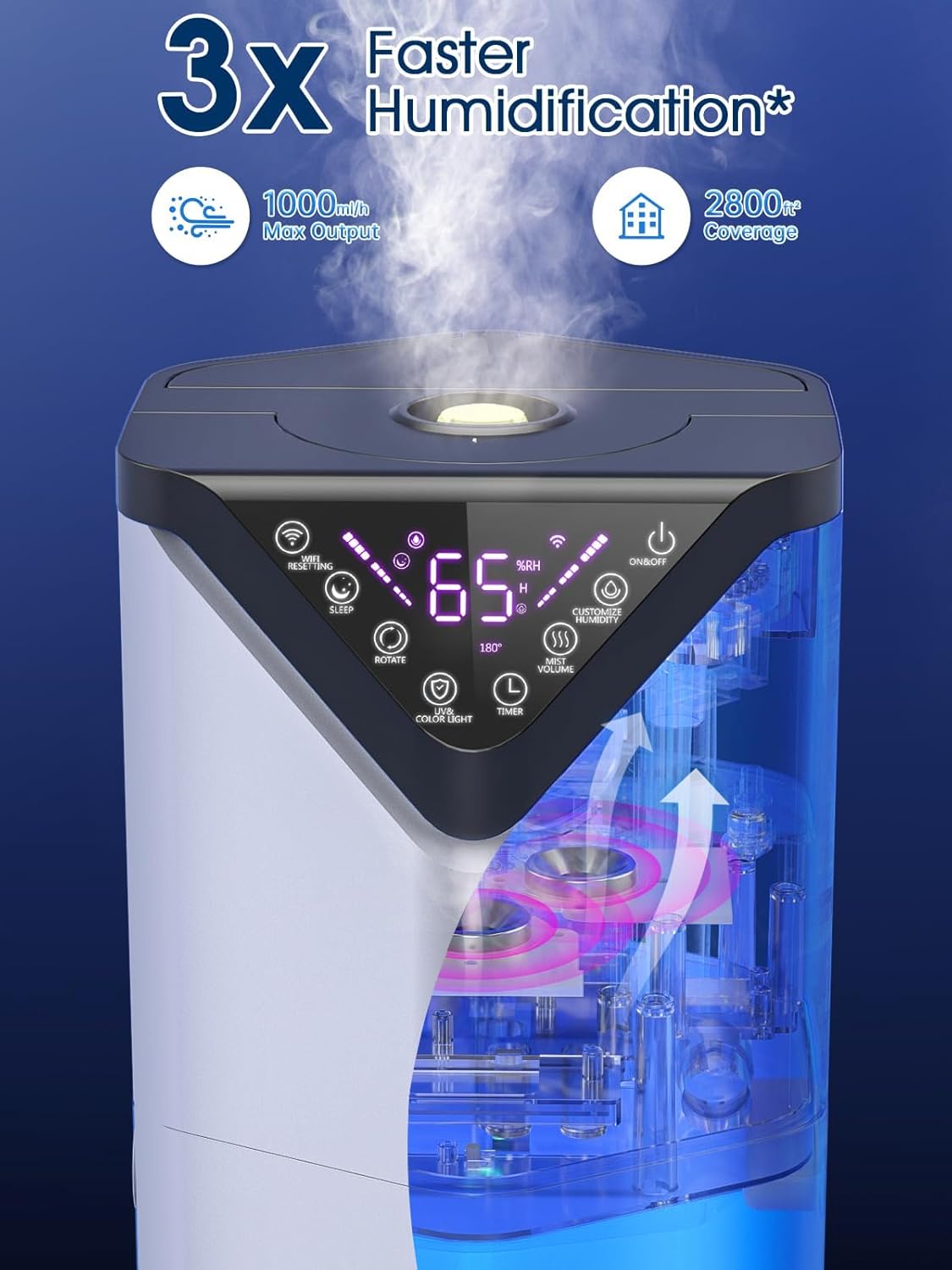
- Power On/Off: Turns the unit on or off.
- Mist Volume: Adjusts mist output to Low, Middle, or High.
- Customized Humidity: Set your desired humidity level (up to 90% RH). The humidifier will automatically adjust mist output to maintain this level.
- Sleep Mode: Dims the display and operates quietly for undisturbed rest.
- Rotate: Activates or deactivates the 180° mist tube oscillation.
- Color Light: Cycles through various ambient light colors or turns off the light.
- Timer: Sets an operating duration (e.g., 1-12 hours) after which the humidifier will automatically turn off.
6.2 Remote Control
The included remote control allows you to adjust settings from a distance (up to 20ft max).

All functions available on the control panel are also accessible via the remote control.
6.3 Smart App Control (Tuya Smart)
Enhance your humidification experience by connecting your device to the Tuya Smart app. This allows for remote control and advanced scheduling.

- Download App: Download the