
DJI DJI Neo Three-Battery Combo
DJI Neo Three-Battery Combo Instruction Manual
Model: DJI Neo Three-Battery Combo
1. Introduction
The DJI Neo is a lightweight and compact mini drone designed for capturing high-quality aerial footage. This Three-Battery Combo provides extended flight time and includes essential accessories for an enhanced user experience. Weighing just 135g, the DJI Neo is regulation-friendly in many regions, often not requiring FAA registration or Remote ID.
This manual provides detailed instructions for setting up, operating, and maintaining your DJI Neo Three-Battery Combo drone. Please read it thoroughly before first use to ensure safe and optimal performance.

Image: The DJI Neo drone, three intelligent flight batteries, and a two-way charging hub.
2. What's in the Box
Verify that all components are present in your package:
- DJI Neo Aircraft x1
- DJI Neo Intelligent Flight Battery x3
- DJI Neo Two-Way Charging Hub x1
- DJI Neo Propeller Guard (Pair) x1
- DJI Neo Spare Propellers (Pair) x1
- DJI Neo Spare Propeller Screw x4
- Screwdriver x1
- DJI Neo Gimbal Protector x1
- Type-C to Type-C PD Cable x1
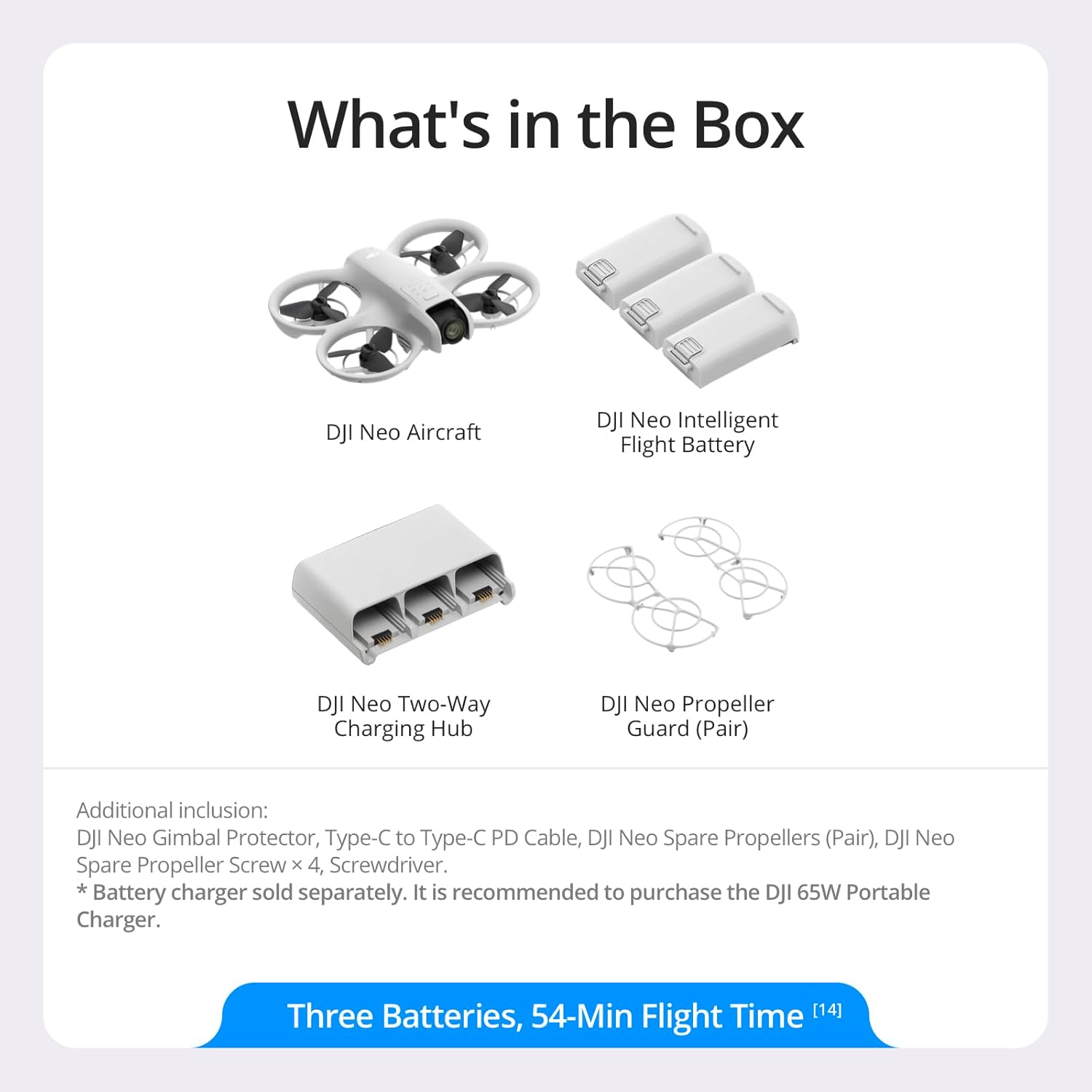
Image: Visual representation of the DJI Neo aircraft, three batteries, two-way charging hub, and propeller guards.
3. Setup
3.1 DJI Fly App Installation and Activation
The DJI Fly app is essential for operating and activating your DJI Neo. Due to platform compatibility issues, the DJI Fly app has been removed from Google Play. To ensure a better product usage experience, please download the official app directly from the DJI official website before use. DJI Neo must be activated through the DJI Fly App.
3.2 Battery Charging
Before first use, fully charge all intelligent flight batteries using the provided Two-Way Charging Hub and a compatible USB-C power adapter (not included). It is recommended to use the DJI 65W Portable Charger for optimal charging speed.
3.3 Propeller Guard Installation
For enhanced safety, especially during indoor flights or in confined spaces, attach the full-coverage propeller guards. Align the guards with the drone's arms and snap them into place. Ensure they are securely fastened before flight.
4. Operating Instructions
4.1 Basic Flight Operations
The DJI Neo offers intuitive control methods. For a quick start, you can initiate a palm takeoff:
- Turn On: Power on the DJI Neo drone.
- Select Mode: Press the mode button on top of the aircraft to choose your desired flight mode.
- Palm Takeoff & Start Filming: Hold the drone in your palm, and it will gracefully take off.

Image: Visual guide for initiating flight from your palm.
4.2 Control Methods
The DJI Neo supports multiple control options:
- Controller-Free: Basic flight can be initiated directly from your hand.
- Voice Control: Use spoken commands (English/Chinese) via the DJI Fly App. Simply say "Hey Fly" to activate.
- Mobile App Control: Use the virtual joysticks within the DJI Fly app on your smartphone to control tracking angle, distance, and other parameters.
- RC Control: For advanced control and extended range (up to 10 km), the DJI Neo is compatible with DJI RC-N3 and DJI RC 2 remote controllers (sold separately).
- Motion Control: For an immersive First-Person-View (FPV) experience, pair the Neo with DJI Goggles N3/DJI Goggles 3 and an RC Motion 3 or FPV Remote Controller 3 (sold separately).

Image: Depiction of different ways to control the DJI Neo drone.
4.3 Camera Features and Flight Modes
The DJI Neo is equipped with a 4K UHD camera and advanced stabilization technology:
- 4K Ultra-Stabilized Video: Records up to 4K/30fps stabilized video with RockSteady and HorizonBalancing stabilization, and level-4 wind resistance for smooth footage.
- Subject Tracking: The drone can intelligently follow a designated subject, keeping it centered in the frame for dynamic shots.
- QuickShots: Eight creative QuickShot modes (e.g., Boomerang, Circle, Dronie, Helix, Rocket, Spotlight, Follow, DirectionTrack) allow for professional-looking aerial maneuvers with ease.

Image: Demonstrates the effectiveness of RockSteady stabilization and 4K video resolution.

Image: Illustrates the drone's ability to track subjects and perform QuickShots.
4.4 Flight Duration and Storage
With the three intelligent flight batteries included in this combo, the DJI Neo can achieve a total flight time of up to 54 minutes (18 minutes per battery). The drone features 22GB of built-in storage, capable of storing up to 55 minutes of 1080p/60fps video or 40 minutes of 4K/30fps video without an SD card.
4.5 Safety Features
The DJI Neo incorporates several safety features:
- Return to Home (RTH): The drone can automatically return to its takeoff point.
- Low Battery RTH: Initiates RTH when the battery level is critically low.
- Failsafe RTH: Activates RTH in case of signal loss.
- Scene Recognition RTH: Utilizes environmental data for safer return paths.
5. Maintenance
Regular maintenance ensures the longevity and optimal performance of your DJI Neo drone. While no specific detailed maintenance schedule is provided, general best practices include:
- Cleaning: Gently wipe the drone body, propellers, and camera lens with a soft, dry cloth after each flight to remove dust and debris.
- Propeller Inspection: Regularly check propellers for any cracks, bends, or damage. Replace damaged propellers immediately using the provided spare parts and screwdriver.
- Battery Care: Store batteries in a cool, dry place. Avoid overcharging or fully discharging batteries. Follow battery safety guidelines provided by DJI.
- Gimbal Protection: Always attach the gimbal protector when transporting or storing the drone to prevent damage to the camera and gimbal mechanism.
6. Troubleshooting
This section addresses common questions and issues you might encounter with your DJI Neo.
6.1 Why is DJI Neo louder when using propeller guards?
DJI Neo is designed to operate efficiently within an acceptable range of noise levels. The propeller guards, while enhancing safety, can slightly increase the operational noise due to altered airflow dynamics. This is normal and expected. It is recommended to use propeller guards for enhanced safety despite a slight increase in noise levels.
6.2 Can DJI Neo's intelligent tracking reliably follow me?
Yes, once DJI Neo locks onto you using visual algorithms, it will follow your movement trajectory and maintain a consistent speed, achieving intelligent follow shots. The maximum tracking speed is 6 m/s. Ensure clear line of sight for optimal tracking performance.
7. Specifications
| Feature | Detail |
|---|---|
| Brand | DJI |
| Model Name | DJI Neo |
| Item Model Number | 6941565993915 |
| Special Features | Auto Follow, Compact, Image Stabilization, Lightweight and Regulation Friendly, Palm Takeoff & Landing, Portable, Subject Tracking & QuickShots |
| Age Range (Description) | Adult |
| Color | Gray |
| Video Capture Resolution | 4K |
| Effective Still Resolution | 12 MP |
| Connectivity Technology | Bluetooth, Wi-Fi |
| Included Components | DJI Neo Aircraft x1, DJI Neo Gimbal Protector x1, DJI Neo Intelligent Flight Battery x3, DJI Neo Propeller Guard (Pair) x1, DJI Neo Spare Propeller Screw x4, DJI Neo Spare Propellers (Pair) x1, DJI Neo Two-Way Charging Hub x1, Screwdriver, Type-C to Type-C PD Cable x1 |
| Skill Level | Beginner; All |
| Item Weight | 135 Grams (4.8 ounces) |
| Battery Capacity | 2600 Milliamp Hours |
| Video Capture Format | MP4 |
| Remote Control Technology | Bluetooth |
| Control Type | Remote Control (via app, voice, or optional RC) |
| Maximum Range | 10 Kilometers (with compatible RC) |
| Material | Plastic |
| Wireless Communication Technology | Wi-Fi |
| Battery Cell Composition | Lithium Ion |
| Batteries Included | Yes (3 Intelligent Flight Batteries included) |
| Supported Image Format | JPEG |
| Video Output Resolution | 4K |
| Remote Control Included? | No (Controller-Free variant) |
| Optical Sensor Technology | CMOS |
| Rechargeable Battery Included | Yes |
| Product Dimensions | 6.2"L x 5.1"W x 1.9"H |
| UPC | 190021119017 |
| ASIN | B0DDS1368S |
| Date First Available | September 5, 2024 |
8. Warranty and Support
DJI provides comprehensive after-sales service and an official warranty for its products. If you encounter any issues during use, require technical assistance, or have questions regarding your warranty, please contact the DJI Official Support Team.
For support, visit the official DJI website or refer to the contact information provided with your product packaging. Keep your proof of purchase for warranty claims.
Online Resources:
- Official DJI Website: www.dji.com
- DJI Support Page: www.dji.com/support
Related documentsDJI Neo Three-Battery Combo


Ask a question about this manual
Ask about setup, troubleshooting, compatibility, parts, safety, or missing instructions. Manuals+ will review the question and use this page’s manual context to help answer it.