1. Introduction
Thank you for choosing the Generic M66 Wireless Bluetooth 5.4 Ear Clip Earphones. These earphones are designed to provide a seamless and high-quality audio experience with advanced features such as Bluetooth 5.4 connectivity, active noise cancellation, bone conduction technology, and an integrated LED display. This manual will guide you through the setup, operation, and maintenance of your new earphones to ensure optimal performance and longevity.
2. Package Contents
Please check the package contents to ensure all items are present:
- Headphone body (Left and Right Earphones)
- Wireless Charging Case
- User Manual (This document)
- Charging Cable (typically USB-C, though not explicitly listed, it's standard)
3. Product Overview
Familiarize yourself with the components of your M66 earphones and charging case.
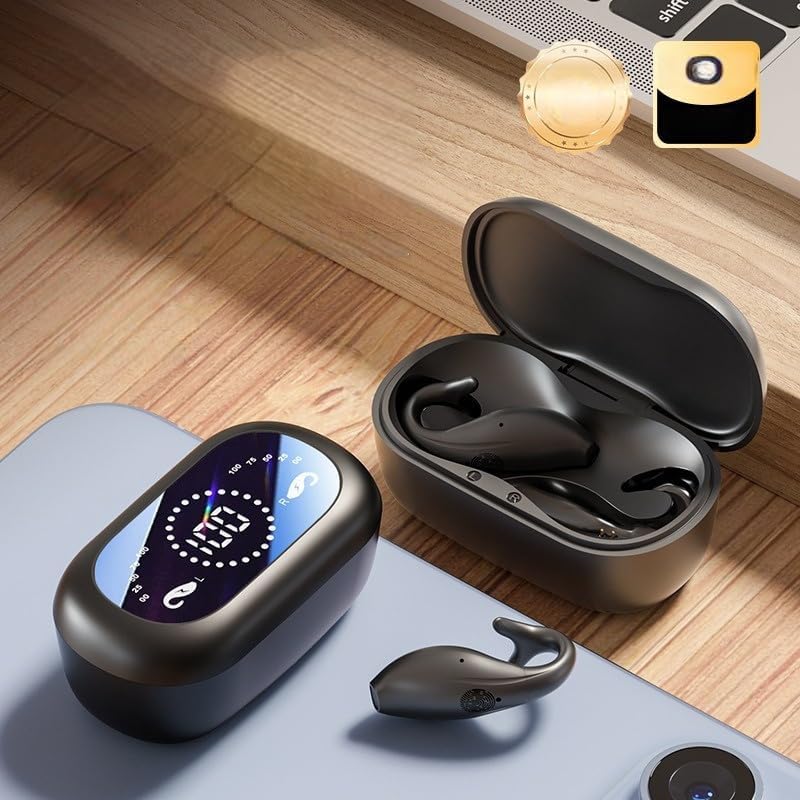
Image 3.1: The M66 earphones and their charging case, showcasing the LED display on the case. The earphones feature a unique dolphin ear clip design.
- Earphone Body: The main audio unit, designed for in-ear clip placement.
- Touch Control Area: Located on the earphone body for managing playback, calls, and voice assistant.
- Charging Contacts: On the earphones, for charging when placed in the case.
- Charging Case: Stores and charges the earphones, featuring an LED display.
- LED Display: Shows battery life of the case and individual earphones, and pairing status.
- Charging Port: On the charging case, for connecting the charging cable.

Image 3.2: Close-up of an M66 earphone, highlighting the responsive touch control area for easy music and call management.
4. Setup
4.1 Charging the Earphones and Case
Before first use, fully charge both the earphones and the charging case.
- Place the earphones into the charging case, ensuring they are correctly seated. The LED display on the case will show the charging status of the earphones.
- Connect the charging case to a USB power source using the provided charging cable. The LED display will indicate the charging progress of the case.
- Once fully charged, the LED display will show 100% for the case and the earphone indicators will stop animating. Disconnect the charging cable.

Image 4.1: A collage showing various features, including the LED digital power display on the charging case, indicating battery levels during charging and use.
4.2 Pairing with a Device
The M66 earphones use Bluetooth 5.4 for a stable and efficient wireless connection.
- Initial Pairing: Open the charging case. The earphones will automatically enter pairing mode. The LED display may show a pairing indicator.
- On your device (smartphone, tablet, laptop), go to the Bluetooth settings.
- Search for available devices and select "M66" from the list.
- Once connected, the earphones will indicate successful pairing (e.g., a voice prompt or a change in the LED display).
- Automatic Reconnection: After initial pairing, the earphones will automatically connect to the last paired device when taken out of the case and the device's Bluetooth is active.
5. Operating Instructions
5.1 Power On/Off
- Power On: Open the charging case, and the earphones will automatically power on.
- Power Off: Place the earphones back into the charging case and close the lid. They will automatically power off and begin charging.
5.2 Wearing the Earphones
The M66 earphones feature a dolphin ear clip design for a secure and comfortable fit, utilizing bone conduction technology for sound transmission without blocking the ear canal.
- Identify the Left (L) and Right (R) earphones.
- Gently clip the earphone onto your ear, positioning the main body to rest comfortably in front of your ear canal, with the clip securing it behind your ear.
- Adjust the position for optimal comfort and sound clarity. The design allows for an open-ear listening experience, reducing sound leakage.
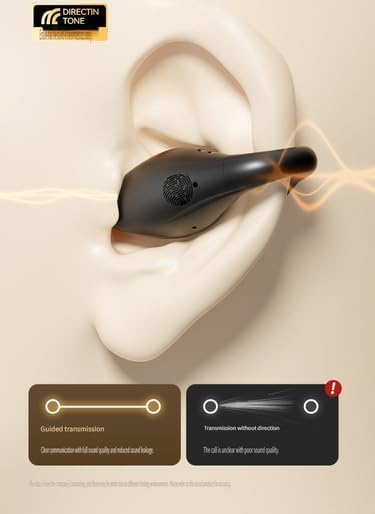
Image 5.1: Illustration of the M66 earphone correctly placed on the ear, demonstrating its guided transmission for clear sound and reduced leakage, characteristic of bone conduction technology.
5.3 Touch Controls
The M66 earphones feature intuitive touch controls on each earbud. The specific functions may vary slightly, but common operations are as follows:
- Play/Pause: Single tap on either earphone.
- Next Track: Double tap on the Right earphone.
- Previous Track: Double tap on the Left earphone.
- Volume Up: Triple tap on the Right earphone.
- Volume Down: Triple tap on the Left earphone.
- Answer/End Call: Single tap on either earphone during an incoming call or active call.
- Reject Call: Press and hold either earphone for 2 seconds during an incoming call.
- Activate Voice Assistant: Press and hold either earphone for 2 seconds (when not on a call).
5.4 Performance and Gaming
The M66 earphones are designed with low-latency algorithms to ensure smooth coordination of sound and visuals, enhancing the gaming experience. This feature minimizes audio delay, providing a more immersive and responsive interaction.

Image 5.2: The M66 earphones and charging case positioned next to a smartphone displaying a game, illustrating the product's suitability for gaming with low-latency audio.
5.5 LED Display Functionality
The charging case features an LED display that provides real-time information:
- Case Battery Level: Displays the percentage of charge remaining in the charging case.
- Earphone Battery Indicators: Separate indicators for the Left (L) and Right (R) earphones, showing their individual charging status or battery levels.
- Charging Status: Animations or specific icons indicate when the case or earphones are actively charging.
- Pairing Status: May show specific icons or animations when the earphones are in pairing mode or successfully connected.

Image 5.3: The M66 earphones and charging case in both black and white variants, clearly showing the prominent LED display on the charging case.
6. Maintenance
6.1 Cleaning
- Regularly clean the earphones and charging case with a soft, dry, lint-free cloth.
- Do not use abrasive cleaners, alcohol, or chemical solvents.
- Ensure the charging contacts on both the earphones and the case are clean and free of debris to maintain proper charging.
6.2 Storage
- When not in use, always store the earphones in their charging case to protect them and keep them charged.
- Store the device in a cool, dry place, away from extreme temperatures and direct sunlight.
6.3 Water Resistance
The M66 earphones are designed to be waterproof and sweat-proof, making them suitable for sports and exercise. However, they are not intended for swimming or submersion in water. Avoid exposing the charging case to water.
7. Troubleshooting
If you encounter any issues with your M66 earphones, please refer to the following common solutions:
- Earphones not pairing:
- Ensure both earphones are fully charged.
- Make sure Bluetooth is enabled on your device.
- Turn off Bluetooth on your device, then turn it back on.
- Forget "M66" from your device's Bluetooth list and try pairing again.
- Place earphones back in the case, close the lid, wait a few seconds, then open to re-enter pairing mode.
- No sound from one or both earphones:
- Check the volume level on both your device and the earphones.
- Ensure earphones are properly connected to your device.
- Try restarting your device and the earphones.
- Ensure the earphones are clean and free of debris.
- Charging issues:
- Ensure the charging cable is securely connected to both the case and the power source.
- Verify that the power source is working.
- Clean the charging contacts on the earphones and inside the case.
- Try a different charging cable or power adapter.
- Poor sound quality or disconnections:
- Ensure there are no obstructions between the earphones and your device.
- Move closer to your device to reduce interference.
- Avoid using the earphones in environments with strong electromagnetic interference.
- Ensure your device's operating system and Bluetooth drivers are up to date.
8. Specifications
| Model Name | M66 In-ear wireless Bluetooth headset |
| Brand | Generic |
| Connectivity Technology | Bluetooth, Wireless (Bluetooth 5.4 core) |
| Noise Control | Active Noise Cancellation |
| Ear Placement | In Ear (Dolphin Ear Clip) |
| Form Factor | In Ear |
| Control Type | Button Control (Touch Controls) |
| Special Features | Bluetooth 5.4 core, Ultra-long battery life, Waterproof and sweat-proof, LED Display, Bone Conduction, No Sound Leakage |
| Included Components | Headphone body, Wireless Charging Case |
| Impedance | 80 Ohm |
| Manufacturer | Guangzhou Kung Fu Fat Technology Co., Ltd. |
9. Warranty and Support
For warranty information and customer support, please refer to the documentation provided at the point of purchase or contact the retailer/manufacturer directly. Keep your proof of purchase for any warranty claims.


