
1. Introduction
Thank you for choosing Kailh PG1350 Choc V1 Low-Profile Mechanical Keyboard Switches. These switches are designed for mechanical keyboards requiring a compact form factor and offer a distinct typing experience. Their low-profile design allows for a shorter travel distance and faster actuation, making them suitable for various applications, including gaming.
This manual provides essential information regarding the features, installation, operation, maintenance, and specifications of your Kailh PG1350 Choc V1 switches. Please read it carefully to ensure proper use and longevity of your product.
2. Product Overview
The Kailh PG1350 Choc V1 switches are engineered with precision components to deliver reliable performance. They feature a 5-pin design for enhanced stability and durability when mounted on a compatible PCB.

Figure 2.1: Top and bottom perspectives of a single Kailh PG1350 Choc V1 mechanical keyboard switch, highlighting its compact low-profile design and internal structure.

Figure 2.2: An exploded diagram illustrating the individual components of a Kailh PG1350 Choc V1 switch, including the POM stem, PC housing, spring, moving film, torsion spring, putter, and pedestal, demonstrating its internal construction.
3. Features
- Advanced Contact Materials: Features alloy copper and palladium gold contacts for improved conductivity, stability, and long-term durability.
- Enhanced Stability: Designed with 5 pins to ensure a secure and stable connection when installed on a compatible PCB.
- LED Compatibility: Equipped with built-in LED slots and SMD compatibility, allowing for custom backlighting configurations.
- Corrosion Resistance: Utilizes electroplated copper legs and nickel-plated springs to resist corrosion and maintain performance over time.
- Smooth Actuation: The lubricated stem provides a super smooth glide, contributing to a consistent and comfortable typing experience.
- Fast Response: Small size and shorter travel distance enable faster actuation, beneficial for rapid input scenarios.
- High Durability: Engineered for a long lifespan, with an estimated durability of approximately 50 million keystrokes based on rigorous laboratory testing.
4. Setup and Installation
Kailh PG1350 Choc V1 switches are specifically designed for Choc-Compatible PCBs. They are not compatible with MX-style PCBs due to differing pin configurations. Ensure your keyboard's PCB supports Choc switches before attempting installation.
Installation Steps:
- Prepare PCB: Ensure your keyboard's PCB is clean and ready for switch installation.
- Align Pins: Carefully align the 5 pins of the Choc switch with the corresponding holes on the Choc-Compatible PCB.
- Press Gently: Apply gentle, even pressure to push the switch into place until it sits flush with the PCB. Avoid excessive force to prevent bending pins.
- Verify Connection: Visually inspect the underside of the PCB to ensure all pins are correctly inserted and soldered if necessary (for hot-swappable PCBs, soldering is not required).
- Install Keycaps: Once switches are securely installed, attach compatible Choc keycaps.

Figure 4.1: Kailh PG1350 Choc V1 switches installed on a mechanical keyboard PCB, with some keycaps removed to reveal the switches. The switches are illuminated by RGB lighting, demonstrating their compatibility with SMD LEDs.
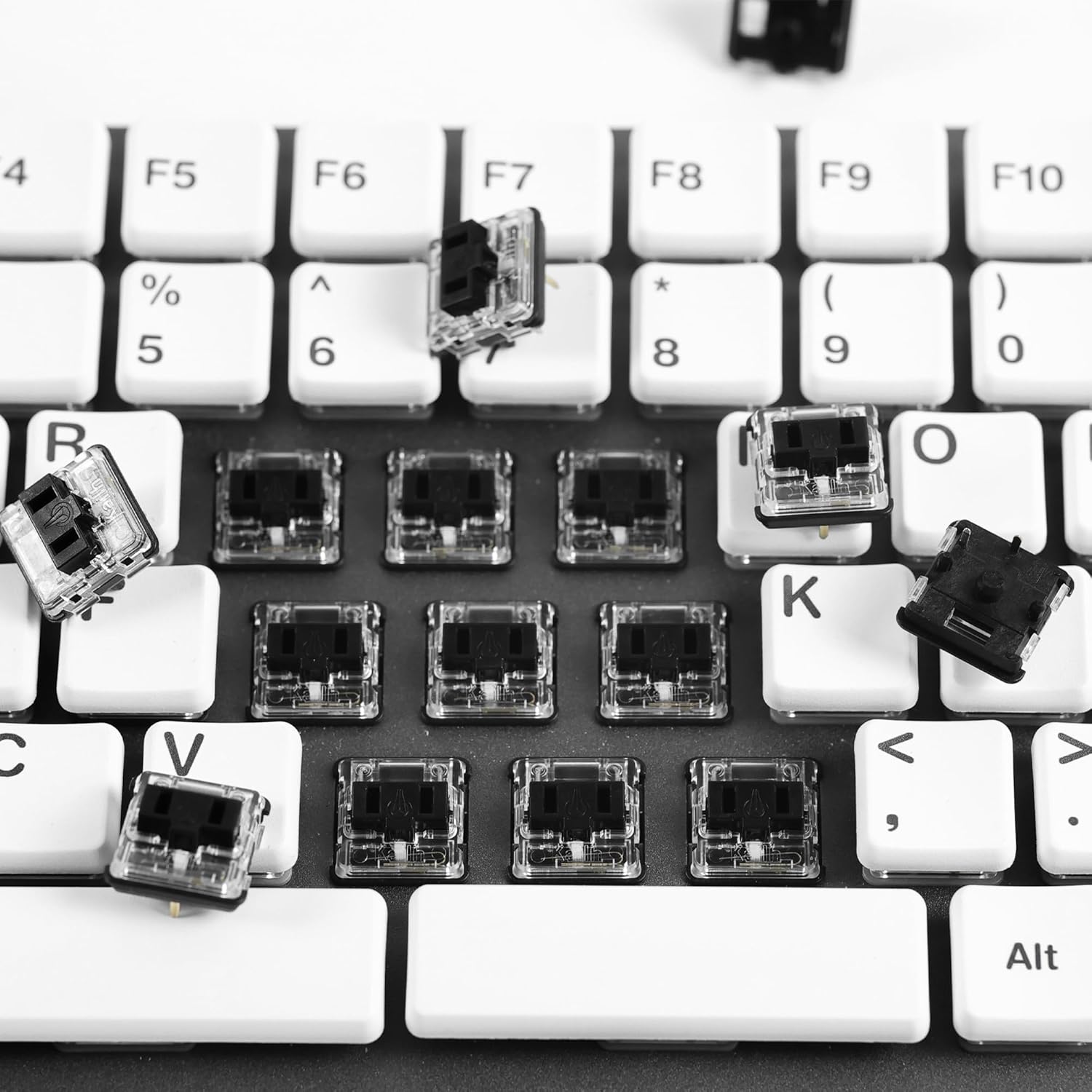
Figure 4.2: An overhead view of a mechanical keyboard with several Kailh PG1350 Choc V1 switches partially installed or removed, demonstrating the process of switch replacement or assembly.
5. Operation
Kailh PG1350 Choc V1 switches are available in three primary operational styles, each offering a distinct tactile and auditory feedback:
- Linear Switches: Provide a smooth, consistent keystroke without any tactile bump or audible click. Ideal for users who prefer a fluid and uninterrupted press. Available in Blue (20gf), Red Pro (35gf), Red (40±5gf), and Black (50gf).
- Tactile Switches: Feature a noticeable bump during the keystroke, indicating actuation without an audible click. This provides feedback to the user that the key has registered. Available in Brown (50gf) and Brunt Orange (70gf).
- Clicky Switches: Offer both a tactile bump and an audible click sound upon actuation. This provides clear feedback for each keypress. Available in White (50±10gf), Robin (47gf), and Navy (60gf).
Refer to the table below for detailed specifications of each switch type:

Figure 5.1: A comprehensive table outlining the various types of Kailh PG1350 Choc V1 switches, their respective operating forces, pre-travel distances, total travel distances, and an estimated lifespan.
6. Maintenance
Proper maintenance can extend the lifespan and performance of your Kailh PG1350 Choc V1 switches.
- Regular Cleaning: Periodically remove keycaps and use compressed air to clear dust, crumbs, and debris from around and within the switches.
- Gentle Handling: When removing or installing switches, use a switch puller and apply gentle, even force to avoid bending pins or damaging the switch housing.
- Avoid Liquids: Keep liquids away from your keyboard to prevent damage to the switches and PCB. In case of a spill, immediately power off the keyboard and allow it to dry completely before use.
- Storage: Store unused switches in a clean, dry environment, preferably in their original packaging or a dedicated switch tray, to protect them from dust and physical damage.

Figure 6.1: A clear plastic tray containing multiple Kailh PG1350 Choc V1 mechanical keyboard switches, illustrating proper storage and packaging.
7. Troubleshooting
If you encounter issues with your Kailh PG1350 Choc V1 switches, consider the following:
- Switch Not Registering:
- Ensure the switch is fully seated in the PCB.
- Check for bent pins. If a pin is bent, carefully straighten it with fine-nose pliers before reinserting.
- Verify PCB compatibility (must be Choc-Compatible).
- Inconsistent Actuation:
- Clean the switch thoroughly to remove any debris that might be obstructing movement.
- Ensure the keycap is properly seated and not interfering with the switch stem.
- Physical Damage During Transport: If any switches are damaged during transportation, please notify the seller immediately for a replacement.
8. Specifications
| Attribute | Detail |
|---|---|
| Product Dimensions | 0.39 x 0.39 x 0.39 inches (per switch) |
| Item Weight | Approximately 3.53 ounces (for 70 switches) |
| Manufacturer | Kailh |
| Operation Mode | ON-OFF |
| Current Rating | 1 Amps |
| Operating Voltage | 1 Volts |
| Contact Type | Normally Open |
| Connector Type | Plug In |
| Terminal | Through Hole |
| Circuit Type | 1-way |
| Actuator Type | Push Button |
9. Warranty and Support
Kailh PG1350 Choc V1 switches are manufactured to high-quality standards. In the event of any switch failure or damage that occurs during transportation, please contact the seller or manufacturer's support channel promptly. We will arrange for a replacement of the affected switches.
For further assistance or inquiries, please refer to the contact information provided by your point of purchase.


