
Introduction
Thank you for choosing the MANSCAPED® The Chairman™ PRO Electric Face Shaver. This manual provides essential information for the safe and effective use, maintenance, and care of your device. Please read it thoroughly before first use and retain it for future reference.

Image: The Chairman™ PRO Electric Face Shaver, showcasing its main unit, interchangeable heads, charging cable, and travel case.
Safety Information
WARNING:
- Keep all batteries (new or spent) out of reach of children.
- Seek medical attention immediately if ingestion of batteries is suspected.
- This appliance is not intended for use by persons (including children) with reduced physical, sensory or mental capabilities, or lack of experience and knowledge, unless they have been given supervision or instruction concerning use of the appliance by a person responsible for their safety.
- Children should be supervised to ensure that they do not play with the appliance.
For detailed safety guidelines, please refer to the full safety manual included with your product.
Package Contents
Upon opening your MANSCAPED® The Chairman™ PRO package, please ensure all the following items are present:
- The Chairman™ PRO Electric Face Shaver Unit
- SkinSafe® Four-Blade Foil Head (pre-installed or separate)
- SkinSafe® Stubble Trimmer Head
- Two Stubble Trimmer Combs
- USB-C Charging Cable
- Travel Case
- User Manual (this document)

Image: An overhead view displaying all components included in The Chairman™ PRO package.
Setup
Charging the Device
- Connect the provided USB-C charging cable to the charging port on the shaver.
- Plug the other end of the USB-C cable into a compatible USB power adapter (not included) or a USB port.
- The battery indicator on the shaver will illuminate to show charging status. A full charge provides up to 75 minutes of runtime.
- For a quick shave, a 5-minute quick charge option is available.
- The device is also compatible with wireless charging pads (not included). Place the shaver on a compatible wireless charging pad to charge.
Attaching/Changing Blade Heads
The Chairman™ PRO features an interchangeable dual-head system with magnetic blade heads for easy attachment and removal.
- To remove a blade head, gently pull it upwards from the shaver body. The magnetic connection will release.
- To attach a blade head, align the desired head (Foil or Stubble Trimmer) with the top of the shaver body and gently push it down until the magnets secure it in place.

Image: Detailed view of the interchangeable foil and stubble trimmer heads, highlighting the magnetic attachment mechanism.
Operating Instructions
General Operation
- Press the power button to turn the shaver on.
- The built-in LED spotlight will illuminate, assisting in visibility of fine hairs and hard-to-reach areas.
- Gently glide the shaver across your face and neck. The FlexAdjust technology allows the shaver head to pivot and maintain close contact with your skin for an even shave.
- Press the power button again to turn the shaver off.

Image: The shaver's LED spotlight in action, highlighting its ability to illuminate the shaving path for precision.
Using the SkinSafe® Four-Blade Foil Head
This head is designed for a close shave, effectively removing up to five days of stubble.
- Ensure the foil head is securely attached.
- Hold the shaver with the foil system flat against your skin.
- Move the shaver in gentle, straight, or circular motions against the direction of hair growth for optimal results.
- For enhanced comfort, consider using a pre-shave gel or foam.
Using the SkinSafe® Stubble Trimmer Head
The stubble trimmer allows for shaping, defining, and maintaining various stubble lengths.
- Attach the stubble trimmer head to the shaver.
- Select one of the two provided combs and snap it onto the trimmer head to achieve your desired stubble length.
- Hold the trimmer flat against your skin and move it in smooth, controlled strokes.

Image: A man using The Chairman™ PRO with the stubble trimmer attachment to maintain facial hair.
Travel Lock Feature
To prevent accidental activation during travel, engage the travel lock:
- Press and hold the lock button (often indicated by a padlock icon) for 3 seconds. The shaver will indicate that the lock is engaged.
- To disengage, press and hold the lock button for 3 seconds again.

Image: Close-up of the shaver's control panel, highlighting the travel lock button and its waterproof design.
Maintenance
Cleaning the Shaver
The Chairman™ PRO is IPX7 rated waterproof, allowing for easy cleaning under running water.
- After each use, turn off the shaver.
- Remove the blade head by gently pulling it upwards.
- Rinse both the blade head and the shaver body under warm running water to remove hair clippings and debris.
- Allow all parts to air dry completely before reattaching the blade head or storing the shaver.
- For a more thorough cleaning, a small brush (not included) can be used to dislodge stubborn hairs from the blades.
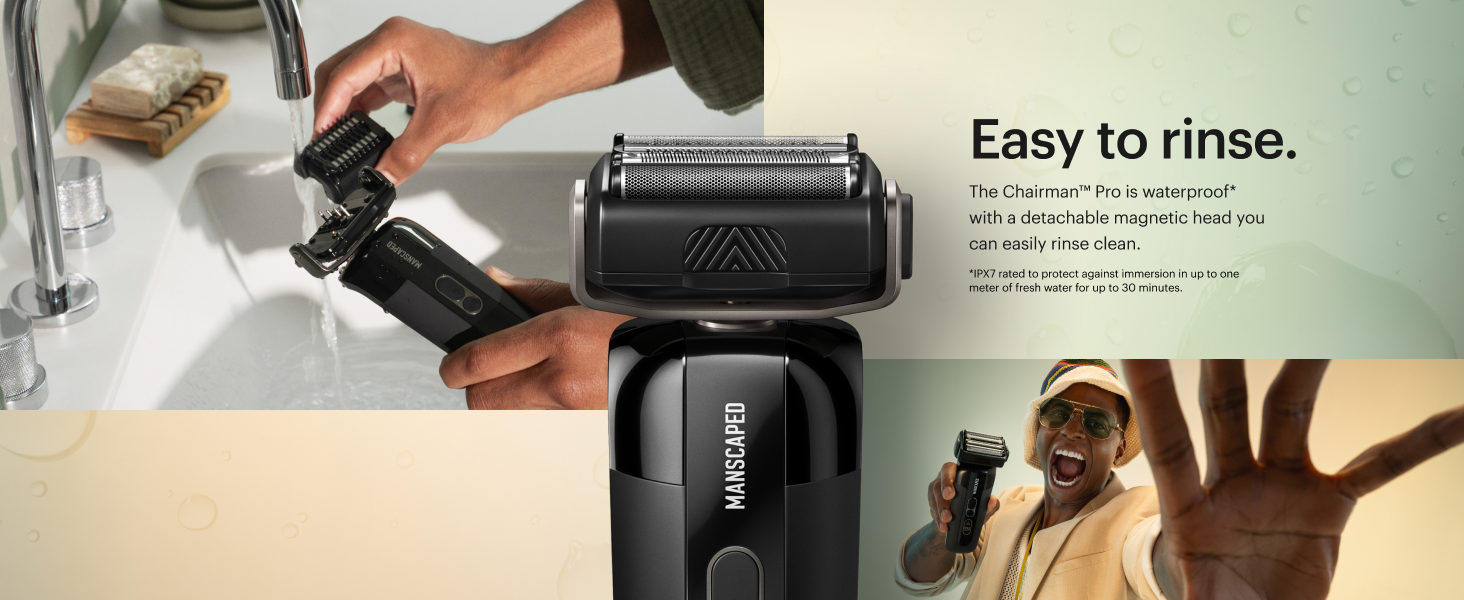
Image: The shaver and its detachable head being rinsed under running water, demonstrating its waterproof design for easy cleaning.
Replacing Blade Heads
For optimal performance and hygiene, it is recommended to replace blade heads periodically. Replacement foil and stubble trimmer blades are available separately from MANSCAPED®.
- Follow the instructions for "Attaching/Changing Blade Heads" to remove the old head and install a new one.
Troubleshooting
| Problem | Possible Cause | Solution |
|---|---|---|
| Shaver does not turn on. | Battery is depleted. Travel lock is engaged. | Charge the shaver. Disengage the travel lock by pressing and holding the lock button for 3 seconds. |
| Poor shaving performance / pulling hairs. | Blade head is dirty or worn. Battery is low. | Clean the blade head thoroughly. Ensure the shaver is fully charged. Consider replacing the blade head if it is old or damaged. |
| Shaver not charging. | USB-C cable or power source issue. Wireless charging misalignment. | Ensure the USB-C cable is securely connected to both the shaver and a working power source. Try a different cable or adapter. For wireless charging, ensure the shaver is correctly positioned on the charging pad. |
If you encounter issues not listed here, please contact MANSCAPED® customer support.
Specifications
| Feature | Detail |
|---|---|
| Model Name | The Chairman™ PRO |
| Item Model Number | 30-00160 |
| Brand | MANSCAPED |
| Power Source | Battery Powered |
| Battery Type | 1 Lithium Ion battery (included) |
| Battery Capacity | 1800 milliamp-hours |
| Runtime | Up to 75 minutes |
| Special Features | SkinSafe® & FlexAdjust Technology, LED Spotlight, Waterproof (IPX7) |
| Recommended Use | Face |
| Package Dimensions | 8.19 x 5.51 x 3.23 inches; 1.63 Pounds |
Warranty and Support
For information regarding product warranty, returns, or to purchase replacement parts and accessories, please visit the official MANSCAPED® store or contact their customer support directly.
- MANSCAPED® Store: Visit the MANSCAPED Store on Amazon
- Return Policy: This product is subject to a 30-day return policy for refund or replacement. Please refer to your purchase platform for specific details.