1. Introduction
This manual provides essential information for the safe and efficient operation of your KAISAL 48V/58.4V 15A LiFePO4 Battery Charger. This charger is specifically designed for 48V vehicles equipped with 16-string LiFePO4 batteries, including golf carts, forklifts, floor scrubbers, sightseeing vehicles, transport vehicles, electric motorcycles, and boats. Please read this manual thoroughly before use and retain it for future reference.

Image 1.1: KAISAL 48V 15A LiFePO4 Battery Charger
2. Important Safety Information
WARNING: Failure to follow these safety instructions may result in electric shock, fire, or serious injury.
- Always ensure the charger is compatible with your battery type (LiFePO4) and voltage (48V).
- Do not attempt to charge non-rechargeable batteries.
- Operate the charger in a well-ventilated area.
- Keep the charger away from water, moisture, and flammable materials. The output cable connector is IP68 waterproof, but the main unit should be protected from excessive moisture.
- Do not open the charger casing. There are no user-serviceable parts inside.
- Disconnect the charger from the power outlet before making or breaking connections to the battery.
- Avoid short-circuiting the output terminals.
- If the charger or battery shows signs of damage, discontinue use immediately and contact support.
- This charger is equipped with multiple protection functions including overvoltage, overcurrent, overheating, short-circuit, reverse connection, overcharge, and timing charging protection. If a fault occurs, the charger will stop charging and display a fault code.
3. Package Contents
Verify that all items are present in the package:
- KAISAL 48V/58.4V 15A LiFePO4 Battery Charger Unit
- Output Cable with M8 Ring Terminals and Waterproof Connector
- AC Input Power Cable
4. Product Features
The KAISAL 48V/58.4V 15A LiFePO4 Battery Charger offers several key features for efficient and safe battery charging:
- Wide Compatibility: Designed for all 48V vehicles with 16-string LiFePO4 batteries, including various golf cart models (Yamaha, EZGO, Club Car), forklifts, and other electric vehicles.
- Automatic 4-Stage Smart Charging: Utilizes advanced charging technology to optimize the charging process, prevent overcharging, and extend battery life.
- LCD Digital Display: Provides real-time monitoring of charging current, voltage, and status (e.g., 'FULL', fault codes).
- 0V Charging Wake Up Mode: Capable of activating low-voltage 48V LiFePO4 batteries that have entered BMS cut-off protection.
- IP68 Waterproof Cable & Separate Plug Design: Features a 16ft extra-long output cable with an IP68 waterproof connector, allowing the M8 terminal to remain connected to the battery for convenient charging.
- 7 Protection Functions: Includes overvoltage, overcurrent, overheating, short-circuit, reverse connection, overcharge, and timing charging protection for enhanced safety.
- Timing Charging Protection: Automatically stops charging after 15 hours of continuous operation to prevent potential battery damage from prolonged charging.
- Built-in Cooling Fan: Ensures efficient heat dissipation for stable operation and extended service life.
- Portable Design: Compact and lightweight (approximately 6.47 lbs) with an integrated handle for easy transport.
- Certifications: FCC and ETL certified for safety and quality assurance.

Image 4.1: Key Features of the KAISAL Charger
5. Setup
Follow these steps to set up your KAISAL battery charger:
- Connect to Battery: Ensure the vehicle is turned off. Connect the M8 ring terminals of the charger's output cable directly to the corresponding positive (+) and negative (-) terminals of your 48V LiFePO4 battery. The separate plug design allows these terminals to remain on the battery.
- Connect Charger to Output Cable: Connect the waterproof plug from the charger unit to the waterproof charging port of the output cable. Ensure a secure connection.
- Connect to Power: Plug the AC input power cable into a standard wall outlet (100-240V AC).
- Power On: Flip the power switch on the charger unit to the 'ON' position. The LCD display will illuminate.

Image 5.1: Charger Connection Diagram
6. Operating Instructions
Once properly connected and powered on, the charger will automatically begin the charging process. The 4-stage smart charging technology will manage the charge cycle.
- Automatic Charging: The charger will automatically detect the battery status and initiate charging. The LCD display will show real-time charging current and voltage.
- Charging Completion: When the battery is fully charged, the charger will automatically reduce the current and eventually shut down, displaying 'FULL' on the LCD screen. This prevents overcharging and protects battery health.
- 0V Charging Wake Up Mode: If your 48V LiFePO4 battery has entered a low-voltage state due to BMS cut-off protection, this charger can attempt to reactivate it. Connect the charger as described in the setup section; the charger will automatically try to wake up the battery.

Image 6.1: 0V Charging Wake Up Mode in action
7. LCD Digital Display
The integrated LCD screen provides visual feedback on the charging status. It alternately displays the real-time charging voltage and current at four-second intervals. It also indicates the charging completion status and any fault codes.
- Charging Current: Displays the current (in Amperes) being delivered to the battery.
- Charging Voltage: Displays the voltage (in Volts) of the battery during charging.
- 'FULL' Status: Indicates that the battery is fully charged.
- Fault Codes: Displays specific codes if an error or protection function is triggered. Refer to the troubleshooting section for code interpretations.

Image 7.1: LCD Display Indications
8. 4-Stage Smart Charging Technology
This charger employs an advanced 4-stage smart charging process to ensure optimal battery health and longevity. The CPU continuously monitors the charging process to prevent overcharging and automatically shuts down when the battery is full.
The charging stages typically involve:
- Pre-charge/Soft Start: Gently brings deeply discharged batteries to a safe voltage.
- Bulk Charge: Delivers maximum current until the battery reaches approximately 80% of its capacity.
- Absorption Charge: Charges at a constant voltage, gradually reducing current until the battery is fully charged.
- Float/Maintenance Charge: Maintains the battery at full charge with a low, constant voltage.
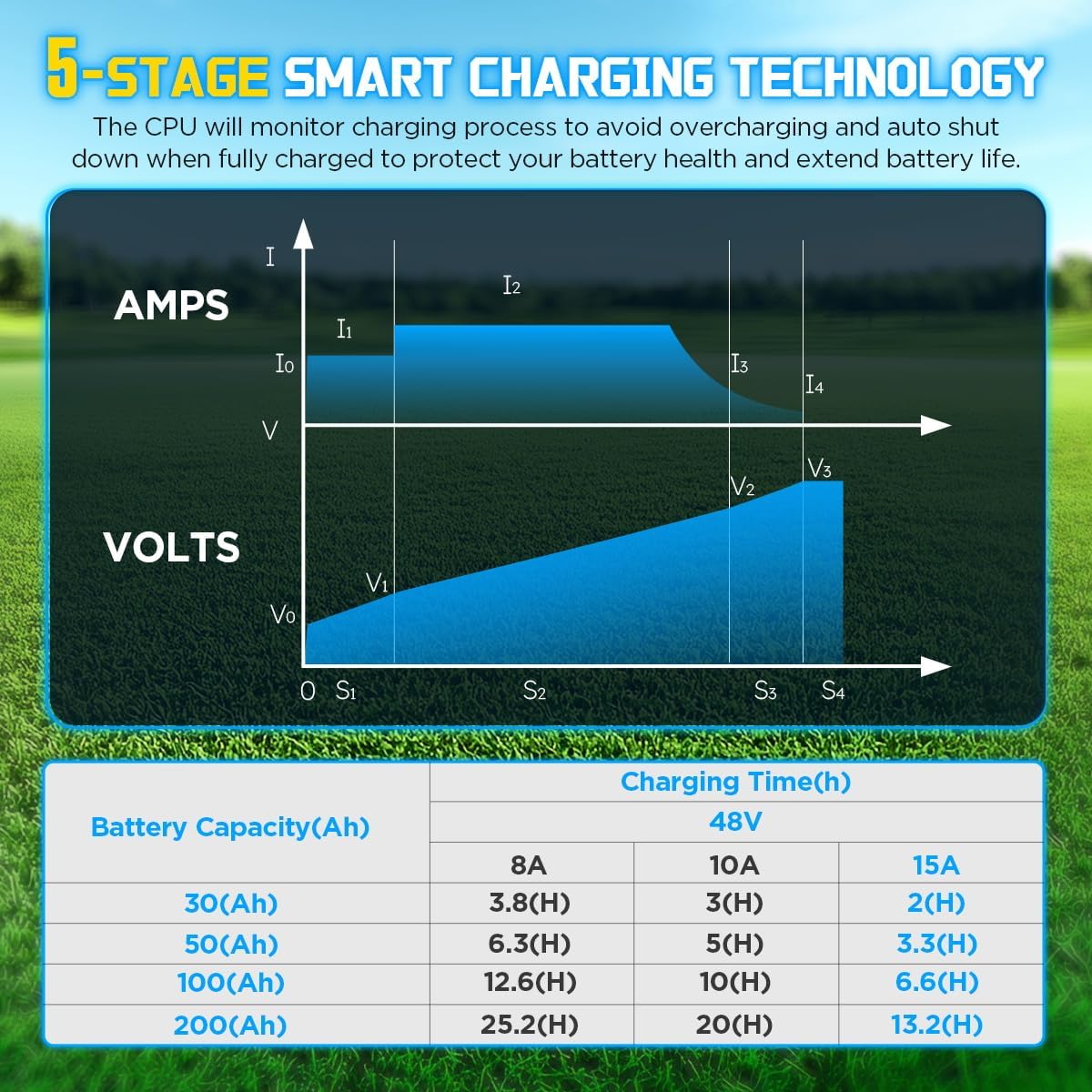
Image 8.1: Smart Charging Curve and Estimated Charging Times
Note: The image refers to '5-Stage Smart Charging Technology', while the feature bullet mentions '4-stage'. The core principle of intelligent, multi-stage charging for battery health remains consistent.
9. Protection Functions
The KAISAL charger incorporates seven protection functions to safeguard both the charger and the connected battery, ensuring user safety. In case of a fault, the charger will cease operation and display a fault code. Once the fault condition is resolved, the charger will automatically resume normal operation.
- Overvoltage Protection: Prevents damage from excessive voltage.
- Overcurrent Protection: Protects against drawing too much current.
- Overheating Protection: Shuts down if internal temperature exceeds safe limits.
- Short-circuit Protection: Prevents damage from accidental short circuits.
- Reverse Connection Protection: Protects against incorrect polarity connection to the battery.
- Overcharge Protection: Automatically stops charging when the battery is full.
- Timing Charging Protection: Stops charging after 15 hours to prevent prolonged charging.

Image 9.1: Charger Protection Functions
Note: The image refers to '8 Protection Functions', while the feature bullet mentions '7'. The listed protections cover the critical safety aspects.
10. Maintenance
Proper maintenance ensures the longevity and reliable operation of your charger:
- Cleaning: Keep the charger clean and free from dust and debris. Use a dry, soft cloth for cleaning. Do not use liquid cleaners.
- Ventilation: Ensure the cooling fan and ventilation slots are not obstructed. Good airflow is crucial for efficient heat dissipation.
- Storage: Store the charger in a cool, dry place when not in use.
- Cable Inspection: Regularly inspect the input and output cables for any signs of damage, fraying, or wear. Replace if necessary.

Image 10.1: Cooling Fan and Overheating Protection
11. Troubleshooting
If you encounter issues with your charger, refer to the following table for common problems and solutions. The LCD display will show fault codes to assist in diagnosis.
| Problem | Possible Cause | Solution |
|---|---|---|
| Charger not turning on / No display | No power from outlet; Power switch off; Faulty cable | Check power outlet; Ensure power switch is ON; Inspect AC input cable. |
| Charger not charging / Fault code displayed | Incorrect battery connection; Battery voltage too low (below wake-up threshold); Protection function triggered (e.g., reverse polarity, short circuit, overvoltage, overheating) | Verify M8 terminal connections; Check for reverse polarity; Allow charger to cool if overheated; If fault persists, contact support. |
| 'FULL' displayed prematurely | Battery already near full charge; Battery issue | This may be normal if the battery is already charged. If the battery capacity seems low, inspect the battery. |
| Charger stops after 15 hours | Timing Charging Protection activated | This is a safety feature. If the battery is not fully charged, check battery health or contact support. |
For specific fault code interpretations not covered here, please refer to the manufacturer's support resources or contact customer service.
12. Specifications
| Feature | Specification |
|---|---|
| Model | 48V 15A |
| Input Voltage | 100-240V AC |
| Output Voltage | 58.4V DC |
| Output Current | 15A |
| Battery Type | 16-string LiFePO4 (Lithium Iron Phosphate) |
| Waterproof Rating (Output Connector) | IP68 |
| Output Cable Length | 16 ft |
| Product Dimensions | 23 x 12.4 x 4.5 inches (approx.) |
| Item Weight | 6.47 pounds (approx.) |
| Certifications | FCC, ETL |
13. Warranty and Support
KAISAL provides a 3-year product service for this charger. This service covers quality problems caused by non-human damage. For any quality issues or technical assistance, please contact KAISAL customer support. Ensure you have your product model number and purchase details available when contacting support.
For further assistance, please visit the KAISAL Store on Amazon.


