
Mibro Lite3 Pro
Mibro Lite3 Pro GPS Smartwatch User Manual
Model: Lite3 Pro
1. Product Overview
The Mibro Lite3 Pro GPS Smartwatch is a versatile and intelligent wearable device designed for both men and women, offering a comprehensive suite of features for communication, fitness tracking, and health monitoring. It boasts a vibrant AMOLED display, robust GPS capabilities, and an impressive array of sport modes, all powered by an efficient battery for extended use.

Figure 1: Mibro Lite3 Pro GPS Smartwatch. This image displays the Mibro Lite3 Pro GPS Smartwatch, highlighting its design and the ability to handle phone calls directly from the watch.
2. What's in the Box
Upon unboxing your Mibro Lite3 Pro GPS Smartwatch, please ensure all the following components are present:
- Mibro Lite3 Pro Watch (with leather strap) x 1
- Silicone strap x 1
- User Manual x 1
- Magnetic charger x 1
3. Setup Guide
3.1 Initial Charging
Before first use, fully charge your Mibro Lite3 Pro Smartwatch. Connect the magnetic charger to the charging points on the back of the watch and plug the USB end into a compatible power adapter (not included). A full charge typically takes approximately 2.5 to 3 hours.
3.2 App Installation and Pairing
To unlock the full potential of your smartwatch, download the official Mibro app on your iOS or Android smartphone. Once installed:
- Enable Bluetooth on your smartphone.
- Open the Mibro app and follow the on-screen instructions to add your device.
- Select "Mibro Lite3 Pro" from the list of available devices to initiate the pairing process.
- Confirm the pairing request on both your phone and the smartwatch.
Note: Some users have reported initial difficulties with pairing. If you encounter issues, ensure the app is up-to-date, restart both your phone and watch, and try again.
4. Operating Instructions
4.1 Bluetooth Calling Function
The Mibro Lite3 Pro allows you to manage calls directly from your wrist when connected to your smartphone via Bluetooth. It features a built-in microphone and speaker for clear communication.
- Answering/Making Calls: Once paired, you can answer incoming calls, dial numbers, or select contacts directly from the watch interface.
- Notifications: Receive SMS and other app notifications directly on your smartwatch.
- Call Logs & Contacts: View recent call history and access saved contacts.

Figure 2: Bluetooth Calling and Message Notifications. This image illustrates the smartwatch's Bluetooth calling capability, showing how to answer/make calls and receive various app notifications.

Figure 3: Hands-free Bluetooth Communication. This image shows a user interacting with the smartwatch for Bluetooth calls, emphasizing the convenience of hands-free operation.
4.2 UHD AMOLED Display
The Mibro Lite3 Pro features a stunning 1.32-inch UHD AMOLED screen with a resolution of 466 x 466 pixels and a peak brightness of 1000 nits, ensuring excellent visibility even in bright sunlight. The display also supports an Always On Display feature.
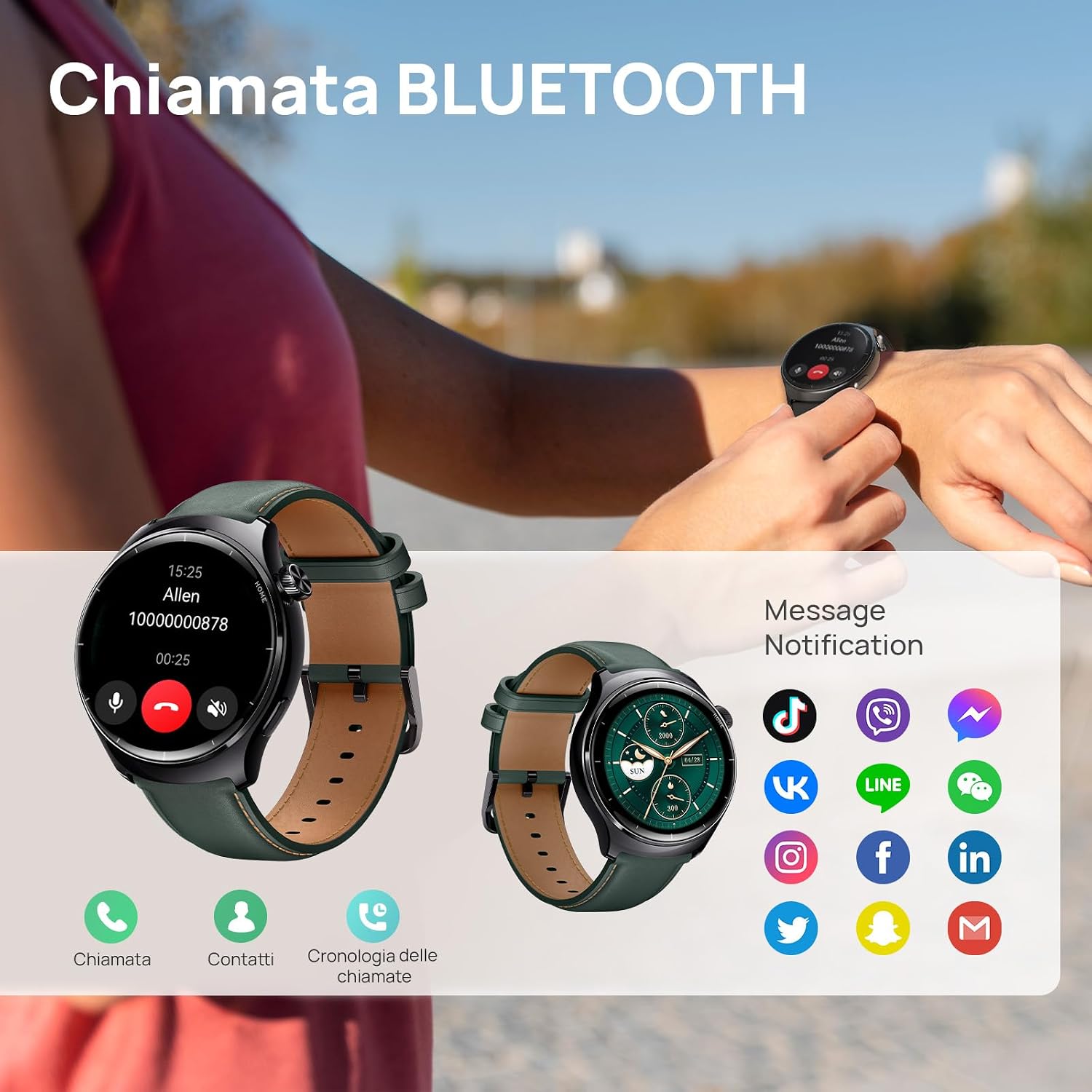
Figure 4: UHD AMOLED Display Details. This image details the impressive display specifications of the smartwatch, including its 466x466 resolution and 1000 nit peak brightness for clear visibility.

Figure 5: Customizable Watch Faces. This image showcases the vibrant color touchscreen and the variety of watch faces available on the Mibro Lite3 Pro.
4.3 GPS Tracking
Equipped with an integrated GPS, the Mibro Lite3 Pro supports 5 global satellite navigation systems, ensuring accurate tracking of your outdoor activities. You can easily record training routes and design return paths.

Figure 6: Global Satellite Positioning. This image demonstrates the smartwatch's integrated GPS, capable of supporting 5 global satellite navigation systems for accurate outdoor activity tracking.

Figure 7: GPS Route Tracking. This image visually represents the smartwatch's global satellite positioning system, showing its ability to accurately track outdoor routes.
4.4 Sport Modes
With over 150 sport modes, the Mibro Lite3 Pro caters to a wide range of physical activities. Its integrated 10-axis gravity sensors precisely detect data such as count, amplitude, orientation, and lifting height during movement.

Figure 8: Swimming Mode and Water Resistance. This image highlights the smartwatch's 5ATM water resistance, suitable for swimming, and its ability to track various metrics during water activities.
4.5 Health Monitoring
The smartwatch offers advanced health monitoring features, including stress detection, breathing training, and blood oxygen measurement. It also incorporates precise algorithms for women's health tracking, such as period and fertile window prediction.

Figure 9: Women's Health Tracking. This image shows the smartwatch's dedicated features for women's health, including menstrual cycle tracking and fertility predictions.

Figure 10: Biological Matrix Detection System. This image illustrates the advanced biological matrix detection system on the smartwatch, designed for improved data collection and accuracy in heart rate monitoring.
4.6 Water Resistance
The Mibro Lite3 Pro is rated 5ATM waterproof, making it suitable for various water activities such as swimming, hand washing, and use in the rain. Avoid hot water, steam, or deep diving.

Figure 11: 5ATM Water Resistance. This image visually confirms the smartwatch's 5ATM water resistance rating, making it suitable for various water-related activities.
4.7 Battery Life
The smartwatch is equipped with a powerful 350 mAh battery and an ultra-low power consumption chip. It offers approximately 15 days of battery life in daily use and up to 60 days in standby mode. Charging takes about 2.5 hours.

Figure 12: Extended Battery Life. This image highlights the smartwatch's impressive battery life, showing different usage modes and their corresponding durations, along with its charging status.
5. Maintenance
Proper maintenance ensures the longevity and optimal performance of your Mibro Lite3 Pro Smartwatch.
- Cleaning: Regularly wipe the watch screen and strap with a soft, dry cloth. For stubborn dirt, a slightly damp cloth can be used, but ensure the watch is completely dry before charging or prolonged use.
- Charging: Use only the provided magnetic charger. Avoid exposing the charging contacts to water or corrosive liquids.
- Storage: Store the watch in a cool, dry place away from direct sunlight and extreme temperatures.
- Avoid Chemicals: Do not use harsh chemicals, cleaning solvents, or strong detergents to clean the watch, as they may damage the finish or internal components.
6. Troubleshooting
If you encounter issues with your Mibro Lite3 Pro Smartwatch, refer to the common problems and solutions below:
| Problem | Possible Cause / Solution |
|---|---|
| Watch does not turn on or charge. | Ensure the magnetic charger is correctly aligned with the charging points. Try a different USB power source. The battery might be completely drained; allow it to charge for a few hours. If the issue persists, contact support. |
| Cannot pair with smartphone / Bluetooth connection unstable. | Make sure Bluetooth is enabled on your phone and the watch. Restart both devices. Ensure the Mibro app is updated to the latest version. Try unpairing and re-pairing the device. Keep the watch close to your phone during pairing. |
| Notifications are not received. | Check notification permissions in the Mibro app and your phone's settings. Ensure the app is running in the background. Verify that the watch is properly connected via Bluetooth. |
| Call audio quality is poor or vibration is weak. | Ensure the watch's speaker and microphone are not obstructed. Check the watch's volume settings. Vibration intensity may not be adjustable on this model. Ensure a stable Bluetooth connection. |
| GPS tracking is inaccurate. | Ensure you are in an open area with clear sky view. Allow the watch sufficient time to acquire GPS signals before starting an activity. |
| Watch requires app for basic functions (e.g., time). | The Mibro Lite3 Pro is designed to work in conjunction with its companion app for full functionality, including time synchronization and settings management. While some basic features may work independently, consistent use requires the app. |
7. Specifications
| Feature | Detail |
|---|---|
| Model | Lite3 Pro |
| Watch Dimensions | 44.7mm x 44.7mm x 11.9mm |
| Item Weight | 59 g |
| Screen Size | 1.32 Inches |
| Display Type | AMOLED |
| Resolution | 466 x 466 |
| Peak Brightness | 1000 nits |
| Operating System | RTOS |
| Memory Capacity | 8 MB |
| Battery Capacity | 350 mAh |
| Battery Cell Composition | Lithium-ion |
| Average Battery Life | 15 Days (daily use) / 60 Days (standby) |
| Charging Time | 2.5 - 3 Hours |
| Connectivity Technology | Bluetooth |
| GPS | Integrated GPS (supports 5 satellite navigation systems) |
| Water Resistance | 5ATM |
| Human Interface Input | Touchscreen |
| Compatible Devices | Smartphone (iOS and Android) |
| Special Features | Music player, Always On Display, Phone calls, Notifications, Camera, Stress detection, Breathing training, Blood oxygen, Women's health tracking |
| Included Components | Magnetic charger x 1, Mibro Lite3 Pro Watch (with leather strap) x 1, User Manual x 1, Silicone strap x1 |
8. Warranty and Support
Mibro products are designed for reliability and performance. For specific warranty details, please refer to the warranty card included with your product or visit the official Mibro website.
For technical support, troubleshooting assistance, or warranty claims, please contact the seller, Mibro Direct, or visit the official Mibro brand store:
Related documentsLite3 Pro


Ask a question about this manual
Ask about setup, troubleshooting, compatibility, parts, safety, or missing instructions. Manuals+ will review the question and use this page’s manual context to help answer it.