
UPBRIGHT HNESD18B
UPBRIGHT 12V AC DC Adapter Instruction Manual
Compatible with HUANUO HNESD18B, HNESD18N, HNESD18V Electric Standing Desks
Introduction
This instruction manual provides important information for the safe and efficient use of your UPBRIGHT 12V AC DC Adapter. This adapter is specifically designed for compatibility with HUANUO HNESD18B, HNESD18N, and HNESD18V electric standing desks. Please read this manual thoroughly before installation and operation, and retain it for future reference.
Important Safety Information
Failure to follow these safety instructions may result in fire, electric shock, or other injuries. Always exercise caution when handling electrical devices.
- Compatibility Check: This adapter is for 12V versions ONLY. It is NOT compatible with 24V or 29V versions. Verify your device's voltage requirements before connecting.
- Indoor Use Only: This adapter is designed for indoor use in dry locations. Do not expose to water, rain, or excessive humidity.
- Proper Ventilation: Ensure the adapter has adequate ventilation. Do not cover it or place it in an enclosed space where heat cannot dissipate.
- Avoid Damage: Do not use the adapter if the cord or plug is damaged. Do not attempt to open or repair the adapter yourself.
- Correct Connection: Always connect the adapter to the device first, then plug it into a power outlet. When disconnecting, unplug from the power outlet first.
- Children and Pets: Keep the adapter and its cords out of reach of children and pets.
Product Overview
The UPBRIGHT 12V AC DC Adapter provides reliable power to your compatible electric standing desk. It features a robust design with built-in safety protections.

Image: The UpBright 12V AC DC Adapter, showing the main unit, the AC input cable, and the DC output cable with its connector.
Components:
- AC Adapter Unit: The main power conversion unit.
- AC Input Cable: Connects the adapter to a wall power outlet (Type A - 2 pin, North American).
- DC Output Cable: Connects the adapter to your electric standing desk.
Setup Instructions
Follow these steps to properly set up your UPBRIGHT AC DC Adapter with your HUANUO electric standing desk:
- Verify Compatibility: Before connecting, confirm that your HUANUO electric standing desk requires a 12V power supply. This adapter is not compatible with 24V or 29V desks.
- Connect to Desk: Take the DC output cable from the UPBRIGHT adapter and securely plug its connector into the power input port on your HUANUO electric standing desk. Ensure a snug fit.
- Connect to Power Outlet: Plug the AC input cable into the UPBRIGHT adapter. Then, insert the other end of the AC input cable into a standard 100-240VAC 50/60Hz wall power outlet.
- Power On: Once both connections are secure, your electric standing desk should receive power and be ready for operation according to its own user manual.
Operating Instructions
The UPBRIGHT 12V AC DC Adapter functions as a power supply for your HUANUO electric standing desk. Once properly connected, the adapter continuously supplies the necessary 12V DC power to the desk's control unit. Operation of the standing desk, including height adjustments and memory settings, is controlled directly through the desk's integrated control panel, as detailed in your standing desk's specific user manual.
Ensure the adapter is always plugged into a functional power outlet when the desk is in use or requires power for its functions.
Maintenance
Proper maintenance ensures the longevity and safe operation of your adapter.
- Cleaning: Disconnect the adapter from the power outlet and the desk before cleaning. Use a soft, dry cloth to wipe the exterior. Do not use liquid cleaners or solvents.
- Storage: When not in use for extended periods, store the adapter in a cool, dry place, away from direct sunlight and extreme temperatures. Coil the cables loosely to prevent damage.
- Inspection: Periodically inspect the adapter unit and cables for any signs of damage, such as cuts, fraying, or discoloration. If damage is found, discontinue use immediately and replace the adapter.
Troubleshooting
If you encounter issues with your adapter, refer to the following table:
| Problem | Possible Cause | Solution |
|---|---|---|
| Desk not receiving power |
|
|
| Adapter feels hot |
|
|
Specifications
| Brand | UPBRIGHT |
| Model Compatibility | HUANUO HNESD18B, HNESD18N, HNESD18V Electric Standing Desks (12V versions only) |
| Input Voltage | 100-240VAC, 50/60Hz |
| Output Voltage | 12VDC |
| Wattage | 60 watts (Max) |
| Connector Type | Specific connector for HUANUO desks |
| Color | Black |
| Included Components | 1 x AC Adapter |
Security Protection Features
The UPBRIGHT adapter is equipped with multiple protection mechanisms to ensure safe and reliable operation:

Image: An internal diagram of the adapter highlighting its various security protection features.
- OVP (Over Voltage Output Protection): Protects connected devices from excessive voltage.
- OCP (Over Current Output Protection): Prevents damage from excessive current draw.
- SCP (Short Circuit Output Protection): Automatically shuts down power in case of a short circuit.
- Overcharge Protection: Safeguards against battery overcharging (if applicable to the connected device).
- Overheat Protection: Prevents the adapter from reaching unsafe temperatures.
- Good Heat Resistance: Designed with materials that effectively dissipate heat.
- VO-Grade Fire-Retardant: Constructed with fire-retardant materials for enhanced safety.
Compliance and Certifications
The UPBRIGHT 12V AC DC Adapter is designed and manufactured to meet international safety and quality standards, including CE, CCC, and RoHS certifications, ensuring its reliability and environmental compliance.
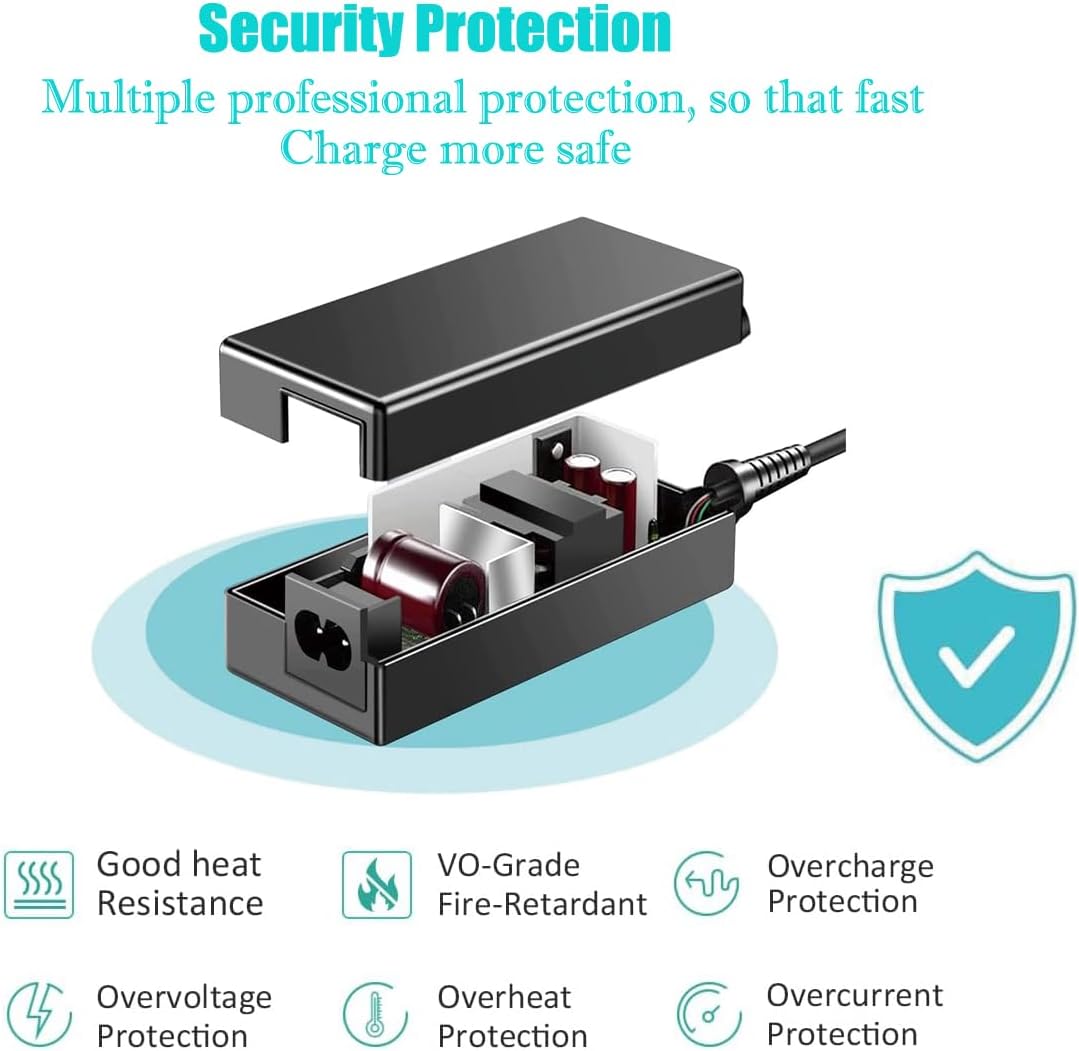
Image: A certificate of compliance, indicating the product meets relevant safety and quality standards.
Warranty and Support
UPBRIGHT stands behind the quality of its products.
- Warranty: This product comes with a 30-day refund policy and a 24-month exchange warranty from the date of purchase. This warranty covers manufacturing defects and issues arising from normal use.
- Customer Support: For any questions, technical assistance, or warranty claims, please contact your retailer or the UPBRIGHT customer service. Refer to your purchase documentation for contact details.
Ask a question about this manual
Ask about setup, troubleshooting, compatibility, parts, safety, or missing instructions. Manuals+ will review the question and use this page’s manual context to help answer it.