1. Introduction
This manual provides detailed instructions for the safe and efficient operation of your HCALORY 8KW All-in-one Portable Diesel Air Heater, Model TC-2. Please read this manual thoroughly before use and retain it for future reference. This heater is designed for versatile use in various environments such as cars, trucks, boats, RVs, and campers, offering both 110V AC and 12V DC power support.
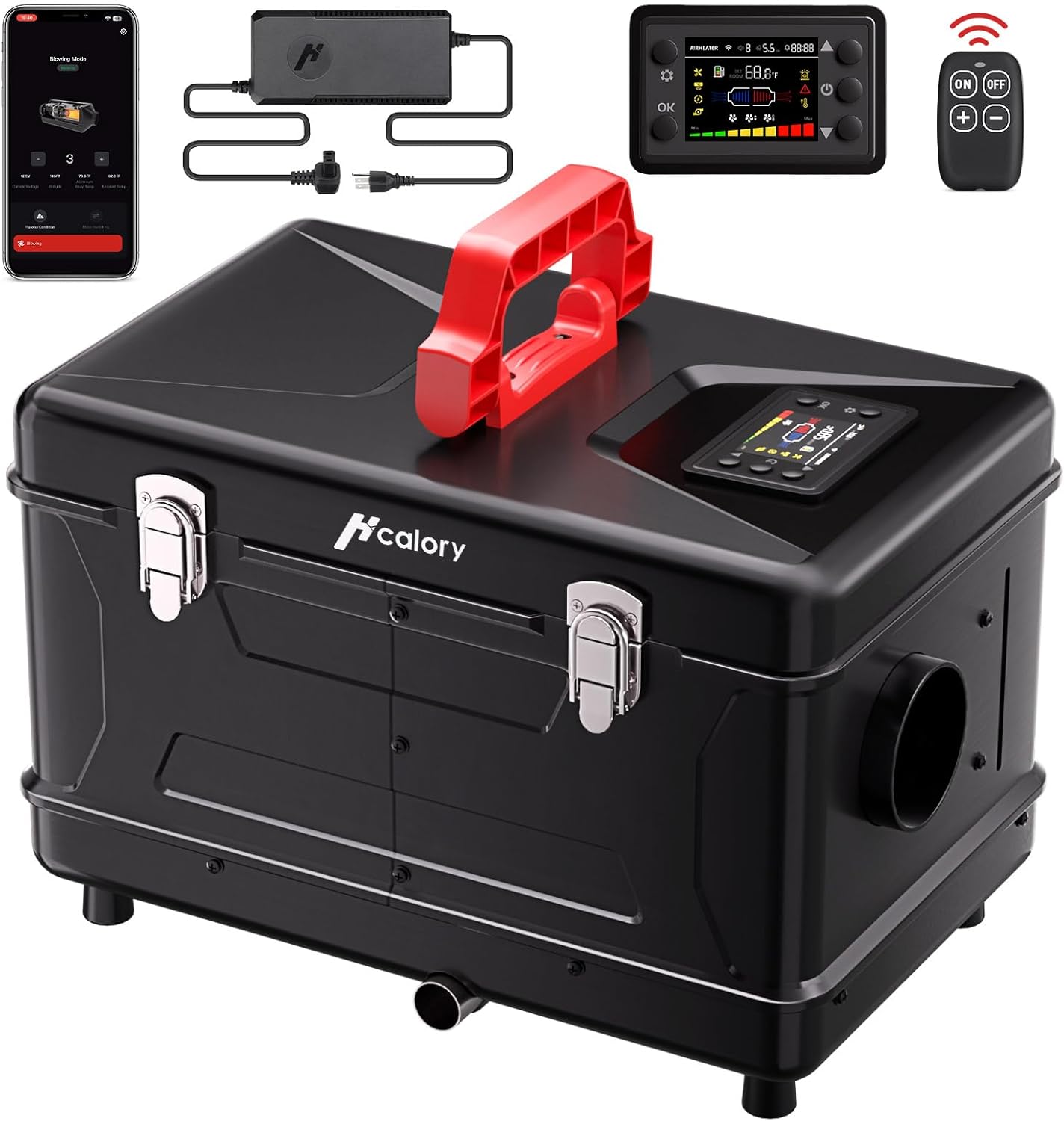
Image 1.1: The HCALORY 8KW All-in-one Portable Diesel Air Heater with its power adapter, control panel, and remote control.
2. Safety Information
Always prioritize safety when operating the diesel air heater. Failure to follow these instructions may result in property damage, injury, or death.
- Ventilation: Ensure adequate ventilation when operating the heater. The exhaust fumes must always be discharged outside to prevent carbon monoxide buildup.
- Placement: Do not place the heater on surfaces that can burn or melt, as the exhaust exits from the bottom of the unit. Maintain a safe distance from flammable materials.
- Fuel Handling: Use only diesel fuel. Exercise caution when refueling to avoid spills. Do not refuel while the heater is operating or hot.
- Power Source: Connect the heater only to compatible 12V/24V DC or 110V-240V AC power sources.
- Children and Pets: Keep children and pets away from the operating heater.
- Maintenance: Perform regular maintenance as described in this manual to ensure safe operation.
3. Package Contents
Verify that all items are present in the package:
- HCALORY 8KW All-in-one Portable Diesel Air Heater Unit
- Power Adapter (supports 110V AC and 12V DC)
- Remote Control
- Exhaust Pipe
- Intake Pipe
- 75mm Heating Duct
- User Manual
4. Product Overview
The HCALORY TC-2 is an all-in-one portable diesel air heater featuring a compact design with a built-in handle for easy transport. It integrates the fuel tank, heater, and control systems into a single unit.
4.1 Key Components
- Main Unit: Houses the combustion chamber, fan, and fuel tank.
- Control Panel: Integrated display for monitoring and adjusting settings.
- Fuel Tank: 6-liter capacity for diesel fuel.
- Air Intake Port: Draws in air for combustion.
- Hot Air Outlet: Discharges heated air.
- Exhaust Port: Discharges combustion gases.
- Power Input Port: For connecting AC or DC power.

Image 4.1: Internal components and design features, including the upgraded control board, overheating protection, metal divider, and 75mm heating duct.

Image 4.2: The heater is suitable for various applications including caravans, camping, indoor spaces (with external exhaust), and truck cabins.
5. Setup
5.1 Placement
- Place the heater on a stable, non-flammable surface.
- Ensure there is sufficient clearance around the heater for proper airflow and to prevent overheating.
- The exhaust port is located at the bottom of the unit. Ensure this area is clear and not obstructed by flammable materials.
5.2 Fueling
- Open the fuel cap and carefully fill the 6-liter tank with clean diesel fuel.
- Avoid overfilling. Note that the fuel level may be difficult to ascertain due to internal components.
- Wipe away any spilled fuel immediately.
5.3 Exhaust and Intake Connections
- Connect the exhaust pipe to the exhaust port and route it safely outside the enclosed space. Ensure the exhaust is directed away from windows, doors, and air intakes.
- Connect the intake pipe to the intake port. Ensure the intake is clear of obstructions.
- Important: Ensure the exhaust and intake are positioned to prevent exhaust fumes from being drawn back into the intake, which can affect combustion efficiency and safety.
- Attach the 75mm heating duct to the hot air outlet if directing heat to a specific area.
5.4 Power Connection
- For vehicle use, connect the 12V DC power cable to a compatible power source (e.g., cigarette lighter adapter).
- For home or workshop use, connect the 110V-240V AC power adapter to a standard electrical outlet.
6. Operating Instructions
6.1 Powering On/Off
- Press the power button on the control panel or remote control to turn the heater on.
- The heater will initiate a startup sequence, including pre-heating.
- To turn off, press the power button again. The heater will enter a cool-down cycle before fully shutting down. Do not disconnect power during the cool-down cycle.
6.2 Control Panel Operation
Use the integrated control panel to monitor status and adjust settings. Refer to the display for temperature, fan speed, and operational modes.
6.3 Remote Control Operation
The included remote control allows for convenient adjustment of settings from a distance. Functions typically include power on/off, temperature adjustment, and mode selection.
6.4 Bluetooth APP Control
Download the HCALORY app to your smartphone to control the heater via Bluetooth.
- Pairing: Follow the app's instructions to pair your smartphone with the heater.
- Temperature Mode: Adjust the desired temperature setting.
- Fan Mode: Control the fan speed.
- Timing Setting: Schedule heater operation times.
- Gear Mode: Select different heating power levels.
- Altitude Mode: Activate this mode when operating at higher elevations. It automatically adjusts the air and diesel mixing ratio for optimal combustion, preventing carbon buildup and ensuring efficient operation.
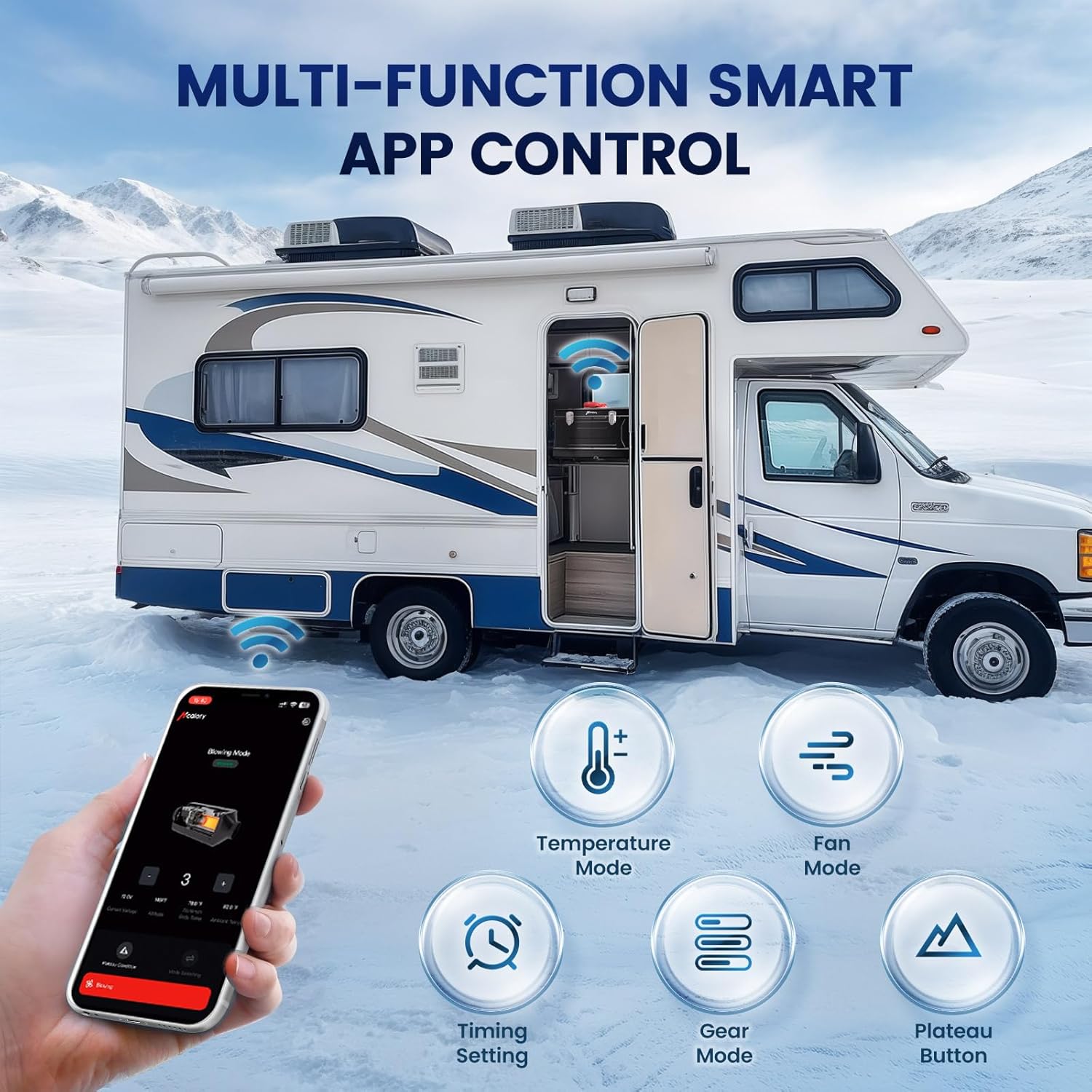
Image 6.1: The HCALORY smartphone application provides comprehensive control over heater functions, including Altitude Mode.

Image 6.2: The Automatic Plateau Mode intelligently adjusts the air and diesel mixing ratio for efficient operation at high altitudes.
6.5 Heating Performance
The heater is designed for rapid heating, reaching up to 212°F in approximately 10 minutes. It offers low fuel consumption, typically between 0.02 to 0.12 gallons per hour, extending operating time.

Image 6.3: The heater is capable of warming spaces up to 215-256 square feet, suitable for RVs and similar environments.
7. Maintenance
Regular maintenance ensures the longevity and efficient operation of your heater.
- Cleaning: Periodically clean the exterior of the heater with a damp cloth. Ensure the air intake and hot air outlet are free from dust and debris.
- Fuel Filter: Check and clean the fuel filter as needed to prevent blockages and ensure consistent fuel flow.
- Exhaust System: Inspect the exhaust pipe for any blockages, damage, or leaks. Ensure it remains securely connected and directs fumes safely away.
- Storage: When not in use for extended periods, drain the fuel tank and store the heater in a dry, protected environment.
8. Troubleshooting
If you encounter issues with your HCALORY diesel air heater, refer to the following common troubleshooting steps:
- Heater Not Starting:
- Check power connection: Ensure the heater is properly connected to a compatible power source (12V/24V DC or 110V-240V AC).
- Check fuel level: Ensure there is sufficient diesel fuel in the tank.
- Inspect fuel lines: Verify that fuel lines are not kinked or blocked. Air in the fuel line can prevent proper operation; priming may be required.
- Insufficient Heat Output:
- Check temperature settings: Ensure the desired temperature is set correctly on the control panel, remote, or app.
- Verify air intake/outlet: Ensure both are clear of obstructions.
- Altitude Mode: If operating at high altitudes, ensure Altitude Mode is activated for optimal combustion.
- Unusual Odor or Smoke:
- Immediately shut down the heater.
- Check exhaust system: Ensure the exhaust pipe is securely connected and fully discharging fumes outside. Verify no exhaust fumes are being drawn into the intake.
- Inspect for fuel leaks: Check for any diesel spills or leaks around the unit.
- Control Panel / App Not Responding:
- Restart the heater.
- For app issues, ensure Bluetooth is enabled on your device and the app is updated. Try re-pairing if necessary.
For issues not covered here, or if problems persist, contact HCALORY customer support.
9. Specifications
| Brand | HCALORY |
| Model | TC-2 |
| Heat Output | 8000 Watts |
| Voltage | 12 Volts (DC), 110V-240V (AC) |
| Fuel Type | Diesel |
| Fuel Tank Capacity | 6 Liters |
| Max. Temperature Setting | 212 Degrees Fahrenheit |
| Product Dimensions | 47.63 x 30.48 x 40.34 cm |
| Item Weight | 11.5 kg |
| UPC | 659675415543 |
10. Warranty and Support
For information regarding the product warranty, please refer to the documentation provided with your purchase or contact the seller directly. For technical support or further assistance, please reach out to HCALORY customer service through their official website or contact channels.


