1. Introduction
Thank you for choosing the Lydsto P1 MAX Robotic Pool Cleaner. This manual provides essential information for the safe and efficient operation, maintenance, and troubleshooting of your new robotic pool cleaner. Please read this manual thoroughly before using the device and keep it for future reference.
The Lydsto P1 MAX is an advanced robotic pool cleaner designed to provide hands-free cleaning for both above-ground and in-ground swimming pools. It features automatic recharging technology, APP and remote control capabilities, intelligent navigation, powerful triple roller brushes, and a long-lasting battery.
2. Safety Information
WARNING: To reduce the risk of injury, do not permit children to use this product unless they are closely supervised at all times.
- Always disconnect the power adapter from the outlet before performing any maintenance or cleaning on the unit.
- Ensure the power adapter is placed in a dry, shaded area, away from direct sunlight and water.
- Do not operate the cleaner if the power cord or plug is damaged.
- Only use the original power adapter provided with the cleaner.
- Do not use the cleaner if the pool water temperature is outside the recommended range (typically 10°C - 35°C / 50°F - 95°F).
- Keep hands, hair, and loose clothing away from moving parts.
- Do not allow the cleaner to run out of water.
- This appliance is not intended for use by persons (including children) with reduced physical, sensory or mental capabilities, or lack of experience and knowledge, unless they have been given supervision or instruction concerning use of the appliance by a person responsible for their safety.
3. Package Contents
Verify that all items are present and in good condition upon unpacking:
- Automatic Pool Cleaner (P1 MAX) x 1
- Power Adapter x 1
- Remote Control x 1
- User Manual x 1
4. Product Components
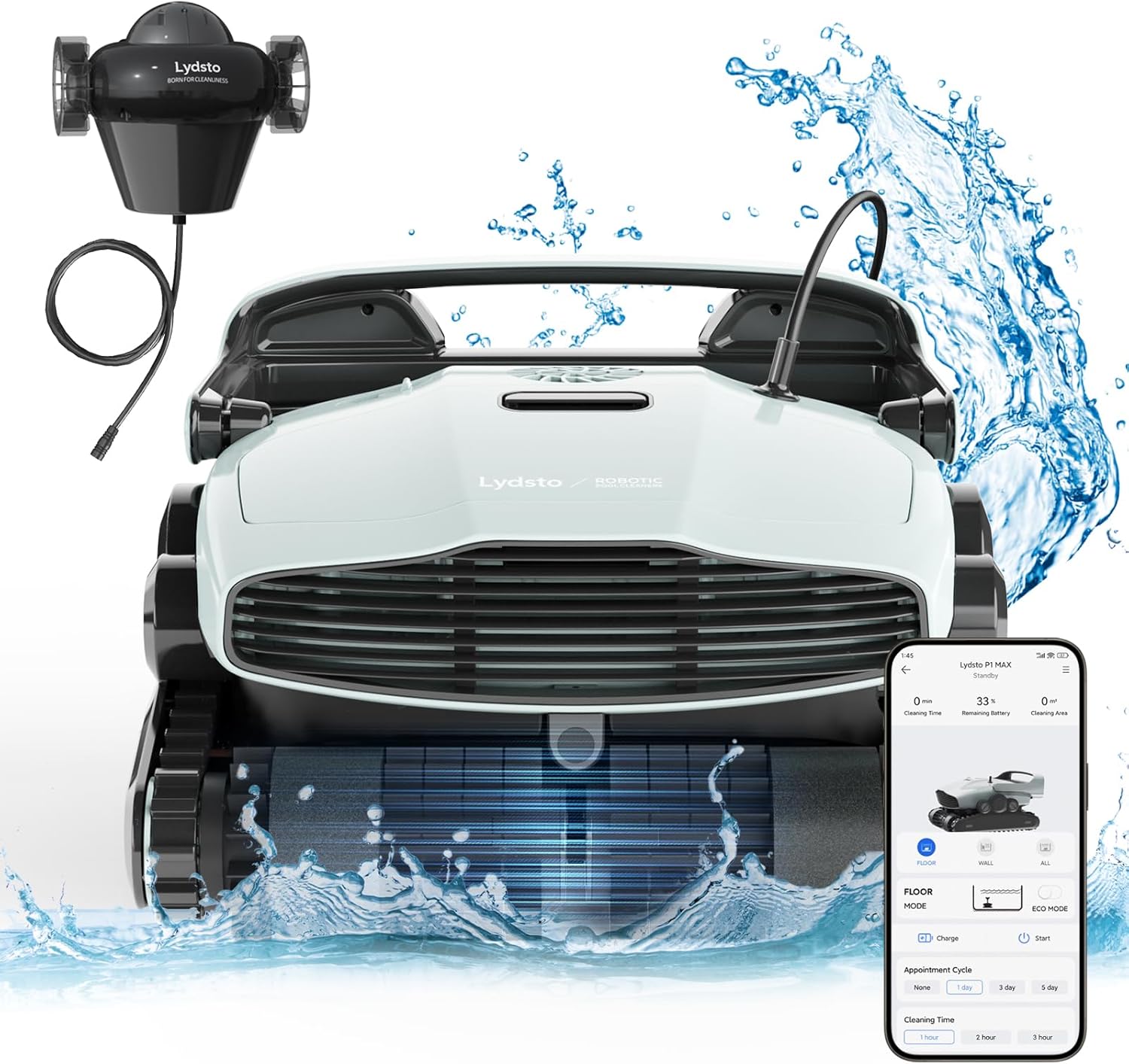
Figure 4.1: Lydsto P1 MAX Robotic Pool Cleaner with its charging station.
This image displays the Lydsto P1 MAX robotic pool cleaner, a white and black unit with tracks, alongside its black charging station connected by a cable. The cleaner is designed for efficient pool maintenance.
The Lydsto P1 MAX consists of the main robotic unit and an automatic charging station. Key components include:
- Main Robotic Unit: Houses the motors, battery, intelligent navigation system, and filter baskets. Features triple roller brushes for comprehensive cleaning.
- Automatic Charging Station: Designed to be placed at the pool's edge, allowing the cleaner to automatically return for charging when its battery is low.
- Triple Roller Brushes: Comprising double PVC roller brushes and a high-density bristle-planting middle brush for deep cleaning.
- Filter Baskets: Two 250µm, 3L capacity filter baskets for collecting debris.
5. Setup
5.1 Initial Charging
Before first use, fully charge the Lydsto P1 MAX. Connect the power adapter to the charging station, and then plug the adapter into a suitable power outlet. Place the cleaner on the charging station. A full charge typically takes approximately 4 hours.

Figure 5.1: Automatic Recharging in action.
This image illustrates the Lydsto P1 MAX robotic pool cleaner automatically returning to its charging station, which is mounted on the pool wall, to recharge its battery. This highlights the automatic recharging feature.
5.2 Charging Station Placement
Position the automatic charging station at the edge of your pool, ensuring it is stable and the power adapter is in a dry, safe location. The cleaner will automatically return to this station for charging when its battery is low.
5.3 App Download and Pairing
Download the Lydsto App from your device's app store. Follow the in-app instructions to pair your P1 MAX cleaner with your smartphone. This will enable advanced control and monitoring features.
6. Operating Instructions
6.1 Starting a Cleaning Cycle
Once fully charged, gently place the Lydsto P1 MAX into the pool. It will sink to the bottom. You can initiate a cleaning cycle using the remote control or the Lydsto App.

Figure 6.1: Triple Intelligent Control via App.
This image shows a person relaxing by a pool, controlling the Lydsto P1 MAX robotic cleaner using a smartphone app. The app interface displays options for scheduled cleaning, consumable life reminders, real-time cleaning status, and pickup mode selection, highlighting the cleaner's intelligent control features.
6.2 Cleaning Modes
The Lydsto P1 MAX offers multiple cleaning modes to suit your pool's needs:
- Pool Bottom Mode: Focuses cleaning on the pool floor.
- Pool Wall Mode: Activates the wall climbing function to clean pool walls and waterlines.
- Fully Automatic Mode: The cleaner intelligently navigates and cleans both the pool floor and walls.
Select your desired mode via the Lydsto App or remote control.

Figure 6.2: Wall Climbing Ability.
This image shows the Lydsto P1 MAX robotic pool cleaner actively climbing a tiled pool wall, demonstrating its ability to clean vertical surfaces in addition to the pool floor and waterline.
6.3 Intelligent Navigation
Equipped with a high-precision IMU sensor, the P1 MAX uses an intelligent navigation system to determine its real-time position and plan an efficient cleaning route, ensuring full coverage of your swimming pool.

Figure 6.3: Intelligent Path Navigation.
This diagram illustrates the Lydsto P1 MAX robotic pool cleaner's intelligent path navigation, showing a bow-shaped cleaning pattern on the pool floor and its ability to climb walls for comprehensive cleaning.
6.4 Automatic Recharging
When the battery level is low, the P1 MAX will automatically return to its charging station to recharge, ensuring it is always ready for the next cleaning cycle.
7. Maintenance
Regular maintenance ensures optimal performance and extends the lifespan of your Lydsto P1 MAX.
7.1 Cleaning Filter Baskets
After each cleaning cycle, or when indicated by the app, remove and clean the filter baskets. The P1 MAX features two 250µm, 3L large filter baskets designed for easy removal and rinsing.

Figure 7.1: Easy to Clean Filter Baskets.
This image shows the Lydsto P1 MAX robotic pool cleaner with its top cover open, revealing two large, removable filter baskets. An inset circle highlights the fine mesh of the filter, emphasizing the ease of cleaning and debris collection.
7.2 Cleaning Roller Brushes
Periodically inspect and clean the triple roller brushes to remove any tangled hair, debris, or algae. This ensures effective scrubbing capability.

Figure 7.2: Strengthened Scrubbing Capability.
This image provides a close-up view of the underside of the Lydsto P1 MAX robotic pool cleaner, highlighting its triple roller brushes actively scrubbing the pool surface. The brushes are designed to go deep into gaps for thorough cleaning.
7.3 General Cleaning and Storage
Wipe down the exterior of the cleaner with a soft, damp cloth. When storing the cleaner for extended periods, ensure it is clean, dry, and fully charged. Store it in a cool, dry place away from direct sunlight.
8. Troubleshooting
If you encounter issues with your Lydsto P1 MAX, refer to the following common problems and solutions:
| Problem | Possible Cause | Solution |
|---|---|---|
| Cleaner does not start or respond. | Low battery; Power adapter not connected; Remote control/App issue. | Ensure cleaner is fully charged. Check power adapter connection. Verify remote control batteries or App connection. |
| Poor cleaning performance. | Full filter baskets; Dirty roller brushes; Obstruction. | Clean filter baskets. Clean roller brushes. Remove any debris obstructing the cleaner. |
| Cleaner gets stuck. | Obstruction; Uneven pool surface; Drain cover interference. | Remove any large debris. The intelligent navigation system includes self-rescue features; allow it time to free itself. If persistent, manually reposition. |
| Cleaner does not climb walls. | Low battery; Slippery pool surface (algae); Incorrect mode selected. | Ensure sufficient battery charge. Clean pool walls if slippery. Select 'Pool Wall Mode' or 'Fully Automatic Mode'. |
| Automatic recharging fails. | Charging station misalignment; Obstruction near charging station. | Ensure charging station is correctly positioned and free from obstructions. |
If the problem persists after trying these solutions, please contact Lydsto customer support.
9. Specifications
| Feature | Specification |
|---|---|
| Model Name | P1 MAX |
| Product Dimensions | 38.1L x 25.4W x 50.8H Centimetres (15 x 10 x 20 inches) |
| Product Weight | 23.13 kg (51 lbs) |
| Battery Type | LG Battery |
| Battery Capacity | 9800mAh |
| Charging Time | Approx. 4 hours |
| Battery Life (Operating) | Up to 90 minutes |
| Max Cleaning Area | 1937 sq ft (180㎡) |
| Filter Volume | 2 x 3L (250µm) |
| Control Method | App, Remote Control |
| Special Feature | Self Charge (Automatic Recharging) |

Figure 9.1: Battery Life and Cleaning Range.
This image displays a top-down view of a swimming pool with the Lydsto P1 MAX robotic cleaner operating within it. Overlaid graphics indicate a 90-minute battery life and a cleaning area of 1937 sq. ft., demonstrating the cleaner's capacity for large pools.
10. Warranty and Support
10.1 Warranty Information
The Lydsto P1 MAX Robotic Pool Cleaner comes with a one-year worry-free warranty service for the entire machine. Please retain your proof of purchase for warranty claims.
10.2 OTA Upgrade
The robot vacuum cleaner supports remote Over-The-Air (OTA) upgrades. This feature allows for continuous optimization of the equipment's various indicators and performance improvements without manual intervention.
10.3 Customer Support
For any questions, technical assistance, or warranty inquiries, please contact Lydsto customer service. Our professional customer service team aims to provide a response within one working day.
For the most up-to-date contact information, please refer to the official Lydsto website or the Lydsto App.


