
metapen B0DDPMQJVH
Metapen Pencil Air8 User Manual
Brand: Metapen | Model: B0DDPMQJVH
Introduction
The Metapen Pencil Air8 is a high-precision stylus designed for Apple iPad models from 2018 to 2025. It features advanced palm rejection technology, a lightweight design, and rapid charging capabilities, providing a smooth and natural writing and drawing experience. This manual provides comprehensive instructions for setting up, operating, maintaining, and troubleshooting your Metapen Pencil Air8.
What's in the Box
- 1 x Metapen Pencil Air8 Stylus
- 2 x Replaceable Tips
- 1 x USB-C Charging Cable
- 1 x Dust Plugs
- 1 x User Manual

Image: The Metapen Pencil Air8, its USB-C charging port, and two spare tips, illustrating the contents of the package.
Compatibility
The Metapen Pencil Air8 is compatible with specific Apple iPad models released from 2018 to 2025. Please verify your iPad model before use to ensure full functionality.
Compatible iPad Models:
- NEW 2025 iPad 11th Generation (A16)
- iPad Pro 13-inch (M4)
- iPad Air 13-inch (M3/M2)
- iPad Pro 11-inch (M4)
- iPad Air 11-inch (M3/M2)
- iPad 6th, 7th, 8th, 9th, 10th, 11th Generation
- iPad Air 3rd, 4th, 5th Generation
- iPad Pro 11-inch 1st, 2nd, 3rd, 4th Generation
- iPad Pro 12.9-inch 3rd, 4th, 5th, 6th Generation
- iPad Mini 5th, 6th Generation
Note: The Metapen Pencil Air8 is not compatible with iPad models released before 2018, iPhones, Android devices, or Microsoft devices. It does not support iPad Mini 7th Gen.
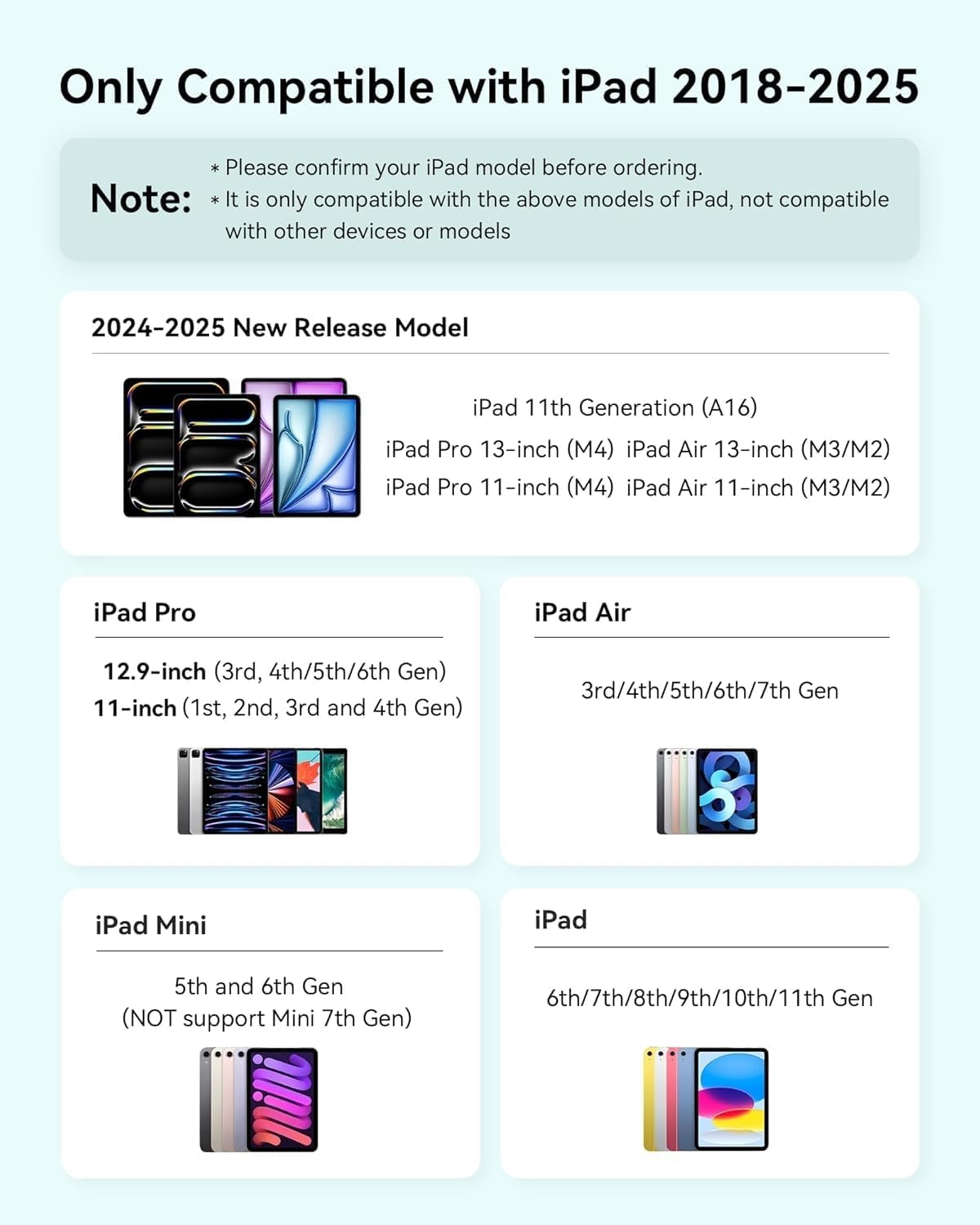
Image: A detailed chart outlining the specific iPad models and generations compatible with the Metapen Pencil Air8.
How to Check Your iPad Model:
- Go to your iPad's Settings.
- Tap on General.
- Tap on About.
- Locate the Model Name or Model Number to confirm compatibility.
Image: A visual guide demonstrating the steps to navigate iPad settings to identify the device's model name and number.
Setup
Charging the Stylus:
The Metapen Pencil Air8 features fast charging via its USB-C port.
- Connect the included USB-C cable to the charging port on the stylus and to a compatible USB power adapter.
- A full charge takes approximately 45 minutes, providing up to 365 minutes (over 6 hours) of continuous use.
- A quick 2-minute charge can provide up to 2 hours of usage.
- The stylus is not compatible with wireless charging or magnetic attachment.

Image: Visual representation of the Metapen Pencil Air8's battery life, highlighting 20 hours of writing time from a 45-minute full charge, with a quick 2-minute charge yielding 2 hours of use.
Power On/Off and Battery Display:
The Metapen Pencil Air8 is designed for ease of use with no Bluetooth connection required.
- To turn on: Click the top button once.
- To turn off: Long-press the top button.
- The stylus will automatically shut down after 5 minutes of inactivity to conserve energy.
The three-color LED indicator on the stylus provides a clear display of the battery level:
- Green: 60-100% battery
- Blue: 20-60% battery
- Red: Less than 20% battery

Image: A close-up of the Metapen Pencil Air8's LED indicator, showing green for 60-100% charge, blue for 20-60%, and red for below 20%.
Operating Instructions
Palm Rejection Technology:
The Metapen Pencil Air8 features advanced palm rejection technology, allowing you to rest your hand naturally on the iPad screen while writing or drawing without causing unintended marks or interference. This provides a comfortable and intuitive experience, similar to using a traditional pen and paper.

Image: A user's hand resting on an iPad screen while writing with the Metapen Pencil Air8, illustrating the palm rejection feature.
Pixel Precision and Smooth Performance:
Equipped with an upgraded chip, the Air8 delivers up to 0.1mm pixel-level accuracy. This ensures smooth, lag-free writing and drawing, allowing for fine details and precise lines. Whether you are taking notes, sketching, or navigating your iPad, the stylus provides a responsive and natural feel.
Note: This stylus does not support pressure sensitivity or tilt sensitivity.

Image: A close-up of the Metapen Pencil Air8's tip interacting with a digital blueprint on an iPad, emphasizing its high precision and smooth performance.
Lightweight Design for Extended Use:
Weighing only 10 grams, the Metapen Pencil Air8 is significantly lighter than many other styluses, reducing hand fatigue during prolonged writing or drawing sessions. This ergonomic design promotes more focused and comfortable use.

Image: A young person intently writing on an iPad with the Metapen Pencil Air8, highlighting its lightweight design for focused work.
Maintenance
Replacing the Stylus Tip:
The Metapen Pencil Air8 comes with durable, high-quality polymer tips designed to withstand extensive use (20 km durability test). Each Air8 package includes two extra replaceable tips to ensure long-term usability and cost savings.
- To remove the old tip: Gently twist and pull the tip counter-clockwise until it detaches from the stylus.
- To install a new tip: Align the new tip with the stylus and gently twist it clockwise until it is securely in place. Do not overtighten.
The polished tip design helps prevent scratches on your iPad screen.
Troubleshooting
| Problem | Possible Cause | Solution |
|---|---|---|
| Stylus not responding or connecting. |
|
|
| Lag or inaccurate writing. |
|
|
| Stylus not charging. |
|
|
Specifications
| Feature | Detail |
|---|---|
| Model Name | Metapen Pencil Air8 |
| Model Number | B0DDPMQJVH |
| Color | White |
| Material | Plastic |
| Item Weight | 10 Grams (0.353 ounces) |
| Product Dimensions (LxWxH) | 6.54 x 0.38 x 0.39 inches |
| Battery Type | 1 CR5 battery (included) |
| Charging Time | Approx. 45 minutes for full charge |
| Continuous Use Time | Up to 365 minutes (approx. 6 hours) |
| Quick Charge | 2 minutes charge for 2 hours use |
| Standby Time | Up to 365 days |
| Precision | 0.1mm pixel-level accuracy |
| Features | Palm Rejection, No Bluetooth Required, LED Battery Indicator, Auto Shutdown |
| Compatibility | iPad models 2018-2025 (specific models listed in Compatibility section) |
Warranty and Support
Metapen is committed to providing high-quality products and excellent customer service.
- 2 Years Care: Enjoy peace of mind with a 2-year care period for your Metapen Pencil Air8.
- 30 Days Replacement: If you encounter any issues, a replacement can be arranged within 30 days of purchase.
- 7x24 Hours Customer Service: Our dedicated customer service team is available around the clock to assist you.
For support inquiries, please contact us at: support@metapen.com

Image: An infographic summarizing Metapen's customer support offerings, including warranty duration, replacement policy, and customer service availability.
Related documentsB0DDPMQJVH


Ask a question about this manual
Ask about setup, troubleshooting, compatibility, parts, safety, or missing instructions. Manuals+ will review the question and use this page’s manual context to help answer it.