1. Introduction
This manual provides essential instructions for the safe and efficient operation and maintenance of your Scepter Flo 'N Go 14 Gallon Diesel Fuel Caddy with Electric Pump. Please read this manual thoroughly before initial use and retain it for future reference. This portable fuel caddy is designed for transferring diesel fuel for various applications including farm, marine, lawn care equipment, commercial, and home use.
2. Safety Information
WARNING: Failure to follow these safety instructions may result in fire, explosion, serious injury, or death.
- Always use this fuel caddy for diesel fuel only. Do not use with gasoline or other flammable liquids unless explicitly stated for a different model.
- Ensure adequate ventilation when operating.
- Keep away from open flames, sparks, and other ignition sources.
- Do not smoke while handling fuel.
- Wear appropriate personal protective equipment (PPE), including gloves and eye protection.
- Never overfill the fuel caddy. Allow for expansion space.
- Always close the vent screw and shut-off valves when transporting or storing the caddy.
- Ensure the hose assembly is disconnected from the tank during transport to prevent leaks and damage.
- The caddy is D.O.T. certified and CARB & EPA Compliant. Its anti-static design, self-venting cap, and child-safe lock are crucial safety features.
- When lifting a full caddy, two adults are required due to its weight (approximately 112 lbs when full). Lift with your knees, not your back.
3. Setup
3.1 Unpacking and Initial Inspection
Carefully remove all components from the packaging. Inspect for any signs of damage. If any parts are missing or damaged, do not proceed with assembly or operation. Contact customer support immediately.
3.2 Attaching the Hose Assembly
- Lay the Duramax caddy in a horizontal position on a flat, stable surface.
- Ensure the shut-off valves on both the hose and the tank are in the OFF position.
- Secure the hose to the tank by twisting the black ring counterclockwise until the connection is tight.
- Stand the tank in the upright position.
- Place the hose over the hose hanger for easy storage.

Figure 1: Scepter 14 Gallon Diesel Fuel Caddy with Electric Pump. The hose is attached to the bottom valve and coiled around the central hanger.

Figure 2: Dimensions of the Scepter 14 Gallon Diesel Fuel Caddy, showing its height, width, and depth.
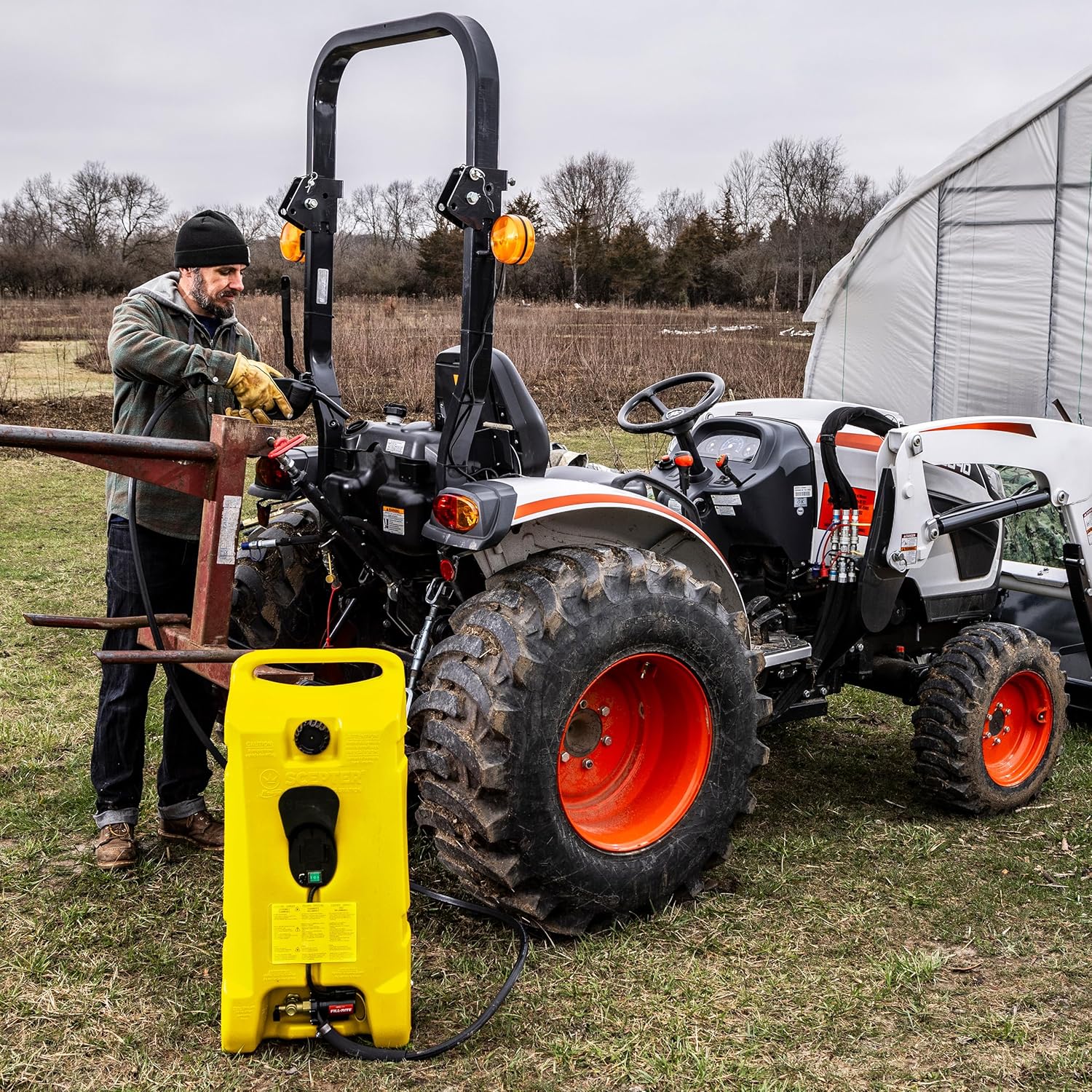
Figure 3: The Scepter 14 Gallon Diesel Fuel Caddy features integrated tie-down strap supports for secure transport.
3.3 Powering the Electric Pump
The electric fuel transfer pump operates on 8-AA batteries (sold separately) or can be powered by an optional AC power cable (sold separately). Connect the power source to the designated port on the caddy. Ensure the power switch is in the OFF position before connecting or disconnecting power.

Figure 4: Close-up of the 2-position power switch, battery power pack compartment (batteries not included), and AC/DC port for optional accessories.

Figure 5: Detail of the Fill-Rite electric fuel pump with bypass valve, connected to the caddy.
4. Operating Instructions
4.1 Filling the Duramax Caddy
- Remove the tank from your vehicle and place it horizontally on the ground next to the gas pump.
- Ensure the tank shut-off valve is closed.
- Remove the tank cap.
- Insert the pump nozzle into the container and pump fuel. Do not overfill.
- When finished, replace the fuel cap and ensure the vent screw on the cap is closed.
- Pro Tip: The shape of the Duramax is slightly contoured. To get a full 14-gallon capacity, place a wedge or block under the Duramax prior to filling to level it.

Figure 6: Close-up of the self-venting fill cap on the Scepter 14 Gallon Diesel Fuel Caddy.
Video 1: Official Scepter instructions for operating the Powered Fueling Station, including filling and transferring fuel.
4.2 Transporting the Duramax Caddy
When filled with fuel, the Duramax weighs approximately 112 lbs. Two adults are required to safely lift and move the tank. Do not attempt to lift a full Duramax on your own.
- Lay the tank horizontally next to the vehicle or equipment you wish to store it on.
- One person will grasp the top pull handle, and the other person will grab the base of the tank.
- Lift with your knees and place it in the vehicle.
- Secure the caddy in place using tie-down straps or bungee cords through the pre-molded indents.
- Important: Never transport the Duramax with the hose assembly attached to the tank. Disconnect it before transport.

Figure 7: The sturdy 6-inch wheels with rugged tread allow for easy maneuverability of the fuel caddy.
4.3 Transferring Fuel (Siphon Mode)
Use siphon mode when the Duramax is positioned above the tank to be filled (e.g., in the bed of a truck, filling a lower tank).
- Ensure both shut-off valves on the tank and the hose are in the OPEN position.
- Make sure the vent screw on the tank cap is OPEN.
- Insert the nozzle into the tank to be filled.
- Press the child safety lock and squeeze the pump handle a couple of times to initiate fuel flow. Fuel will begin to flow via gravity.
- To stop the flow of fuel, release the pump handle.
- Pro Tip: To fully empty the hose of fuel, lift the hose up when the caddy is laying horizontally and both shut-off valves are open.

Figure 8: The Scepter 14 Gallon Diesel Fuel Caddy in use, transferring fuel to a tractor.
Video 2: Official Scepter instructions demonstrating the operation of the Powered Fueling Station, including siphon mode.
4.4 Transferring Fuel (Electric Pump Mode)
Use the electric pump mode when the tank to be filled is at the same level or above the Duramax caddy.
- Ensure both shut-off valves on the tank and the hose are in the OPEN position.
- Make sure the vent screw on the tank cap is OPEN.
- Connect the electric pump to a power source (8-AA batteries or optional AC adapter).
- Insert the nozzle into the tank to be filled.
- Flip the power switch to the ON position to activate the pump. The pump flows at 4.7 GPM (battery) or up to 6.0 GPM (AC).
- To stop the flow of fuel, flip the power switch to the OFF position.

Figure 9: The Scepter 14 Gallon Diesel Fuel Caddy transferring fuel to a UTV.
5. Maintenance
- Regular Inspection: Periodically check all connections, hoses, and valves for signs of wear, damage, or leaks. Replace any compromised parts immediately.
- O-Ring Check: Before each use, ensure the O-ring inside the hose connection is present and in good condition to prevent leakage.
- Cleaning: Clean the exterior of the caddy with a mild detergent and water. Avoid harsh chemicals that could damage the plastic.
- Storage: Store the fuel caddy in a cool, dry place away from direct sunlight and ignition sources. Ensure all valves are closed and the vent screw is tightened before storage.
6. Troubleshooting
- No Fuel Flow (Siphon Mode):
- Ensure the caddy is positioned above the receiving tank.
- Check that both tank and hose shut-off valves are OPEN.
- Verify the vent screw on the tank cap is OPEN.
- Ensure the O-ring in the hose connection is present and sealed.
- No Fuel Flow (Electric Pump Mode):
- Check battery charge or AC power connection.
- Ensure the power switch is ON.
- Verify both tank and hose shut-off valves are OPEN.
- Verify the vent screw on the tank cap is OPEN.
- Leakage:
- Check all connections for tightness.
- Inspect O-rings for damage or displacement.
- Ensure shut-off valves and vent screw are fully closed when not in use.
7. Specifications
| Feature | Detail |
|---|---|
| Brand | Scepter |
| Model Number | PFSD1401 |
| Capacity | 14 Gallons (53 Liters) |
| Fuel Type | Diesel |
| Pump Type | Electric (Fill-Rite) |
| Pump Flow Rate | 4.7 GPM (battery), up to 6.0 GPM (AC) |
| Hose Length | 10-Foot Automotive-Grade Rubber |
| Wheels | 6-inch, Rugged Tread |
| Safety Features | D.O.T. Certified, CARB & EPA Compliant, Anti-static Design, Self-venting Cap, Child-safe Lock, Spill-proof Brass Shut-off |
| Material | Plastic |
| Item Weight (Empty) | 23.1 pounds (10.48 Kilograms) |
| Item Weight (Full) | Approx. 112 pounds |
| Product Dimensions | 16.2 x 12.7 x 33.8 inches |
8. Warranty and Support
For warranty information, technical support, or to purchase replacement parts, please visit the official Scepter website or contact their customer service department. Keep your purchase receipt as proof of purchase.
Official Scepter Website: Scepter Store on Amazon


