
1. Introduction
This manual provides essential information for the safe and efficient use of your HOMCOM Electric Lift Recliner Chair. Please read all instructions carefully before assembly and operation. Keep this manual for future reference.
2. Safety Information
Warning: Do not use the chair if body weight exceeds 150 kg (330 lbs).
Use the lift and recline functions with caution to avoid injury. This chair is designed for use by elderly individuals or those with reduced mobility. It is important to follow all instructions for use and maintenance to ensure the safety and proper functioning of the chair.
- Ensure the power cord is not pinched or damaged.
- Keep children and pets away from the chair's moving parts.
- Do not allow anyone to sit on the footrest when it is extended.
- Always ensure the chair is on a stable, level surface.
- Unplug the chair from the power outlet before cleaning or maintenance.
3. Package Contents
Verify that all components are present before beginning assembly. If any parts are missing or damaged, contact customer support.
- Chair backrest
- Chair base with armrests
- Power adapter and cable
- Remote control
- User Manual

Image: Illustration of the chair components as packaged.
4. Setup and Assembly
Assembly typically involves connecting the backrest to the base and plugging in the power. Follow these steps:
- Unpack Components: Carefully remove all parts from the packaging. Place them on a soft, clean surface to prevent scratches.
- Attach Backrest: Align the metal brackets on the backrest with the corresponding slots on the chair base. Slide the backrest down firmly until it clicks into place. Ensure it is securely fastened.
- Connect Power: Locate the power cable from the chair and connect it to the power adapter. Plug the adapter into a standard electrical outlet (240 Volt).
- Remote Control: The remote control is pre-connected. Place it in the side pocket for easy access.
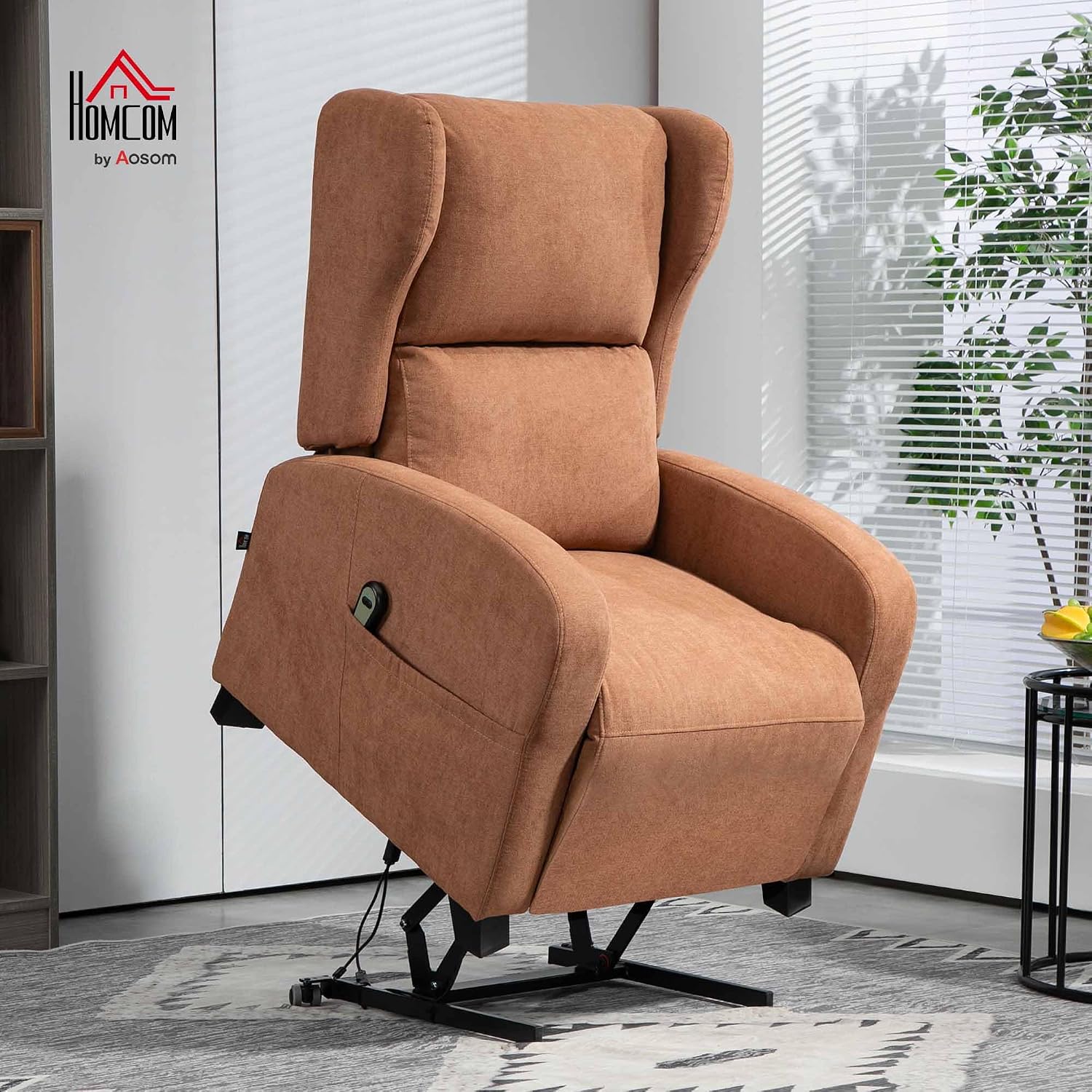
Image: The assembled HOMCOM Electric Lift Recliner Chair in an upright position, ready for use.
5. Operating Instructions
The chair features electric lift and recline functions controlled by a wired remote.
5.1 Remote Control Functions
The remote control has two buttons to manage the chair's positions:

Image: The remote control and visual representation of the three main chair positions: Reclined, Relaxed, and Standing.
- Lift Function (Up Arrow Button): Press and hold the 'up' button to slowly raise the chair to an upright, slightly tilted forward position (up to 60°). This assists users in standing up without straining their back or knees.
- Recline Function (Down Arrow Button): Press and hold the 'down' button to recline the backrest and simultaneously raise the footrest. The backrest can recline up to 160°, providing a comfortable position for relaxation or napping.
5.2 Chair Positions
- Upright: Standard seating position.
- Relaxed: Partially reclined with footrest raised.
- Reclined: Fully reclined (up to 160°) with footrest fully extended.
- Lifted: Tilted forward to assist in standing.
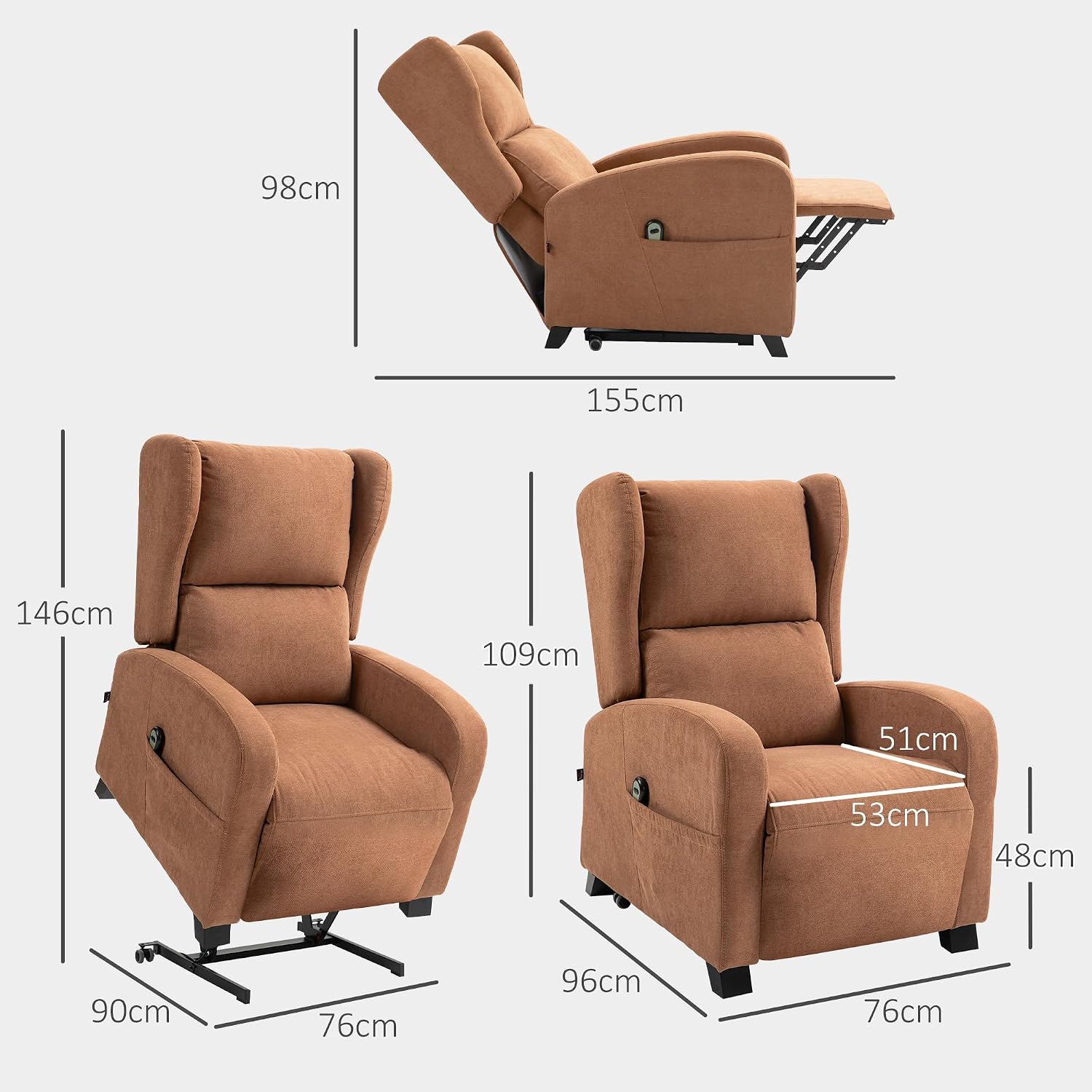
Image: A person comfortably relaxing in the reclined position with the footrest extended.

Image: Detail showing the footrest mechanism and the padded armrest for enhanced comfort.
6. Maintenance
Regular maintenance ensures the longevity and proper functioning of your recliner chair.
6.1 Cleaning
- Fabric: For general cleaning, use a soft cloth dampened with mild soap and water. Do not use harsh chemicals or abrasive cleaners.
- Frame: Wipe the metal frame with a dry cloth.
- Always unplug the chair before cleaning.
6.2 Inspection
- Periodically check all connections and fasteners to ensure they are tight.
- Inspect the power cord for any signs of damage. If damaged, discontinue use and contact customer support.
- Ensure the wheels (if applicable) move freely and are not obstructed.
7. Troubleshooting
If you encounter issues with your chair, refer to the following common problems and solutions:
| Problem | Possible Cause | Solution |
|---|---|---|
| Chair does not move | Power cord unplugged; Power outlet not working; Remote control malfunction. | Check power connections; Test outlet with another device; Contact customer support if remote is faulty. |
| Unusual noise during operation | Loose components; Obstruction in mechanism. | Inspect for loose parts and tighten if necessary; Check for obstructions under the chair. If noise persists, contact customer support. |
| Chair movement is jerky or slow | Low power; Overload; Mechanism obstruction. | Ensure stable power supply; Do not exceed weight limit (150 kg); Check for obstructions. |
If the problem persists after attempting these solutions, please contact HOMCOM customer support.
8. Specifications
Detailed technical specifications for the HOMCOM Electric Lift Recliner Chair.

Image: Detailed dimensions of the chair in both upright and reclined positions.
- Brand: HOMCOM
- Model: IT700-130V90DR0631
- Color: Dark Brown
- Material: Polyester Fabric, Metal Frame
- Overall Dimensions (Upright): 76L x 96W x 109H cm (29.9L x 37.8W x 42.9H inches)
- Reclined Dimensions: 76L x 155W x 98H cm (29.9L x 61W x 38.6H inches)
- Lift Angle: Up to 60°
- Recline Angle: Up to 160°
- Seat Dimensions: 51W x 53D cm (20.1W x 20.9D inches)
- Seat Height: 48 cm (18.9 inches)
- Backrest Height: 61 cm (24 inches)
- Weight Capacity: 150 kg (330 lbs)
- Net Weight: 40 kg (88 lbs)
- Voltage: 240 Volt
- Special Features: Removable, Ergonomic, Reclinable, Universal Wheels
9. Warranty and Support
For warranty information, please refer to the purchase documentation or contact your retailer. For technical support or replacement parts, please visit the official HOMCOM website or contact their customer service department.
HOMCOM Official Website: www.aosom.it