
1. Product Overview
The LAUNCH X431 PRO3 V+ Elite is an advanced OBD2 diagnostic scanner designed for comprehensive vehicle system analysis. It features J2534 programming, ECU coding, bidirectional control, and topological mapping capabilities. This device is an upgrade from previous X431 models, offering enhanced communication protocols like D-PDU, CANFD, and DoIP, alongside extensive vehicle coverage and diagnostic functions.
Key features include:
- J2534 Pass-Thru Programming
- Online ECU Coding
- Remote Diagnostics
- D-PDU/CANFD/DoIP Protocol Support
- Over 60 Reset Functions
- Over 3000 Active Tests
- Intuitive Topology Mapping
- Wide Vehicle Compatibility (200+ brands)

Image 1.1: The LAUNCH X431 PRO3 V+ Elite diagnostic tablet alongside the Smartlink C HD connector, illustrating the system's components and comparative features.
2. Setup and Initial Use
Before operating the LAUNCH X431 PRO3 V+ Elite, ensure the device is fully charged and connected to a stable Wi-Fi network for software updates and online functions.
2.1 Device Connection
- Power On: Press and hold the power button on the tablet until the screen illuminates.
- Smartlink C HD Connection: Connect the Smartlink C HD connector to the vehicle's OBD-II port. The connector's indicator lights will confirm power and communication status.
- Bluetooth Pairing: The tablet and Smartlink C HD connector should automatically pair via Bluetooth. If not, navigate to the device settings on the tablet to manually pair.
2.2 Software Updates
Regular software updates are crucial for optimal performance and expanded vehicle coverage. Connect the tablet to the internet and access the "Update" module to download and install the latest software versions. The device includes 2 years of free updates.
2.3 J2534 Driver Installation
For J2534 Pass-Thru programming, specific drivers may be required. These can be downloaded from the official LAUNCH website. Visit https://en.cnlaunch.com/ and navigate to the SmartLink introduction interface to find the J2534 driver download section.
3. Operating Instructions
The LAUNCH X431 PRO3 V+ Elite offers a wide range of diagnostic and service functions. Below are instructions for key operations.
3.1 J2534 Programming
The J2534 Pass-Thru device allows for ECU programming, functioning similarly to OEM scan tools without additional costs. This feature is essential for addressing issues such as replacing new modules, updating firmware, or resolving fuel quality problems. It supports various vehicle brands including Toyota, Honda, VW, BMW, Ford, GM, Chrysler, and Benz.
- Adaptive Data Recoding: Adjusts data for new components.
- Unlocking Hidden Functions: Activates features not enabled by default.
- Resolving ECU-related Issues: Addresses software or configuration problems.
- Original Setting Personalization: Customizes vehicle parameters.
- Re-pairing During Replacement: Ensures proper function after module replacement.

Image 3.1: Visual representation of J2534 programming and ECU coding capabilities, highlighting adaptive data recoding and hidden function unlocking.
Note: Programming and coding services vary by model. Verify compatibility before use. Contact support for a detailed J2534 programming user manual.
3.2 Online ECU Coding
The X431 PRO3 V+ Elite provides advanced online ECU coding functions. This includes resetting adaptive data for new components, enabling or disabling specific vehicle functions (e.g., audible signals), and adjusting OE parameters to meet specific vehicle requirements. Online coding offers practical guidance for resolving complex ECU issues, along with VAG guided functions, component matching, and online parameter settings.
3.3 Remote Diagnostics
LAUNCH's patented remote technology allows for direct communication between different diagnostic devices and remote vehicles without third-party software. This enables detection of car errors regardless of distance or device type. The system also supports switching from SmartLink to J2534, adapts to device networks for stable transmission, and integrates third-party translation APIs for language settings.

Image 3.2: Depiction of the remote diagnostics feature, showing the SmartLink device connecting to a vehicle and communicating with a remote diagnostic tool.
3.4 Intuitive Topology Mapping
The device features a color-coded topology display based on real circuits, providing an intuitive map of the vehicle's network and the relationships between Electronic Control Units (ECUs). This visual aid helps in quickly identifying Diagnostic Trouble Codes (DTCs) and understanding the system structure, facilitating faster and more accurate repairs.

Image 3.3: A screenshot of the diagnostic tablet displaying a color-coded topology map, illustrating the interconnectedness of vehicle modules for easy fault localization.
3.5 Special Functions and Active Tests
The X431 PRO3 V+ Elite supports over 60 reset functions and more than 3000 active tests. These bidirectional control capabilities allow for quick problem detection and guided repairs by interacting directly with actuators such as AC clutches, fuel pumps, windows, doors, and mirrors.
Examples of supported functions include:
- ABS Bleeding
- SAS Reset (Steering Angle Sensor)
- Power Matching
- Throttle Adjustment
- EPB Reset (Electronic Parking Brake)
- BMS Service (Battery Management System)
- Oil Reset
- D-P-F Regeneration (Diesel Particulate Filter)
- Towing Sensor Calibration
- Fuel Injector Reset
- Cylinder Cut Out Test
- Fuel Pump Test
- Brake System Test
- DEF Pressure System Test
- Dashboard Lamp Test
- Throttle Position Sweep
- Speaker Test Routine
- VGT Hysteresis Test
- Modulator Valve (Chuff) Test
- KOEO Injector Test
- Turbo Actuator Effort Test
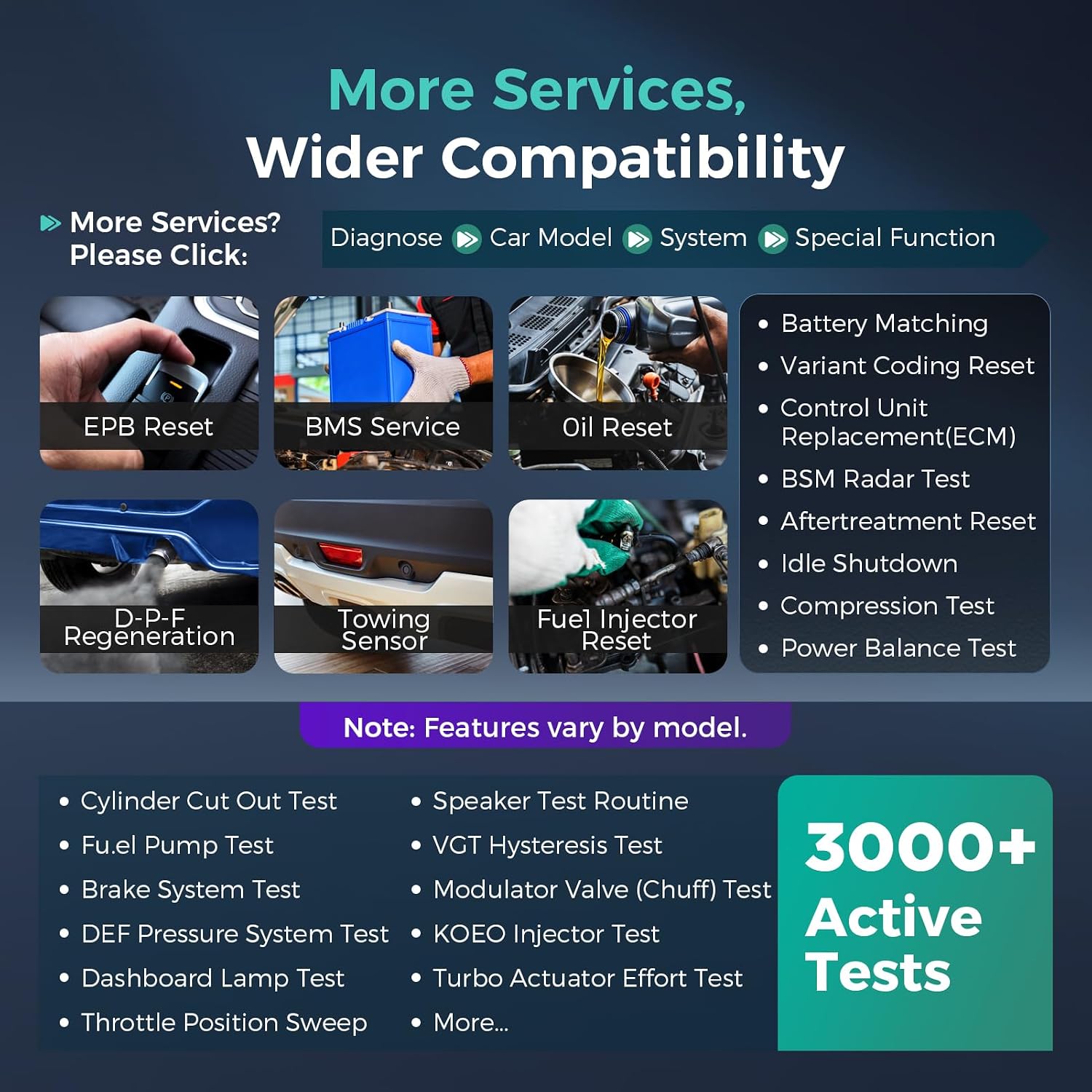
Image 3.4: A visual display of the "More Services, Wider Compatibility" screen, showcasing various reset functions and active tests like EPB Reset, BMS Service, and Oil Reset.
Note: Available functions may vary depending on the specific vehicle model.
3.6 Vehicle Coverage
The X431 PRO3 V+ Elite scanner supports over 200 car brands, including commercial vehicles and new energy vehicles. It supports various protocols such as J2534/D-PDU for HD trucks, DoIP/CANFD for Land Rover/Jaguar, BMW F/G, GM, and FCA Autoauth for Chrysler/Dodge/Fiat. Frequent software updates ensure support for new and emerging vehicle models.

Image 3.5: An infographic illustrating the extensive global vehicle coverage (200+ brands) and supported protocols like J2534, D-PDU, FCA AutoAuth, CANFD, and DoIP, including various vehicle types.
4. Maintenance
To ensure the longevity and optimal performance of your LAUNCH X431 PRO3 V+ Elite scanner, follow these maintenance guidelines:
- Software Updates: Regularly check for and install software updates to keep the diagnostic capabilities current and compatible with the latest vehicle models.
- Cleaning: Use a soft, dry cloth to clean the tablet screen and device exterior. Avoid abrasive cleaners or solvents.
- Storage: Store the device in a cool, dry place, away from direct sunlight and extreme temperatures.
- Battery Care: For optimal battery life, avoid fully discharging the battery frequently. Charge the device regularly.
- Cable Inspection: Periodically inspect all cables and connectors for signs of wear or damage. Replace damaged components immediately.

Image 4.1: A display of additional functions including VAG guided functions, pin detection for the OBDII DLC, compatibility checks, and access to maintenance data.
5. Troubleshooting
This section provides solutions to common issues encountered with the LAUNCH X431 PRO3 V+ Elite scanner.
| Problem | Possible Cause | Solution |
|---|---|---|
| Device does not power on. | Low battery; faulty power adapter. | Charge the device for at least 30 minutes. Ensure the power adapter is functioning correctly. |
| Unable to connect to vehicle. | Loose OBD-II connection; vehicle ignition off; Smartlink C HD not powered. | Verify the Smartlink C HD is securely plugged into the OBD-II port. Turn the vehicle ignition to the ON position. Check Smartlink C HD indicator lights. |
| Software update failure. | Unstable internet connection; insufficient storage space. | Ensure a stable Wi-Fi connection. Clear unnecessary files to free up storage. Retry the update. |
| Diagnostic functions not working for a specific model. | Software not updated; vehicle not supported; specific function not available for model. | Perform a software update. Verify vehicle compatibility. Check the "Compatibility" section on the device or contact technical support. |
For more detailed troubleshooting and repair instructions, refer to the X431 FIX database available online, which includes online videos, wiring diagrams, and real-case scenarios.
6. Specifications
| Feature | Detail |
|---|---|
| Model Number | X431 PRO3 V+ |
| Operating System | Android 10.0 |
| Screen Size | 10.1 Inches |
| Resolution | 1280x800 |
| Power Source | Battery Powered (1 Lithium-ion battery included) |
| RAM | 4GB |
| ROM | 64GB |
| Connectivity | WiFi, Bluetooth |
| Supported Protocols | J2534, D-PDU, CANFD, DoIP |
| Item Dimensions | 44 x 38 x 18 cm |
| Item Weight | 6.4 Kilograms |
| Included Components | OBD2 Diagnostic Device |
7. Warranty and Support
The LAUNCH X431 PRO3 V+ Elite comes with comprehensive support to ensure user satisfaction.
- Software Updates: Enjoy 2 years of free software updates. After this period, previously updated software remains functional.
- Technical Support: Lifetime technical support is provided.
- Language Support: The device supports over 25 languages to eliminate language barriers.
- Contact: For step-by-step instructions on remote diagnostics and J2534 programming, or any other technical assistance, please contact LAUNCH support.

Image 7.1: Information regarding customer support, including contact details and the 2-year update policy.