
DICTAC CBF-02
DICTAC Corner Twin Bed Frame with Storage Bookcase & Headboard, LED Lights
Model: CBF-02
Brand: DICTAC
Introduction
Thank you for choosing the DICTAC Corner Twin Bed Frame. This bed frame is designed to maximize space in compact rooms, offering a comfortable sleeping area, integrated storage, LED lighting, and a convenient charging station. This manual provides detailed instructions for assembly, operation, maintenance, and troubleshooting to ensure safe and proper use of your new bed frame.

Overall view of the DICTAC Corner Twin Bed Frame, highlighting its L-shaped design, bookcase headboard, and under-bed drawers.
Important Safety Information
- Read all instructions carefully before assembly and use.
- Keep all small parts and packaging materials away from children during assembly to prevent choking hazards.
- Assemble the bed frame on a soft, clean surface to prevent scratches.
- Ensure all bolts and screws are securely tightened before use. Periodically check and re-tighten as needed.
- Do not exceed the maximum weight capacity of 450 lbs.
- Use only the recommended mattress thickness of 6-10 inches.
- Do not stand or jump on the bed frame.
- Keep electrical components (LED lights, charging station) away from water.
- If any parts are missing or damaged, do not proceed with assembly. Contact customer support immediately.
Package Contents
Before beginning assembly, verify that all components are present and undamaged. Refer to the included parts list and diagrams in your physical instruction manual for specific part numbers.
Included Components:
- Metal Bed Frame Sections
- Bookcase Headboard Panels (MDF)
- Under-bed Storage Drawers (2 units)
- LED Strip Light
- Charging Station (with USB ports and AC outlets)
- Guardrails
- Slats (metal)
- Assembly Hardware (screws, bolts, Allen wrench)
- Instruction Manual

Detailed dimensions of the bed frame and storage drawers.
Setup and Assembly
Assembly typically takes a few hours. It is recommended to have a helper for certain steps, especially when handling larger components. Follow the numbered steps in your physical instruction manual for precise guidance.
1. Prepare for Assembly
- Clear a spacious area for assembly.
- Unpack all components and lay them out. Verify against the parts list.
- Keep screws and bolts organized, ideally in their original labeled packaging until needed.
2. Assemble the Bed Frame Base
Connect the main metal frame sections according to the diagrams. Ensure all connections are finger-tightened initially, then fully tighten once the frame is stable.
Video demonstrating the assembly process and features of the DICTAC Corner Bed Frame.
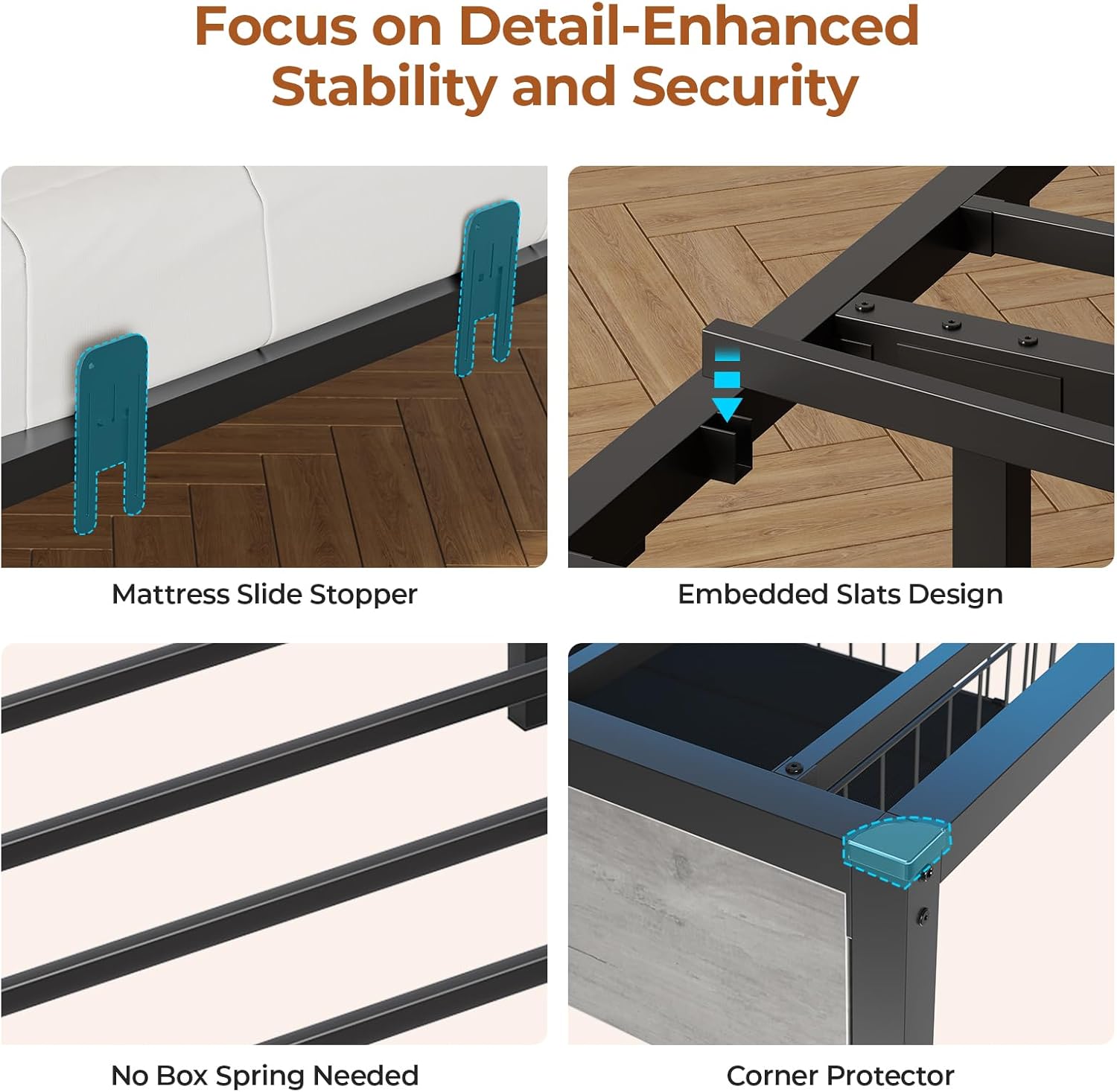
Close-up views of the mattress slide stopper, embedded slats design, and corner protectors for enhanced stability and security.
3. Install Slats and Mattress Stoppers
- Place the metal slats onto the frame. The embedded slat design simplifies installation and provides strong mattress support without a box spring.
- Attach the mattress slide stoppers to prevent the mattress from shifting.
4. Assemble the Bookcase Headboard and Guardrails
The bed frame offers two assembly methods for the guardrail (left or right configuration) to suit your room layout. Choose the desired orientation before attaching the headboard and guardrail sections.

Illustration of the two possible assembly configurations (left or right guardrail) to adapt to different room layouts.
Video showcasing the bookcase storage and guardrail features of the DICTAC Corner Bed Frame.
5. Install LED Lights and Charging Station
- Carefully attach the LED strip light to the designated areas within the bookcase headboard.
- Integrate the charging station into the headboard. Ensure the power cord is routed safely and connected to a wall outlet.

Close-up of the integrated charging station, featuring two 120V/12A AC outlets and two 5V/2A USB ports, with a 5.2-foot power cord.
6. Assemble Under-Bed Storage Drawers
- Assemble the two under-bed drawers. These drawers feature easy-glide casters and a non-woven drawer bottom.
- The drawers are not fixed to a track and can be moved freely.

View of the two under-bed storage drawers with wire netting and easy-glide casters.
Operating Instructions
LED Lights
The integrated RGB LED lights can be controlled via a smart mobile application or a manual controller. Features include:
- Multi-color Options: Over 60,000 colors available.
- Adjustable Brightness: Dim or brighten the lights to your preference.
- Flash Modes: Various dynamic lighting effects.
- Music Synchronization: Lights can react to music.
- Timing Function: Set schedules for the lights to turn on/off.

The LED lights in operation, showing control options via key or mobile app, and various features like color options, music mode, and timing function.
Charging Station
The built-in charging station provides convenient power access:
- AC Outlets: Two 120V/12A standard outlets for larger electronics.
- USB Ports: Two 5V/2A USB ports for charging phones, tablets, and other devices.
Ensure the charging station is plugged into a functional wall outlet. Monitor the temperature of the outlet periodically, especially when multiple devices are charging simultaneously.
Storage Drawers
The two under-bed storage drawers are designed for easy access and organization. They are equipped with casters for smooth movement on various floor types. Since they are not fixed to a track, they can be positioned as needed.

Overview of the ample storage space provided by the top shelf, bookcase compartments, and flexible under-bed fabric drawers.
Maintenance
- Cleaning: Wipe down the metal and MDF surfaces with a soft, damp cloth. Avoid harsh chemicals or abrasive cleaners that could damage the finish.
- Hardware Check: Periodically inspect all bolts and screws to ensure they remain tight. Re-tighten if necessary to maintain stability and prevent squeaking.
- Electrical Components: Keep the LED lights and charging station free from dust. Do not attempt to repair electrical components yourself; contact qualified personnel if issues arise.
- Mattress Care: Rotate your mattress regularly according to its manufacturer's recommendations to ensure even wear.
Troubleshooting
| Problem | Possible Cause | Solution |
|---|---|---|
| Bed frame is wobbly or squeaks. | Loose hardware. | Check and tighten all bolts and screws. Ensure all connections are secure. |
| LED lights not working. | Power connection issue, faulty strip, or controller problem. | Ensure the LED strip is properly connected to the power source. Check the controller for battery issues if applicable. If still not working, contact support. |
| Charging station not providing power. | Not plugged in, circuit breaker tripped, or faulty unit. | Verify the charging station's power cord is securely plugged into a working wall outlet. Check your home's circuit breaker. If the issue persists, contact support. |
| Missing or damaged parts during assembly. | Packaging error or transit damage. | Do not proceed with assembly. Contact DICTAC customer support immediately for replacement parts. |
Specifications
| Feature | Detail |
|---|---|
| Model Number | CBF-02 |
| Size | Twin |
| Material | MDF, Metal |
| Product Dimensions (L x W x H) | 83.07" x 47.24" x 29.72" |
| Maximum Weight Recommendation | 450 pounds |
| Recommended Mattress Thickness | 6-10 inches |
| Number of Drawers | 2 |
| Charging Station | 2 AC Outlets (120V/12A), 2 USB Ports (5V/2A) |
| LED Lights | RGB, APP/Manual Control, Adjustable Brightness, Flash Modes, Music Sync, Timing Function |
| Assembly Instructions | Included with product |
Warranty and Support
DICTAC is committed to providing quality products and customer satisfaction. If you encounter any issues, have questions, or require assistance with missing/damaged parts, please contact our support team.
- Customer Support: Our support team is available to resolve any problems within 24 hours. Refer to your purchase documentation for specific contact details.
- Returns: This product typically includes a 30-day easy return policy. Please consult your retailer's return policy for full details.
For further information or to explore other DICTAC products, please visit the official DICTAC store.
Visit the DICTAC StoreAsk a question about this manual
Ask about setup, troubleshooting, compatibility, parts, safety, or missing instructions. Manuals+ will review the question and use this page’s manual context to help answer it.