1. Introduction
The YEELIGHT Smart Curtain Lights are innovative RGB LED string lights designed to transform any space with dynamic and customizable illumination. Featuring 475 individually controllable LEDs across a 5x6.5 Ft canvas, these lights offer a vast array of pre-set scenes, static patterns, and flexible DIY customization options. Control is made easy via the Yeelight APP, which also includes a Music Flow feature for synchronized light effects. With an IP65 waterproof rating and a wide operating temperature range, these lights are suitable for both indoor and outdoor use, making them perfect for holidays, parties, or daily decor.
2. Safety Information
Please read and understand all safety instructions before installing and operating the YEELIGHT Smart Curtain Lights. Failure to follow these instructions may result in electric shock, fire, or serious injury.
- Ensure the power supply is disconnected before installation or maintenance.
- Use only the provided power adapter. Do not use with dimmers or other control devices not specified by the manufacturer.
- Do not submerge the product in water, despite its IP65 rating. The IP65 rating protects against water jets, not submersion.
- Operate within the specified temperature range of -4°F to 140°F (-20°C to 60°C).
- Keep out of reach of children and pets.
- Do not attempt to repair or modify the product. Refer all servicing to qualified personnel.
- Avoid sharp objects or excessive force that could damage the LED strings.
3. Package Contents
Verify that all components are present and in good condition:
- YEELIGHT Smart Curtain Light Unit (5x6.5 Ft, 475 LEDs)
- Power Adapter
- Mounting Accessories (Hooks, 3M Tape, Non-marking Nails)
- User Manual
4. Setup and Installation
The YEELIGHT Smart Curtain Lights offer flexible installation options for various surfaces. Choose the method best suited for your desired location.
4.1 Unpacking and Preparation
- Carefully remove the curtain lights from the packaging.
- Gently unroll the light strings, ensuring they do not tangle.
- Identify your desired installation area (e.g., window, wall, outdoor facade).
4.2 Installation Methods
The curtain lights provide a 5x6.5 feet canvas for your designs. Consider the dimensions of your installation area.

Figure 4.1: The 5x6.5 feet light canvas, ideal for various display sizes.
Three primary installation options are available:
Method 1: Mount on Curtain Hooks

Ideal for existing curtain rods or tracks. Simply attach the light unit's top loops to standard curtain hooks.
Method 2: Mount with 3M Tape

For smooth, clean surfaces. Peel the backing from the included 3M tape and firmly press the light unit's top bar onto the desired surface.
Method 3: Mount with Non-marking Nails

For walls where minimal impact is desired. Use the provided non-marking nails to secure the top bar of the light unit.
Figure 4.2: Three easy installation options for the YEELIGHT Smart Curtain Lights.
4.3 Power Connection
- Connect the power adapter to the light unit.
- Plug the power adapter into a standard electrical outlet.
- The lights should illuminate, indicating successful power connection.
5. Operating Instructions
Control your YEELIGHT Smart Curtain Lights using the dedicated Yeelight APP for a full range of features.
5.1 App Download and Connection
- Download the "Yeelight" app from your device's app store (iOS App Store or Google Play Store).
- Ensure Bluetooth is enabled on your smartphone or tablet.
- Open the Yeelight app and follow the on-screen instructions to add your Smart Curtain Lights. The app will guide you through the pairing process via Bluetooth.
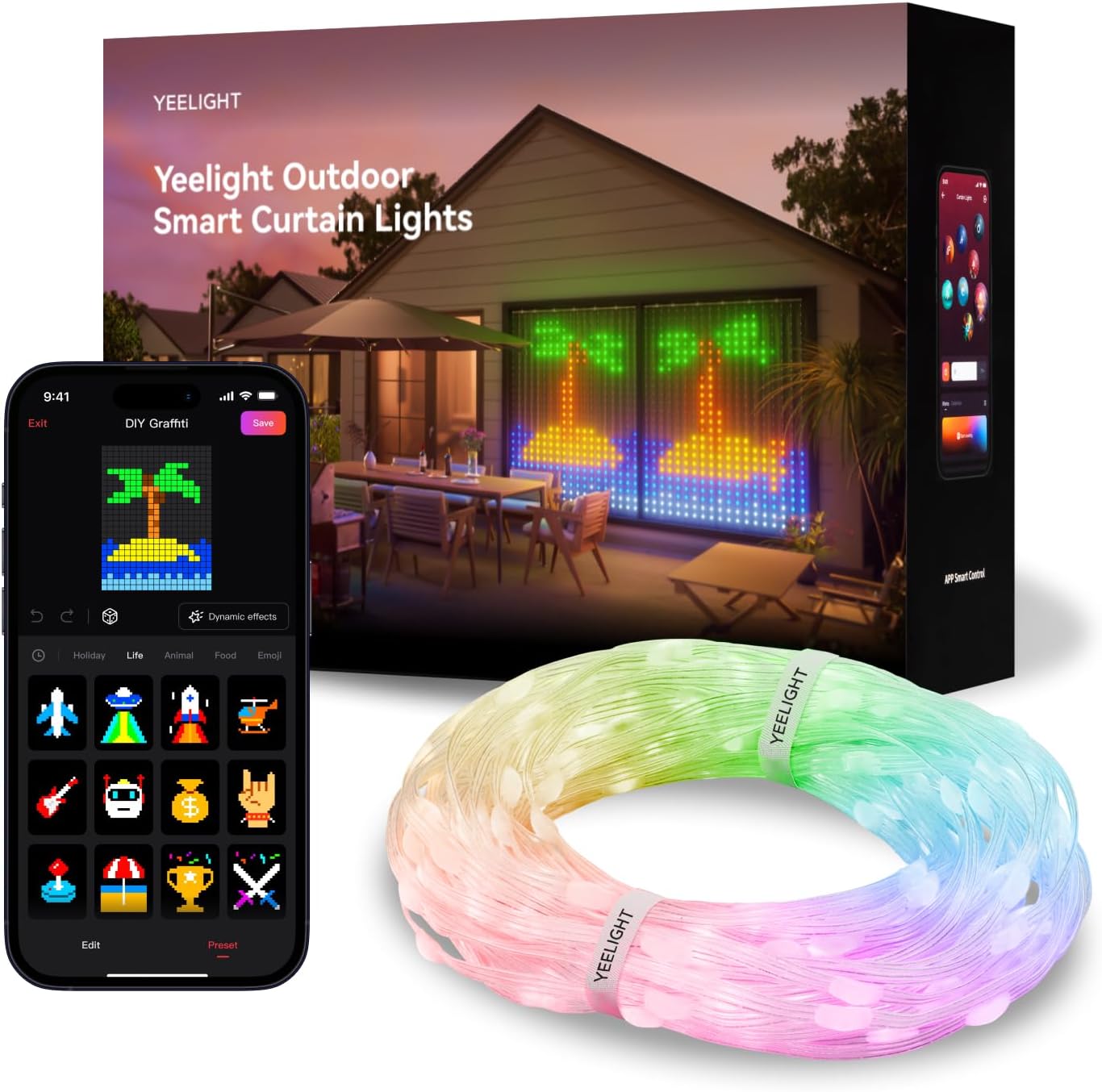
Figure 5.1: Product packaging and app interface for initial setup.
5.2 Key Features and Modes
The Yeelight app unlocks the full potential of your curtain lights:
- Rich Pre-set Scenes: Access over 20 dynamic light scenes and 100+ static patterns suitable for various occasions like holidays, parties, or daily ambiance.
- DIY Customization: Utilize the 475 individually controllable LEDs to create your own patterns and designs with 16 million colors. The app provides a pixel-art canvas for free DIY.
- Music Flow: Synchronize your lights with music. The Music Flow feature offers dynamic effects that react to the rhythm and beat of your audio, turning your space into a visual spectacle.

Figure 5.2: Overview of key features including LED count, patterns, and color options.

Figure 5.3: Examples of over 170 preset static patterns available.

Figure 5.4: Examples of over 20 dynamic lighting effects.

Figure 5.5: Music Flow feature in action, synchronizing lights with audio.
5.3 Basic Controls
- Power On/Off: Use the power button within the app or disconnect from the power source.
- Brightness Adjustment: Adjust the light intensity via the app's brightness slider.
- Color Selection: Choose from 16 million colors for static displays or DIY patterns.
- Scene Selection: Browse and apply pre-programmed scenes and patterns.
6. Maintenance
Proper maintenance ensures the longevity and optimal performance of your YEELIGHT Smart Curtain Lights.
- Cleaning: Disconnect power before cleaning. Use a soft, dry cloth to wipe the light strings and control unit. For outdoor use, a damp cloth can be used, but avoid harsh chemicals or abrasive cleaners.
- Storage: When not in use for extended periods, store the lights in a cool, dry place, away from direct sunlight and extreme temperatures. Gently coil the strings to prevent tangling and damage.
- Inspection: Periodically inspect the power cord and light strings for any signs of damage, fraying, or exposed wires. If damage is found, discontinue use and contact customer support.

Figure 6.1: The lights are designed for long-lasting indoor and outdoor use, featuring IP65 waterproof rating and resistance to temperatures from -4°F to 140°F.
7. Troubleshooting
If you encounter issues with your YEELIGHT Smart Curtain Lights, refer to the following common problems and solutions:
| Problem | Possible Cause | Solution |
|---|---|---|
| Lights do not turn on. | No power, loose connection, faulty adapter. | Check power outlet. Ensure all connections are secure. Try a different outlet. Verify power adapter is working. |
| Cannot connect to Yeelight APP. | Bluetooth off, app not updated, incompatible phone OS, lights not in pairing mode. | Ensure Bluetooth is on. Update Yeelight app to the latest version. Check phone's operating system compatibility (older phones may have limited functionality). Restart lights and phone. Try re-pairing in the app. |
| Lights flicker or display incorrect colors. | Loose connection, software glitch, environmental interference. | Check all physical connections. Restart the lights by unplugging and re-plugging. Close and reopen the app. Ensure no strong electromagnetic interference nearby. |
| Music Flow feature not working. | Microphone access denied, app settings, no music playing. | Ensure the Yeelight app has microphone permissions on your device. Verify music is playing clearly near your device. Check Music Flow settings within the app. |
If the problem persists after trying these solutions, please contact YEELIGHT customer support.
8. Specifications
| Feature | Detail |
|---|---|
| Brand | YEELIGHT |
| Model Number | YLYDD-0053 |
| Dimensions | 5 x 6.5 Feet (Light Canvas) |
| Number of LEDs | 475 |
| Light Color | Multicolor (RGB, 16 Million Colors) |
| Control Method | App Control (Bluetooth) |
| Power Source | Corded Electric |
| Indoor/Outdoor Usage | Indoor, Outdoor |
| Water Resistance Level | IP65 Water Resistant |
| Operating Temperature | -4°F to 140°F (-20°C to 60°C) |
| Material | Polycarbonate, Polyester, Rubber |
| Item Weight | 2.5 Pounds |
9. Warranty and Support
YEELIGHT provides comprehensive support for its products.
- Warranty: This product comes with a 2-year warranty from the date of purchase. Please retain your proof of purchase for warranty claims.
- Customer Service: For any questions, technical assistance, or warranty inquiries, please contact YEELIGHT customer service at amazon-support@yeelight.com. Support is available 24 hours.


