Introduction
Thank you for choosing the Lamicall Airplane Phone Holder. This versatile and portable phone holder is designed to provide a hands-free viewing experience for your smartphone in various settings, including airplanes, desks, and kitchens. Its foldable design and adjustable features ensure convenience and stability wherever you go. Please read this manual carefully to understand the product's features, setup, and operation.
Product Overview
The Lamicall Airplane Phone Holder is engineered for portability and stability, offering multiple functionalities:
- Portable Design: Small, compact, and foldable, it easily fits into pockets or bags, making it ideal for travel. The base clip opens and closes smoothly for quick attachment to various surfaces.
- Superior Stability: The phone clip features non-slip silicone padding to secure your phone even on moving vehicles. The base clip is compatible with surfaces up to 4 cm thick, providing excellent stability without causing damage.
- Flexible Adjustment: Equipped with a 360° rotatable ball joint, allowing you to adjust your phone to any desired angle. An included hexagonal wrench enables tightening of the ball joints for long-term stability. The design ensures silent adjustment, preventing disturbance to others.
- Multifunctional Support: Includes two stowable support legs at the bottom, allowing it to stand stably on flat surfaces. This transforms the holder into a desk stand for office or home use. Note: Ensure placement on a flat desk to prevent tipping. Avoid excessive force to prevent product damage.
- Accessory Friendly: The phone clip accommodates devices up to 15 mm thick and is compatible with most phone accessories like magnetic wallets and ring holders, eliminating the need to remove them.
- Wide Compatibility: Suitable for smartphones ranging from 4.7 to 6.9 inches, including various iPhone models (17, 16, 15, 14, 13, 12, 11 series, SE, Xs, X, 8, 7, 6s, 6) and Samsung Galaxy models (S10, S9, S8, S7, S6, S5, S4, S3, Note series, A series, J series), Xiaomi Redmi, Motorola, Huawei, HTC, Google Pixel, Nokia, and BlackBerry smartphones. Note: This holder is not suitable for tablets.
Setup
- Unfolding the Holder: Gently unfold the holder from its compact, folded state. The main arm and the phone clip should extend.
- Attaching to a Surface (Clip Mode):
- Identify a suitable surface edge, such as an airplane tray table, luggage handle, or kitchen counter.
- Press the release button on the base clip to open it.
- Position the open clip over the edge of the surface and release the button to secure it. Ensure the clip is firmly attached and stable.

Image: The phone holder securely clipped to an airplane tray table, providing a stable viewing platform for a smartphone.
- Setting up as a Desk Stand (Tripod Mode):
- Locate the two stowable support legs at the bottom of the holder.
- Pull out and extend these legs to form a stable tripod base.
- Place the holder on a flat, stable surface like a desk or table.

Image: The phone holder configured as a desk stand, supporting a smartphone for hands-free viewing while working on a laptop.
Operating Instructions
- Inserting Your Smartphone:
- Gently pull apart the spring-loaded phone clip to widen it.
- Carefully place your smartphone into the clip, ensuring it is centered and securely held by the non-slip silicone pads. The clip can accommodate phones between 4.7 and 6.9 inches and up to 15mm thick.

Image: The phone holder demonstrating its wide compatibility with smartphones, including those with thick cases, wallet cases, or ring holders.
- Versatile Placement Examples:
- Beyond airplane tray tables and desks, the holder can be clipped to various surfaces like kitchen shelves or cabinets for hands-free recipe viewing or entertainment while cooking.

Image: The phone holder demonstrating its wide utility by being clipped to a kitchen shelf, allowing for hands-free viewing of a smartphone.
- Adjusting the Viewing Angle:
- The holder features a 360° rotatable ball joint. Gently rotate the phone clip to achieve your desired horizontal or vertical viewing angle.
- To adjust the tilt, manipulate the ball joint. If the joint feels too loose or too tight, use the provided hexagonal wrench to adjust the screw near the ball joint for optimal tension.
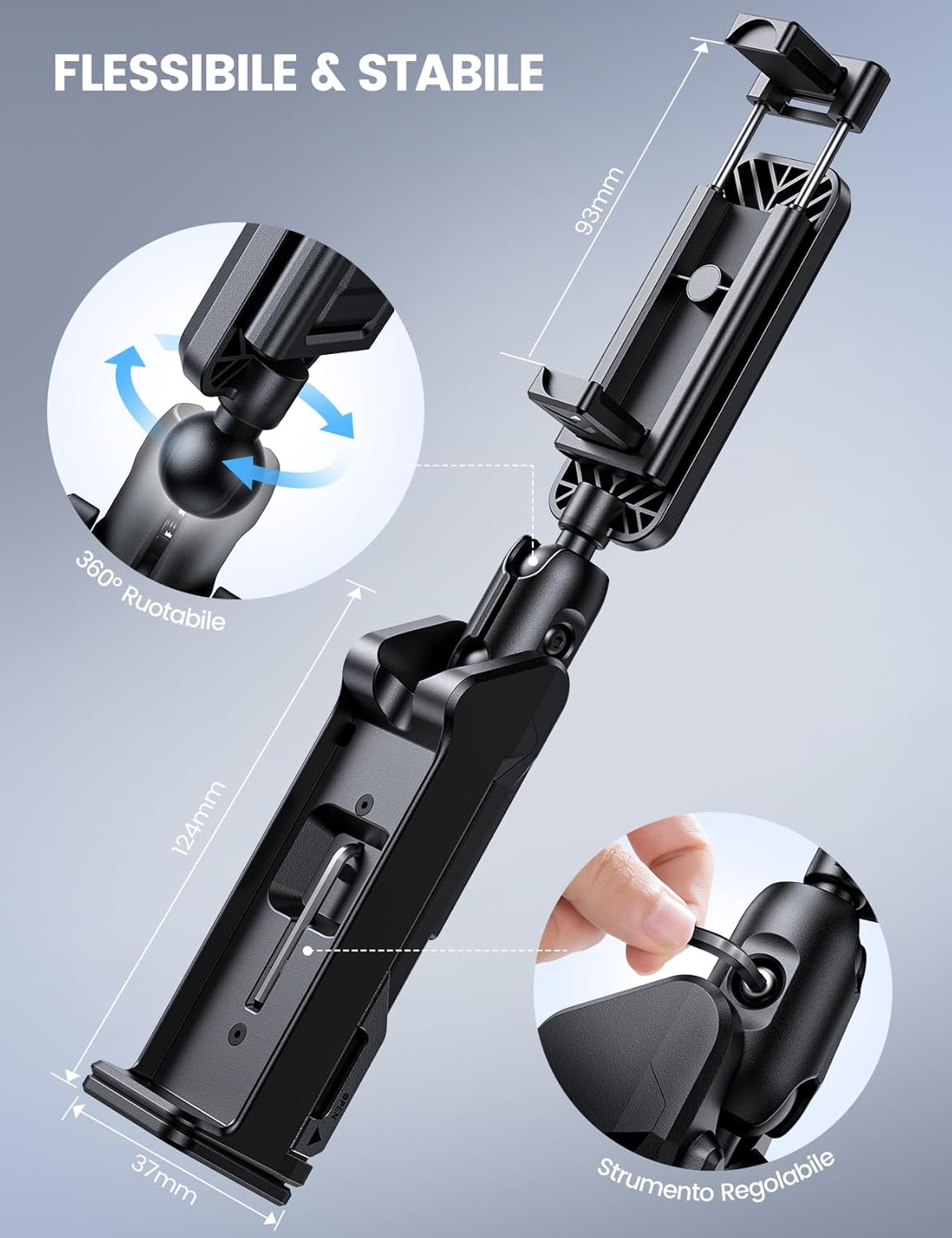
Image: A close-up illustrating the 360° rotatable ball joint and the hexagonal wrench used for adjusting its tension, along with key dimensions.
- Removing Your Smartphone:
- Gently pull apart the phone clip and carefully remove your smartphone.
- Folding for Storage:
- Once you are finished using the holder, fold the support legs (if extended) and collapse the main arm and phone clip back into its compact form for easy storage.

Image: The compact, folded phone holder being easily stored in a bag, highlighting its portability.
Maintenance
- Clean the holder with a soft, damp cloth. Avoid abrasive cleaners or solvents.
- Ensure the silicone pads on the phone clip are free from dust or debris to maintain optimal grip.
- Periodically check the tightness of the ball joint using the provided hexagonal wrench to ensure continued stability.
- Store the holder in a cool, dry place when not in use.
Troubleshooting
| Problem | Possible Cause | Solution |
|---|---|---|
| Phone is not stable in the clip. | Phone is too small/large, or not properly centered. Silicone pads are dirty. | Ensure your phone is within the 4.7-6.9 inch range and up to 15mm thick. Center the phone properly. Clean the silicone pads. |
| Base clip is not holding firmly. | Surface is too thick or too thin. Clip not fully engaged. | Ensure the surface thickness is within 4 cm. Press the release button fully and ensure the clip jaws are securely gripping the surface. |
| Viewing angle keeps shifting. | Ball joint is loose. | Use the provided hexagonal wrench to tighten the screw near the ball joint until the desired tension is achieved. |
| Holder tips over in desk stand mode. | Not on a flat surface. Support legs not fully extended. | Always place the holder on a completely flat and stable surface. Ensure both support legs are fully extended and locked into position. |
Specifications
- Brand: Lamicall
- Model: B0DDKN4TKS (Clip)
- Color: Black
- Compatible Devices: Smartphones
- Compatible Phone Sizes: 4.7 - 6.9 inches
- Max Phone Thickness (with case): 15 mm
- Max Clamp Thickness (for surfaces): 4 cm
- Mounting Type: Clamp, Tabletop (with integrated tripod legs)
- Rotation: 360° ball joint
Warranty Information
Lamicall products are manufactured to high-quality standards. For specific warranty details, including duration and coverage, please refer to the warranty card included with your purchase or visit the official Lamicall website. Keep your purchase receipt as proof of purchase for any warranty claims.
Support
If you encounter any issues or have questions regarding your Lamicall Airplane Phone Holder, please contact our customer support team. You can find contact information on the official Lamicall website or through the retailer where you purchased the product. Please have your model number (B0DDKN4TKS) ready when contacting support.


