
1. Important Safety Instructions
Please read all instructions carefully before using this appliance and retain them for future reference. Failure to follow these instructions may result in electric shock, fire, or serious personal injury.
- Ensure the power supply voltage matches the rating label on the fan.
- Do not immerse the fan, plug, or cord in water or other liquids.
- Unplug the fan from the outlet when not in use, before cleaning, or before moving.
- Keep the fan out of reach of children and pets.
- Do not operate the fan with a damaged cord or plug.
- Avoid placing the fan near curtains or other objects that could be drawn into the fan blades.
- Do not insert fingers or any objects into the grille when the fan is operating.
2. Product Overview
The Mistral MSF1610DR-WE is a 16-inch stand fan designed for efficient air circulation and cooling. It features multiple speed settings, a timer function, and various operating modes to suit different preferences.
Key Features:
- 10 Speed selection for customized airflow.
- 7 Hours timer for automatic shut-off.
- 5 ABS fan blades for durable and effective air movement.
- Adjustable height for versatile positioning.
- Left & right oscillation to cover a wider area.
- 3 Modes: Natural, Sleep & Normal for varied comfort.
- DC brushless motor for quiet and comfortable wind.
Components:
The fan consists of a base, an adjustable stand pole, a motor housing, fan blades, front and rear grilles, a control panel, and a remote control.
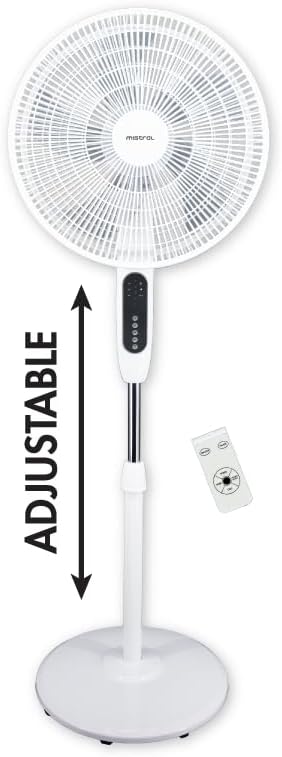
Figure 2.1: Front view of the Mistral MSF1610DR-WE stand fan, showcasing its overall design and the included remote control.

Figure 2.2: Side view of the Mistral MSF1610DR-WE stand fan, illustrating its slim profile and stable base.
3. Setup and Assembly
Assembly is required for this stand fan. Please follow these general steps for proper setup:
- Base Assembly: Attach the stand pole to the fan base, ensuring it is securely fastened.
- Pole Extension: Insert the adjustable inner pole into the main stand pole.
- Motor Unit Attachment: Secure the motor housing unit to the top of the stand pole.
- Rear Grille and Blade Installation: Mount the rear grille onto the motor unit, then attach the fan blades to the motor shaft. Secure the blades with the provided cap.
- Front Grille Attachment: Place the front grille over the fan blades and secure it to the rear grille using the clips or screws provided.
- Power Connection: Connect the AC adapter to the fan and then plug it into a suitable power outlet.
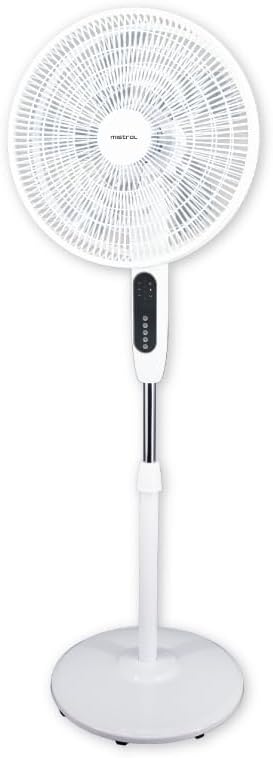
Figure 3.1: The adjustable height feature of the stand fan, allowing users to customize the fan's elevation for optimal airflow.
4. Operating Instructions
The Mistral MSF1610DR-WE fan can be operated using the control panel on the unit or the included remote control.
Control Panel and Remote Functions:

Figure 4.1: Detailed view of the fan's control panel, showing buttons for Mode, Oscillation, Timer, Speed, and Power.
- ON/OFF Button: Press to turn the fan on or off.
- SPEED Button: Press repeatedly to cycle through 10 different speed settings.
- MODE Button: Selects between the three operating modes:
- Normal Mode: Provides a consistent airflow at the selected speed.
- Natural Mode: Simulates natural breezes by varying the fan speed.
- Sleep Mode: Operates at a lower, quieter speed, often gradually decreasing over time for undisturbed sleep.
- TIMER Button: Sets the automatic shut-off timer. Press to select desired duration up to 7 hours.
- OSC (Oscillation) Button: Activates or deactivates the left and right oscillation function, allowing the fan head to sweep from side to side.
Adjusting Height:
To adjust the fan's height, loosen the height adjustment knob on the stand pole, raise or lower the inner pole to the desired position, and then securely tighten the knob.
5. Maintenance and Cleaning
Regular cleaning helps maintain the fan's performance and extends its lifespan.
- Before Cleaning: Always unplug the fan from the power outlet.
- Exterior Cleaning: Wipe the exterior surfaces of the fan with a soft, damp cloth. Do not use abrasive cleaners or solvents.
- Grille and Blades: To clean the fan blades and inside the grilles, you may need to carefully remove the front grille. Refer to the assembly instructions for removal and reattachment. Use a soft cloth or a vacuum cleaner with a brush attachment to remove dust.
- Storage: When not in use for extended periods, store the fan in a cool, dry place, preferably in its original packaging.
6. Troubleshooting
If you encounter issues with your fan, refer to the following common problems and solutions:
- Fan does not turn on:
- Ensure the power cord is securely plugged into a working electrical outlet.
- Check if the power button has been pressed.
- Weak airflow:
- Increase the speed setting.
- Clean the fan blades and grilles to remove dust accumulation.
- Fan is noisy:
- Ensure all parts are securely assembled.
- Check for any foreign objects caught in the fan blades or grilles.
- Oscillation not working:
- Press the OSC button to activate the function.
- Ensure the fan is on a flat, stable surface.
If the problem persists after attempting these solutions, please contact customer support.
7. Technical Specifications
| Specification | Detail |
|---|---|
| Model | MSF1610DR-WE |
| Voltage | 100-240V~, 50/60Hz |
| Wattage | 24.0VDC | 30W |
| Air Volume | 43 m³ / min |
| Max Air Flow | 5.53 m / s |
| Product Dimensions (L*W*H) | 445 * 400 * 1340 mm (44.5D x 134W x 40H centimetres) |
| Net Weight | 4.82 KGS |
| AC Adapter Input | 100-240V~, 50/60Hz, 1.3A |
| AC Adapter Output | 24.0VDC 1.5A 36.0W |
| Form Factor | Standing |
| Finish Types | Glossy or Matte |
| Assembly Required | Yes |
| Batteries Required | No (for fan unit) |
| Included Components | Remote |
| Brand | MISTRAL |
| Colour | White |
| Electric Fan Design | Floor Fan |
| Power Source | Corded Electric |
| Style | 10 Speeds | 7h Timer |
| Room Type | Home Office |
| Special Features | Brushless Motor, Multiple Wind Modes |
| Recommended Uses | Cooling, Air Circulation, Office Use |
| Mounting Type | Floor Mount |
8. Warranty and Customer Support
This Mistral MSF1610DR-WE Stand Fan comes with a standard manufacturer's warranty. Please refer to the warranty card included in your product packaging for specific terms and conditions, including warranty duration and coverage details.
For technical assistance, troubleshooting beyond this manual, or warranty claims, please contact Mistral customer support. You can find contact information on the official Mistral website or through your retailer.
Visit the official MISTRAL Store for more information.


