
1. Introduction
The briidea MK-147 Handheld Practice Device is designed to enhance your reaction time and launch skills for competitive activities. This portable electronic device provides customizable training modes and data feedback to help users monitor and improve their performance. It is equipped with advanced sensors to ensure precision in training.

Image 1.1: The briidea Handheld Practice Device, showcasing its relevance to various racing disciplines and its core features: Precision Response, Data Feedback, Customized Training, High-precision Equipment, and Portability.
2. Safety Information
- Keep the device away from water and other liquids to prevent electrical damage.
- Do not attempt to disassemble or repair the device yourself. Refer to qualified service personnel.
- Use only the provided wired thumb trigger. Using unauthorized accessories may damage the device.
- Store the device in a cool, dry place when not in use.
- This device is not a toy. Keep out of reach of small children.
3. Package Contents
Verify that all items are present in your package:
- briidea Handheld Practice Device (Main Unit)
- Wired Thumb Trigger
- User Manual (this document)
4. Product Overview
The briidea MK-147 consists of a main unit with a digital display and control buttons, and a wired thumb trigger for input. The display shows reaction times, training modes, and feedback indicators.

Image 4.1: The briidea Handheld Practice Device, showing the main unit with its display and control buttons, and the connected wired thumb trigger.
Main Unit Components:
- Digital Display: Shows reaction times, mode settings, and data.
- Power Button: Turns the device on/off.
- Mode (M) Button: Cycles through different training modes.
- Up (^) Button: Adjusts settings or navigates menus.
- Down (V) Button: Adjusts settings or navigates menus.
- Trigger (T) Port: Connects the wired thumb trigger.
- Indicator Lights: Represent pre-stage and stage lights, similar to a drag racing tree.
Wired Thumb Trigger:
- Ergonomically designed for comfortable use.
- Connects to the main unit via a cable for precise input.
5. Setup
- Unpack the Device: Carefully remove the main unit and wired thumb trigger from the packaging.
- Connect the Trigger: Insert the connector of the wired thumb trigger into the 'T' port on the main unit. Ensure it is securely connected.
- Power On: Press and hold the Power button on the main unit until the display illuminates.
- The device is now ready for use.
6. Operating Instructions
6.1. Power On/Off
- To turn on: Press and hold the Power button for approximately 2 seconds.
- To turn off: Press and hold the Power button for approximately 3 seconds until the display shuts down.
6.2. Navigating Modes and Settings
- Use the Mode (M) button to cycle through different training programs or display options.
- Use the Up (^) and Down (V) buttons to adjust numerical settings (e.g., delay times, bump down values) within a selected mode.
6.3. Custom Training Modes
The device offers various customizable training options to simulate different racing conditions.

Image 6.1: The device's display illustrating the pre-stage and stage light sequence, mirroring a professional drag racing tree for customized training.
- PRO and FULL Trees: Select between 0.4-second PRO tree and 0.5-second FULL tree timing sequences.
- Adjustable Delay Box: Set a specific delay time before the start sequence begins.
- Bump Down Function: Fine-tune your staging position.
- Rollout Functions: Simulate vehicle movement before the timing starts.
To adjust these settings, press the Mode (M) button until the desired setting appears on the display, then use the Up (^) and Down (V) buttons to modify the values.
6.4. Data Feedback
The device tracks your performance, providing valuable data for improvement.
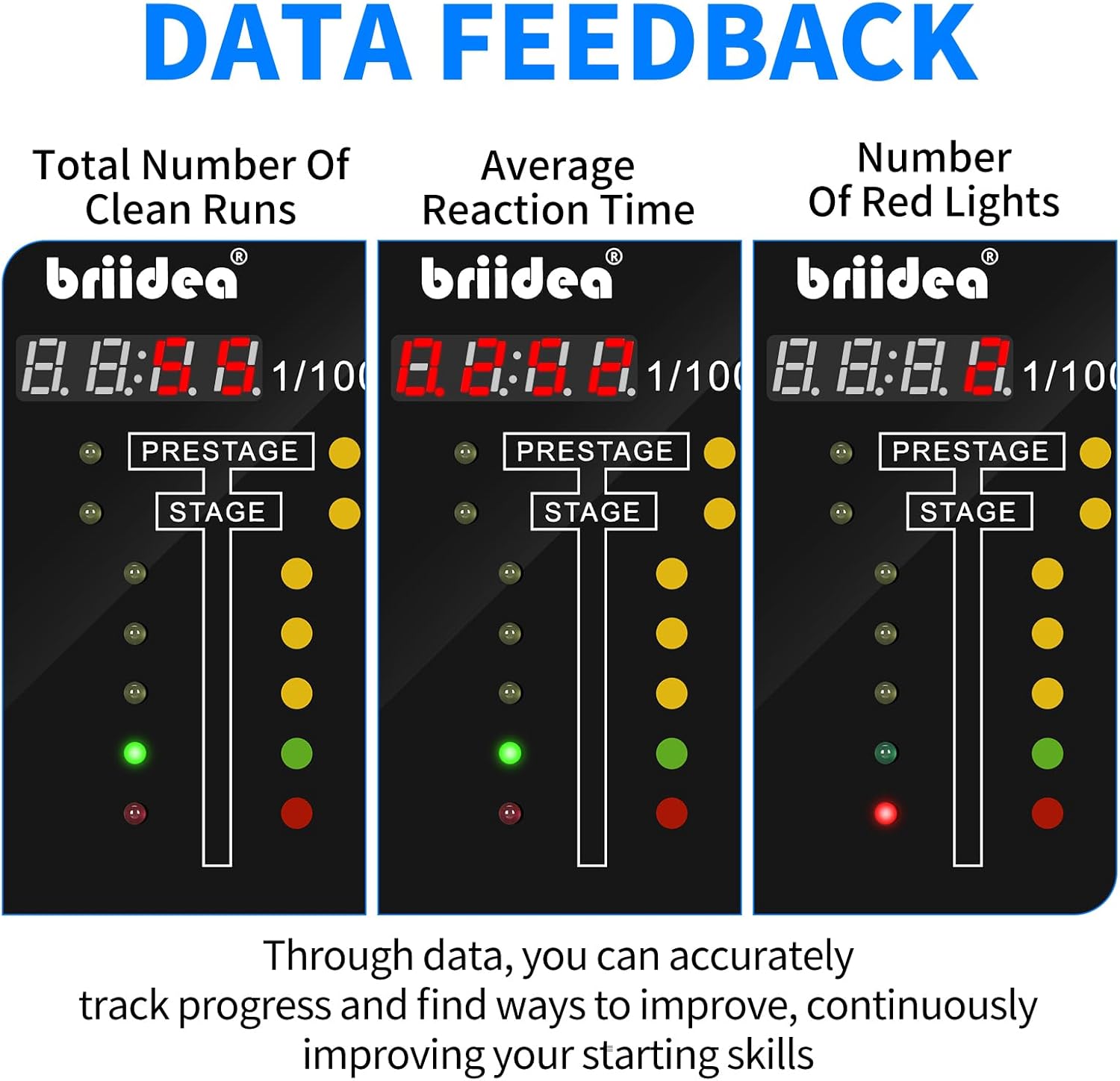
Image 6.2: Data feedback screens showing total clean runs, average reaction time, and red light counts, enabling precise performance monitoring.
Press the Mode (M) button to cycle through the following data displays:
- Total Runs Without Fouls: The number of practice runs completed without a red light or other foul.
- Average Reaction Time: Your average reaction time across all recorded runs.
- Red Light Counts: The total number of times a red light (foul start) occurred.
This data helps you identify patterns and areas for continuous improvement in your starting skills.
7. Maintenance
- Cleaning: Use a soft, dry cloth to clean the device. Do not use abrasive cleaners or solvents.
- Storage: When not in use, store the device in its original packaging or a protective case to prevent damage. Keep it away from extreme temperatures and direct sunlight.
- Cable Care: Avoid bending or twisting the trigger cable excessively to prevent internal wire damage.
8. Troubleshooting
| Problem | Possible Cause | Solution |
|---|---|---|
| Device does not power on. | Low or no power. | Ensure the device is charged or has fresh batteries (if applicable, not specified in product data). If USB powered, check connection. |
| Thumb trigger not responding. | Trigger cable loose or damaged. | Check if the trigger cable is securely plugged into the 'T' port. Inspect the cable for visible damage. |
| Inaccurate reaction times. | Incorrect mode settings. | Verify that the correct PRO or FULL tree mode is selected. Check delay box and rollout settings. |
| Display is dim or flickering. | Low power. | Ensure the device has adequate power. |
9. Specifications

Image 9.1: Dimensional overview of the briidea Handheld Practice Device, including the main unit and the wired thumb trigger.
| Feature | Detail |
|---|---|
| Model | MK-147 |
| Brand | briidea |
| Material | Plastic |
| Product Dimensions (Main Unit) | 7.62 x 5.08 x 7.62 cm (3.0 x 2.0 x 3.0 inches) |
| Item Weight | 0.21 Kilograms (approx. 7.4 oz) |
| Trigger Cable Length | Approx. 5.1 ft |
| Power Source | Not specified (typically battery or USB) |
10. Warranty and Support
For warranty information or technical support, please refer to the documentation included with your purchase or contact briidea customer service directly. Contact details can typically be found on the manufacturer's official website or on the product packaging.