
1. Introduction
Thank you for choosing the Manker E05 II Red Copper EDC Flashlight. This compact and durable flashlight is designed for everyday carry, offering versatile power options and multiple lighting modes. Please read this manual carefully before use to ensure proper operation and maintenance.

Image 1: Manker E05 II Red Copper EDC Flashlight highlighting key features like 800 lumens, 120m beam distance, and 14500/AA battery compatibility.

Image 2: The Manker E05 II flashlight demonstrating its ultra-compact and lightweight design when held in a hand, with dimensions 91.35 x 17 x 20 mm and a weight of 123.1 g (with battery).
2. Package Contents
Verify that all items are present in your package:
- 1x Mankerlight E05 II LED Flashlight
- 1x Type-C USB Charging Cable
- 1x Lanyard
- 1x Spare Waterproof O-ring
- 1x User Manual
- 2x Filters (Red and White)

Image 3: The Manker E05 II Red Copper flashlight shown alongside an included red filter cone, illustrating one of the accessories.
3. Setup
3.1 Battery Installation
- Unscrew the tail cap of the flashlight.
- Insert one 14500 Li-ion battery or one AA battery (Ni-MH or Alkaline) with the positive (+) end facing towards the flashlight head. Note: Batteries are not included with the product.
- Screw the tail cap back on tightly to ensure proper contact and water resistance.
3.2 Charging (14500 Li-ion Battery Only)
If using a rechargeable 14500 Li-ion battery with a built-in USB-C port, connect the provided Type-C USB charging cable to the battery and a power source to charge. The flashlight itself does not have a charging port.
4. Operating Instructions
4.1 Power On/Off and Mode Selection
The Manker E05 II features a single tail-switch for all operations:
- To Turn On/Off: Fully press the tail switch.
- To Change Modes: With the light on, lightly tap the tail switch (half-press) to cycle through modes: Low → Medium → High → Strobe.

Image 4: Visual representation of the four lighting modes: High (800 Lumens), Medium (220 Lumens), Low (6.5 Lumens), and Strobe (800 Lumens).
4.2 Using the Filters
The included filters can be attached to the head of the flashlight to modify the beam:
- Red Filter: Provides a soft red light, useful for preserving night vision, signaling, or emergency situations.
- White Filter: Diffuses the light for a softer, more comfortable beam, ideal for reading or close-up tasks.

Image 5: The Manker E05 II flashlight demonstrating the effect of optional multi-purpose filters, showing both white and red light outputs.
5. Maintenance
5.1 Cleaning
- Wipe the flashlight body with a soft, damp cloth.
- Clean the threads and O-rings regularly to maintain water resistance. Apply silicone grease to O-rings as needed.
5.2 Battery Care
- Remove the battery if the flashlight will not be used for an extended period to prevent leakage.
- Store batteries in a cool, dry place.
5.3 Storage
Store the flashlight in a dry environment, away from direct sunlight and extreme temperatures.
6. Troubleshooting
- Light does not turn on: Check if the battery is inserted correctly with the positive end facing the head. Ensure the tail cap is screwed on tightly. Verify the battery has sufficient charge.
- Light flickers or is dim: Clean the battery contacts and threads. Ensure the battery is fully charged or replace it.
- Water ingress: Check O-rings for damage or proper seating. Ensure all parts are screwed on tightly.
7. Specifications
| Feature | Detail |
|---|---|
| Light Output (14500) | Up to 1300 lumens (High Density White LED Emitters) / 800 lumens (NICHIA 519A LED) |
| Beam Distance (14500) | 148 m (High Density White LED Emitters) / 120 m (NICHIA 519A LED) |
| Run Time (Low) | 50 hours |
| Light Source | High Density White LED Emitters (4000K) or NICHIA 519A LED (4000K, R9080) |
| Battery Compatibility | 14500 Li-ion, Ni-MH AA, Alkaline AA |
| Material | Red Copper |
| Lighting Modes | High, Medium, Low, Strobe |
| Waterproof Rating | IP68 (2 meters submersible for 60 minutes) |
| Impact Resistance | 1.5 meters |
| Dimensions | 91.35 x 20 x 20 mm (3.6"D x 0.8"W x 0.8"H) |
| Weight | 123.1 g (with battery) / 9.6 ounces |
| Special Features | Durable, Impact Resistant, Portable, Rechargeable (via 14500 battery), Weatherproof, Deep Carry Clip |
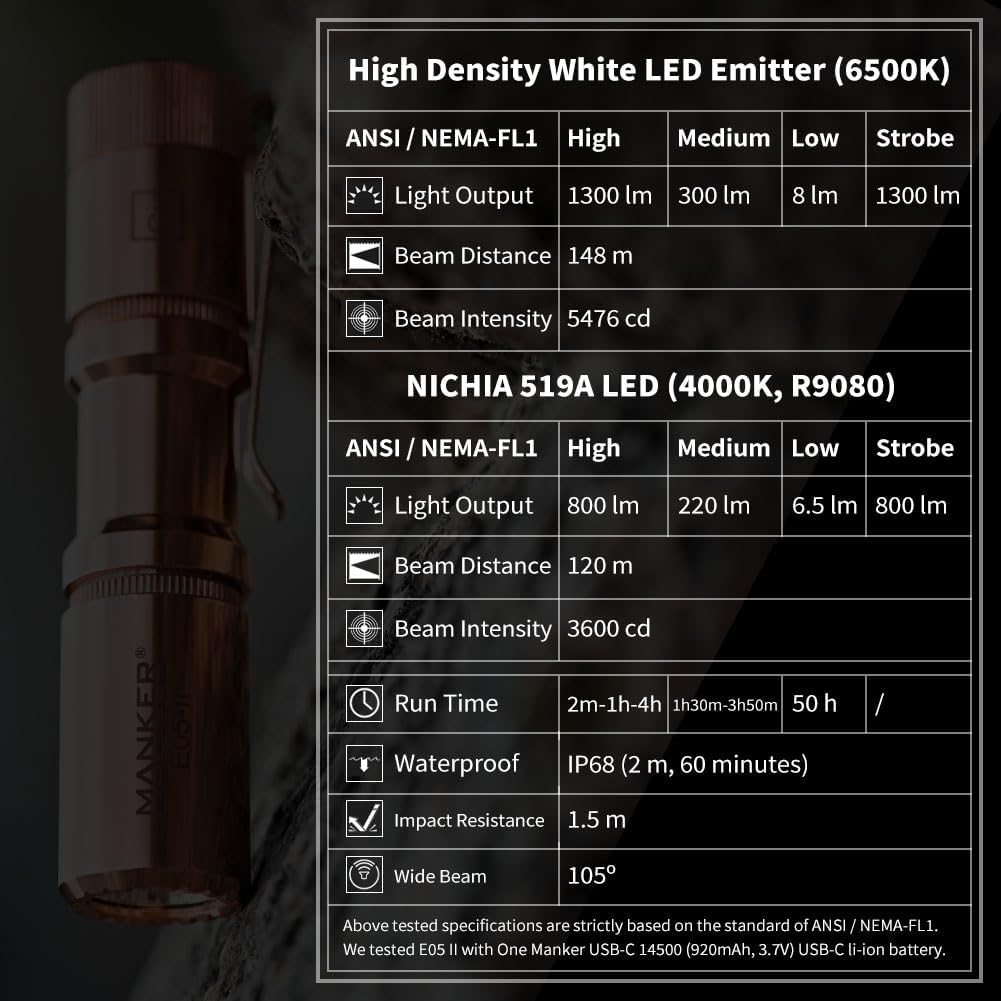
Image 6: A comprehensive table detailing the ANSI/NEMA-FL1 specifications for both High Density White LED Emitter and NICHIA 519A LED versions, including light output, beam distance, run time, waterproof rating, and impact resistance.

Image 7: The Manker E05 II flashlight's beam illuminating a long hallway, demonstrating its 800 lumens, 120 meters beam distance, and 105-degree wide beam.
8. Warranty and Support
For warranty information and customer support, please refer to the official Mankerlight website or contact your authorized dealer. Keep your purchase receipt as proof of purchase.