
1. Introduction
The FULODE K-8 Professional KTV Digital Pre-stage Effector is an advanced audio processor designed to enhance your sound experience in various settings. Featuring anti-howling technology, a high-definition LCD color digital screen, and multiple input/output options, this device provides precise control over music, microphone, and effect parameters. This manual will guide you through the setup, operation, and maintenance of your K-8 effector to ensure optimal performance.
2. Product Features
- All-metal KTV Preamp Reverb Effector: Newly upgraded anti-howling digital mixer reverb with a high-definition LCD color digital screen. Features a built-in smart effect chip, sensitive large knobs, and a durable metal shell.
- Computer Control: Equipped with a USB interface for easy connection to a computer via a data cable, allowing direct parameter adjustment through software.
- Multiple Inputs & Outputs: Supports 6 audio inputs (DVD, AUX, Optical, Coaxial, USB, Bluetooth) and 4 microphone inputs. Offers subwoofer output, center speaker output, front left/right channel output, and surround left/right channel output.
- Real Dual-ECHO Adjustment: Independent adjustments for Music, Microphone, Subwoofer, Reverb, Echo, and EQ to achieve a balanced and appropriate tone for various scenarios.
- Intelligent Anti-Whistling: Utilizes multi-point frequency shifting technology to eliminate howling in the sound system, preventing damage to microphones and speakers.
- Infrared Remote Control + Screwdriver Control: Includes a screwdriver for precise, tamper-resistant parameter adjustments and an infrared remote control for convenient operation.
3. Package Contents
Please check the package for the following items:
- Audio Pre-effects Processor (K-8) x 1
- Data Cable x 1
- Remote Control x 1
- Power Cord (110V, US Plug) x 1
- Screwdriver x 1
- Instruction Manual x 1
- U Disk Software x 1
- CD-ROM Software x 1
Note: Ensure all components are present and undamaged before proceeding with setup.
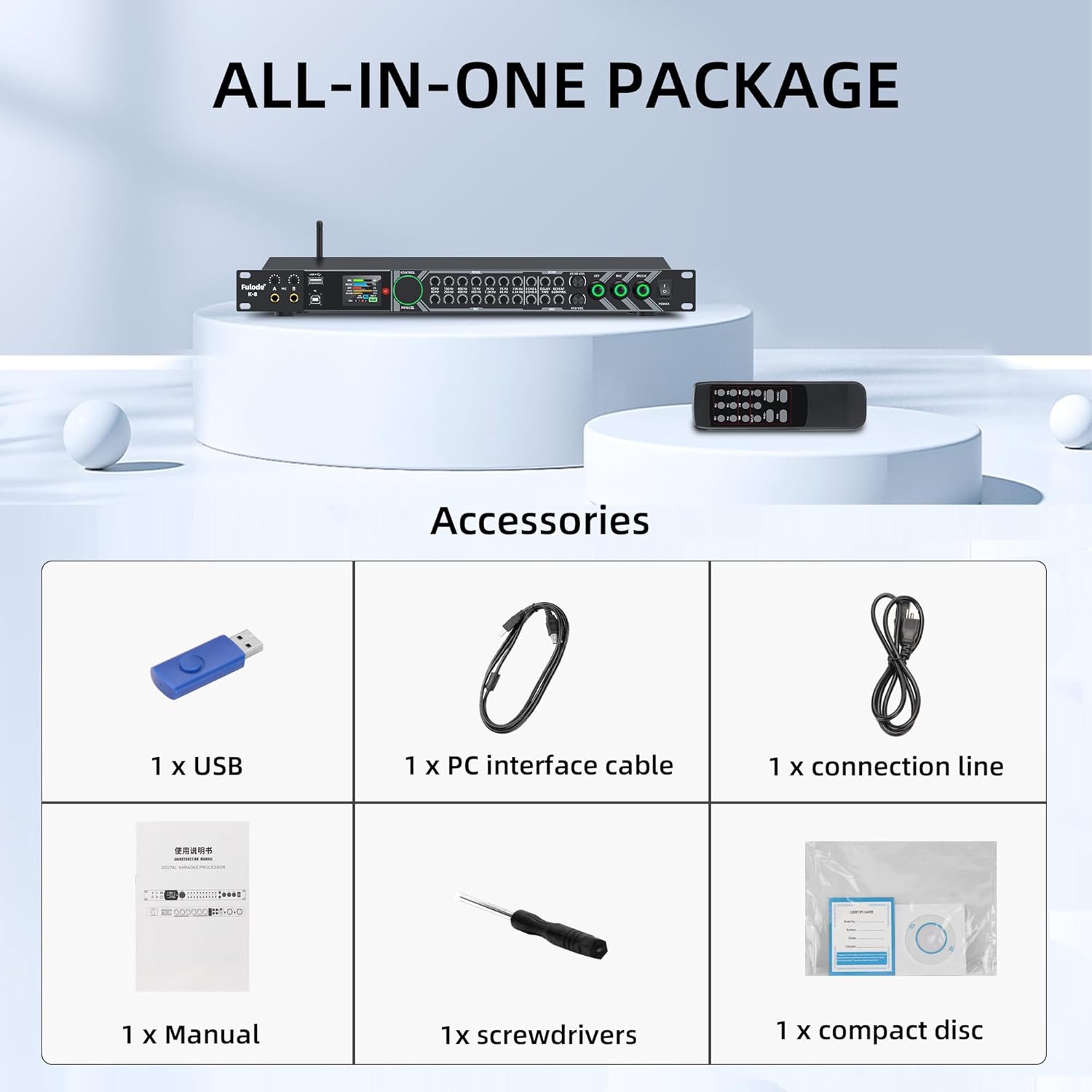
Image: All-in-one package showing the audio pre-effects processor, data cable, remote control, power cord, screwdriver, manual, U disk software, and CD-ROM software.
4. Panel Descriptions
4.1 Front Panel
The front panel provides access to primary controls and input ports for microphones and USB devices, along with the LCD display for status monitoring.
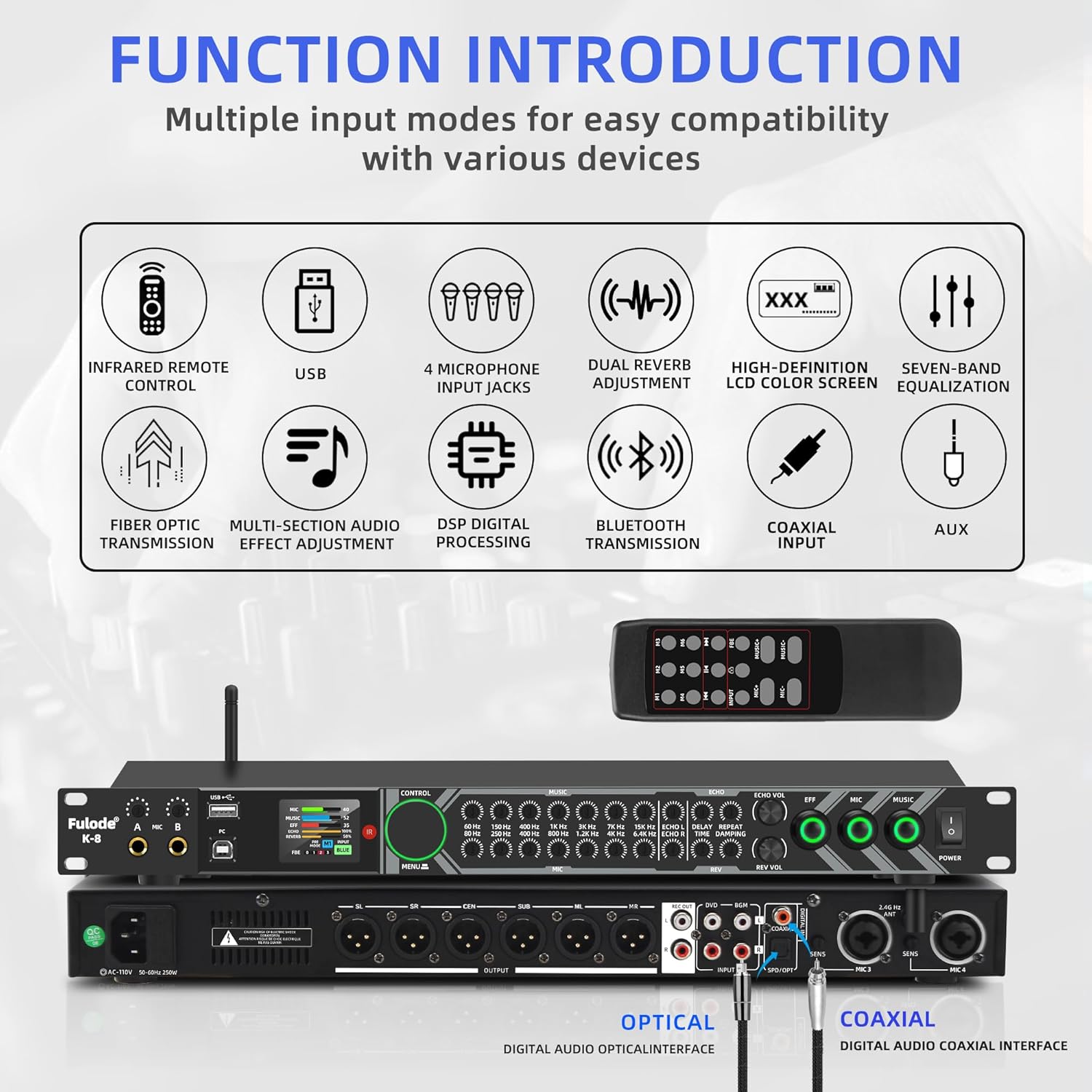
Image: Front panel overview highlighting various functions including infrared remote control, USB, 4 microphone input jacks, dual reverb adjustment, high-definition LCD color screen, seven-band equalization, fiber optic transmission, multi-section audio effect adjustment, DSP digital processing, Bluetooth transmission, coaxial input, and AUX input.
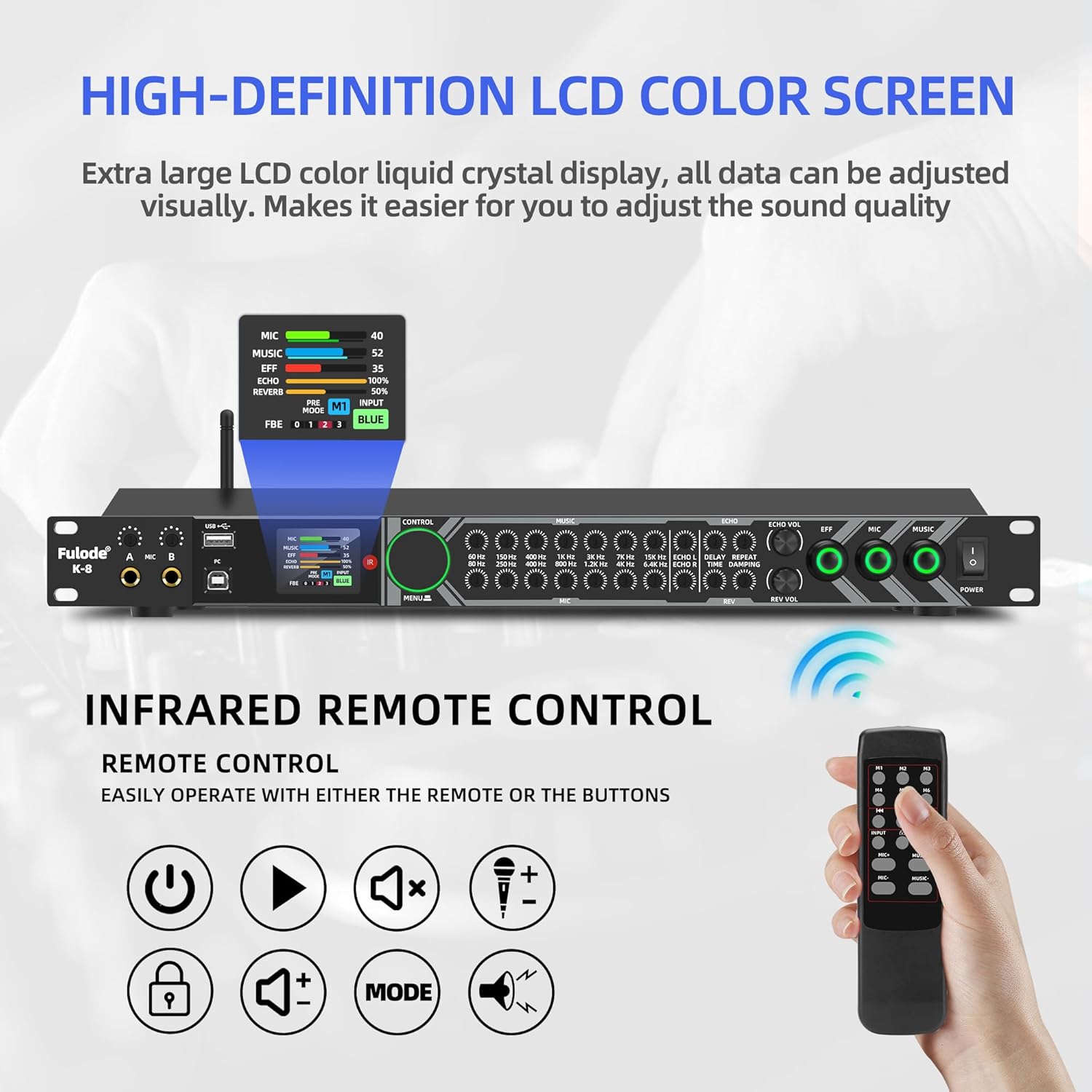
Image: Close-up of the high-definition LCD color screen displaying current settings and the infrared remote control with various function buttons.
4.2 Rear Panel
The rear panel houses various audio input and output connections, along with the power input and antenna ports.

Image: Detailed diagram of the rear panel showing AC 110V input, XLR output, Record Output, XLR/microphone input, Digital fiber input, Coaxial audio input, DVD Analog Lotus input, BGM Analog Lotus input, Wireless antenna, Microphone sensitivity adjustment, and various volume and equalization controls.
5. Setup and Installation
5.1 Microphone Connection
The K-8 supports up to four microphones. Two 6.35mm (1/4-inch) input jacks are located on the front panel, and two XLR or 1/4-inch hybrid jacks are on the rear panel. Each input has an individual volume knob.

Image: Diagram illustrating the four microphone input options on the front and rear panels, with individual volume controls.
5.2 Audio Source Connection
The K-8 offers versatile audio input options:
- Bluetooth: Connect your smartphone or other Bluetooth-enabled devices wirelessly. Ensure the Bluetooth antenna is connected to the rear panel for optimal signal reception.
- USB: Insert a USB drive into the front panel USB port to play MP3 files.
- Optical/Coaxial: Use the digital optical or coaxial inputs on the rear panel for high-quality digital audio from compatible devices (e.g., DVD players, TVs).
- AUX/DVD: Use the RCA (Lotus) inputs on the rear panel for analog audio sources like DVD players or other auxiliary devices.
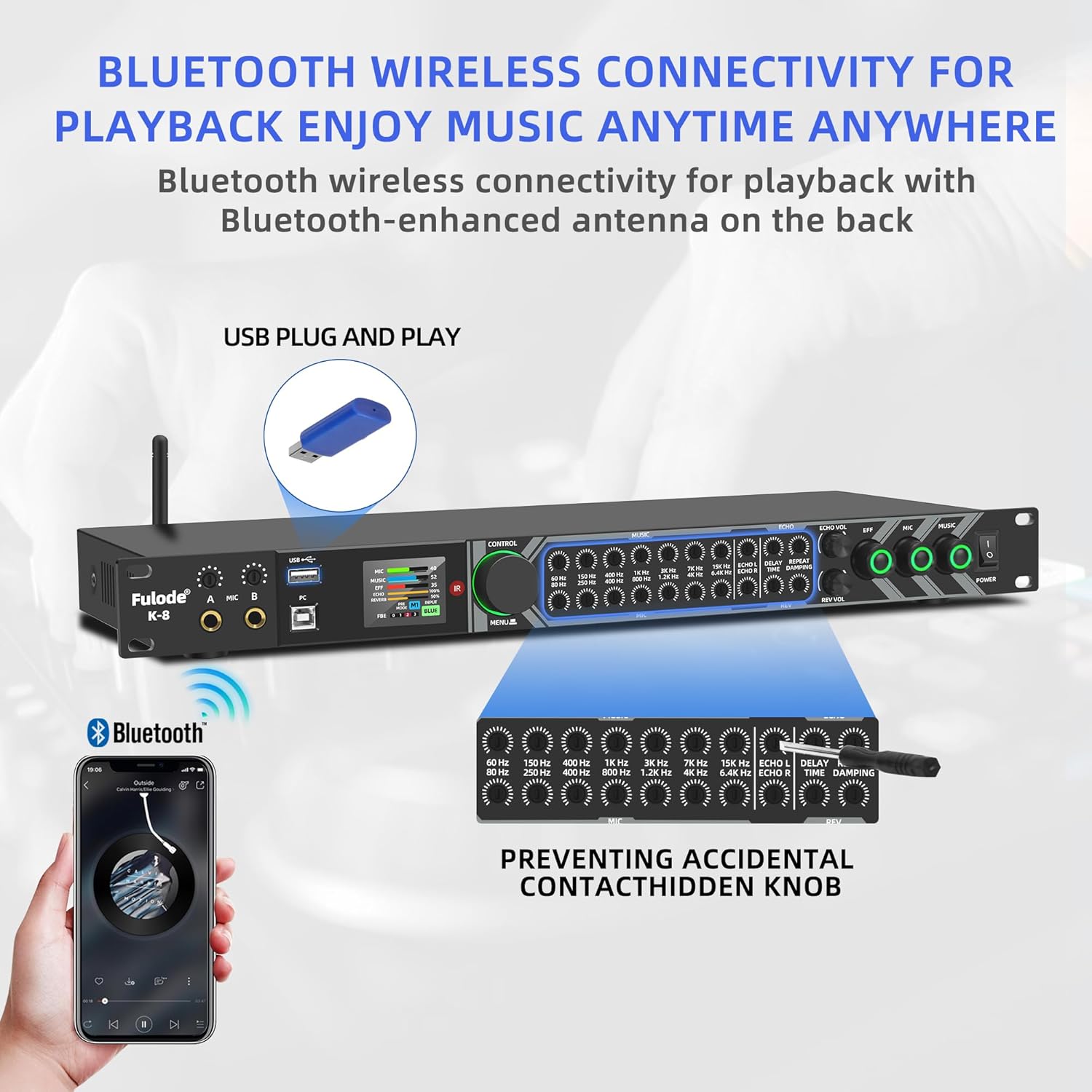
Image: Illustration of Bluetooth wireless connectivity with a smartphone and USB plug-and-play functionality on the front panel.
5.3 Speaker/Amplifier Connection
Connect the K-8's outputs to your power amplifier and speakers. The rear panel provides XLR outputs for main channels (Left/Right), subwoofer, and center speaker, as well as RCA outputs.
Video: Usage Guide of AX-666 by FULODE Official Shop. This video demonstrates the connection process for a FULODE audio processor, including microphone, Bluetooth, audio source, and amplifier connections. While the model is AX-666, the connection principles are similar to the K-8.
6. Operation
6.1 Power On/Off
Use the power switch on the front panel to turn the device on or off. The LCD screen will illuminate upon power-on.
6.2 Input Selection
Press the INPUT button on the front panel to cycle through available audio sources (AUX, Optical, Coaxial, USB, Bluetooth). The selected input will be displayed on the LCD screen.
6.3 Volume Adjustments
- Music Volume: Adjust the dedicated MUSIC VOL knob on the front panel to control the overall music playback volume.
- Microphone Volume: Adjust the dedicated MIC VOL knob on the front panel for microphone volume. Individual microphone input jacks also have their own volume controls.
- Effect Volume: Adjust the EFFECT knob to control the overall level of applied audio effects.
6.4 Equalization (EQ)
The K-8 features a double seven-segment equalization system, offering 14 balanced independent adjustments for music and microphone tones.

Image: Front panel view highlighting the seven-band equalization controls for high, low, and mid-range music, along with microphone EQ adjustments for mid, high, and bass frequencies. Also shows dual reverb adjustment and built-in sound effect modes.
- Music EQ: Use the dedicated knobs for Bass, Mid, and Treble under the 'MUSIC' section to fine-tune the music tone.
- Microphone EQ: Use the dedicated knobs for Bass, Mid, and Treble under the 'MIC' section to adjust microphone tone.
6.5 Effect Adjustments
Adjust various effects to enhance vocals and music:
- Delay: Controls the time delay of the echo effect.
- Repeat: Adjusts the number of echo repetitions.
- Reverb: Controls the depth and decay of the reverb effect.
- Exciter: Enhances vocal presence and clarity.
6.6 Anti-Howling Function
The K-8 features an intelligent three-level anti-whistling function to prevent feedback. This can be activated or adjusted via the front panel controls or software.
6.7 Computer Control
Connect the K-8 to a computer via the USB data cable to access advanced parameter adjustments through the provided software. This allows for precise customization of all audio settings.

Image: Screenshot of the computer software interface for adjusting parameters like MIC, CONCERT, REVERB equalization, connected to the FULODE K-8 via USB.
6.8 Remote Control
Use the included infrared remote control for convenient adjustment of various parameters from a distance, including volume, input selection, and effect settings.
7. Specifications
| Feature | Specification |
|---|---|
| Item Weight | 6.84 pounds |
| Package Dimensions | 21 x 11 x 3 inches |
| Item Model Number | K-8 |
| Power Source | Corded Electric (110V, US Plug) |
| Number of Channels | 12 |
| Connectivity Technology | Bluetooth, USB, Optical, Coaxial, RCA |
| Output Connector Type | RCA, XLR |
8. Troubleshooting
If you encounter issues with your FULODE K-8, please refer to the following common problems and solutions:
- No Sound Output:
- Ensure the power is on and all cables (audio input, output to amplifier/speakers) are securely connected.
- Check that the correct input source is selected on the K-8.
- Verify that all volume knobs (Music, Mic, Effect, and individual channel volumes) are turned up.
- Confirm that your amplifier and speakers are powered on and functioning correctly.
- Microphone Feedback (Howling):
- Activate the anti-whistling (FBX) function on the front panel or via software.
- Reduce the microphone volume.
- Adjust microphone position to avoid pointing directly at speakers.
- Lower the microphone's treble EQ settings.
- Bluetooth Connection Issues:
- Ensure the Bluetooth antenna is securely connected to the rear panel.
- Select 'Bluetooth' as the input source on the K-8.
- Make sure your device's Bluetooth is enabled and visible.
- Try restarting both the K-8 and your Bluetooth device.
- Distorted Sound:
- Reduce input volume from the audio source.
- Check all cable connections for damage or loose contacts.
- Adjust EQ settings to remove excessive bass or treble.
9. Maintenance
To ensure the longevity and optimal performance of your FULODE K-8, follow these maintenance guidelines:
- Cleaning: Use a soft, dry cloth to clean the exterior of the device. Avoid using liquid cleaners or abrasive materials.
- Ventilation: Ensure the device is placed in a well-ventilated area to prevent overheating. Do not block ventilation openings.
- Storage: When not in use for extended periods, store the device in a cool, dry place away from direct sunlight and extreme temperatures.
- Cable Management: Regularly check all cables for wear and tear. Replace damaged cables immediately to prevent signal loss or electrical hazards.
10. Warranty and Support
Your FULODE K-8 Professional KTV Digital Pre-stage Effector comes with a manufacturer's warranty. Please refer to the warranty card included in your package for specific terms and conditions. For technical support, troubleshooting assistance, or warranty claims, please contact FULODE customer service through the retailer where you purchased the product.