
Introduction
Thank you for purchasing the Xuevcn Q90 Bluetooth Shower Speaker. This manual provides essential information for setting up, operating, and maintaining your speaker. Please read it thoroughly before use to ensure optimal performance and longevity of the device.
Safety Information
- Do not disassemble, hit, or burn the device.
- Keep away from extreme temperatures and direct sunlight.
- Ensure the charging port cover is securely closed when using the speaker in wet environments to maintain its IPX7 waterproof rating.
- Use only the provided charging cable or a certified equivalent.
- Keep out of reach of children.
Package Contents
Verify that all items are present in your package:
- 1 x Xuevcn Q90 Bluetooth Speaker
- 1 x User Manual
- 1 x Type-C Charging Cable
- 1 x Suction Cup
Product Overview
The Xuevcn Q90 Bluetooth Shower Speaker features a compact design with intuitive controls and a vibrant RGB light show. It is equipped with a digital display for time and battery level, and a powerful suction cup for versatile placement.

Image: Front view of the Xuevcn Q90 Bluetooth Shower Speaker, highlighting its waterproof design and control buttons.
Control Buttons and Display:
- Power/Play/Pause Button: Turns the speaker on/off, plays/pauses music.
- Volume Up/Next Track Button: Increases volume, skips to the next track.
- Volume Down/Previous Track Button: Decreases volume, skips to the previous track.
- Mode Button (M): Switches between different modes (e.g., Bluetooth, TWS).
- Light Button: Changes RGB light modes.
- Call Button: Answers/ends phone calls.
- Digital Display: Shows current time and battery level.
Setup
1. Charging the Speaker
Before first use, fully charge the speaker. The speaker is powered by a 1000mAh rechargeable lithium battery.
- Locate the Type-C charging port on the speaker.
- Connect the provided Type-C charging cable to the speaker and a USB power adapter (not included).
- The digital display will indicate charging status. A full charge typically takes about 1.5 hours.
- Once fully charged, disconnect the cable and ensure the charging port cover is sealed.

Image: The speaker connected to a charging cable, displaying battery and time information.
2. Power On/Off
- To power on, press and hold the Power/Play/Pause button until the display lights up.
- To power off, press and hold the Power/Play/Pause button again until the display turns off.
3. Bluetooth Pairing
The speaker uses Bluetooth 5.3 for a stable connection.
- Ensure the speaker is powered on and in Bluetooth pairing mode (indicated by a flashing Bluetooth icon on the display).
- On your device (smartphone, tablet, PC), enable Bluetooth and search for available devices.
- Select "Q90" from the list of devices.
- Once paired, the speaker will emit a confirmation sound, and the Bluetooth icon on the display will stop flashing.
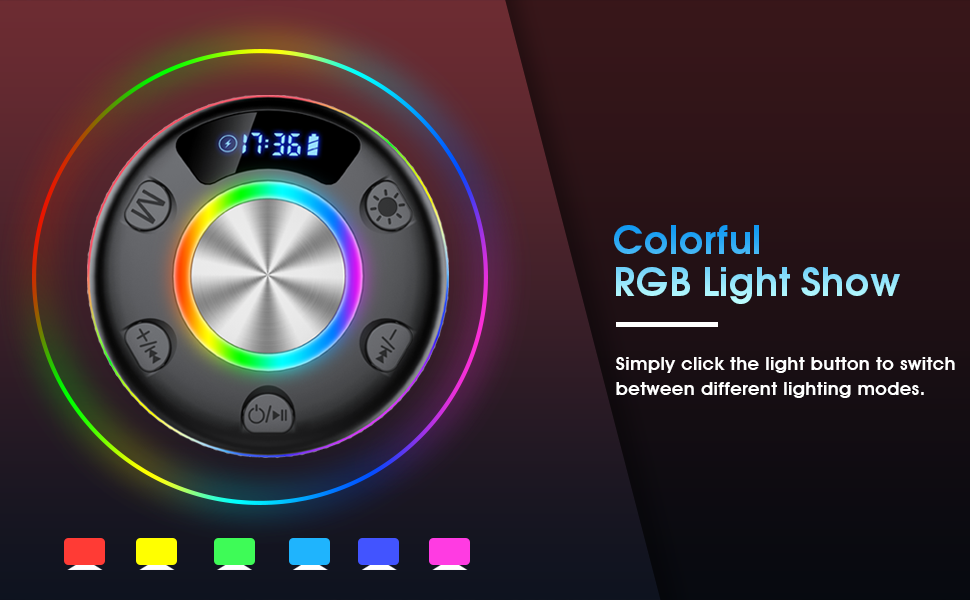
Image: Illustration of wireless pairing, demonstrating how two speakers can connect to a device for stereo sound.
4. Suction Cup Installation
The removable suction cup allows for secure attachment to smooth surfaces.
- Ensure the surface (e.g., bathroom wall, mirror) is clean and dry.
- Attach the suction cup firmly to the back of the speaker.
- Press the speaker with the attached suction cup against the desired smooth surface, applying firm pressure to remove air and create a strong seal.

Image: The speaker securely mounted on a tiled shower wall using its suction cup, demonstrating its waterproof capability.
Operating Instructions
Music Playback
- Play/Pause: Press the Power/Play/Pause button once.
- Volume Up: Short press the Volume Up/Next Track button.
- Volume Down: Short press the Volume Down/Previous Track button.
- Next Track: Long press the Volume Up/Next Track button.
- Previous Track: Long press the Volume Down/Previous Track button.
Call Management
The built-in microphone allows for hands-free calls.
- Answer Call: Press the Call button once.
- End Call: Press the Call button once during a call.
- Reject Call: Press and hold the Call button.
RGB Light Modes
The speaker features seven different color-changing themes.
- Press the Light button to cycle through different lighting modes.
- To turn off the lights, continue pressing the Light button until they are off.

Image: The speaker showcasing its colorful RGB light show, with multiple colors illuminated.
Time Display
The high-definition digital display shows the current time and battery level.
- The time is automatically synchronized when connected to a device.
- The battery level indicator is visible on the display.
True Wireless Stereo (TWS) Pairing
If you have two Xuevcn Q90 speakers, you can pair them together for a stereo sound experience.
- Ensure both speakers are powered on and not connected to any other Bluetooth device.
- On one speaker (this will be the primary speaker), press and hold the Mode (M) button until you hear a pairing tone.
- The two speakers will automatically connect to each other. A confirmation tone will sound once connected.
- Now, connect your device to the primary speaker via Bluetooth as described in the "Bluetooth Pairing" section.
Maintenance
- Cleaning: Wipe the speaker with a soft, damp cloth. Do not use harsh chemicals or abrasive cleaners.
- Storage: Store the speaker in a cool, dry place when not in use. Avoid prolonged exposure to direct sunlight or extreme temperatures.
- Suction Cup Care: Periodically clean the suction cup and the surface it attaches to for optimal adhesion.
Troubleshooting
| Problem | Solution |
|---|---|
| Speaker does not power on. | Ensure the speaker is fully charged. Press and hold the Power button for a few seconds. |
| Cannot pair with Bluetooth device. | Ensure the speaker is in pairing mode. Turn off and on Bluetooth on your device. Move the speaker closer to your device. Disconnect from other Bluetooth devices. |
| Sound quality is poor or distorted. | Check the volume levels on both the speaker and your connected device. Ensure there are no obstructions between the speaker and your device. Charge the speaker if the battery is low. |
| Suction cup does not stick. | Ensure the surface and the suction cup are clean and dry. Apply firm pressure to remove air. The suction cup works best on smooth, non-porous surfaces. |
| Time display is incorrect. | The time should synchronize automatically upon Bluetooth connection. If not, try re-pairing the device. |
Specifications
| Feature | Detail |
|---|---|
| Model Name | Q90 |
| Bluetooth Version | 5.3 |
| Waterproof Rating | IPX7 |
| Battery Capacity | 1000 mAh |
| Playtime | Up to 8 hours (at 50% volume) |
| Charging Time | Approx. 1.5 hours |
| Speaker Size | 40 mm |
| Speaker Maximum Output Power | 10 Watts |
| Wireless Range | Up to 15 meters |
| Input Voltage | 5 Volts |
| Material | Plastic |
| Special Features | Built-in Microphone, Time Display, RGB LED Light, Portable, Stereo Pairing (TWS) |
Warranty and Support
The Xuevcn Q90 Bluetooth Shower Speaker comes with a limited warranty. For detailed warranty information or technical support, please refer to the contact information provided with your purchase or visit the official Xuevcn website.