
Introduction
This manual provides comprehensive instructions for the MAILANGSHI G108 Wireless Microphone System. Designed for clear and stable audio transmission, this dual handheld cordless microphone system is ideal for various applications including singing, weddings, DJ events, parties, and speeches. It features upgraded one-on-one connection technology, DSP noise reduction, and long-lasting rechargeable batteries for reliable performance.
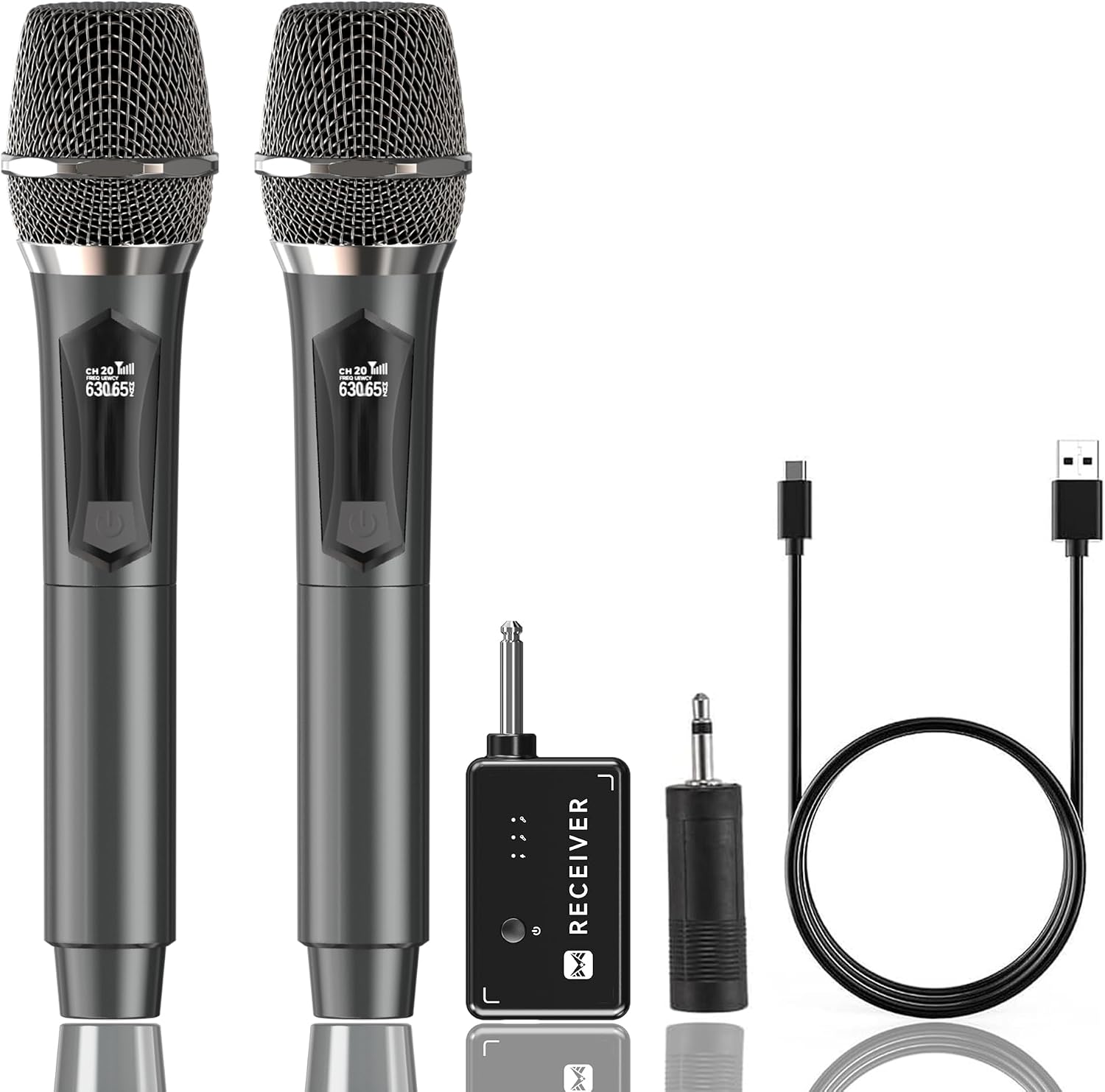
Figure 1: MAILANGSHI Dual Wireless Microphone System components.
What's in the Box
The MAILANGSHI G108 Wireless Microphone System includes the following items:
- 2 x Wireless Microphones
- 1 x Rechargeable Receiver
- 1 x USB-C Charging Cable
- 1 x 6.35mm to 3.5mm Adapter
- 2 x Anti-roll Rings (Orange and Blue)
- 2 x Microphone Foam Covers
- 1 x User Manual
Figure 2: All components included in the package.
Setup Guide
1. Charging the Devices
Both the wireless microphones and the receiver are equipped with 1200mAh rechargeable batteries and USB-C charging ports. A full charge takes approximately 3-4 hours and provides up to 50 hours of duration.
- Locate the USB-C charging port at the bottom of each microphone and on the receiver.
- Connect the provided USB-C charging cable to the devices and a suitable USB power source (e.g., wall adapter, computer USB port).
- The battery indicator light will show charging status and turn off when fully charged.

Figure 3: Microphones and receiver charging via USB-C.
2. Connecting the Receiver to an Audio Device
The system features plug-and-play functionality, requiring no software download or manual pairing. The receiver is compatible with devices that have a Mic input, such as speakers, singing machines, audio amplifiers, PA systems, mixers, and voice amplifiers. Note: Incompatible with laptops, iPads, or phones.
- Identify the microphone input port on your audio device. The receiver has a 6.35mm jack.
- If your audio device has a 3.5mm microphone input, attach the provided 6.35mm to 3.5mm adapter to the receiver before plugging it in.
- Insert the receiver firmly into the microphone input port of your audio device.
- Press and hold the power button on the receiver until the indicator lights illuminate.

Figure 4: Step-by-step guide for receiver and microphone setup.
Video 1: Official setup and connection guide for the MAILANGSHI Karaoke Microphone system.
3. Powering On the Microphones
- Press and hold the power button on each microphone.
- The microphones will automatically connect to the receiver. The indicator lights on both the microphones and receiver will show a stable connection.
Operating Instructions
1. Audio Performance
The MAILANGSHI Wireless Microphone System is designed for high-quality audio capture with minimal interference. It features a cardioid pickup pattern and DSP noise reduction technology to focus on human voices and reduce background noise, delivering warm, clear, and crisp sound.

Figure 5: Emphasizing the microphone's studio-grade sound quality and noise reduction.
2. Wireless Range and Stability
The upgraded one-on-one connection technology ensures signal stability, no delay, no radiation, anti-howling, and anti-jamming capabilities. The system offers an impressive connection range of up to 200 feet (60 meters), allowing for freedom of movement during performances or presentations.

Figure 6: Demonstrating the ultra-distance stable transmission of the microphone system.
Video 2: Detailed overview of the MAILANGSHI Wireless Microphone features and operation.
3. Dual Microphone Use
The system supports simultaneous use of both microphones, making it perfect for duets, interviews, or events requiring multiple speakers.

Figure 7: Illustrating the dual microphone functionality for shared performances.
Maintenance
1. Battery Care
To maximize battery lifespan, fully charge the microphones and receiver before first use. Recharge them when the battery indicator shows low power. Avoid completely draining the batteries for extended periods.

Figure 8: Rechargeable endurance of the microphone system.
2. Microphone Protection
The included silicone anti-drop rings prevent the microphones from rolling and provide additional protection against accidental drops. The foam covers help maintain hygiene and reduce plosive sounds.

Figure 9: Anti-roll rings and foam covers for microphone protection.
Troubleshooting
Common Issues and Solutions:
- No Sound: Ensure both microphones and receiver are fully charged and powered on. Verify the receiver is correctly plugged into the audio device's microphone input. Check the volume levels on your audio device.
- Interference/Poor Sound Quality: Move closer to the receiver. Ensure no other 2.4GHz wireless devices are causing interference nearby. Check for physical obstructions between the microphone and receiver.
- Microphone Not Connecting: Power cycle both the microphone and receiver. Ensure they are within the 200ft operating range.
For any persistent issues or further assistance, please refer to the full user manual or contact our customer service.
Technical Specifications
| Feature | Specification |
|---|---|
| Model Number | G108 |
| Brand | MAILANGSHI |
| Connectivity Technology | 2.4 GHz Wireless |
| Connector Type | 6.35 mm Jack (with 3.5mm adapter) |
| Operating Range | Up to 200 feet (60 meters) |
| Battery Type | Lithium Polymer (1200mAh) |
| Battery Duration | Up to 50 hours |
| Charging Time | 3-4 hours |
| Polar Pattern | Unidirectional (Cardioid Pickup) |
| Special Features | DSP Noise Reduction, Anti-Howling, Anti-Jamming, Anti-roll Rings |
| Dimensions (L x W x H) | 11.42 x 5.92 x 2.28 inches |
| Item Weight | 1.52 pounds |
Warranty and Support
MAILANGSHI offers a 1-year replacement warranty for this product. If you encounter any questions or issues (such as connection problems), please do not hesitate to contact our customer service team. We provide 7*24 online reply customer service to ensure your satisfaction.
Please read the manual carefully before using the product for optimal performance and to address any initial queries.