
Introduction
Thank you for choosing the Carpuride W702B Pro Motorcycle CarPlay Screen. This device is designed to enhance your riding experience by providing seamless wireless CarPlay and Android Auto integration, dual Bluetooth connectivity, intercom functionality, and essential navigation features directly on your motorcycle. This manual provides detailed instructions for installation, operation, and maintenance to ensure safe and optimal use of your device.
Safety Information
- Always prioritize road safety. Do not operate the device in a way that distracts you from riding.
- Ensure the device is securely mounted before riding.
- Do not attempt to disassemble or modify the device.
- Keep the device away from extreme temperatures and direct sunlight for prolonged periods when not in use.
- This product does not have a tire pressure monitoring system (TPMS) function.
Package Contents
Please check the package contents upon unboxing:
- 1x Motorcycle Stereo (Carpuride W702B Pro Screen)
- 1x Power Cable
- 1x USB Cable
- 1x U-shaped Support
- 1x Customized Support for BMW Bracket
- 1x User Manual

Figure 1: Contents of the Carpuride W702B Pro package.
Product Overview
The Carpuride W702B Pro is a feature-rich motorcycle display designed for convenience and safety on the road.
- 7-inch HD IPS Touch Screen: Features a 1024*600 resolution, 65K vibrant colors, and a maximum brightness of 1000 nits for clear visibility even in direct sunlight. Supports 64G TF cards for media playback.
- Wireless CarPlay & Android Auto: Seamlessly connect your smartphone for navigation, calls, music, and messaging via Siri or Google Assistant.
- Enhanced Dual Bluetooth: Allows simultaneous connection of two Bluetooth headsets/helmets for music sharing and intercom functionality between two riders.
- Intercom Function: Facilitates communication between the main rider and co-rider (effective distance approximately 10 cm).
- Light Sensing Design: Automatically adjusts screen brightness based on ambient light for eye protection and safer riding.
- Compass & Barometer: Integrated functions to help with navigation and altitude awareness during outdoor exploration.
- IP67 Waterproof & Anti-theft Design: Durable and waterproof for use in various weather conditions (-20°C to 70°C). The removable anti-theft bracket provides security.

Figure 2: Front view of the Carpuride W702B Pro screen highlighting key features.
Installation
Compatibility
The W702B Pro is specifically designed for BMW motorcycles, including models like R1200GS, R1250GS, S1000XR, and R1300GS. It comes with a customized bracket kit for easy installation.

Figure 3: Carpuride W702B Pro custom-designed for BMW Motorcycles.
Two Installation Methods
There are two primary methods for installing your Carpuride W702B Pro:
Method 1: Using an Original BMW Navigation Base
- Ensure your BMW motorcycle has an original navigation base.
- Install the provided custom BMW bracket onto the motorcycle CarPlay screen.
- Mount the assembled screen and bracket onto the original BMW navigation base.
- The installation is complete and ready for use.
Method 2: Using a Mobile Phone Holder (Universal)
- Ensure you have a mobile phone holder that is compatible in size with our motorcycle bracket.
- Install the provided bracket onto the motorcycle CarPlay screen.
- Mount the assembled screen and bracket onto your existing mobile phone holder.
- The installation is complete and ready for use.

Figure 4: Detailed steps for both installation methods.
Power Connections
The device supports two power connection methods:
- Motorcycle Power Line: When using the motorcycle's power line to power the battery, ensure the output voltage and current are 12V and 1A.
- USB Cable: If your motorcycle's USB port provides less than 4.5V, 2.5A, it is not recommended to use the USB cable, as insufficient voltage or current may cause the screen to shut down. If the USB port provides 4.5V, 2.5A or more, you can use the USB cable.

Figure 5: Power connection options for the Carpuride W702B Pro.
Operating Instructions
Wireless CarPlay and Android Auto
Connect your smartphone wirelessly to access navigation, calls, music, and more.
CarPlay Requirements:
- iPhone running iOS 6 or above.
- iPhone system version requires iOS 13 and above.
- CarPlay system and iPhone's voice system must be turned on.
- Ensure Siri is enabled.
Android Auto Requirements:
- Phone supporting 5GHz Wi-Fi and running Android 11 or above.
- Cannot turn on VPN function on mobile phone.
- Phone supporting Android Auto, Google Maps, Google Voice app must be updated to the latest version.
- Before purchasing, ensure your phone supports wireless CarPlay or wireless Android Auto.
Incompatible Phone Models:
- Samsung Series (S20, S23, Note 20, etc.)
- Huawei Series (P10 Pro, P30 lite MAR-LX1A, Mate 20, Mate 20 Pro, Mate 10, P40 Pro, P40, P30, P30 Pro, etc.)
- Xiaomi Series (Xiaomi 12 Pro, Xiaomi 11 lite, Xiaomi 9, etc.)
- Oppo Series (Oppo Reno 2, Oppo RENO2 Z, A16S, etc.)
- Galaxy A20 (Model SM-A205G), Redmi 9, M22, P smart 2019 - POT-LX1, Nova 5t, etc.

Figure 6: CarPlay and Android Auto compatibility information.
Bluetooth Connectivity (BT Trans Mode)
The W702B Pro supports connecting to Bluetooth headsets/helmets for audio output.
Single-person Connection Mode:
- Go to the "Audio Output" icon on the homepage and enter the BT Trans interface.
- Select BT Trans, turn on your cycling helmet or headset, and click "BT search" to find and pair.
- Clicking the "Disconnect" button and seeing "Connected" means the connection is successful.
- When using BT Trans output, ensure your phone is not connected to a BT headset. If it is connected, disconnect and delete the pairing records from the BT headset in the phone's Bluetooth list.

Figure 7: Single-person Bluetooth connection setup.
Two-person Connection Mode (Enhanced Dual Bluetooth):
Connect two Bluetooth headsets/helmets to the W702B Pro simultaneously for music sharing and intercom functionality between two riders.
- Music and route navigation can be shared between both headsets.
- Voice assistant commands and phone call audio can only be transmitted to Bluetooth 1. It is recommended that the main rider connects to Bluetooth 1.

Figure 8: Two-person Bluetooth connection setup.
Intercom Function
The intercom function allows communication between the main rider and co-rider when two Bluetooth headsets are connected.
- Click the audio output icon on the homepage, then select BT Trans mode. Connect both Bluetooth 1 and Bluetooth 2 simultaneously.
- Click the intercom icon on the homepage to activate intercom mode. This allows Bluetooth 1 and Bluetooth 2 to make Bluetooth calls.
Note: The effective Bluetooth distance for intercom is approximately 10 cm. This function is primarily for intercom between the main rider and co-rider on the same motorcycle.
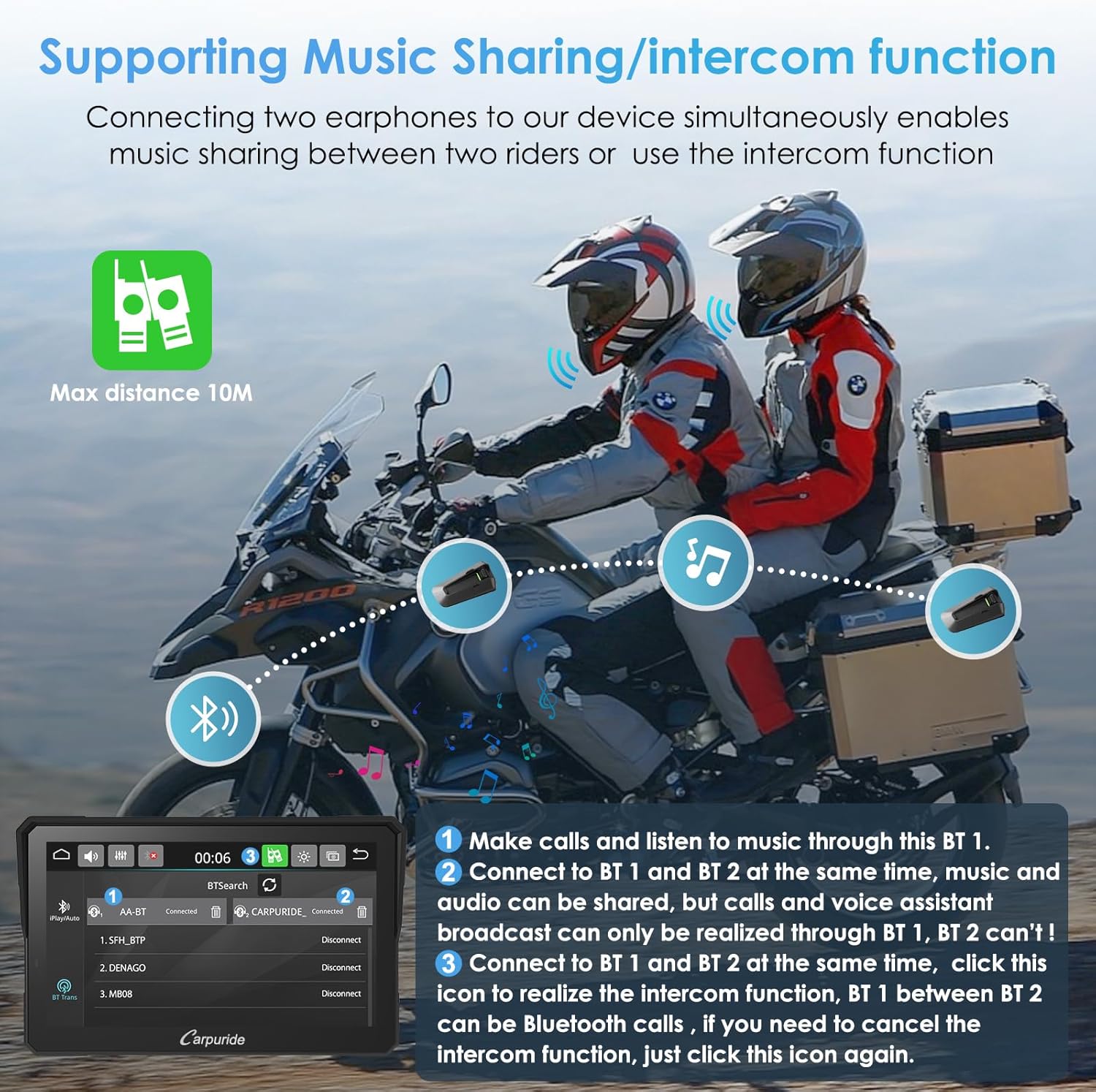
Figure 9: Intercom function in use.
Light Sensing Design
The device features a light-sensing design that automatically adjusts screen brightness based on the surrounding ambient light. This helps protect your eyes and promotes safer riding conditions.
Note: Android maps may not automatically switch to night mode. You may need to manually switch it each time the device is turned on.

Figure 10: Light Sensing Design in action.
Compass & Barometer
For outdoor riding and exploration, the integrated compass and barometer functions provide useful information to help you stay oriented and aware of altitude changes, enhancing your safety.

Figure 11: Compass and Barometer features.
TF Card Support
The device supports up to a 64GB TF card, allowing you to store and enjoy your favorite music or videos during your journey.

Figure 12: TF Card media playback.
Maintenance
Waterproof and Anti-theft Design
The Carpuride W702B Pro features an IP67 waterproof rating, ensuring normal operation even when riding in rain or under scorching sun. Its durable design allows it to function perfectly in temperatures ranging from -20°C to 70°C.
The anti-theft removable bracket design provides enhanced security and convenience, allowing you to easily detach the screen when parked.

Figure 13: IP67 Waterproof and durable design.
Cleaning
Use a soft, damp cloth to clean the screen and exterior. Avoid using abrasive cleaners or solvents that could damage the device.
Troubleshooting
- No Power/Device Shuts Down: Ensure the power connection provides sufficient voltage and current (12V 1A for motorcycle power line, or 4.5V 2.5A or more for USB).
- CarPlay/Android Auto Connection Issues:
- Verify your phone meets the minimum OS requirements (iOS 6+/13+ for CarPlay, Android 11+ for Android Auto).
- Check if your phone model is listed as incompatible.
- Ensure Wi-Fi and Bluetooth are enabled on your phone and the device.
- Disable any VPN on your mobile phone for Android Auto.
- For CarPlay, ensure Siri is enabled.
- No Sound from Headset:
- Ensure your headset is properly paired and connected to the Carpuride device (not directly to your phone if using BT Trans mode).
- In two-person connection mode, voice assistant and call audio only transmit to Bluetooth 1. Ensure the main rider is connected to Bluetooth 1.
- Android Maps Night Mode: Android maps may require manual switching to night mode each time the device is powered on. This is not a product defect.
Specifications
| Feature | Detail |
|---|---|
| Brand | CARPURIDE |
| Model Name | W702B Pro (MC-702B Pro) |
| Screen Size | 7 Inches |
| Display Type | IPS LCD |
| Resolution | 1024*600 |
| Brightness | 1000 nits (Max) |
| Connectivity Technology | Bluetooth, Wi-Fi |
| Special Features | Wireless Apple CarPlay, Wireless Android Auto, Enhanced Dual Bluetooth, Intercom Function, Light Sensing Design |
| Waterproof Rating | IP67 |
| Operating Temperature | -20°C to 70°C |
| Product Dimensions (L x W x H) | 18.2 x 4.42 x 11.4 cm |
| Weight | 940 grams |
| TF Card Support | Up to 64GB |
Warranty and Support
The Carpuride W702B Pro comes with a 1-year manufacturer's warranty.
For technical support, troubleshooting assistance, or warranty claims, please contact Carpuride customer service. Refer to the contact information provided in your product packaging or visit the official Carpuride website for support details.
Please note that spare parts availability information is not provided at this time.