
1. Introduction and Overview
This manual provides essential information for the safe and efficient operation of your Frigidaire 0.9 cu. ft. Microwave, Model EMW959. This compact countertop microwave features 900 watts of cooking power, a digital control panel with a green LED display, and various auto-cooking and defrost settings. Please read these instructions thoroughly before use and retain them for future reference.
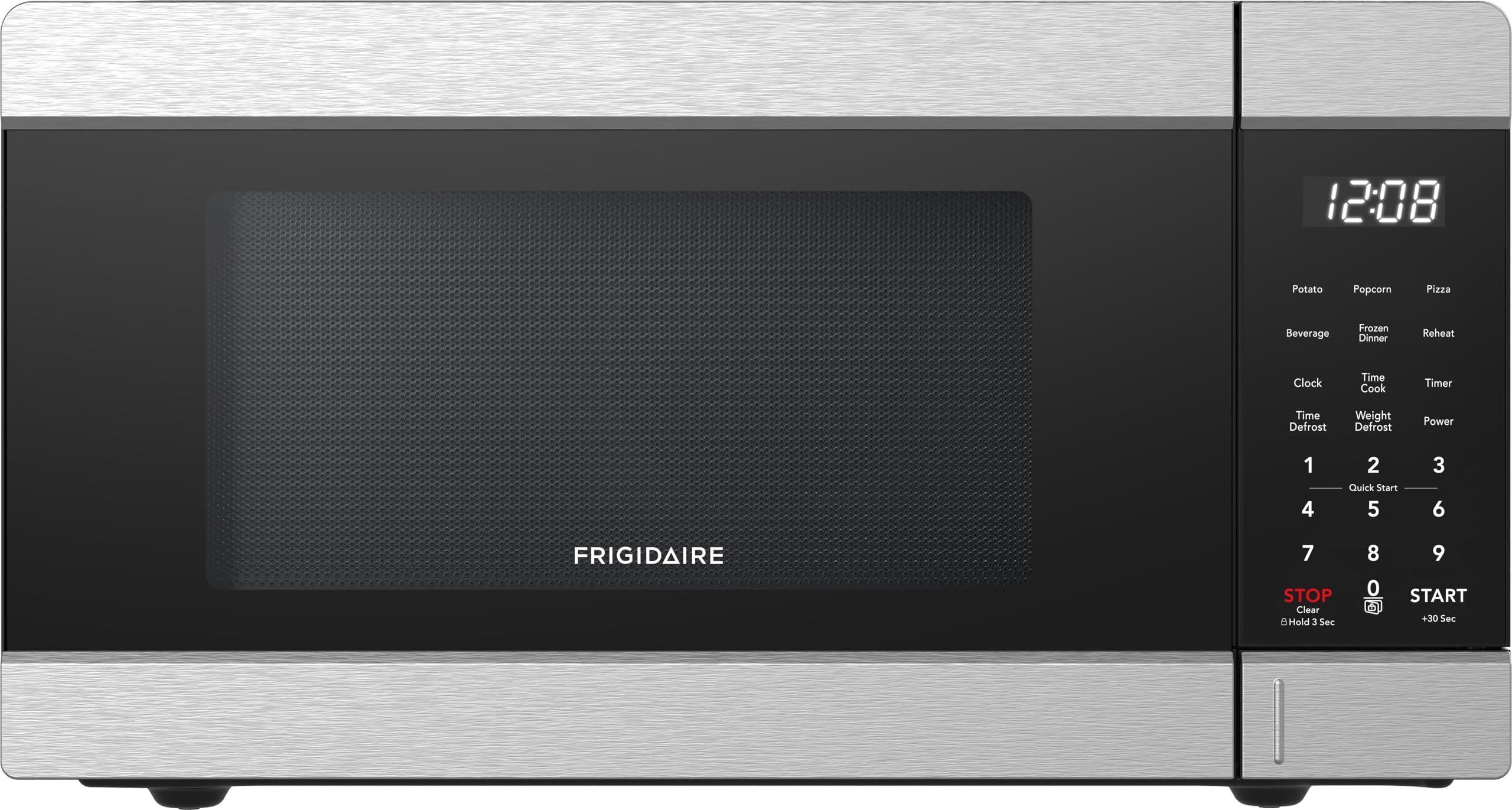
Front view of the Frigidaire 0.9 cu. ft. Microwave, highlighting its sleek stainless steel finish and digital control panel.
2. Important Safety Instructions
To reduce the risk of fire, electric shock, injury to persons, or exposure to excessive microwave energy when using your appliance, follow basic precautions, including the following:
- Read all instructions before using the appliance.
- Do not attempt to operate this oven with the door open or if the door is damaged.
- Do not place metal containers or foil in the microwave.
- Ensure proper ventilation around the unit.
- Always use caution when removing hot items from the microwave to prevent burns.
- Close supervision is necessary when the appliance is used by or near children.
3. Product Features
Your Frigidaire EMW959 microwave is equipped with several features designed for convenience and efficient cooking:
- Capacity: 0.9 Cubic Feet, accommodating various dish sizes.
- Power Output: 900 Watts for quick and effective heating.
- Digital Control Panel: Intuitive interface with a vibrant green LED display.
- Power Levels: 10 adjustable power levels for precise cooking.
- Quick Cook Menu: 6 pre-programmed settings for common foods (Potato, Beverage, Veggie, Frozen Pizza, Popcorn, Reheat).
- Express Cook: One-touch cooking for 1 to 6 minutes.
- +30 Sec Button: Adds 30 seconds to cooking time or starts quick cooking.
- Child Safety Lock: Prevents unintended operation.
- Defrost Settings: Weight Defrost and Time Defrost options.
- Digital Clock/Timer: Functions as a clock and a kitchen timer.
- Push-Button Door: Easy access to the oven cavity.

Angled view of the microwave, showcasing the digital control panel and the push-button door mechanism.
4. Setup and Installation
The Frigidaire EMW959 is designed for countertop installation. Follow these steps for proper setup:
- Placement: Place the microwave on a flat, stable surface. Ensure there is adequate space for ventilation (at least 4 inches on top, sides, and back).
- Power Supply: Plug the microwave into a standard 110-volt, 60 Hz grounded electrical outlet. Do not use an extension cord.
- Turntable Installation: Place the roller ring in the center of the oven floor. Then, place the glass turntable securely on top of the roller ring. Ensure it rotates freely.
- Initial Cleaning: Before first use, wipe the interior and exterior with a soft, damp cloth.

The Frigidaire microwave positioned on a kitchen countertop, demonstrating its compact size and integration into a kitchen environment.
5. Operating Instructions
Basic Microwave Cooking (Time Cook)
- Place food in a microwave-safe container on the turntable.
- Close the door.
- Press the TIME COOK button.
- Enter the desired cooking time using the number pads (e.g., for 1 minute 30 seconds, press 1, 3, 0).
- Press START/+30 SEC to begin cooking.
Setting Power Level
To adjust the power level during Time Cook:
- After pressing TIME COOK and entering time, press the POWER LEVEL button.
- Enter the desired power level from 1 to 10 (10 being full power).
- Press START/+30 SEC.
Express Cook
For quick cooking at full power:
- Press any number pad from 1 to 6 for instant cooking of that many minutes.
- Press +30 SEC to add 30 seconds to the current cooking time or to start cooking for 30 seconds at full power.
Setting the Clock
- Press the CLOCK button once.
- Enter the current time using the number pads (e.g., for 1:30, press 1, 3, 0).
- Press CLOCK again to confirm.
Using the Kitchen Timer
- Press the KITCHEN TIMER button.
- Enter the desired time using the number pads.
- Press START/+30 SEC. The timer will count down without microwave operation.
6. Auto Cooking Settings
The microwave features 6 pre-programmed settings for common food items:
| Setting | Description |
|---|---|
| Potato | For cooking potatoes. Select quantity (1-3). |
| Beverage | For heating beverages. Select quantity (1-3 cups). |
| Veggie | For cooking vegetables. Select weight. |
| Frozen Pizza | For heating frozen pizza. Select size. |
| Popcorn | For popping popcorn. Select bag size. |
| Reheat | For reheating food. Select weight. |
To use an auto-cooking setting, press the corresponding button, then select the quantity or size if prompted, and press START/+30 SEC.
7. Defrost Settings
Your microwave offers two defrost options:
Weight Defrost
This feature automatically sets the defrosting time and power level based on the weight of the food.
- Press the WEIGHT DEFROST button.
- Enter the weight of the food in ounces using the number pads.
- Press START/+30 SEC.
Time Defrost
This feature allows you to manually set the defrosting time.
- Press the TIME DEFROST button.
- Enter the desired defrosting time using the number pads.
- Press START/+30 SEC.
For best results, turn food over halfway through the defrosting cycle.
8. Child Safety Lock
The child safety lock prevents accidental operation of the microwave, especially by children.
- To Activate: Press and hold the STOP/CLEAR button for 3 seconds. A lock indicator will appear on the display.
- To Deactivate: Press and hold the STOP/CLEAR button for 3 seconds again. The lock indicator will disappear.
9. Care and Maintenance
Regular cleaning and maintenance will ensure the longevity and optimal performance of your microwave.
- Interior: Wipe the interior cavity after each use with a soft, damp cloth and mild detergent. Avoid abrasive cleaners.
- Exterior: Clean the exterior surfaces with a soft cloth and mild soap. Dry thoroughly.
- Turntable and Roller Ring: The glass turntable and roller ring can be washed in warm, soapy water or in the dishwasher. Ensure they are completely dry before placing them back in the oven.
- Door Seal: Keep the door seal clean to ensure proper closure and efficient operation.
10. Troubleshooting
If you encounter issues with your microwave, refer to the following common problems and solutions:
| Problem | Possible Cause / Solution |
|---|---|
| Microwave does not start. | Ensure the door is securely closed. Check if the unit is plugged in. Verify if the child safety lock is activated. |
| Food is not heating. | Check if the power level is set correctly. Ensure cooking time is sufficient. Verify that the food container is microwave-safe. |
| Turntable does not rotate. | Ensure the turntable and roller ring are correctly positioned and free from obstructions. |
| Oven light does not work. | The bulb may need replacement. Contact customer service for assistance. |
For persistent issues, please contact Frigidaire customer support.
11. Specifications
| Feature | Detail |
|---|---|
| Model Number | EMW959 |
| Capacity | 0.9 Cubic Feet |
| Wattage | 900 watts |
| Voltage | 110 Volts |
| Product Dimensions (D x W x H) | 13.9" x 18.9" x 11.5" |
| Item Weight | 30.5 pounds |
| Color | Stainless Steel |
| Material | Glass, Stainless Steel |
| Installation Type | Countertop |
| Included Components | Roller Ring |
12. Warranty and Support
For warranty information or to obtain service, please refer to the warranty card included with your product or visit the official Frigidaire website. You may also contact Frigidaire customer support for assistance with product operation, parts, or service inquiries.
Frigidaire Customer Support: Please refer to your product registration materials or the Frigidaire website for current contact information.


