Introduction
Thank you for choosing the TESSAN TS-1024-C-JP Power Strip. This device is designed to provide convenient and efficient power distribution for your electronic devices, whether at home, in the office, or during travel. It features multiple AC outlets and USB ports, along with safety features to ensure reliable operation.
Product Features
- Simultaneous Charging for 7 Devices: Equipped with one USB-C port, two USB-A ports, and four AC outlets, allowing you to charge multiple electronic devices concurrently.
- Space-Saving Design with Ultra-Thin Plug: The power strip features an ultra-thin plug (less than 1cm) that is thinner than standard extension cords and foldable types. This design allows easy access to power from outlets hidden behind furniture placed against walls. The cable exits from the side, minimizing interference with adjacent outlets.
- Non-Interfering Outlet Layout: The AC outlets and USB ports are arranged in a three-sided layout, ensuring neat cable management. The 5.69 cm distance between AC outlets prevents large AC adapters from interfering with each other.
- Convenient for Storage and Travel: The compact design of the power strip does not obstruct tables. It includes a tangle-resistant flat 2m extension cord that can be neatly wrapped around the main unit, making it highly portable for travel and business trips.
- Smart IC Technology: The integrated Smart IC automatically identifies connected devices and efficiently delivers the optimal current. It also provides comprehensive protection against overcurrent, overvoltage, and overheating, ensuring high-efficiency charging. The Type-C port supports a maximum output of 3A, and the USB-A ports support a maximum output of 2.4A.
Setup Instructions
- Unpack the Device: Carefully remove the TESSAN power strip from its packaging. Inspect for any visible damage.
- Choose a Location: Select a dry indoor location away from water sources, heat, and direct sunlight. Ensure the 2-meter extension cord can reach your desired power outlet without being stretched or obstructed.
- Plug into Wall Outlet: Insert the ultra-thin plug of the power strip into a standard 2-pin or 3-pin wall AC outlet. The 45-degree angled plug design helps prevent blocking adjacent outlets.
- Connect Devices: Plug your electronic devices into the available AC outlets, USB-C port, or USB-A ports. Ensure that the total power consumption of all connected devices does not exceed the maximum rated power of the power strip (refer to specifications).
- Cable Management: Utilize the wrap-around design to store any excess cable length neatly around the unit for a tidy setup.
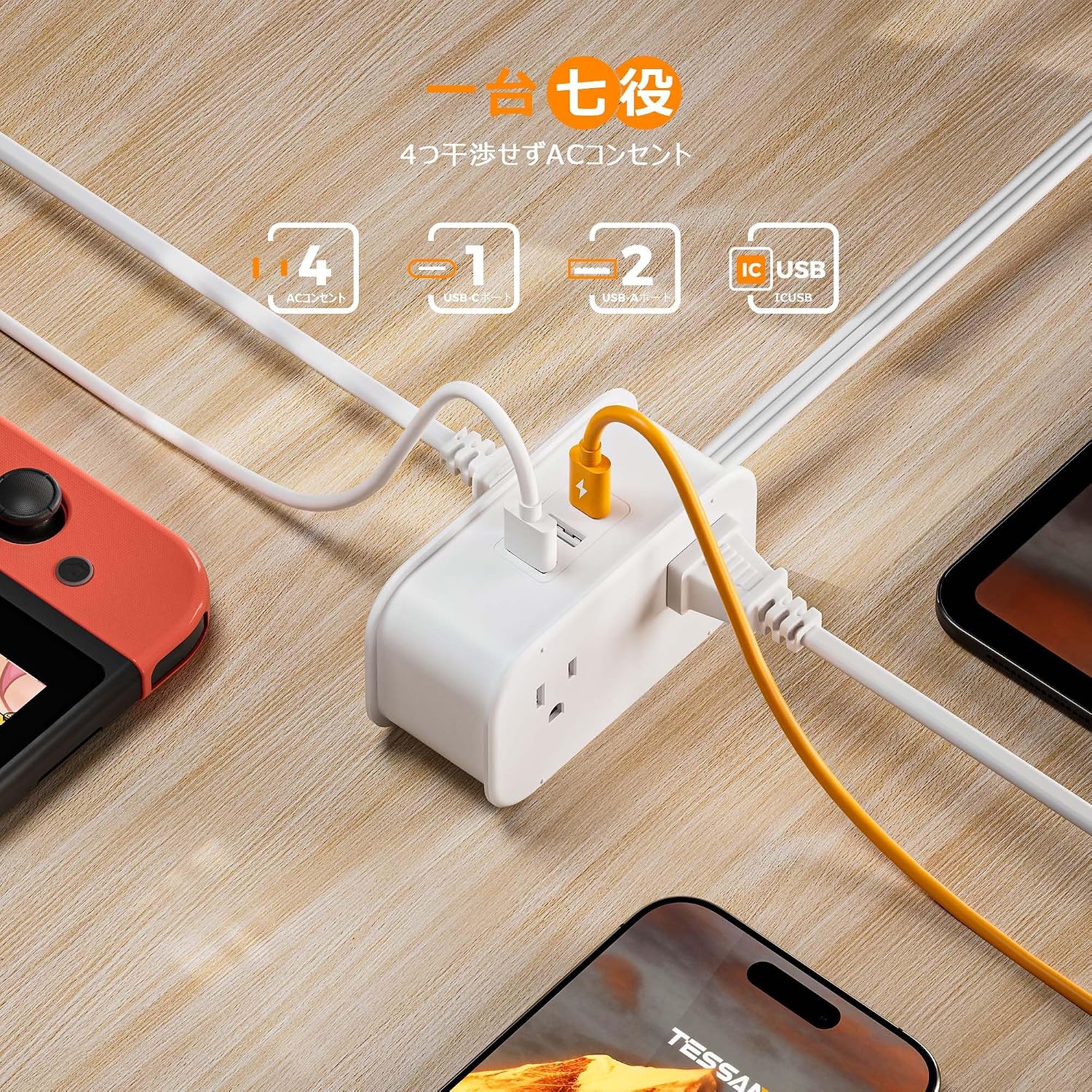
Image: The TESSAN power strip connected to a laptop, smartwatch, tablet, and smartphone, demonstrating its multi-device charging capability.

Image: A comparison showing the TESSAN power strip's 45-degree ultra-thin plug design, which allows furniture to be placed closer to the wall and avoids blocking other outlets, versus a standard plug.
Operating Instructions
- Power On: Once plugged into a live wall outlet, the power strip is ready for use. There is no separate power switch.
- Charging Devices: Connect your devices to the appropriate ports. For AC-powered devices, use the 4 AC outlets. For USB-powered devices, use the 1 USB-C port or 2 USB-A ports.
- Smart IC Functionality: The built-in Smart IC will automatically detect the connected device and deliver the optimal charging current for efficient and safe charging.
- Disconnecting Devices: To stop charging, simply unplug your devices from the power strip.
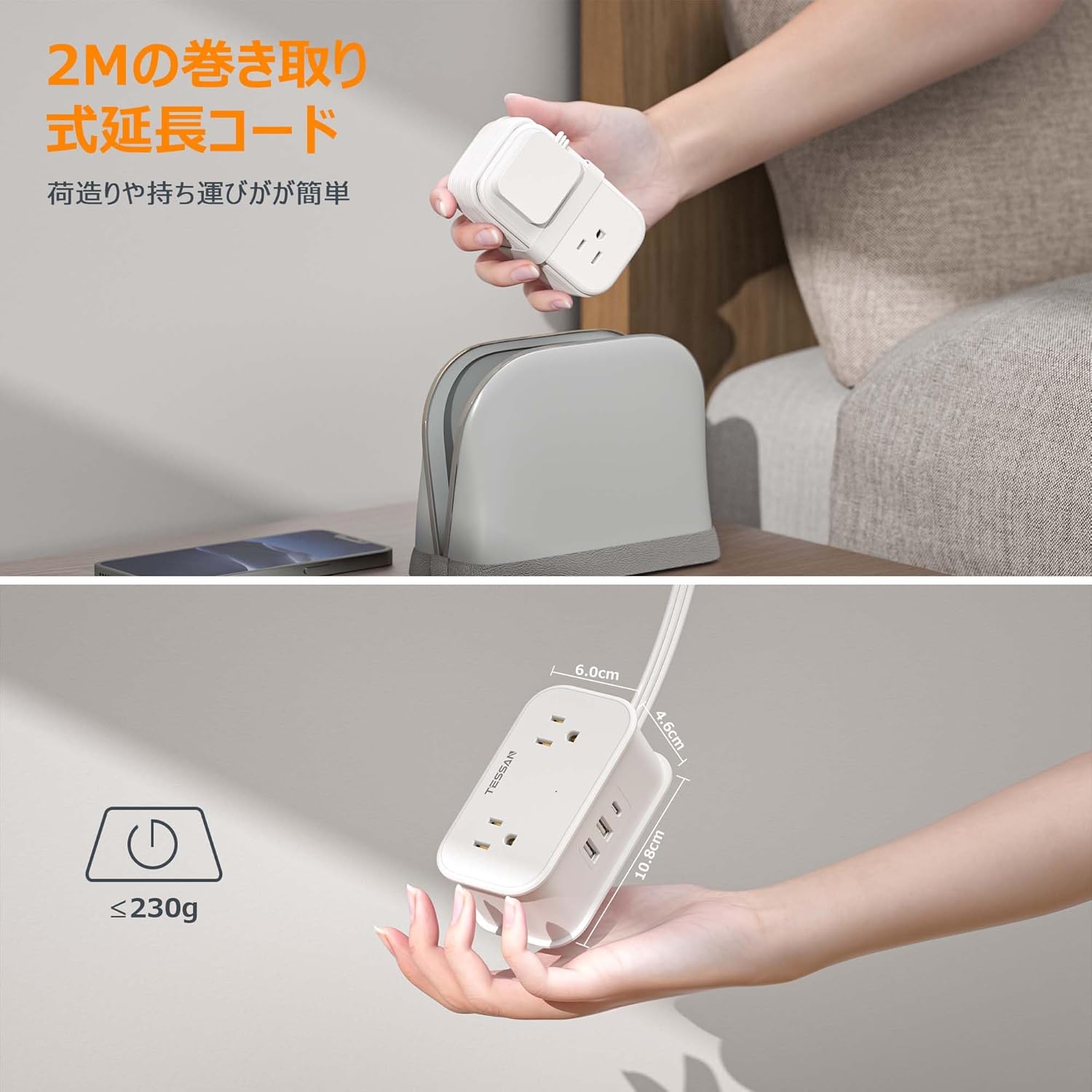
Image: A hand demonstrating how the 2-meter cord can be wrapped around the TESSAN power strip for compact storage, highlighting its portability.

Image: A close-up view of the TESSAN power strip, highlighting the USB-C port (Max 3A output) and two USB-A ports (Max 2.4A output), along with the Smart IC recognition feature.
Video: An official product video demonstrating the TESSAN power strip's features, including its compact design, multiple charging ports, and ease of use for various devices.
Safety Information
- For indoor use only. Do not expose to liquids, moisture, or extreme temperatures.
- Do not exceed the maximum rated power of the power strip. Overloading can cause overheating and potential damage.
- Do not disassemble or modify the device. Refer all servicing to qualified personnel.
- Keep out of reach of children and pets.
- Ensure the plug is fully inserted into the wall outlet. A loose connection can cause overheating.
- Do not use if the cord or plug is damaged.
- Avoid running the cord under carpets or furniture, as this can cause insulation damage and fire hazards.
Specifications
| Model Number | TS-1024-C-JP |
| Brand | TESSAN |
| AC Outlets | 4 |
| USB-C Ports | 1 (Max 3A Output) |
| USB-A Ports | 2 (Max 2.4A Output) |
| Extension Cord Length | 2 meters |
| Plug Type | Ultra-thin, 45-degree angled (2-pin/3-pin compatible) |
| Dimensions | 13.2 x 8.3 x 5.9 cm |
| Weight | 290 g |
| Color | White |
Troubleshooting
- No Power to Devices:
- Ensure the power strip is securely plugged into a working wall outlet.
- Check if the wall outlet itself is functioning by plugging in another device.
- Verify that the total power consumption of connected devices does not exceed the power strip's maximum rating. Unplug some devices if overloaded.
- Slow Charging via USB Ports:
- Ensure your device's charging cable is not damaged and is properly connected.
- The Smart IC delivers optimal current; however, some devices may have specific charging requirements.
- If multiple high-power devices are connected, the total available current might be distributed, leading to slower charging.
- Power Strip Feels Warm:
- It is normal for the power strip to feel slightly warm during operation, especially when charging multiple devices.
- If it feels excessively hot or emits a burning smell, immediately unplug it from the wall outlet and disconnect all devices. Contact customer support.
Maintenance
- Cleaning: Disconnect the power strip from the wall outlet before cleaning. Use a dry, soft cloth to wipe the surface. Do not use liquid cleaners or abrasive materials.
- Storage: When not in use, store the power strip in a cool, dry place. The integrated cord wrap feature allows for neat storage of the 2-meter cable.
- Inspection: Periodically inspect the power cord and plug for any signs of damage, such as cuts, fraying, or bent prongs. If damage is found, discontinue use and replace the unit.
Warranty and Support
TESSAN products come with a standard manufacturer's warranty. For specific warranty details, please refer to the warranty card included with your purchase or visit the official TESSAN website. If you encounter any issues or have questions regarding your TESSAN TS-1024-C-JP Power Strip, please contact TESSAN customer support through the retailer where you purchased the product or via the contact information provided on the official TESSAN website.
For more information and product updates, visit the TESSAN Brand Store.


