1. Introduction
Thank you for choosing the AITONE Wireless Page Turner (Model A-SP1). This Bluetooth foot pedal is designed to provide musicians, presenters, and readers with a hands-free solution for navigating digital content. Its versatile modes and robust design ensure a smooth and reliable experience across various applications and devices.
Please read this manual carefully to ensure proper setup and optimal performance of your device.
2. What's in the Box
- 1 x AITONE Wireless Page Turner (Model A-SP1)
- 1 x USB Charging Cable
- 1 x User Manual
3. Product Overview
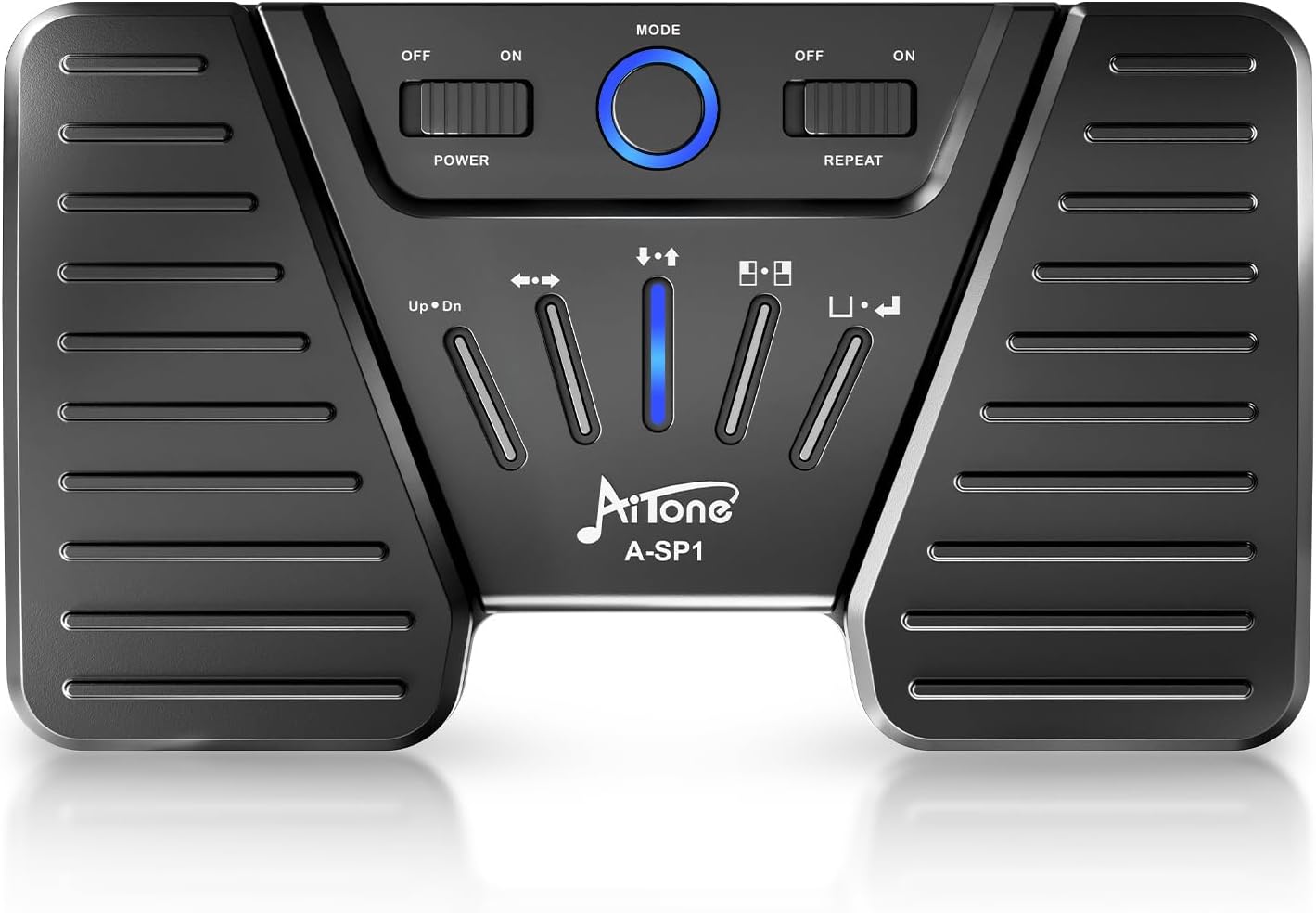
Figure 1: Top view of the AITONE Wireless Page Turner, showing the power switch, mode button, repeat switch, and pedal indicators.
The AITONE Wireless Page Turner features two large foot pedals for left and right actions. The central panel includes control switches and LED indicators:
- Power Switch: Located on the top left, slides to ON/OFF to power the device.
- Mode Button: A circular button in the center used to cycle through the five different operating modes.
- Repeat Switch: Located on the top right, slides to ON/OFF to enable or disable continuous action when a pedal is held down.
- LED Indicators: Blue lights indicate the currently selected mode and battery status.
4. Setup: Bluetooth Connection
Follow these steps to connect your AITONE Wireless Page Turner to your device via Bluetooth:
- Charge the Device: Before first use, ensure the pedal is fully charged using the provided USB cable. The LED indicator will show green (60-100%), blue (30-60%), or red (<30%) to indicate battery level. A full charge typically takes about 2 hours.
- Power On: Slide the 'POWER' switch to the 'ON' position. The blue LED indicator will begin to flicker, indicating it is in pairing mode.
- Enable Bluetooth on Your Device: On your iPad, tablet, phone, or PC, go to your device's Bluetooth settings and ensure Bluetooth is enabled.
- Pairing: Look for 'A-SP1' in the list of available devices and select it. The LED indicator on the pedal will stop flickering and remain solid blue once successfully connected.
- Connect to Another Device: If you need to connect to a different device, long-press the 'MODE' button for 3 seconds to sever the current connection and enter pairing mode again.

Figure 2: Visual guide for connecting the AITONE A-SP1 via Bluetooth.
5. Operating Modes
The AITONE Wireless Page Turner offers five distinct operating modes, each designed for specific control functions. Press the 'MODE' button to cycle through these modes. The blue LED indicators on the pedal will show the active mode.
| Mode | Pedal Left Action | Pedal Right Action |
|---|---|---|
| 1 | Page Up | Page Down |
| 2 | Left Arrow | Right Arrow |
| 3 | Up Arrow | Down Arrow |
| 4 | Left-click | Right-click |
| 5 | Space | Enter |

Figure 3: Visual representation of the 5 modes and pedal functions.
The 'REPEAT' switch, when set to 'ON', allows for continuous action when a pedal is held down. When 'OFF', each pedal press performs a single action.
Demonstration Videos:
Video 1: AITONE Bluetooth Page Turner Pedal for iPad - This video demonstrates the pedal's functionality with an iPad, showcasing page turning and mode switching.
Video 2: AITONE Wireless Page Turner Product Function - This video provides an overview of the product's various functions and how they can be utilized.
6. Charging the Device
The AITONE Wireless Page Turner is equipped with a rechargeable Lithium Ion battery, providing up to 60 hours of continuous working time on a single charge.
- Connect the provided USB charging cable to the Type-C charging port on the side of the pedal and to a 5V USB power source (e.g., computer USB port, wall adapter).
- The LED indicator will show the charging status: Green (60-100%), Blue (30-60%), Red (<30%).
- A full charge typically takes approximately 2 hours.
- If the unit shuts down automatically during use, it indicates the battery is low and needs to be recharged.

Figure 4: Charging port and battery indicator details.
7. Compatibility
The AITONE Wireless Page Turner is designed for wide compatibility with various devices and music applications, offering a hands-free experience for musicians and digital readers.
- Compatible Devices: iPad, Tablets, Android phones, iOS phones, PC, Piano, Keyboard.
- Compatible Applications: Works with various popular music apps and software that support keyboard commands (e.g., page up/down, arrow keys, space/enter). Specific app compatibility may vary, and users may need to experiment with different modes to find the optimal setting for their preferred application.

Figure 5: The AITONE A-SP1 offers wireless connectivity to various devices for hands-free operation.

Figure 6: The pedal is compatible with a wide range of sheet music reader applications.
8. Maintenance
To ensure the longevity and optimal performance of your AITONE Wireless Page Turner, follow these maintenance guidelines:
- Cleaning: Use a soft, dry cloth to clean the surface of the pedal. Avoid using alcohol or other cleaning fluids that may cause damage.
- Storage: Store the device in a cool, dry place away from direct sunlight, high temperatures, and humidity.
- Handling: Avoid violent vibration or shock to prevent internal damage.
- Non-slip Design: The pedal features a non-slip bottom design for stability during use, ensuring it remains in place on various surfaces.

Figure 7: The non-slip bottom ensures pedal stability during use.
9. Troubleshooting
If you encounter issues with your AITONE Wireless Page Turner, refer to the following common problems and solutions:
- Device Not Connecting via Bluetooth:
- Ensure the pedal is powered on and fully charged.
- Verify Bluetooth is enabled on your device.
- Long-press the 'MODE' button on the pedal for 3 seconds to reset the Bluetooth connection and re-enter pairing mode.
- If the device was previously connected to another device, ensure it is disconnected from that device before attempting to pair again.
- Pedal Not Responding in App:
- Ensure the pedal is successfully paired with your device.
- Cycle through the 5 operating modes using the 'MODE' button to find the mode that is compatible with your specific application. App compatibility can vary.
- Check the app's settings to see if it supports external keyboard commands or foot pedal input.
- Unit Shuts Down Automatically:
- This indicates a low battery level. Please recharge the device fully.
- Delayed Response:
- Ensure the pedal is within the 30ft wireless connection range.
- Minimize interference from other electronic devices.
- Some apps may have inherent delays; check app-specific settings or try a different application.
10. Specifications
| Feature | Detail |
|---|---|
| Model Number | AITONE-ASP1 |
| Item Weight | 9.2 ounces |
| Product Dimensions | 6.69 x 3.94 x 0.98 inches |
| Batteries | 1 Lithium Ion batteries required (included) |
| Battery Type | Lithium Polymer |
| Battery Life | Up to 60 hours |
| Material Type | Plastic, Metal |
| Connectivity | Bluetooth |
| Wireless Range | Up to 30 feet |
11. Warranty and Support
AITONE products are manufactured to high-quality standards. For warranty information and support, please refer to the documentation included with your purchase or visit the official AITONE store on Amazon.
For further assistance or inquiries, please contact AITONE customer support through the contact information provided on the product packaging or the official brand store.