
HiBy R4
HiBy R4 Digital Audio Player User Manual
Next-Gen HiFi DAP with Android 12, Spotify, Bluetooth, and Wi-Fi
1. Introduction
This manual provides essential information for operating your HiBy R4 Digital Audio Player. The HiBy R4 is a high-performance portable media player designed for superior audio quality, featuring an SD665 processor, Android 12 OS, and extensive connectivity options. It supports various streaming services and high-resolution audio formats, delivering an authentic HiFi experience.
2. Product Overview
Familiarize yourself with the physical components and layout of your HiBy R4.
2.1 Front View
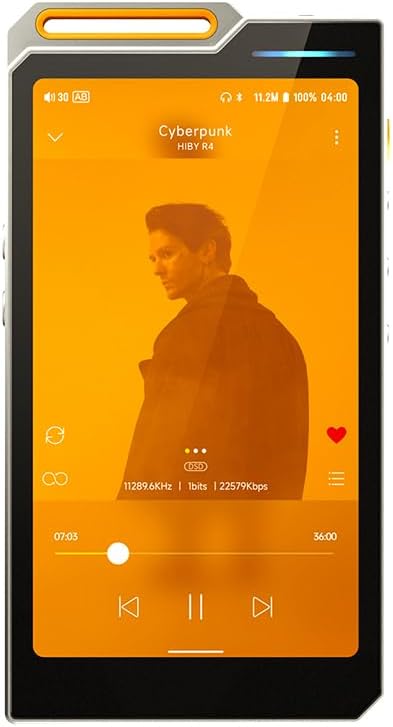
Figure 1: Front view of the HiBy R4, showing the 4.7-inch HD LCD screen with a music playback interface.
2.2 Side and Back Views

Figure 2: Side view of the HiBy R4, highlighting the power button and volume controls.

Figure 3: Back view of the HiBy R4, featuring the model number, certifications, and Hi-Res Audio logos.

Figure 4: Angled view of the HiBy R4, illustrating the 3.5mm single-ended output, 4.4mm balanced output, and Type-C port.
3. Setup
3.1 Initial Charging
Before first use, fully charge your HiBy R4 using the provided Type-C to Type-C charging and data cable. Connect the cable to the device's Type-C port and a compatible USB power adapter (not included). The charging indicator will show progress.
3.2 Power On/Off
- To power on: Press and hold the power button (located on the side) until the screen illuminates.
- To power off: Press and hold the power button, then select "Power off" from the on-screen options.
- To restart: Press and hold the power button, then select "Restart" from the on-screen options.
3.3 Inserting a Micro SD Card
The HiBy R4 supports expandable memory up to 2TB via a Micro SD card. Locate the Micro SD card slot on the device. Gently insert the Micro SD card into the slot until it clicks into place. Ensure the device is powered off before inserting or removing the card to prevent data loss.
3.4 Basic Navigation (Android 12)
The HiBy R4 operates on Android 12, offering a familiar smartphone-like interface. Use touch gestures to navigate menus, launch applications, and control playback. Swipe down from the top of the screen to access quick settings and notifications.
4. Operating Instructions
4.1 Audio Playback
- Supported Formats: The R4 supports DSD 256native, PCM768kHz/32bit, and MQA 16X unfolding for high-fidelity audio.
- Headphone Outputs: Connect your headphones to either the 3.5mm single-ended output or the 4.4mm balanced output for optimal sound.
- Bluetooth Connectivity: Utilize Bluetooth 5.0 for wireless audio with support for UAT*, LDAC, aptX, aptX HD, AAC, and SBC codecs.
- Wi-Fi Streaming: Connect to dual-band Wi-Fi (2.4GHz and 5GHz) to access streaming applications such as Spotify and Amazon Music.
- Local Storage: Play music directly from the 32GB internal storage or from an inserted Micro SD card (up to 2TB).
4.2 Android 12 OS Features
- App Installation: Download and install third-party applications from the Google Play Store or other sources.
- SRC Bypass: Enjoy pure audio quality with the SRC bypass feature, ensuring audio is processed without resampling.
- Video Playback: The device supports video playback for platforms like YouTube.
- Wireless Audio: Supports DLNA, AirPlay, and Wi-Fi song transfer for flexible audio management.
4.3 Sound Customization
The HiBy R4 incorporates advanced audio hardware for exceptional sound:
- DAC Chips: Features 4 DAC chips for enhanced audio resolution and reduced distortion.
- Amplification: Integrated Class A headphone amplifier provides powerful output and clear details.
- Circuitry: PCM/DSD dual circuitry with independent DAC, low-pass filters, and power supplies automatically adjusts for optimal audio output, reducing high-frequency noise.
5. Maintenance
5.1 Battery Care
The HiBy R4 is equipped with a 4500mAh battery for extended listening sessions. To prolong battery life, avoid extreme temperatures and fully discharge and recharge the device periodically.
5.2 Cleaning the Device
Use a soft, dry cloth to clean the exterior of the device. Avoid using harsh chemicals or abrasive materials that could damage the screen or finish.
5.3 Software Updates
Periodically check for software updates through the device's settings menu to ensure optimal performance and access to the latest features.
6. Troubleshooting
- Device not powering on: Ensure the device is fully charged. If the issue persists, try performing a hard reset (refer to the device's specific reset procedure if available, or hold the power button for an extended period).
- No audio output: Check headphone connections, volume levels, and ensure the correct output is selected in audio settings. Verify that the audio file is not corrupted.
- Bluetooth connectivity issues: Ensure Bluetooth is enabled on both the R4 and the connected device. Try unpairing and re-pairing the devices.
- Wi-Fi connection problems: Verify Wi-Fi is enabled and you are connected to the correct network. Restart the device and your router if necessary.
- Slow performance: Close unnecessary background applications. Clear cache for frequently used apps. Consider a factory reset if performance issues continue after backing up your data.
For further assistance, please visit the official HiBy support website or contact customer service.
7. Specifications
| Product Dimensions | 0.73 x 5.1 x 2.51 inches |
| Item Weight | 8.2 ounces |
| Manufacturer | HiBy |
| Model Name | Hiby R4 |
| Batteries | 1 Lithium Ion batteries required (included) |
| Connectivity Technology | Bluetooth, Wi-Fi |
| Memory Storage Capacity | 32 GB (expandable up to 2TB via Micro SD) |
| Screen Size | 4.7 Inches |
| Operating System | Android 12 |
| Audio Outputs | 3.5mm Single-ended, 4.4mm Balanced |
8. What's in the Box
- HiBy R4 Digital Audio Player
- TPU Protective Case
- 2x Front Screen Protector (1 Pre-applied)
- Type-C to Type-C Charging and Data Cable
- Warranty Card, QC Card, and User Manual
9. Official Product Videos
Watch these official videos for a visual guide to your HiBy R4.
HiBy R4 MP3 & MP4 Players Overview
This video provides an overview of the HiBy R4, showcasing its design, features, and user interface. It highlights the device's capabilities as a modern digital audio player.
HiBy R4 MP3 & MP4 Players Spotify Player with Blue
This video demonstrates the HiBy R4's functionality with streaming services like Spotify, emphasizing its seamless integration and user experience for online music playback.
HiBy R1 HiFi MP3 Player Overview (General Features)
While specifically featuring the HiBy R1, this video illustrates general features and user interface elements common across HiBy's digital audio players, which may be helpful for understanding the R4's operation.
10. Warranty and Support
Your HiBy R4 comes with a Warranty Card. Please refer to this card for detailed warranty information. For product support, FAQs, and additional resources, please visit the official HiBy website: HiBy Official Store.
Related documentsR4


Ask a question about this manual
Ask about setup, troubleshooting, compatibility, parts, safety, or missing instructions. Manuals+ will review the question and use this page’s manual context to help answer it.