
1. Introduction
This manual provides detailed instructions for the assembly, operation, and maintenance of your WLIVE 59-Inch TV Stand with LED Lights. Please read all instructions carefully before assembly and use to ensure safe and proper functionality. Keep this manual for future reference.
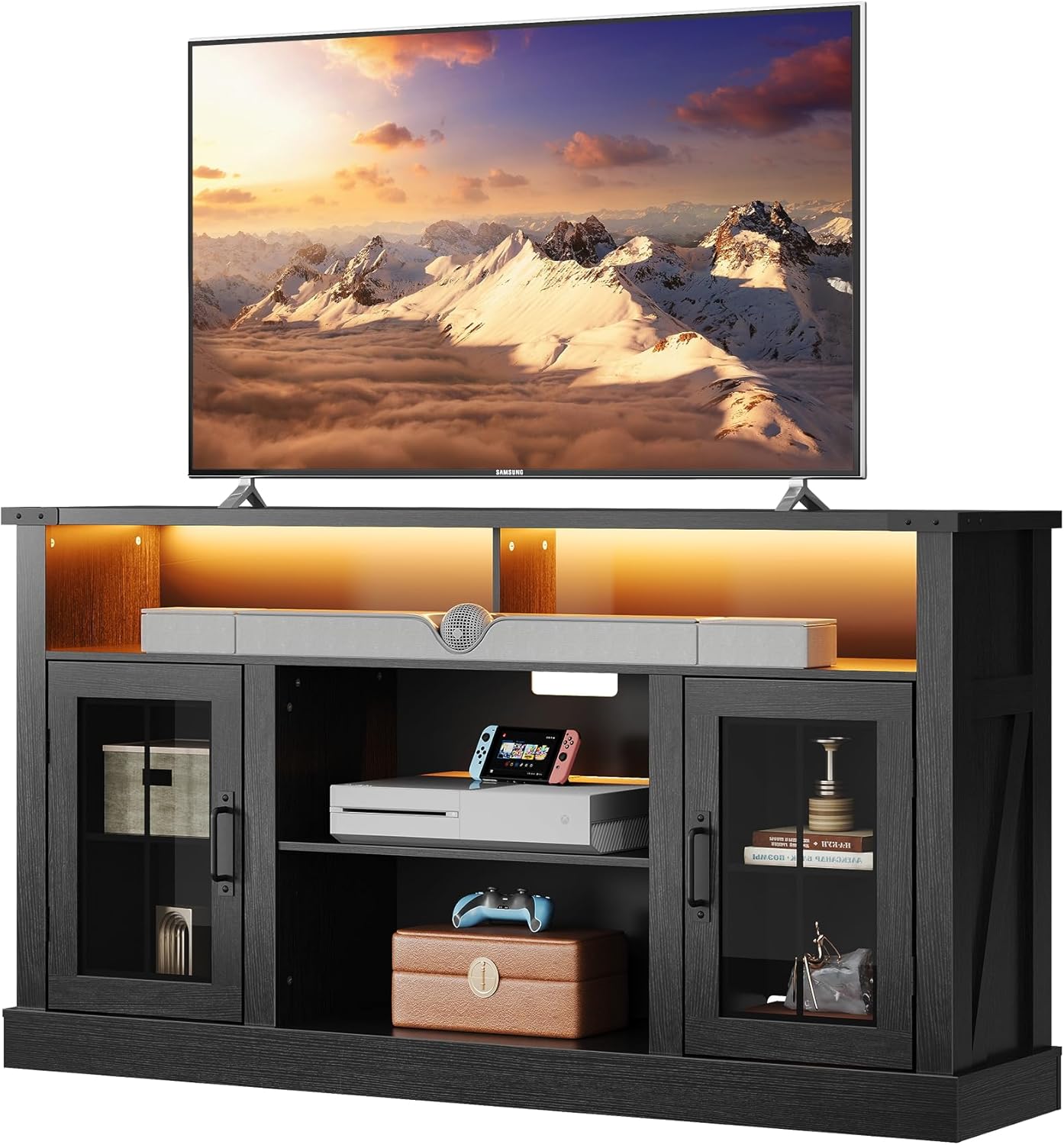
Image 1.1: The WLIVE 59-Inch TV Stand with a television, demonstrating its intended use.
2. Safety Information
- Always assemble the unit on a soft, clean surface to prevent scratches.
- Ensure all parts are securely fastened before use. Periodically check and re-tighten fasteners as needed.
- Do not overload the TV stand. Refer to the 'Specifications' section for weight capacities.
- Keep small parts and packaging materials away from children and pets to prevent choking hazards.
- Use only the provided hardware. Substituting hardware may compromise the unit's stability.
- For optimal stability, place the TV stand on a level surface.
- Two people are recommended for assembly to prevent injury and ensure proper alignment.
3. Package Contents
Before beginning assembly, verify that all components listed below are present and undamaged. If any parts are missing or damaged, please contact customer support.
- Wood Panels (various sizes for top, sides, shelves, base)
- Glass Cabinet Doors (2 units)
- Hardware Kit (screws, dowels, cam locks, hinges, handles, shelf pins)
- LED Light Strips (3 units)
- LED Remote Control (batteries not included)
- Assembly Instructions Manual
4. Assembly Instructions
Assembly typically requires two individuals. Please follow the step-by-step instructions provided in the separate assembly manual included in your package. A Phillips head screwdriver and a hammer (for dowels) are commonly required tools.
4.1 Pre-Assembly Checks
- Unpack all components and lay them out on a clean, soft surface.
- Identify each part by comparing it to the parts list in the assembly manual.
- Ensure all hardware is present.
4.2 General Assembly Steps (Refer to included manual for specifics)
- Attach cam locks and dowels to designated panels.
- Connect side panels to the base and top panels.
- Install fixed shelves and back panels.
- Assemble and attach glass cabinet doors using hinges and handles.
- Insert adjustable shelves into desired positions using shelf pins.
- Install LED light strips in the designated areas (side cabinets and central open space).

Image 4.1: Illustration of the 3-level adjustable shelves and cable management holes for organized media setup.
5. Operating Instructions (LED Lights)
The WLIVE TV Stand includes 3 LED light strips to enhance your viewing experience. These strips can be installed in the side cabinets and the central open space.
5.1 LED Light Installation
- Ensure the TV stand is fully assembled and stable.
- Carefully peel the adhesive backing from each LED strip.
- Adhere the strips to the desired locations within the side cabinets and central open shelf, ensuring they are securely attached.
- Connect the LED strips to the power adapter and plug into a standard electrical outlet.
5.2 Using the Remote Control
The included remote control allows you to customize the LED lighting. Insert 2 AAA batteries (not included) into the remote before use.
- Power Button: Turns the LED lights On/Off.
- Color Selection: Choose from 20 vibrant colors.
- Brightness Adjustment: Adjust between 5 brightness levels.
- Dynamic Modes: Select various flashing or fading modes for different effects.

Image 5.1: Overview of the LED light features and remote control functionality.
6. Maintenance and Care
6.1 Cleaning
- Wipe surfaces with a soft, damp cloth.
- Avoid using harsh chemicals, abrasive cleaners, or polishes that may damage the finish.
- For glass doors, use a standard glass cleaner and a lint-free cloth.
6.2 General Care
- Periodically check all screws and fasteners to ensure they remain tight. Re-tighten if necessary.
- Avoid exposing the TV stand to direct sunlight or extreme temperature changes, which can cause warping or fading.
- Do not place hot items directly on the surface without protective padding.
7. Troubleshooting
- LED Lights Not Working:
- Check if the power adapter is securely plugged into both the LED strip connector and the wall outlet.
- Ensure batteries in the remote control are correctly inserted and not depleted.
- Verify that the LED strips are properly connected to the controller.
- Stand Appears Unstable:
- Ensure the TV stand is placed on a flat, level surface.
- Re-check all assembly hardware to confirm they are fully tightened.
- Verify that the weight on the stand does not exceed the specified load capacities.
- Cabinet Doors Not Aligning:
- Adjust the hinges on the cabinet doors. Most hinges allow for minor adjustments to align doors horizontally and vertically.
8. Specifications

Image 8.1: Key dimensions and weight capacities of the TV stand.
| Feature | Detail |
|---|---|
| Model | WLIVE 59-Inch TV Stand |
| Dimensions (L x W x H) | 150.01 x 35 x 81 cm (59.06 x 13.78 x 31.85 inches) |
| Material | Wood (Composite), Glass, Metal Accents |
| Item Weight | 41.91 kg (92.4 lbs) |
| Desktop Load Capacity | Up to 136 kg (300 lbs) |
| Middle Shelf Load Capacity | Up to 22.7 kg (50 lbs) per shelf |
| Number of Shelves | 3 (including 2 adjustable) |
| Special Features | Adjustable Shelves, LED Lighting (RGB, 5 brightness levels, dynamic modes), Cable Management Holes |
| Color | Black |
9. Customer Support
For any questions regarding assembly, missing parts, or product functionality, please contact WLIVE customer support. Refer to your purchase documentation for specific contact information or visit the official WLIVE website.


