
WLIVE ADSG054HX
WLIVE 3-Sided Glass Electric Fireplace TV Stand User Manual
Model: ADSG054HX
Brand: WLIVE
Introduction
This manual provides comprehensive instructions for the assembly, operation, and maintenance of your WLIVE 3-Sided Glass Electric Fireplace TV Stand. Please read all instructions carefully before assembly and use to ensure safe and optimal performance of the product. This entertainment center is designed to accommodate TVs up to 65 inches and features an integrated electric fireplace with adjustable flame colors and LED lighting, along with ample storage.
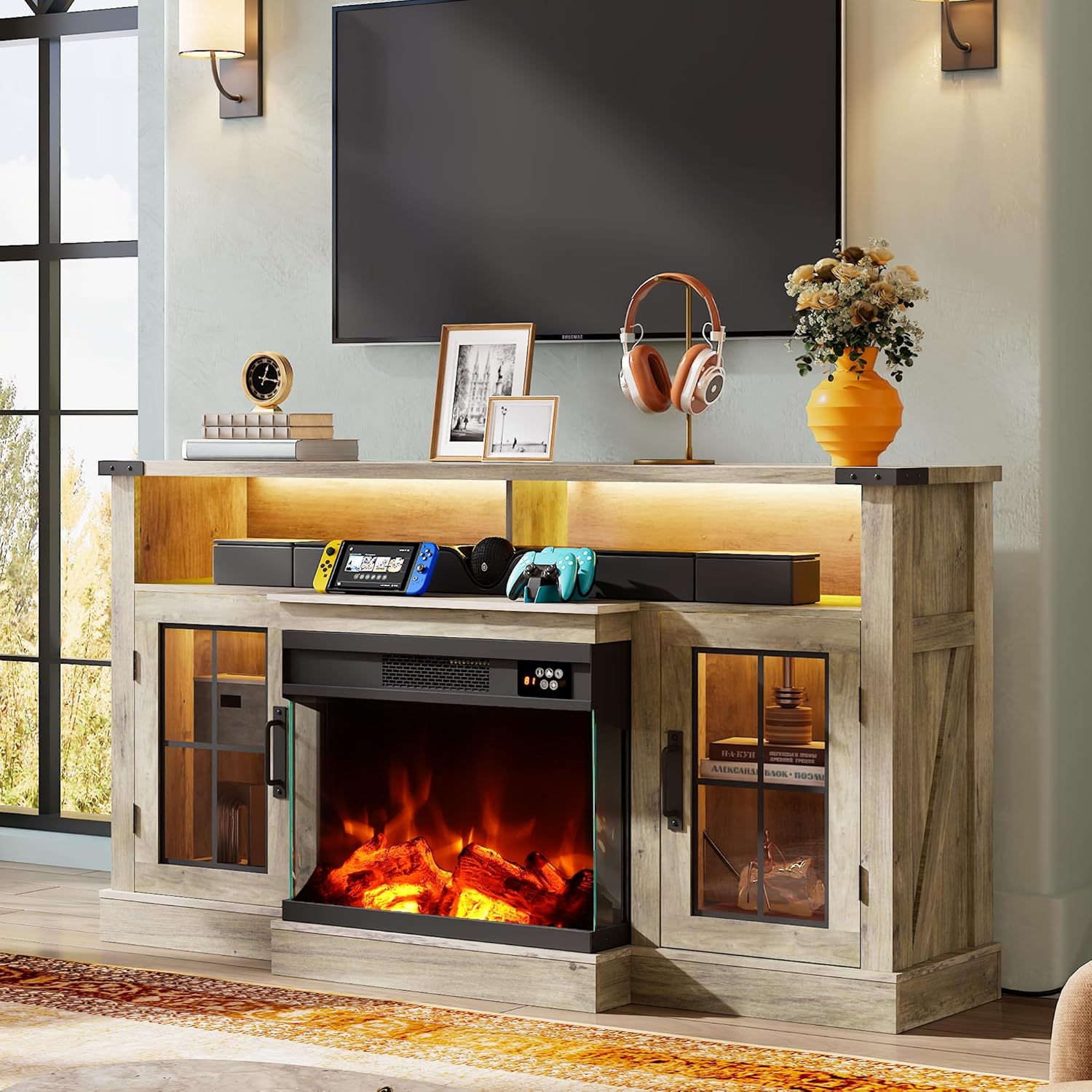
Image: The WLIVE Electric Fireplace TV Stand, showcasing its design and functionality within a living room environment.
Safety Information
Adherence to the following safety guidelines is crucial for preventing injury and damage to the product.
- Do not leave the fireplace unattended while in use.
- Allow the fireplace to cool down before touching any heated surfaces.
- Exercise caution regarding sharp edges, particularly during the assembly process.
- Keep children and pets at a safe distance from the fireplace feature during operation.
- Ensure the product is placed on a stable and level surface to prevent tipping.
- Do not overload the TV stand with weight exceeding its capacity (300 lbs).
Package Contents
Before beginning assembly, verify that all components are present and undamaged. The item will be delivered in two separate packages, which may not arrive on the same day.
- All necessary wood particle board panels for the TV stand structure.
- Electric fireplace insert (23-inch, 1500W).
- Glass doors and associated hardware.
- LED strip lights and power adapter.
- Remote control for fireplace and LED functions.
- Assembly hardware (screws, dowels, cam locks, etc.).
- Assembly tools (basic wrench/screwdriver if included).
- Instruction manual (this document).

Image: Product dimensions, TV size compatibility up to 65 inches, 300 lbs weight capacity, and indication of two-package delivery.
Setup and Assembly
The WLIVE TV stand is designed for hassle-free setup. All hardware and parts are clearly numbered for easy identification. It is recommended to assemble the unit on a soft, clean surface to prevent scratches.
- Unpack and Identify Parts: Carefully remove all components from the packaging. Lay them out and compare with the parts list provided in the separate assembly guide to ensure all pieces are present.
- Assemble the Main Frame: Follow the step-by-step instructions in the assembly guide to construct the primary structure of the TV stand. Pay attention to the orientation of panels.
- Install Shelves and Cabinets: Insert the adjustable shelves into the side cabinets. The glass-door side cabinets offer 3-level adjustability for flexible storage.
- Integrate the Fireplace Unit: Carefully slide the 23-inch electric fireplace insert into its designated opening in the center of the TV stand. Ensure it is securely seated.
- Apply LED Strip Lights: Adhere the 20-color LED strip lights to the designated areas, typically under the top open shelf, to enhance the ambiance.
- Cable Management: Utilize the 4 large cable management holes located at the rear of the unit to organize wiring for your TV, media devices, and the fireplace unit, reducing clutter.
- Final Placement: Position the assembled TV stand on a flat, stable surface. The 3-inch thickened base provides enhanced stability.

Image: Illustration of the TV stand's practical features, including cable management holes, open shelving, glass-door cabinets with adjustable shelves, and the sturdy 3-inch thickened base.
Operating Instructions
Electric Fireplace Operation
The electric fireplace offers a realistic flame simulation with customizable settings for ambiance and heating.
- Power On/Off: Use the power button on the fireplace unit or the remote control to turn the fireplace on or off.
- Flame Colors: Select from 14 different flame colors to match your mood or decor. The flame and heat can be controlled independently, allowing for year-round use of the flame effect without heat.
- Brightness Levels: Adjust the flame brightness to one of 3 available levels.
- Temperature Control: Set the desired room temperature between 62-95°F using the remote control. The 1500W heater is capable of heating up to 400 square feet.
- Timer Function: Utilize the built-in timer to set the fireplace to operate for 1 to 12 hours, ensuring worry-free relaxation and energy efficiency.
- Safety Features: The fireplace includes overheat protection, automatically shutting off if it detects overheating. It also operates with low noise.

Image: Overview of the 3D panorama electric fireplace's key features, including temperature range, timer, heating capacity, and safety mechanisms.

Image: Detailed view of the fireplace's realistic flame simulation technology, highlighting 3D surround, dynamic LED lighting, and smoke effects.
LED Strip Lights Operation
The integrated LED strip lights provide additional ambiance and can be controlled via the remote.
- Color Selection: Choose from 20 different LED colors to customize your entertainment area.
- Dynamic Modes: Select from 15 dynamic modes for various lighting effects.
- Adjustment Levels: Adjust the intensity of the LED lights with 5 different adjustment levels.
- Remote Control: The LED lights are controlled by the same remote as the fireplace, with a remote distance of up to 15 meters.

Image: Features of the integrated LED strip lights, detailing the range of colors, dynamic modes, and remote control capabilities.
Maintenance
Proper care will extend the life and appearance of your TV stand.
- Cleaning: To clean the surfaces of the TV stand, simply wipe with a damp cloth. The waterproof wooden top resists stains, allowing spills to be wiped away easily.
- Dusting: Regularly dust the unit with a soft, dry cloth to prevent buildup.
- Fireplace Unit: Ensure the fireplace unit's air intake and exhaust vents are clear of obstructions to maintain proper airflow and prevent overheating.
- Glass Surfaces: Use a glass cleaner for the fireplace glass and cabinet doors, applying it to a cloth first rather than directly to the surface.
Troubleshooting
If you encounter issues with your WLIVE Electric Fireplace TV Stand, consider the following common solutions:
- Fireplace Not Turning On:
- Ensure the power cord is securely plugged into a functional electrical outlet.
- Check if the circuit breaker has tripped.
- Verify the remote control batteries are not depleted and are inserted correctly.
- No Heat Output:
- Confirm the heat function is activated, as flame and heat can be controlled independently.
- Check if the thermostat setting is higher than the current room temperature.
- Ensure the air vents are not blocked.
- LED Lights Not Functioning:
- Verify the LED strip light power adapter is connected.
- Check remote control batteries and ensure direct line of sight to the receiver.
- Unstable Structure:
- Re-tighten all assembly screws and connections.
- Ensure the unit is placed on a completely level surface.
If these steps do not resolve the issue, please contact customer support for further assistance.
Specifications
| Model Number | ADSG054HX |
| Product Dimensions (L x W x H) | 59 x 13.8 x 31.9 inches |
| Item Weight | 92.4 pounds |
| Material | Engineered Wood |
| Color | Gray Oak |
| TV Size Compatibility | Up to 65 inches |
| Weight Capacity | 300 lbs |
| Fireplace Power | 1500W |
| Heating Area | Up to 400 sq ft |
| Fireplace Flame Colors | 14 |
| Fireplace Brightness Levels | 3 |
| LED Strip Light Colors | 20 |
| LED Dynamic Modes | 15 |
| Adjustable Shelves | Yes (3 levels) |
| Special Features | Electric Fireplace, LED Lighting, Cable Management, Overheat Protection |
Warranty and Support
WLIVE is committed to providing high-quality products and customer satisfaction. If you have any questions, concerns, or require assistance with your product, please do not hesitate to reach out to our customer support team. We are available to help you every step of the way.
For support inquiries, please refer to the contact information provided with your purchase documentation or visit the official WLIVE store on Amazon: WLIVE Store.
Related documentsADSG054HX

Ask a question about this manual
Ask about setup, troubleshooting, compatibility, parts, safety, or missing instructions. Manuals+ will review the question and use this page’s manual context to help answer it.