
1. Introduction
The TOMAHAWK TLL-S-03 Green Line Laser Level is a precision instrument designed for accurate leveling and alignment tasks in various applications, including construction, home improvement, and installation projects. This device features a highly visible green laser, self-leveling capabilities, and a durable design for reliable performance. This manual provides essential information for the safe and effective use, setup, operation, and maintenance of your laser level.
2. Safety Instructions
Always adhere to the following safety guidelines to prevent injury and ensure proper operation of the laser level.
2.1 Laser Safety
- This product is a Class 2 laser device with a power output of <1mW and a wavelength of 635nm.
- Do not stare directly into the laser beam. Direct eye exposure can cause eye injury.
- Avoid pointing the laser beam at people or reflective surfaces.
- Use the provided protective sunglasses to enhance visibility and protect your eyes when working with the laser.
- Do not attempt to disassemble or modify the laser level. Unauthorized modifications can lead to hazardous laser radiation exposure.
- Keep the device out of reach of children.
2.2 General Safety
- Ensure the work area is clear of obstructions and potential hazards.
- Operate the device within the specified temperature range (-10 to 50°C).
- Protect the device from extreme temperatures, moisture, and direct sunlight.
- The device has an IP54 rating, providing protection against dust and splashing water. However, it is not waterproof and should not be submerged.
3. Package Contents
Verify that all items listed below are included in your package:
- 1 x TOMAHAWK TLL-S-03 Green Line Laser Level
- 2 x Rechargeable Lithium-Ion Batteries
- 1 x Battery Charger
- 1 x Protective Sunglasses
- 1 x Sturdy Carry Bag (BMC box)
- 1 x User Manual

Figure 3.1: Package contents of the TOMAHAWK TLL-S-03 Green Line Laser Level.
4. Product Overview and Controls
Familiarize yourself with the components and controls of your laser level.

Figure 4.1: TOMAHAWK TLL-S-03 Laser Level Controls.
- On/Off Switch: Powers the device on or off.
- Vertical Switch: Activates or deactivates the vertical laser lines.
- Horizontal Switch: Activates or deactivates the horizontal laser line.
- Horizontal Bubble: Assists in rough manual leveling.
- Rechargeable Battery Compartment: Houses the lithium-ion batteries.
- 360° Rotation Adjustment: Allows for fine adjustment of the laser's rotational position on its base.
5. Setup
5.1 Battery Installation and Charging
- Open the battery compartment.
- Insert the two rechargeable lithium-ion batteries, ensuring correct polarity.
- Close the battery compartment securely.
- Before first use, fully charge the batteries using the provided charger. Connect the charger to the device and a power outlet. The charging indicator will show the charging status.
5.2 Mounting the Laser Level
- On a Flat Surface: Place the laser level on a stable, flat surface.
- Magnetic Base: Utilize the integrated 360° vertical/horizontal magnetic base to attach the laser level to metallic surfaces for versatile positioning.
- Tripod Mounting: The device may include a standard tripod thread for mounting on a compatible tripod (tripod sold separately).
6. Operation
6.1 Powering On/Off
Slide the On/Off switch to the 'On' position to power on the device. Slide it to 'Off' to power it down.
6.2 Self-Leveling Mode
- When powered on, the laser level automatically enters self-leveling mode.
- The device will self-level within a range of <3°.
- If the device is tilted beyond its self-leveling range, a buzzer alarm will sound, and the laser lines may flash to indicate it is out of level. Adjust the device's position until the alarm stops and the lines are stable.

Figure 6.1: Self-leveling feature and IP54 durability.
6.3 Manual Mode
To project lines at an angle, switch to manual mode. This typically involves locking the pendulum by holding down a specific button or sliding a lock switch (refer to device specific controls). In manual mode, the self-leveling function is deactivated, allowing the laser to be locked at any desired angle.
6.4 Line Selection and Brightness
- Use the Vertical Switch to activate or deactivate the vertical laser lines. The TLL-S-03 projects two vertical lines.
- Use the Horizontal Switch to activate or deactivate the horizontal laser line.
- The device features adjustable brightness for optimal visibility in various lighting conditions. Consult the device controls for brightness adjustment options.
6.5 Applications
The TOMAHAWK TLL-S-03 is suitable for a wide range of applications requiring precise alignment:
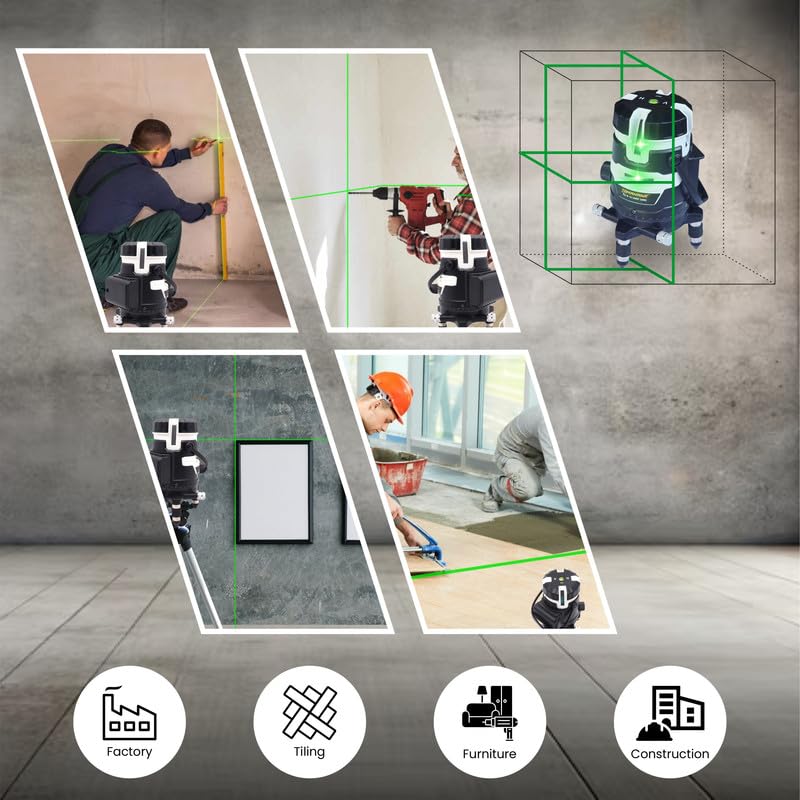
Figure 6.2: Common applications for the laser level.
- Construction: Layout, framing, and general building tasks.
- Tiling: Accurate placement of floor and wall tiles.
- Furniture Installation: Ensuring level and plumb installation of cabinets and shelves.
- Factory Use: Industrial alignment and setup tasks.
7. Maintenance
7.1 Cleaning
- Regularly clean the laser level, especially the laser output windows, with a soft, damp cloth.
- Do not use harsh chemicals, solvents, or abrasive cleaning agents.
7.2 Storage
- Store the device in its sturdy carry bag when not in use to protect it from dust, moisture, and impact.
- Store in a cool, dry place, away from direct sunlight and extreme temperatures.
- For long-term storage, remove the batteries from the device.
7.3 Calibration
While the laser level is factory-calibrated, prolonged use or severe impacts may affect its accuracy. If you suspect accuracy issues, contact customer support for information on calibration services.
8. Troubleshooting
Refer to the table below for common issues and their solutions.
| Problem | Possible Cause | Solution |
|---|---|---|
| Laser does not turn on. | Batteries are depleted or incorrectly installed. | Charge batteries fully or ensure correct polarity. |
| Laser lines are flashing or buzzer alarm sounds. | Device is outside its self-leveling range. | Adjust the device's position until it is within <3° of level. |
| Laser lines are dim. | Low battery or bright ambient light. | Charge batteries. Use protective sunglasses to enhance visibility. Adjust brightness if available. |
| Inaccurate laser lines. | Device not stable, impact damage, or out of calibration. | Ensure device is on a stable surface. If issues persist after checking stability, contact customer support for calibration. |
9. Specifications
Technical specifications for the TOMAHAWK TLL-S-03 Green Line Laser Level.
| Feature | Specification |
|---|---|
| Model | TLL-S-03 |
| Laser Wavelength | 635nm |
| Laser Class | Class 2 |
| Power Output | <1mW |
| Accuracy | ±2mm/5m |
| Line Width | 2.5mm/5m |
| Self-Leveling Range | <3° |
| Operating Temperature | -10°C to 50°C |
| IP Rating | IP54 (Dust and Water Resistant) |
| Material | Plastic |
| Operation Mode | Automatic and Manual |
| Power Source | Rechargeable Lithium-Ion Batteries |
10. Warranty Information
TOMAHAWK products are manufactured to high-quality standards. For specific warranty terms and conditions, please refer to the warranty card included with your product or contact customer support. Keep your purchase receipt as proof of purchase for any warranty claims.
11. Customer Support
If you have any questions, require technical assistance, or need to report an issue with your TOMAHAWK TLL-S-03 Green Line Laser Level, please contact our customer support team:
- Phone: 8928949415
- Email: hello@tomahawk.tools
Our team is dedicated to ensuring customer satisfaction and will assist you promptly.