1. Introduction
Thank you for choosing the Sperax Folding Electric Treadmill. This manual provides essential information for the safe and efficient operation, setup, and maintenance of your new treadmill. Please read this manual thoroughly before using the product and retain it for future reference.

Image 1.1: Sperax Folding Electric Treadmill in its upright configuration, with a user exercising.
Key Features:
- High Power Motor: Equipped with a 2.5 HP motor, supporting users up to 150 kg.
- Versatile Speed Range: Adjustable from 1 to 10 km/h, offering leisure (1-3 km/h), walking (1-5 km/h), and running (5-10 km/h) modes.
- Wider Anti-Slip Belt: Features a five-layer non-slip running belt with cushioning for joint protection.
- LED Display: Real-time display of exercise data including distance, speed, time, and calories burned.
- Remote Control: Convenient control of treadmill functions.
- Portable & Compact Design: 3-in-1 folding design requires no assembly and includes carrying wheels for easy movement and storage.
2. Safety Information
To ensure safe operation and prevent injury, please adhere to the following safety guidelines:
- Always consult with a healthcare professional before starting any new exercise program.
- Place the treadmill on a flat, stable surface, away from water and heat sources. Ensure adequate clearance around the treadmill (at least 2 meters behind and 0.6 meters on each side).
- Do not allow children or pets near the treadmill while it is in operation.
- The maximum user weight capacity for this treadmill is 150 kg. Do not exceed this limit.
- Always use the safety key/clip provided. Attach the clip to your clothing before starting the treadmill. In case of an emergency, pulling the safety key will immediately stop the treadmill.
- Wear appropriate athletic footwear and clothing. Avoid loose clothing that could get caught in moving parts.
- Do not step on or off the treadmill while the belt is moving.
- If you feel faint, dizzy, or experience pain, stop exercising immediately.
- Unplug the treadmill from the power outlet when not in use or before cleaning and maintenance.

Image 2.1: Illustration of the treadmill's shock absorption system and weight capacity.
3. What's in the Box
Upon opening the package, please verify that all components are present and undamaged:
- Sperax Folding Electric Treadmill (Main Unit)
- Remote Control
- Tool Kit
- User Manual (this document)
If any items are missing or damaged, please contact customer support immediately.
4. Setup
The Sperax Folding Electric Treadmill is designed for quick and easy setup with no assembly required. It is ready to use upon arrival.
4.1 Unfolding the Treadmill
- Carefully remove the treadmill from its packaging.
- Place the treadmill on a flat, level surface.
- To transition from the compact storage position to the upright running position, gently lift the handlebar until it locks into place. Ensure it is securely latched before use.

Image 4.1: Illustration of the treadmill's fast folding capability and compact storage options.
4.2 Power Connection
- Locate the power cord at the front of the treadmill.
- Plug the power cord into a grounded electrical outlet.
- Ensure the power switch (usually located near the power cord inlet) is in the 'ON' position.
5. Operating Instructions
Familiarize yourself with the treadmill's controls and functions before beginning your workout.
5.1 Control Panel and Remote Control
The treadmill features an integrated LED display and can be controlled via the included remote control.

Image 5.1: Overview of the LED display and safety switch.
- LED Display: Shows real-time exercise data including:
- Time: Duration of your workout.
- Speed: Current speed of the treadmill belt.
- Distance: Total distance covered during the workout.
- Calories: Estimated calories burned.
- Safety Switch: A red button on the console. Attach the safety clip to your clothing. If the clip is detached, the treadmill will stop immediately.
- Remote Control: Use the remote to start/stop the treadmill and adjust speed.
5.2 Starting a Workout
- Ensure the treadmill is properly set up and plugged in.
- Attach the safety clip to your clothing.
- Step onto the treadmill belt.
- Press the 'Start' button on the remote control or console. The treadmill will typically start at a low speed.
- Adjust the speed using the '+' and '-' buttons on the remote control to your desired pace.
5.3 Speed Modes
The Sperax treadmill offers three distinct speed modes:

Image 5.2: Visual representation of the three operational modes.
- Leisure Mode (1-3 km/h): Suitable for light activity or warm-up.
- Walking Mode (1-5 km/h): Ideal for brisk walking.
- Running Mode (5-10 km/h): For jogging or running workouts.
5.4 Ending a Workout
- Press the 'Stop' button on the remote control or console. The treadmill belt will gradually slow down and stop.
- Once the belt has completely stopped, carefully step off the treadmill.
- Remove the safety clip.
- Unplug the treadmill from the power outlet when not in use.
5.5 Folding for Storage
To fold the treadmill for compact storage:
- Ensure the treadmill is turned off and unplugged.
- Gently push down the handlebar until it folds flat against the running deck.
- Utilize the built-in carrying wheels to easily move the treadmill to your desired storage location, such as under a bed or sofa.
6. Maintenance
Regular maintenance ensures the longevity and optimal performance of your treadmill.
6.1 Cleaning
- Always unplug the treadmill before cleaning.
- Wipe down the console and exterior surfaces with a soft, damp cloth. Avoid abrasive cleaners or solvents.
- Periodically vacuum underneath the treadmill to remove dust and debris that may accumulate.
6.2 Belt Lubrication
The running belt requires periodic lubrication to reduce friction and extend its lifespan. Refer to the specific instructions provided with your lubrication kit (if included) or contact customer support for recommended lubricants and procedures. Typically, lubrication is needed every few months depending on usage.
6.3 Belt Adjustment
If the running belt starts to slip or drift to one side, it may require adjustment. Consult the detailed instructions in the full user manual (if a more comprehensive version is available) or contact customer support for guidance on how to properly tension and center the belt.
7. Troubleshooting
This section addresses common issues you might encounter. For problems not listed here, please contact customer support.
| Problem | Possible Cause | Solution |
|---|---|---|
| Treadmill does not power on. | Not plugged in; power switch off; circuit breaker tripped. | Ensure power cord is securely plugged in. Check power switch. Reset household circuit breaker if necessary. |
| Treadmill stops suddenly during use. | Safety key detached; motor overheating; overloaded. | Ensure safety key is properly attached. Allow treadmill to cool down. Do not exceed maximum weight capacity. |
| Running belt slips or hesitates. | Belt too loose; insufficient lubrication. | Adjust belt tension (refer to maintenance section or contact support). Lubricate the running belt. |
| Unusual noise from treadmill. | Loose parts; motor issue; belt misalignment. | Check for and tighten any loose screws. Ensure treadmill is on a level surface. If noise persists, contact customer support. |
8. Specifications
Detailed technical specifications for the Sperax Folding Electric Treadmill (Model XM-Q2F):
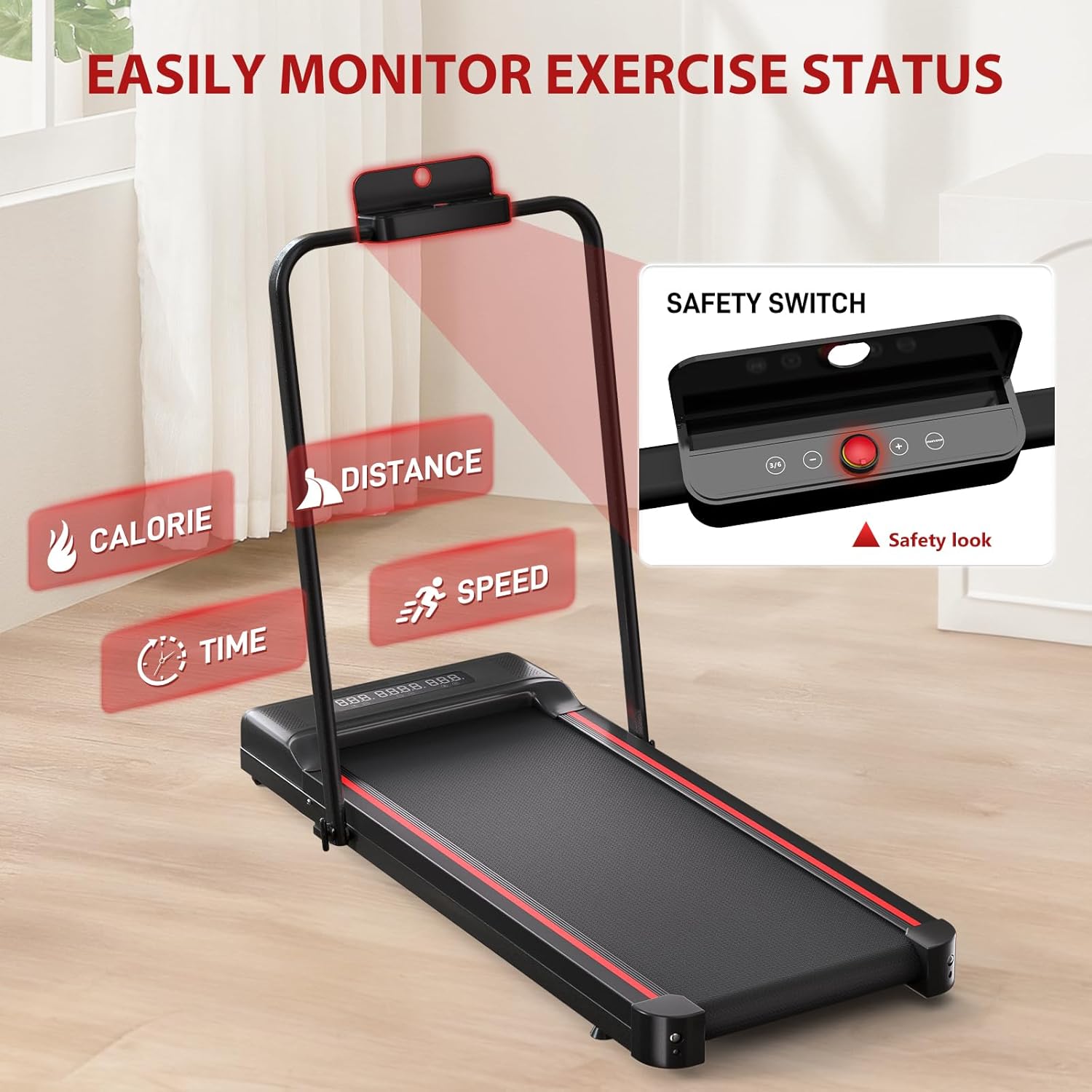
Image 8.1: Key performance specifications of the treadmill's motor.
| Specification | Value |
|---|---|
| Brand | Sperax |
| Model Name | Sperax (Model Number: XM-Q2F) |
| Colour | Black-Red |
| Product Dimensions (D x W x H) | 132.5D x 63.5W x 13H Centimeters |
| Folded Size | 66.25 x 63.5 x 13 cm |
| Item Weight | 23 Kilograms |
| Material | High Carbon Steel (Frame: Carbon Steel) |
| Maximum Horsepower | 2.5 Horsepower |
| Maximum Speed | 10 Kilometers per Hour |
| Minimum Speed | 1 Kilometers per Hour |
| Maximum Weight Recommendation | 150 Kilograms |
| Deck Width | 40 Centimetres |
| Display Type | LED |
| Metrics Measured | Calories Burned, Distance, Speed, Time |
| Power Source | Corded Electric |
| Assembly Required | No |
| UPC | 726960964410 |
9. Warranty and Support
Sperax is committed to providing high-quality products and services. While specific warranty details are not provided in this manual, if you have any questions, concerns, or require assistance with your Sperax Folding Electric Treadmill, please do not hesitate to contact Sperax customer support. Please have your product model number (XM-Q2F) and purchase information ready when contacting support.


