1. Introduction
The DJI Zenmuse H30 SP Camera Combo is an advanced, all-weather, multi-sensor camera system designed for professional applications. It integrates a high-resolution zoom camera, a wide-angle camera, an infrared thermal camera, a laser range finder, and an NIR auxiliary light. This manual provides essential information for the safe and effective operation of your Zenmuse H30 SP.
Key features include a 40MP zoom camera with 34x optical zoom and 400x digital zoom, enhanced low-light performance, and robust image stabilization for clear footage in various conditions. The system is engineered for precision and reliability in demanding environments.
2. Safety Information
Always operate the Zenmuse H30 SP in accordance with local regulations and guidelines. Failure to do so may result in property damage, injury, or legal consequences.
- Pre-Flight Checks: Ensure the camera is securely mounted and all connections are firm before operation.
- Environmental Conditions: Avoid operating in extreme weather conditions (e.g., heavy rain, strong winds, lightning).
- Battery Safety: Use only approved batteries and chargers. Follow all battery charging and handling instructions.
- Laser Safety: The laser range finder emits a laser beam. Do not stare into the laser beam or point it at people or animals.
- Maintenance: Regularly inspect the camera for any signs of damage or wear. Do not attempt to disassemble the camera.
3. What's in the Box
The DJI Zenmuse H30 SP Camera Combo package includes:
- DJI Zenmuse H30 SP Camera Unit
- All standard components and accessories included with the combo package.
4. Product Overview
The Zenmuse H30 SP features multiple integrated sensors for versatile data acquisition.

Figure 4.1: Front view of the DJI Zenmuse H30 SP Camera, showing the main lens and other sensors.
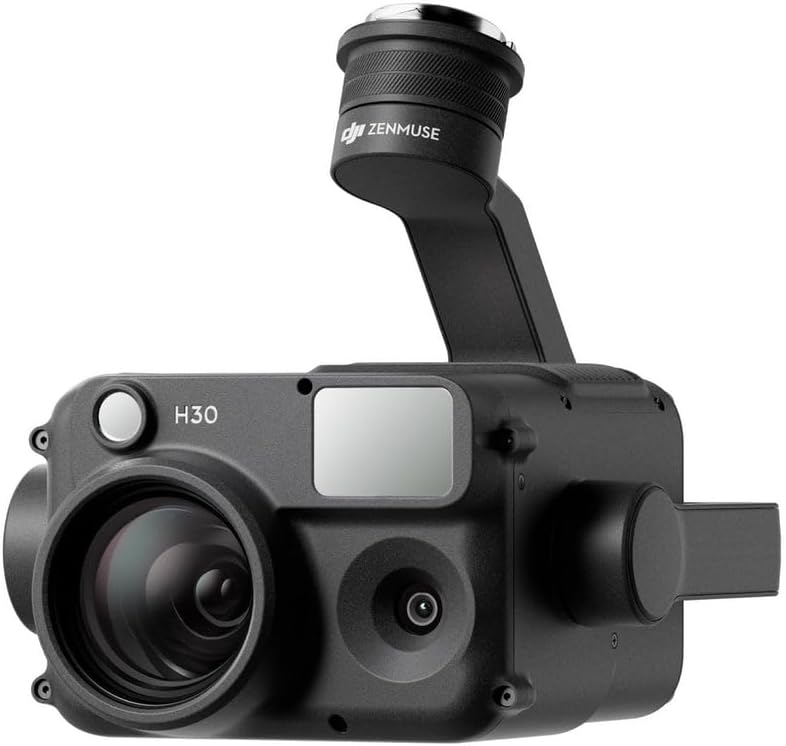
Figure 4.2: Angled front view of the DJI Zenmuse H30 SP Camera, highlighting its compact design.

Figure 4.3: Angled top view of the DJI Zenmuse H30 SP Camera, showing the gimbal connection point.

Figure 4.4: Side view of the DJI Zenmuse H30 SP Camera, illustrating its profile.

Figure 4.5: Back and top view of the DJI Zenmuse H30 SP Camera, showing the mounting interface.
The camera unit typically consists of:
- Zoom Camera: High-resolution sensor for detailed imaging at long distances.
- Wide-Angle Camera: Provides a broad field of view for situational awareness.
- Thermal Camera: Infrared sensor for thermal imaging, useful in low-light or specific inspection scenarios.
- Laser Range Finder: Measures distances to objects.
- NIR Auxiliary Light: Enhances visibility in extremely dark conditions.
- Gimbal: Stabilizes the camera for smooth footage.
5. Setup
Follow these steps for initial setup of your Zenmuse H30 SP:
- Unpacking: Carefully remove all components from the packaging.
- Gimbal Mounting: Attach the Zenmuse H30 SP to the compatible DJI drone's gimbal port. Ensure it clicks securely into place. Refer to your drone's manual for specific mounting instructions.
- Power On: Power on the drone and then the remote controller. The camera will initialize automatically.
- Firmware Update: Connect the drone and camera to the DJI Pilot 2 app. Check for and install any available firmware updates for both the drone and the Zenmuse H30 SP to ensure optimal performance and access to the latest features.
- Calibration: Perform any necessary gimbal or sensor calibrations as prompted by the DJI Pilot 2 app.

Figure 5.1: The DJI Zenmuse H30 SP camera mounted on a compatible drone during operation.
6. Operating
The Zenmuse H30 SP offers various modes and functions accessible through the DJI Pilot 2 app.
6.1 Camera Modes
- Visible Light Camera: Switch between the zoom and wide-angle lenses. Utilize the 34x optical zoom and up to 400x digital zoom for detailed inspections.
- Thermal Camera: Access thermal imaging for temperature analysis and heat signature detection. Adjust palettes and isotherms as needed.
- Split-Screen Mode: View visible light and thermal feeds simultaneously for comprehensive situational awareness.
6.2 Intelligent Functions
- Night Scene Mode: Enhances live view and recording quality in extremely low-light conditions for both visible light and thermal cameras.
- IR Illumination & NIR Support: Provides clear vision in complete darkness by utilizing infrared and near-infrared light.
- Target Tracking: Select a moving object on screen for the camera to automatically track and keep in frame.
- PinPoint: Mark a point of interest on the screen to obtain its precise coordinates.
- Smart Capture: Optimize image settings automatically based on environmental conditions.
6.3 Data Synchronization and Storage
The Zenmuse H30 SP supports enhanced data synchronization and storage. Ensure a compatible microSD card is inserted for recording photos and videos. Data can be offloaded via the DJI Pilot 2 app or by removing the microSD card.
7. Maintenance
Proper maintenance ensures the longevity and optimal performance of your Zenmuse H30 SP.
- Cleaning: Use a soft, clean, lint-free cloth to wipe the camera lenses and body. For stubborn dirt, use a lens cleaning solution specifically designed for optical surfaces. Do not use harsh chemicals.
- Storage: Store the camera in a cool, dry place, away from direct sunlight and extreme temperatures. Use the original carrying case or a dedicated protective case when transporting.
- Firmware: Regularly check for and install the latest firmware updates to ensure compatibility and access to new features.
- Inspection: Before each use, inspect the gimbal and camera for any physical damage, loose connections, or obstructions.
8. Troubleshooting
This section addresses common issues you might encounter.
| Problem | Possible Cause | Solution |
|---|---|---|
| Camera not recognized | Loose connection, outdated firmware, incompatible drone. | Ensure camera is securely mounted. Update drone and camera firmware. Verify drone compatibility. |
| Gimbal abnormal | Obstruction, calibration error, physical damage. | Check for obstructions. Recalibrate gimbal via DJI Pilot 2 app. If damaged, contact support. |
| Poor image quality | Dirty lens, incorrect settings, low light. | Clean lenses. Adjust camera settings (exposure, ISO). Use Night Scene mode in low light. |
| No video output | SD card error, recording limit reached. | Check SD card status. Format or replace SD card. Ensure sufficient storage space. |
If the issue persists, refer to the official DJI support resources or contact customer service.
9. Specifications
Detailed technical specifications for the DJI Zenmuse H30 SP Camera Combo:
| Feature | Specification |
|---|---|
| Model | CP.EN.00000531.SB |
| Dimensions | 7 x 6 x 7 inches |
| Item Weight | 7 pounds |
| Photo Sensor Technology | CMOS |
| Supported File Format | MP4 |
| Image Stabilization | Optical |
| Optical Zoom | 34x |
| Digital Zoom | Up to 400x |
| Special Features | Infrared, Enhanced Low-Light Vision, Laser Range Finder |
| Color | Black |
10. Warranty and Support
Warranty Information: The DJI Zenmuse H30 SP Camera Combo comes with a limited warranty. For detailed information regarding warranty terms, conditions, and duration, please refer to the official DJI warranty policy document available on the DJI website or contact DJI customer support.
Customer Support: For technical assistance, troubleshooting, or service requests, please visit the official DJI Support website or contact their customer service team. You can find contact information and support resources at www.dji.com/support.


