1. Introduction
This manual provides essential information for the safe and efficient operation of the DJI BS65 Intelligent Battery Station. Please read this manual thoroughly before using the product and retain it for future reference.
The DJI BS65 Intelligent Battery Station is designed as a comprehensive solution for charging, storing, and transporting TB65 and WB37 intelligent batteries. It features advanced charging modes to optimize battery life and includes integrated wheels for enhanced portability.
2. Safety Information
Always adhere to the following safety guidelines to prevent injury or damage to the product and connected devices.
General Safety Precautions:
- Do not expose the battery station to water or moisture.
- Ensure proper ventilation during operation to prevent overheating.
- Use only compatible batteries (TB65 and WB37) with this station.
- Do not disassemble or attempt to repair the battery station. Contact authorized service personnel for assistance.
- Keep out of reach of children and pets.
Charging Safety:
- Verify the input voltage (240 Volts) matches your power supply.
- The station incorporates protection features against anti-backflow, short circuit, over voltage, over current, and temperature. However, always monitor the charging process.
- Do not charge damaged or swollen batteries.
3. Product Overview
The DJI BS65 Intelligent Battery Station is designed for efficient management of DJI TB65 and WB37 batteries. It offers multiple charging ports and intelligent charging modes.

Figure 3.1: DJI BS65 Intelligent Battery Station with the top lid open, revealing the internal compartments for batteries and control panel. The station is designed for easy access to battery slots and charging indicators.
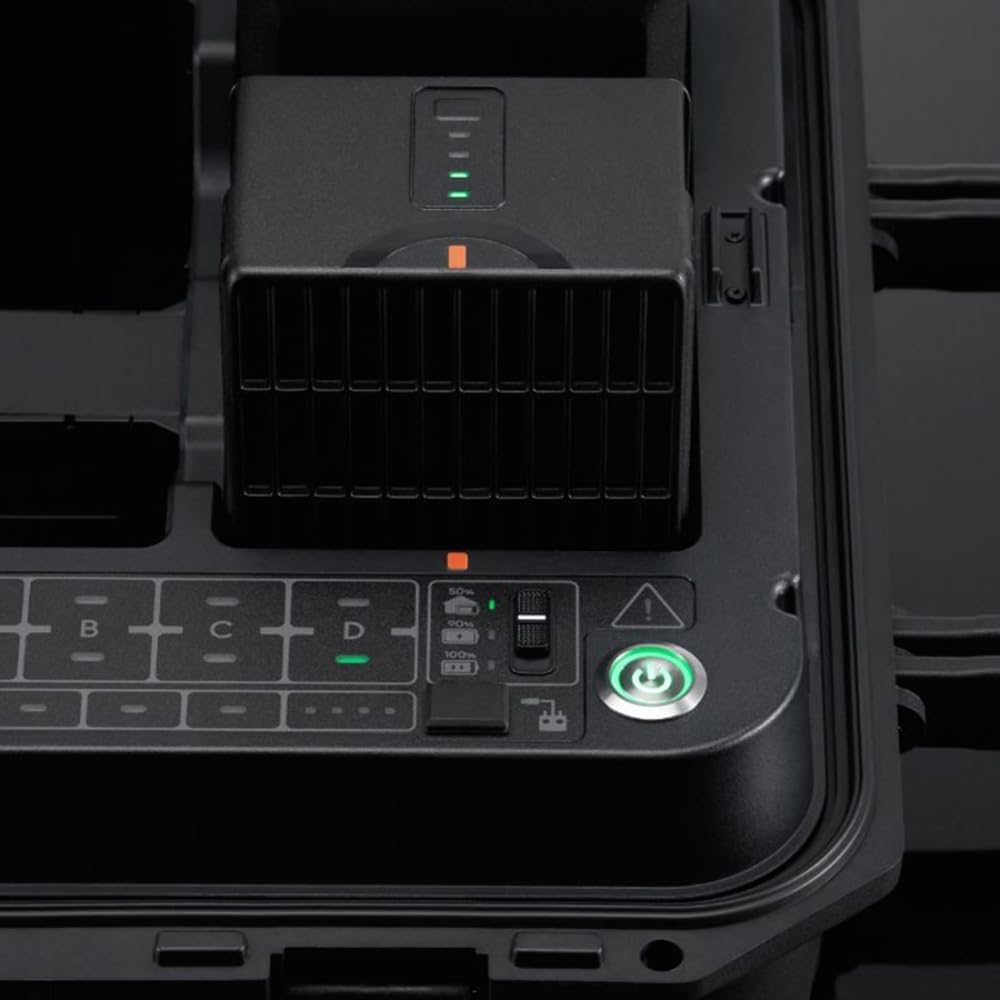
Figure 3.2: A detailed view of the control panel and a battery slot on the DJI BS65 Intelligent Battery Station. This image highlights the charging mode switch (50%/100%), battery status indicators, and the power button.
Key Features:
- Supports charging of up to eight TB65 Intelligent Flight Batteries and four WB37 Intelligent Batteries.
- Simultaneous charging of up to two TB65 batteries and one WB37 battery.
- Includes one USB-C maintenance port, one USB-C charging port, and one USB-A charging port.
- Features Storage Mode and Ready-to-Fly Mode for optimized battery management.
- Equipped with 360-degree movement wheels for convenient transportation.
- Integrated protection against anti-backflow, short circuit, over voltage, over current, and temperature.
4. Setup
Follow these steps to set up your DJI BS65 Intelligent Battery Station for first use.
- Unpacking: Carefully remove the battery station from its packaging. Inspect for any signs of damage during transit.
- Placement: Place the battery station on a stable, flat, and well-ventilated surface. Ensure there is adequate space around the unit for heat dissipation.
- Power Connection: Connect the power cable to the battery station's power input port. Plug the other end of the power cable into a compatible 240V AC power outlet.
- Initial Power On: Press the power button on the control panel to turn on the battery station. The indicator lights should illuminate.

Figure 4.1: The DJI BS65 Intelligent Battery Station in its closed, transportable state with the retractable handle extended. This configuration is used for moving the station on its integrated wheels.

Figure 4.2: Top-down view of the DJI BS65 Intelligent Battery Station when closed. This view emphasizes its compact and durable design for storage and transport.
5. Operating Instructions
5.1 Charging Batteries
- Insert Batteries: Open the lid of the battery station. Insert TB65 or WB37 batteries into their respective slots. Ensure they are securely seated.
- Select Charging Mode: Use the switch on the control panel to select the desired charging mode:
- Ready-to-Fly Mode (100%): Charges batteries to full capacity for immediate use.
- Storage Mode (50%): Charges or discharges batteries to approximately 50% for optimal long-term storage, extending battery life.
- Start Charging: The station will automatically begin charging once batteries are inserted and a mode is selected. Monitor the battery status indicators on the control panel.
- Remove Batteries: Once charging is complete (all indicator lights are solid green), carefully remove the batteries.
5.2 Using USB Ports
- USB-C Charging Port: Connect compatible devices (e.g., remote controllers, mobile devices) to this port for charging.
- USB-A Charging Port: Connect compatible devices to this port for charging.
- USB-C Maintenance Port: This port is typically used for firmware updates or diagnostics. Refer to DJI's official website for specific instructions on its use.
6. Maintenance
Regular maintenance ensures the longevity and optimal performance of your DJI BS65 Intelligent Battery Station.
- Cleaning: Use a soft, dry cloth to wipe down the exterior of the station. Do not use liquid cleaners or solvents.
- Port Inspection: Periodically inspect all ports (battery slots, USB ports, power input) for dust, debris, or damage. Use compressed air to clear any obstructions if necessary.
- Storage: When not in use, store the battery station in a cool, dry place away from direct sunlight and extreme temperatures. Ensure the lid is securely closed.
- Firmware Updates: Check the official DJI website regularly for firmware updates. Keeping the firmware updated can improve performance and add new features.
7. Troubleshooting
This section addresses common issues you might encounter with the DJI BS65 Intelligent Battery Station.
| Problem | Possible Cause | Solution |
|---|---|---|
| Station does not power on. | No power supply; power cable loose; faulty power outlet. | Ensure power cable is securely connected. Try a different power outlet. Verify input voltage. |
| Batteries not charging. | Batteries not inserted correctly; incompatible battery type; battery fault; charging mode not selected. | Re-insert batteries firmly. Ensure batteries are TB65 or WB37. Check battery condition. Select a charging mode (100% or 50%). |
| Charging is slow. | Too many batteries charging simultaneously; high ambient temperature. | The station charges up to two TB65 and one WB37 simultaneously. Charging speed may vary based on battery state and environmental conditions. Ensure proper ventilation. |
| Error indicator light is on. | Over-temperature, over-current, short circuit, or other internal fault. | Disconnect power, remove all batteries, wait a few minutes, then reconnect. If the error persists, contact DJI Support. |
If the issue persists after attempting the above solutions, please contact DJI customer support for further assistance.
8. Specifications
| Feature | Detail |
|---|---|
| Model | BS65 |
| Compatible Batteries | DJI TB65 Intelligent Flight Batteries, DJI WB37 Intelligent Batteries |
| Battery Capacity | 8 x TB65, 4 x WB37 |
| Simultaneous Charging | Up to 2 x TB65, 1 x WB37 |
| Input Voltage | 240 Volts |
| Ports | 1 x USB-C Maintenance, 1 x USB-C Charging, 1 x USB-A Charging |
| Weight | 8 pounds (approx. 3.63 kg) |
| Protection Features | Anti-Backflow, Short Circuit, Over Voltage, Over Current, Temperature Protection |
| UPC | 190021085657 |
9. Warranty and Support
For detailed warranty information, please refer to the warranty card included with your product or visit the official DJI website. DJI provides comprehensive customer support for its products.
Contacting Support:
- Online Support: Visit www.dji.com/support for FAQs, troubleshooting guides, and contact options.
- Service Centers: Information on authorized service centers can be found on the DJI website.
When contacting support, please have your product model (BS65) and serial number ready.


