
1. Introduction
This manual provides essential information for the safe and effective use of your BAOFENG BC-K626 Original Battery. Designed specifically for the BAOFENG K6 handheld radio, this 2600mAh high-capacity Li-Ion battery ensures extended communication time and reliable performance.

Figure 1.1: Rear view of the BAOFENG BC-K626 battery, displaying its specifications and safety warnings.
2. Product Features
- Original Equipment: Specifically designed for seamless compatibility with the BAOFENG K6 handheld radio.
- High Capacity: Features a 2600mAh capacity, providing extended talk and standby times for uninterrupted communication.
- Reliable Li-Ion Performance: Constructed with high-quality lithium-ion cells for stable output and dependable operation.
- Integrated USB-C Charging: Allows for convenient charging using a standard USB-C cable from various power sources.
- Safety Protections: Equipped with over-temperature, over-charge, and over-discharge protection mechanisms to ensure safe operation and battery longevity.
- Easy Installation: Compact and lightweight design facilitates quick and tool-free installation and removal.

Figure 2.1: Key safety protection features of the BAOFENG BC-K626 battery.

Figure 2.2: Estimated working and standby times provided by the 2600mAh battery.
3. Setup and Installation
To install the BC-K626 battery into your BAOFENG K6 handheld radio, follow these steps:
- Ensure the radio is powered off before attempting battery installation or removal.
- Align the battery with the battery compartment on the back of the BAOFENG K6 radio.
- Gently slide the battery into the compartment until it clicks securely into place. Ensure it is flush with the radio body.
- To remove the battery, locate the release latch (if present on your radio model), press it, and slide the battery out.
The compact design allows for quick and tool-free installation, making battery swaps efficient.
4. Charging Instructions
The BAOFENG BC-K626 battery features a convenient USB-C charging port. This allows for flexible charging from various power sources.
4.1. Charging Methods
You can charge the battery using any standard USB-C cable connected to:
- Wall outlets (with a USB wall adapter)
- Power banks
- Car chargers
- Laptops or desktop computers

Figure 4.1: Versatile USB-C charging options for the battery.
4.2. Charging Indicator
The battery is equipped with a charging indicator to show its charging status. Refer to the specific LED behavior for your battery model (e.g., red for charging, green for fully charged).

Figure 4.2: Location of the USB-C charging port and charging indicator lights.
5. Usage Guidelines
- Always use the battery with compatible BAOFENG K6 handheld radios.
- For optimal performance, fully charge the battery before its first use.
- Avoid completely draining the battery frequently, as this can reduce its overall lifespan.
- The 2600mAh capacity is designed to provide extended communication time, making it suitable for prolonged outdoor activities or professional use.
6. Maintenance and Storage
- Keep the battery terminals clean and free from dust or debris. Use a dry cloth for cleaning.
- Store the battery in a cool, dry place away from direct sunlight and extreme temperatures.
- If storing for extended periods, charge the battery to approximately 50-60% capacity to maintain its health. Avoid storing a fully charged or completely depleted battery.
- Do not expose the battery to water or high humidity.
7. Troubleshooting
| Problem | Possible Cause | Solution |
|---|---|---|
| Battery not charging | Loose USB-C connection; faulty cable/adapter; battery too hot/cold. | Ensure cable is securely connected. Try a different USB-C cable or power adapter. Allow battery to reach room temperature before charging. |
| Short operating time | Battery not fully charged; battery nearing end of lifespan. | Ensure battery is fully charged. If issue persists, battery may need replacement. |
| Battery not fitting radio | Incorrect battery model; improper alignment. | Verify battery model BC-K626 is compatible with your BAOFENG K6 radio. Re-align and gently push until it clicks. |
8. Specifications
| Attribute | Value |
|---|---|
| Model Number | BC-K626 |
| Battery Type | Rechargeable Li-Ion |
| Capacity | 2600mAh (19.24Wh) |
| Nominal Voltage | 7.4V |
| Charge Limit Voltage | 8.4V |
| Charging Port | USB-C |
| Item Weight | 5 ounces (approx. 141.7 grams) |
| Dimensions (L x W x H) | 4.65 x 2.6 x 1.26 inches (approx. 11.8 x 6.6 x 3.2 cm) |
| Compatibility | BAOFENG K6 Handheld Radio |
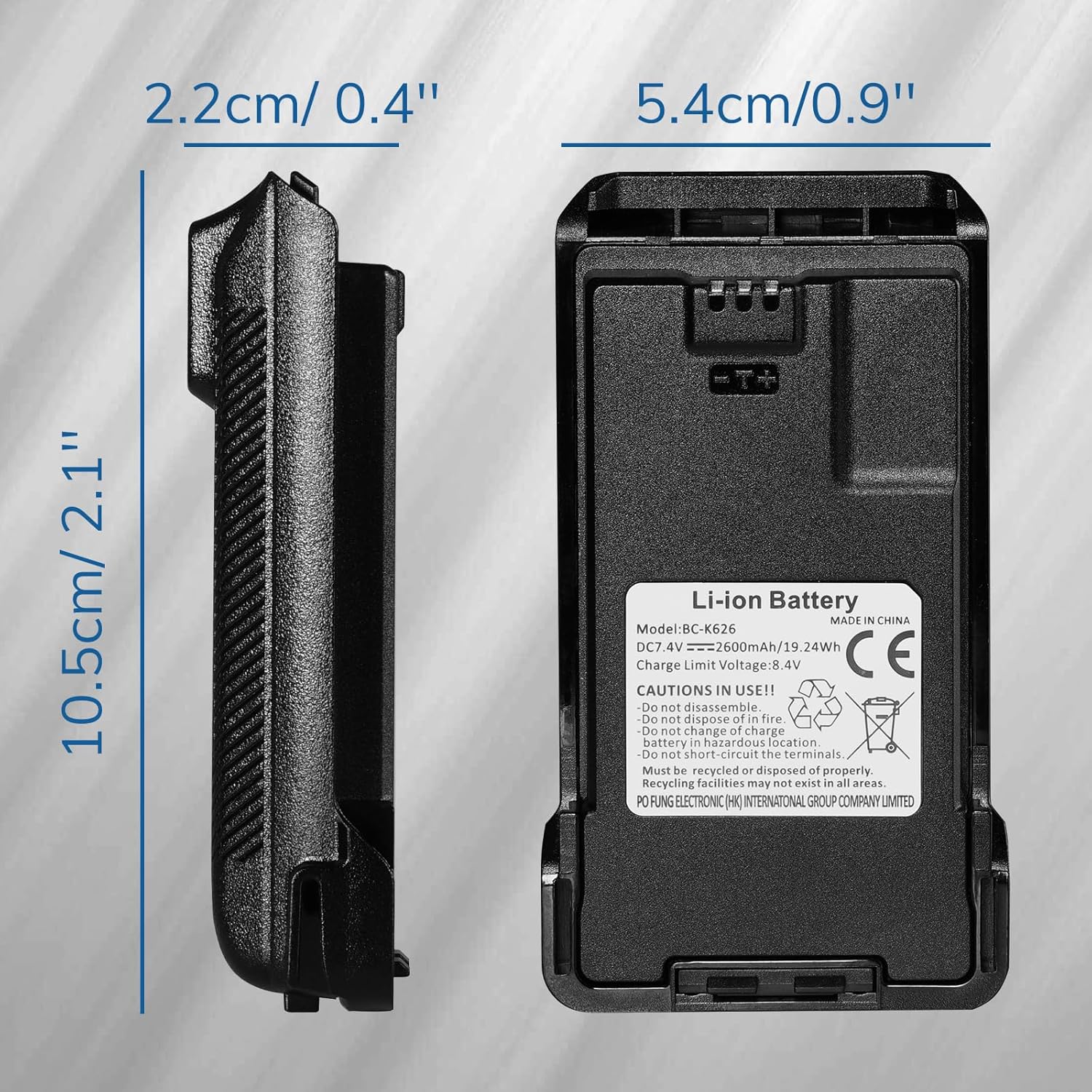
Figure 8.1: Physical dimensions of the BAOFENG BC-K626 battery.
9. Safety Information
Please observe the following cautions for safe use and disposal of the battery:
- Do not disassemble.
- Do not dispose of in fire.
- Do not change or modify the battery.
- Do not charge in a hazardous location.
- Do not short circuit the terminals.
- Must be recycled or disposed of properly. Recycling facilities may not exist in all areas.
PO FUNG ELECTRONIC (HK) INTERNATIONAL GROUP COMPANY LIMITED
10. Warranty and Support
For warranty information and technical support, please refer to the documentation provided with your original BAOFENG K6 radio or visit the official BAOFENG website. Keep your purchase receipt for warranty claims.
For further assistance, you may contact BAOFENG customer service through their official channels.