1. Introduction
The LewanSoul Robot Hand Glove is an open-source, wireless somatosensory control device designed for bionic robot manipulation. Compatible with the Arduino development environment, it allows users to control robots through hand gestures, facilitating secondary development and creative robotics projects.
2. Product Overview
The wireless glove integrates several key components to enable precise gesture sensing and control:
- Bluetooth Module: For wireless communication with compatible robots.
- Accelerometer Gyroscope Sensor: Detects hand orientation and movement.
- Potentiometers: Five high-accuracy potentiometers measure individual finger bends.
- LED Indicators: Provide status feedback.
- USB Port: For programming and data transfer.
- Power Switch: Controls device power.
- Reset Key: For restarting the device.

3. Setup
- Power On: Ensure the glove is charged or connected to a power source. Locate the power switch on the circuit board and slide it to the 'ON' position.
- Bluetooth Pairing: The glove features a built-in Bluetooth module. To establish communication, pair the glove with your robot's Bluetooth module. For optimal compatibility, ensure that non-Hiwonder robots utilize either DX-BT24 or HC-08 Bluetooth modules.
- Software Configuration: Connect the glove to your computer via the USB port. Use the Arduino IDE to upload necessary firmware and configure the glove for your specific robot application. Refer to the official LewanSoul/Hiwonder documentation for detailed programming guides and source code.

4. Operating Instructions
The LewanSoul Robot Hand Glove translates your hand and finger movements into commands for a connected robot. The 5 encoders and 1 accelerometer sensor capture detailed gesture data, which is then transmitted wirelessly.
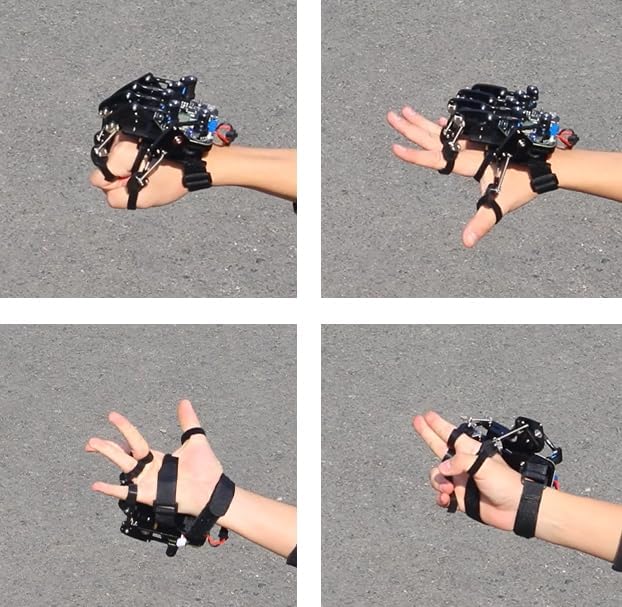
- Wear the Glove: Securely place the glove on your hand, ensuring the finger rings are properly positioned to detect bends.
- Gesture Recognition: The glove is programmed to recognize various hand gestures. These gestures correspond to specific actions or movements of the robot. For example, clenching your fist might command a robot arm to grip, while extending fingers could command it to release.
- Custom Programming: Users can customize the combination of sensor inputs through programming in the Arduino environment. This allows for tailored control schemes and advanced robot manipulation. Refer to the provided source code for examples and modification guidelines.

5. Compatibility
The LewanSoul Robot Hand Glove is designed for broad compatibility within the robotics ecosystem, particularly with Arduino-based systems.
- Arduino Development Environment: Fully compatible with Arduino, allowing for extensive customization and integration into various projects.
- Bluetooth Modules: For controlling robots not manufactured by Hiwonder, ensure they are equipped with DX-BT24 or HC-08 Bluetooth modules for seamless communication.
- Hiwonder Robots: The glove is optimized for use with a range of Hiwonder robots, including robotic arms (LeArm, xArm-ESP32, xArm2.0, xArm1S), humanoid robots (H5S), hexapod robots (Spiderbot), tank robots (Tankbot Car), and various other bionic and wheeled robots.

6. Maintenance
Proper maintenance ensures the longevity and optimal performance of your Robot Hand Glove.
- Cleaning: Gently wipe the glove's surfaces with a dry, soft cloth. Avoid using harsh chemicals or abrasive materials.
- Storage: Store the glove in a cool, dry place away from direct sunlight and extreme temperatures. Protect it from dust and moisture.
- Handling: Handle the glove with care to prevent damage to the electronic components, sensors, and mechanical linkages. Avoid dropping or subjecting it to strong impacts.
7. Troubleshooting
If you encounter issues with your LewanSoul Robot Hand Glove, consider the following troubleshooting steps:
- No Power: Ensure the glove is fully charged or properly connected to a power source. Verify the power switch is in the 'ON' position.
- Connectivity Issues:
- Confirm both the glove and the target robot's Bluetooth modules are powered on and within effective range.
- Verify that the robot's Bluetooth module is compatible (DX-BT24 or HC-08 for non-Hiwonder robots).
- Attempt to re-pair the Bluetooth connection.
- Unresponsive Gestures:
- Check your custom programming in the Arduino environment for any errors or incorrect sensor mappings.
- Ensure the finger rings are correctly positioned and the potentiometers are not obstructed.
- Calibrate the sensors if necessary, following the instructions in the provided source code documentation.
- Software/Firmware Problems: If issues persist, try re-uploading the latest firmware to the glove using the Arduino IDE. Refer to the official LewanSoul/Hiwonder website for updated software and support resources.
8. Specifications
| Feature | Detail |
|---|---|
| Product Dimensions | 4 x 1 x 5 inches |
| Item Weight | 1 pound |
| Manufacturer Recommended Age | 16 years and up |
| Connectivity | Wireless Bluetooth (DX-BT24 or HC-08 compatible) |
| Development Environment | Arduino |
9. Package Contents
The following items are included in your LewanSoul Robot Hand Glove package:
- 1x Robot Hand Glove (assembled)
- 1x 7.4V 800mA Charger
- 1x Data Cable (1000mm)
- 1x Bluetooth 4.0 Module
10. Warranty and Support
For technical support, access to schematic diagrams, source code, and a diverse selection of robot control routines, please refer to the official LewanSoul and Hiwonder resources. The manufacturer is dedicated to providing high-quality products and continuously updates resources to support your development needs.
For further assistance, visit the LewanSoul Store or contact customer service through the platform of purchase.