
1. Introduction
This manual provides essential information for the safe and effective use of your FLUENTPOWER 18V MAX 4.0Ah Lithium-Ion Battery, Model TLS1840. Please read these instructions carefully before using the battery to ensure proper operation and to prevent damage or injury.
2. Safety Information
Always observe the following safety precautions when handling and using lithium-ion batteries:
- Do not disassemble, open, or shred the battery pack.
- Do not expose the battery pack to heat or fire. Avoid storage in direct sunlight.
- Do not short-circuit a battery pack. Do not store battery packs indiscriminately in a box or drawer where they may short-circuit each other or be short-circuited by conductive materials.
- Do not remove a battery pack from its original packaging until required for use.
- Do not subject battery packs to mechanical shock.
- In the event of a battery leaking, do not allow the liquid to come into contact with the skin or eyes. If contact has been made, wash the affected area with copious amounts of water and seek medical advice.
- Do not use any charger other than that specifically provided for use with the equipment.
- Observe the plus (+) and minus (-) marks on the battery and equipment and ensure correct use.
- Keep battery packs out of the reach of children.
- Seek medical advice immediately if a battery pack has been swallowed.
- Keep battery packs clean and dry.
- Recharge battery packs only with the charger specified by FLUENTPOWER.
- Do not use any battery pack not designed for use with the equipment.
- Do not mix battery packs of different manufacture, capacity, size, or type within the same device.
- When disposing of battery packs, keep battery packs of different electrochemical systems separate from each other.
- Store the battery pack in a cool, dry place.
- Do not charge the battery in temperatures below 0°C (32°F) or above 45°C (113°F).
3. Specifications
| Battery Type | Lithium-Ion |
| Voltage | 18V MAX |
| Capacity | 4000 mAh (4.0Ah) |
| Model Number | TLS1840 |
| Battery Weight | 0.88 Pounds |
| Item Dimensions (L x W x H) | 4.5 x 3.7 x 2.9 inches |
| Reusability | Rechargeable |
| Protection Circuit | Over-current, Overcharging, Anti-discharge |
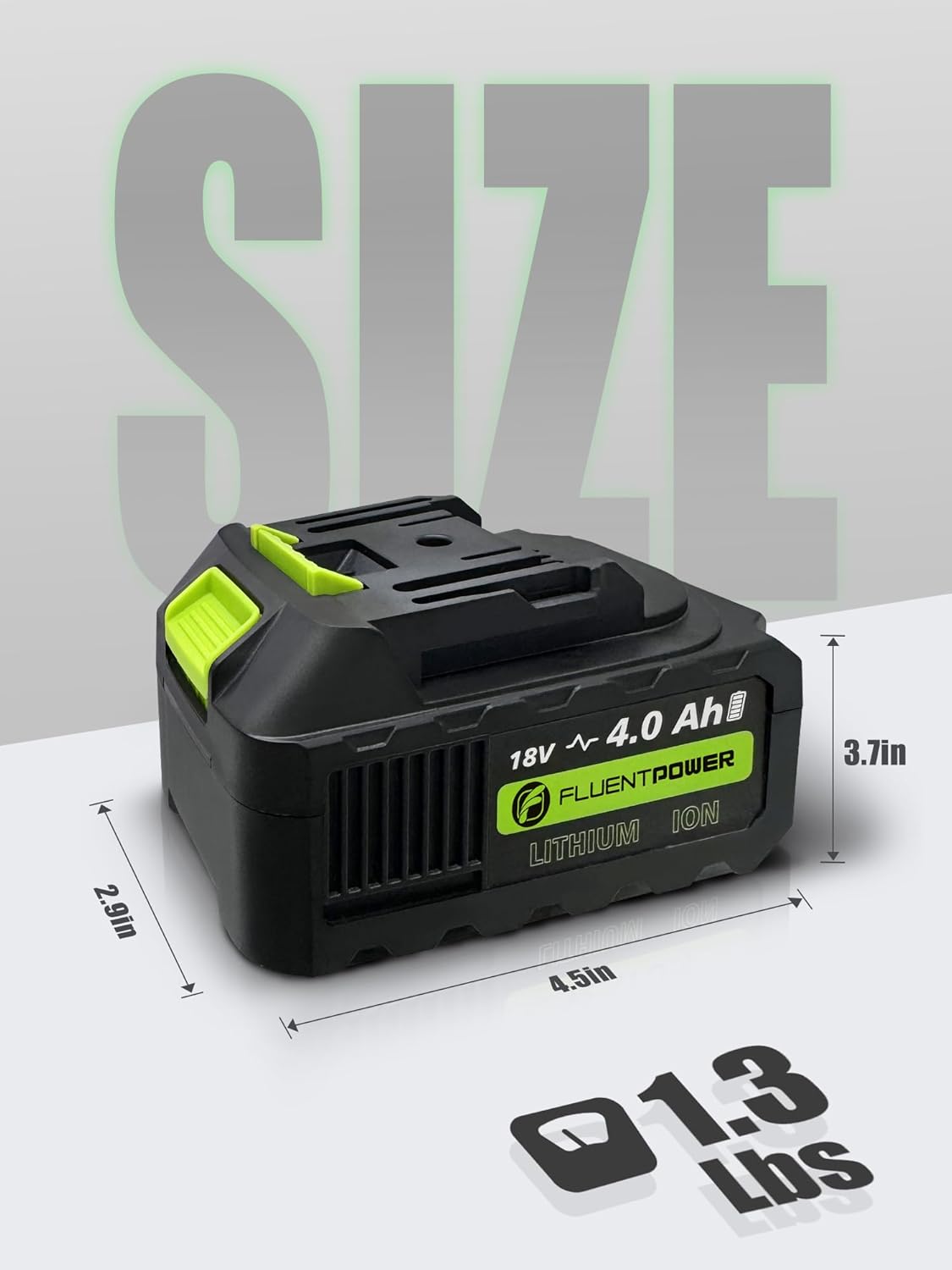
Image 1: Physical dimensions and weight of the FLUENTPOWER 18V MAX 4.0Ah Lithium-Ion Battery.
4. Features
- High Capacity: 4.0Ah capacity provides extended runtime for compatible tools.
- LED Indicators: Four LED lights display the remaining power level, allowing users to monitor battery status.
- Intelligent Protection System: Built-in safeguards protect against over-current, overcharging, over-discharge, over-voltage, and over-heat conditions, enhancing safety and battery lifespan.

Image 2: User-friendly design elements including the release button, smart LED indicator, and precise interface.

Image 3: Overview of the intelligent protection system and fast charging capability.
5. Compatibility
The FLUENTPOWER 18V MAX 4.0Ah Lithium-Ion Battery (Model TLS1840) is designed for use with specific FLUENTPOWER 18V tools. Compatible models include:
- FLUENTPOWER Cordless Submersible Pump FSP20DC-2
- FLUENTPOWER Cordless Submersible Pump FSP20DC-4-NB
- FLUENTPOWER Ratchet Wrench FRW01-18V
- FLUENTPOWER Ratchet Wrench FRW02-18V
Ensure your tool model is listed above for proper fit and function.
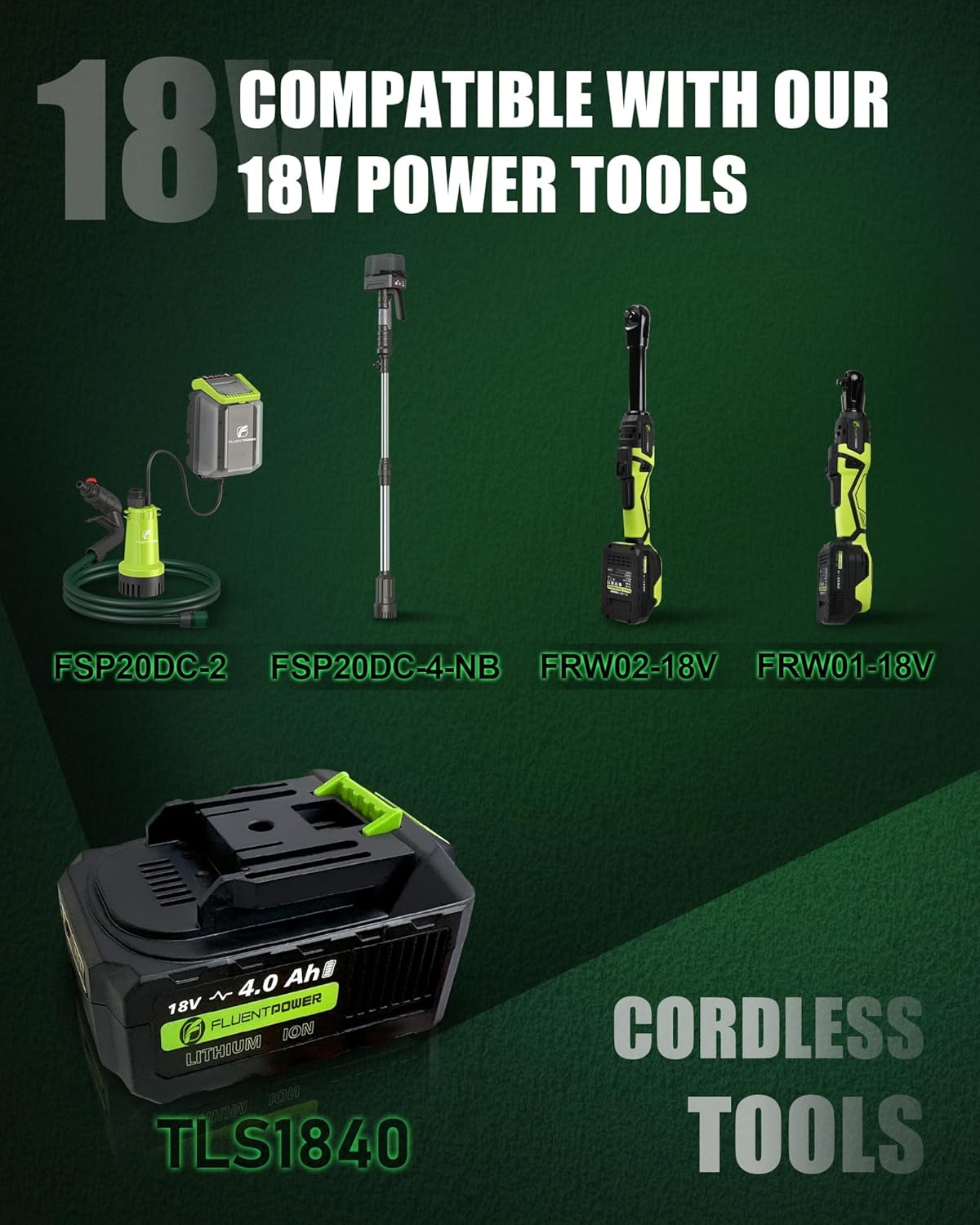
Image 4: The TLS1840 battery shown with various compatible FLUENTPOWER 18V cordless tools.
6. Setup
6.1 Initial Charging
Before first use, fully charge the battery pack. Use only a FLUENTPOWER-approved charger designed for 18V Lithium-Ion batteries. Refer to your charger's instruction manual for specific charging procedures.
6.2 Installing the Battery
- Align the battery pack with the battery port on your compatible FLUENTPOWER tool.
- Slide the battery into the tool until it clicks securely into place. Ensure the battery is fully seated and locked to prevent accidental detachment during operation.
- To remove the battery, press the release button (refer to Image 2) and slide the battery out of the tool.
7. Operating
7.1 Checking Battery Charge Level
The battery features four LED indicators to display the remaining charge. Press the battery level indicator button (if present on your model) or observe the lights when the battery is inserted into a tool:
- 4 LEDs: 75-100% charge
- 3 LEDs: 50-75% charge
- 2 LEDs: 25-50% charge
- 1 LED: Below 25% charge, recharge soon
- No LEDs: Battery is fully discharged or faulty.
7.2 General Use
Once installed, the battery powers the compatible FLUENTPOWER tool. Operate the tool according to its specific instruction manual. Avoid completely draining the battery to prolong its lifespan. Recharge the battery when the charge level is low.
8. Maintenance
8.1 Charging
Always use the FLUENTPOWER-approved charger. Charging times may vary based on the charger model and battery's state of discharge. Do not leave batteries on charge indefinitely.
8.2 Storage
Store the battery pack in a cool, dry place, away from direct sunlight and extreme temperatures. For long-term storage, it is recommended to store the battery with a partial charge (around 50%) to maintain optimal health. Avoid storing fully discharged or fully charged batteries for extended periods.
8.3 Cleaning
Keep the battery contacts clean. Use a clean, dry cloth to wipe away any dust or debris. Do not use liquids or solvents.
8.4 Disposal
Lithium-ion batteries must be recycled or disposed of properly. Do not dispose of batteries in household waste or by incineration. Contact your local waste management authority for information on battery recycling programs.
9. Troubleshooting
9.1 Battery Not Charging
- Check Connections: Ensure the battery is properly seated in the charger and the charger is plugged into a working power outlet.
- Charger Functionality: Verify the charger is working correctly. Try charging another compatible battery if available.
- Battery Temperature: If the battery is too hot or too cold, the charger may not initiate charging. Allow the battery to reach room temperature before attempting to charge.
- Faulty Battery: If the issue persists, the battery or charger may be faulty.
9.2 Battery Not Powering Tool
- Battery Insertion: Ensure the battery is fully inserted and locked into the tool.
- Charge Level: Check the battery's LED indicators to confirm it has sufficient charge.
- Tool Compatibility: Verify that the battery is compatible with your specific FLUENTPOWER tool model (refer to Section 5).
- Tool Malfunction: Test the tool with another known-good battery if possible to rule out a tool issue.
9.3 Short Runtime
- Battery Age/Degradation: Over time, all rechargeable batteries experience a decrease in capacity.
- Operating Conditions: Extreme temperatures (very hot or very cold) can reduce battery performance and runtime.
- Application Demands: High-demand applications will naturally deplete the battery faster.
10. Warranty and Support
10.1 Warranty Information
For warranty details, please refer to the specific warranty documentation provided with your purchase or contact FLUENTPOWER customer service. The general warranty period is typically one year from the date of purchase, covering defects in materials and workmanship.
10.2 Customer Support
If you have any questions, require technical assistance, or need to report an issue, please contact FLUENT TOOLS customer support. Contact information can usually be found on the product packaging or the official FLUENTPOWER website.