
WEIBEIQI YYK-Q16S
WEIBEIQI Open Ear Bluetooth 5.4 Headphones User Manual
Model: YYK-Q16S
1. Introduction
Thank you for choosing the WEIBEIQI Open Ear Bluetooth 5.4 Headphones. This manual provides essential information for setting up, operating, and maintaining your new headphones. Please read it thoroughly to ensure optimal performance and longevity of your device.
These headphones are designed for comfort and awareness, allowing you to enjoy audio while remaining connected to your surroundings. They feature advanced Bluetooth 5.4 technology for stable connectivity and a durable, water-resistant design suitable for various activities.
2. Product Overview
The WEIBEIQI Open Ear Bluetooth 5.4 Headphones (Model YYK-Q16S) offer a unique open-ear design that rests comfortably over your ear without entering the ear canal, preventing discomfort and allowing ambient sound awareness. They come with a portable charging case that also displays battery levels.
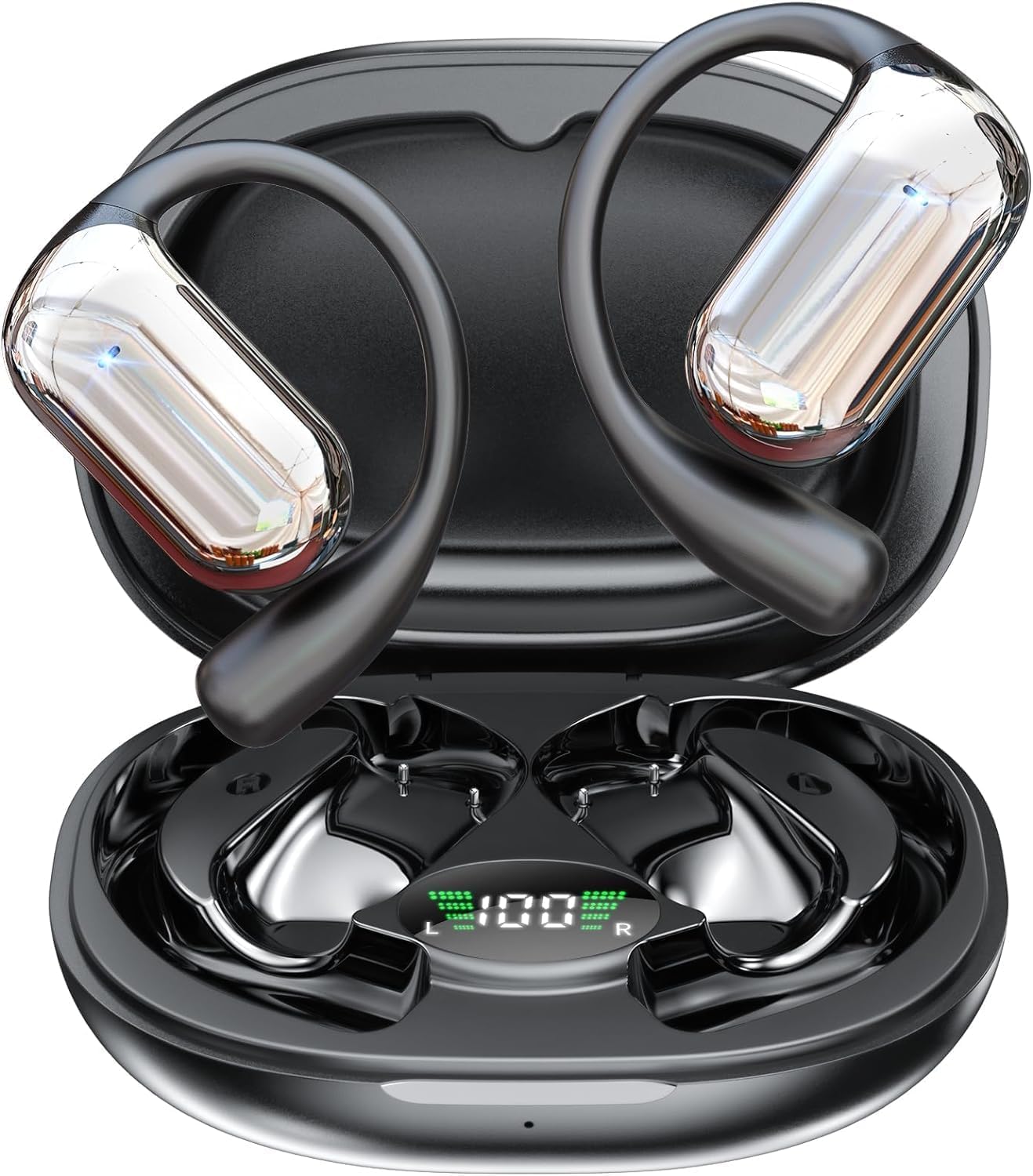
Figure 2.1: WEIBEIQI Open Ear Bluetooth 5.4 Headphones and Charging Case.
2.1 Package Contents
- Open Ear Bluetooth Headphones (Left and Right)
- Charging Case
- USB Type-C Charging Cable
- User Manual (this document)
2.2 Key Features
- Open Over-Ear Design: Ergonomic design for comfort and environmental awareness, avoiding ear canal discomfort.
- Bluetooth 5.4 Connectivity: Ensures faster, more stable transmission, seamless pairing, ultra-low latency, and perfect synchronization.
- Extended Playtime: Up to 10 hours of continuous play on a single charge, with an additional 40 hours provided by the charging case (total 50 hours).
- LED Digital Display: Charging case features an LED display to show battery levels for both earbuds and the case.
- Bone Conduction Technology: Delivers clear, distinct HI-FI sound through the acoustic cavity, optimizing audio performance.
- Lightweight & Skin-Friendly: Each earbud weighs approximately 0.26 ounces (7.5g), crafted with a memory-flex titanium alloy frame and skin-friendly silicone for comfortable, all-day wear.
- Water Resistant Design: Suitable for running and fitness activities.
3. Setup
3.1 Initial Charging
Before first use, fully charge the headphones and charging case. Connect the provided USB Type-C cable to the charging port on the case and plug the other end into a USB power source (e.g., wall adapter, computer USB port). The LED display on the case will indicate charging progress.
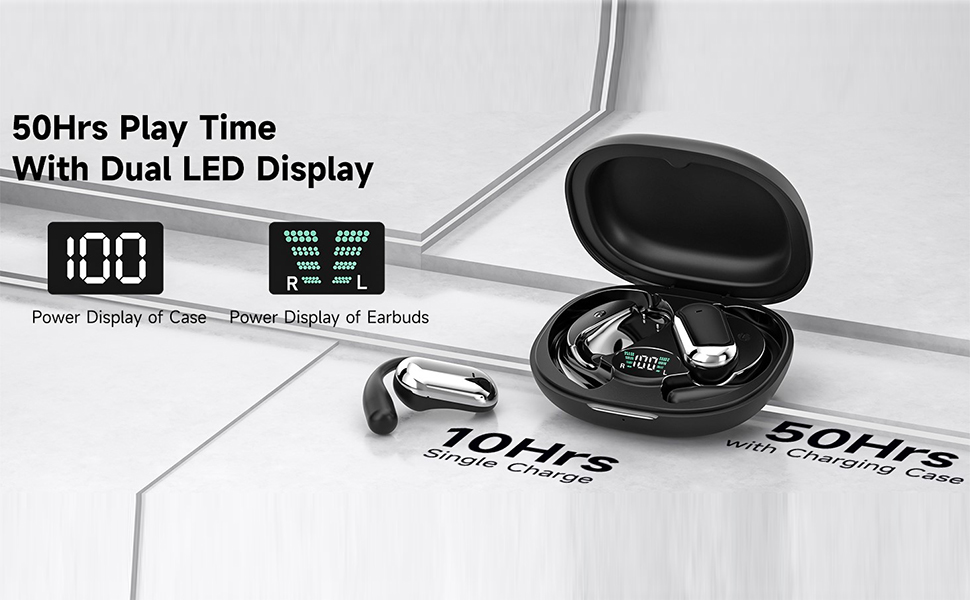
Figure 3.1: Charging case displaying battery levels and total playtime.
A full charge for the case takes approximately 1 hour. The earbuds will charge automatically when placed inside the powered case.
3.2 Pairing with Your Device
- Ensure the headphones are charged.
- Open the lid of the charging case. The earbuds will automatically enter pairing mode.
- On your device (smartphone, tablet, etc.), go to Bluetooth settings and turn Bluetooth ON.
- Look for "YYK-Q16S" in the list of available devices and select it to connect.
- Once connected, you will hear an audio prompt, and the earbuds will be ready for use.
Video 3.1: Demonstration of the quick pairing process for the Open Ear Bluetooth Headphones.
Automatic Reconnection: After initial pairing, the headphones will automatically reconnect to the last paired device when removed from the charging case and Bluetooth is enabled on the device.
4. Operating Instructions
4.1 Wearing the Headphones
The YYK-Q16S headphones feature an open-ear design with ear hooks for a secure and comfortable fit. Follow these steps to wear them correctly:
- Take out the earphones from the charging case.
- Hang the end of the earphones on your ear bone.
- Turn the earphones and slide it behind the ear.
- Adjust the ear hook to ensure a secure and comfortable fit.

Figure 4.1: Proper wearing method for the open ear headphones.
4.2 Touch Controls
The headphones are equipped with flexible touch controls on each earbud. Refer to the table below for common functions:
| Action | Function | Earbud (L/R) |
|---|---|---|
| Double Tap | Volume + (R) / Volume - (L) | Right / Left |
| Single Tap | Pause/Play | Any |
| Single Tap | Answer Call | Any |
| Long Press (2s) | Reset Earbuds (Unpairing) | Any |
| Single Tap (1s) | Previous Song | Left |
| Single Tap (1s) | Next Song | Right |
| Long Press (1s) | Reject Call / Hang Up | Any |
| Triple Tap | Activate Siri (Voice Assistant) | Any |
Figure 4.2: Simple Touch Controls for the headphones.
Resetting Earbuds: To reset the earbuds, disconnect them from your phone and quickly press the left button 5 times simultaneously.
5. Maintenance
5.1 Cleaning
- Regularly wipe the earbuds and charging case with a soft, dry, lint-free cloth.
- Avoid using abrasive cleaners, solvents, or aerosol sprays.
- Do not submerge the charging case in water. While the earbuds are water-resistant, prolonged exposure to water should be avoided.
5.2 Storage
When not in use, store the headphones in their charging case to protect them from dust and damage. Store in a cool, dry place away from extreme temperatures.
6. Troubleshooting
| Problem | Possible Cause | Solution |
|---|---|---|
| Headphones not pairing | Bluetooth is off on device; headphones not in pairing mode; previously paired to another device. | Ensure Bluetooth is on. Open case lid to activate pairing. Forget "YYK-Q16S" on other devices. Perform a factory reset (see Section 4.2). |
| No sound or low volume | Volume too low on device/headphones; headphones not properly connected; audio source issue. | Increase volume on both device and headphones. Reconnect headphones. Check audio source. |
| Charging issue | Cable not connected properly; faulty cable/charger; dirty charging contacts. | Ensure cable is securely connected. Try a different USB port or charger. Clean charging contacts on earbuds and case with a dry cotton swab. |
| Intermittent connection | Too far from device; interference; low battery. | Stay within 10 meters (33 feet) of your device. Avoid areas with strong Wi-Fi or other Bluetooth signals. Charge headphones fully. |
7. Specifications
| Feature | Detail |
|---|---|
| Model Name | YYK-Q16S |
| Connectivity Technology | Wireless (Bluetooth 5.4) |
| Bluetooth Version | 5.4 |
| Audio Driver Type | Bone Conduction Driver |
| Ear Placement | Over Ear (Open Ear Design) |
| Playtime (Single Charge) | Up to 10 hours |
| Total Playtime (with Charging Case) | Up to 50 hours |
| Charging Time (Case) | Approx. 1 hour (via Type-C) |
| Control Method | Touch |
| Water Resistance Level | Water Resistant |
| Item Weight (Each Earbud) | 0.26 ounces (approx. 7.5g) |
| Material | Plastic, Skin-friendly Silicone, Titanium Alloy |
| Manufacturer | WEIBEIQI |
8. Warranty and Support
For warranty information and customer support, please refer to the product packaging or contact the manufacturer directly through their official website or the retailer where the product was purchased. Keep your purchase receipt as proof of purchase for warranty claims.
For common questions and further assistance, you may also visit the product's Amazon page: WEIBEIQI Open Ear Bluetooth 5.4 Headphones on Amazon.
Related Documents - YYK-Q16S
 |
EUQQ YYK-Q16 Open Ear Bluetooth Headphones User Manual User manual for the EUQQ YYK-Q16 Open Ear Bluetooth 5.4 Headphones. This guide provides instructions on setup, features, and usage of the wireless earbuds. |
 |
MAIJOFO YYk-635 Wireless Earbuds User Manual - Bluetooth 5.3, 50H Playtime User manual for MAIJOFO YYk-635 wireless earbuds featuring Bluetooth 5.3, 50-hour total playtime, dual power display, IPX7 water resistance, and secure earhook design for sports. Includes specifications, pairing, charging, controls, and troubleshooting. |
 |
Kinganda YYK-Q71 Clip-On Wireless Earbuds User Manual Comprehensive user manual for the Kinganda YYK-Q71 Clip-On Wireless Earbuds, covering package contents, wearing instructions, product specifications, power on/off, pairing, button controls, charging, reset operations, safety warnings, and after-sales service. |
 |
YYK-Q63 Wireless Bluetooth Earbuds User Manual This document provides instructions and specifications for the YYK-Q63 Wireless Bluetooth Earbuds, featuring 120H playtime, Bluetooth 5.3, Hi-fi stereo sound, and an LED display charging case. |
 |
YYK-Q16S Ear-Mounted Wireless Headphones User Manual User manual for the YYK-Q16S ear-mounted wireless headphones, detailing product specifications, pairing, charging, operation, and safety precautions. |
 |
YYK-Q92 Bluetooth 5.3 Earbuds User Manual This manual provides comprehensive instructions for the YYK-Q92 Bluetooth 5.3 Earbuds, covering product overview, charging, wearing, power on/off, specifications, Bluetooth connection, operation, factory reset, and troubleshooting. |