
1. Introduction
Thank you for choosing the BETOPPER 120 Watt RGBW Moving Head Light. This professional-grade stage lighting fixture combines a 120W COB with four RGBW LEDs to deliver powerful and versatile lighting effects. Designed for parties, shows, stages, bars, and various events, it offers a wide range of colors and dynamic movements to enhance any atmosphere. This manual provides essential information for safe operation, setup, maintenance, and troubleshooting to ensure optimal performance and longevity of your device.
2. Safety Information
Please read all safety instructions carefully before installation and operation. Keep this manual for future reference.
- Electrical Safety: Ensure the power supply voltage matches the device's requirements (230V). Always disconnect power before cleaning, servicing, or moving the fixture.
- Ventilation: Ensure adequate ventilation around the fixture. Do not block ventilation openings.
- Temperature: Operate the fixture within the specified temperature range of -20°C to 40°C. Avoid direct exposure to extreme heat or cold.
- Moisture: This device is intended for indoor use. Do not expose it to rain, moisture, or high humidity.
- Mounting: Securely mount the fixture using appropriate hardware. Ensure the mounting surface can support the weight of the device.
- Eye Protection: Avoid direct eye exposure to the light source, as it can cause eye damage.
- Repairs: Do not attempt to repair the device yourself. Refer all servicing to qualified personnel.
3. Package Contents
Upon opening the package, please verify that all components are present and in good condition:
- BETOPPER 120 Watt RGBW Moving Head Light Unit
- Power Cable
- DMX Cable
- Mounting Bracket
- User Manual (this document)
4. Setup
Follow these steps to set up your BETOPPER Moving Head Light:
- Unpacking: Carefully remove the fixture from its packaging.
- Placement: Place the fixture on a stable, flat surface or securely mount it using the provided mounting bracket. Ensure there is sufficient space for movement and ventilation.
- Power Connection: Connect the included power cable to the power input on the rear of the fixture and then to a suitable power outlet.
- DMX Connection (Optional): If using DMX control, connect a DMX cable from your DMX controller's output to the DMX IN port on the fixture. For multiple fixtures, daisy-chain them by connecting the DMX OUT of the first fixture to the DMX IN of the next.

Figure 4.1: Front view of the BETOPPER 120 Watt RGBW Moving Head Light, showing the main unit and control panel.
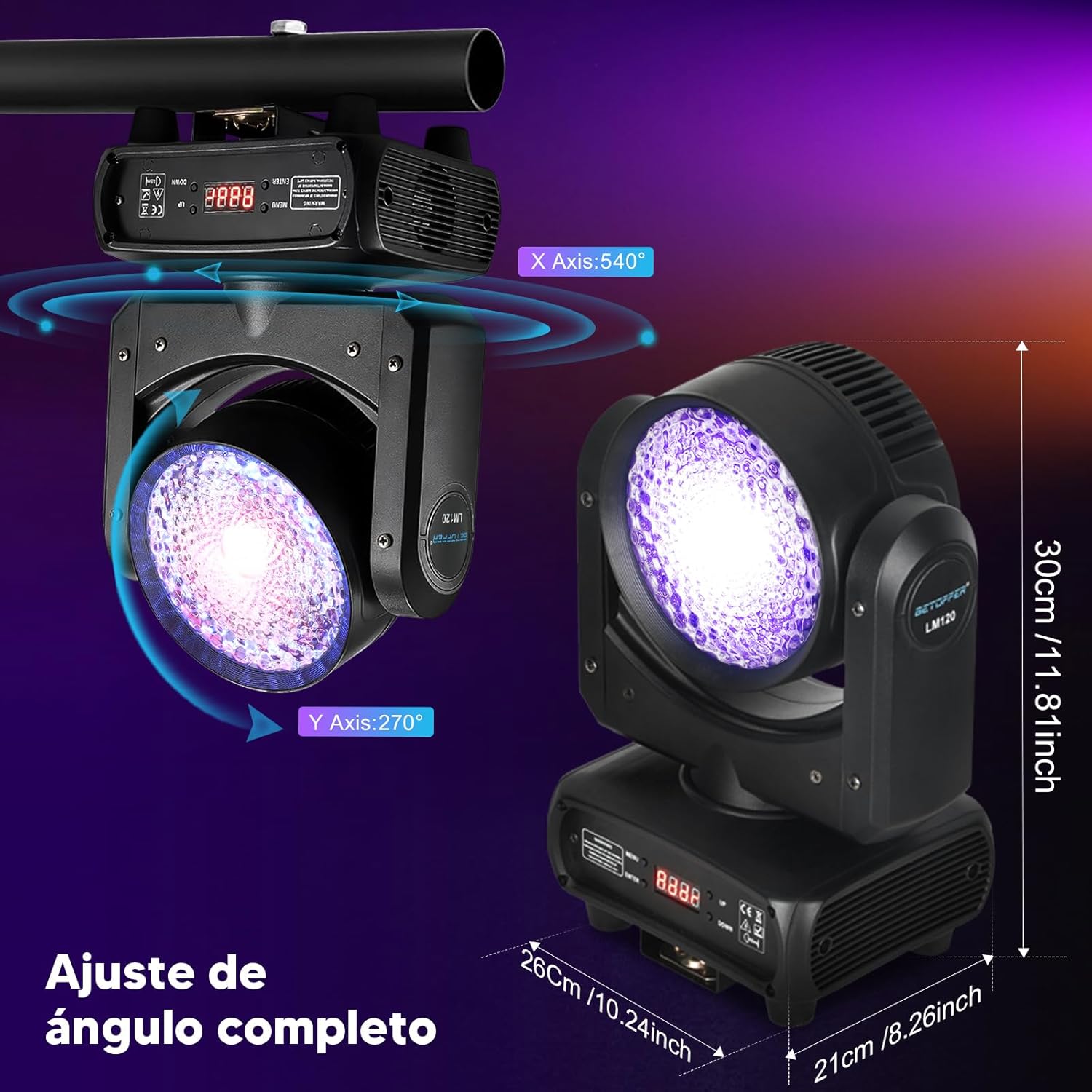
Figure 4.2: Dimensions and movement range (540° Pan, 270° Tilt) of the fixture, important for installation planning.
5. Operating Modes
The BETOPPER Moving Head Light offers four primary control modes:
- DMX512 Mode: This mode allows precise control over all functions using a DMX controller. The fixture supports 23 DMX channels, enabling detailed adjustments of color, movement, dimming, strobe, and other effects. Refer to the DMX channel chart (usually provided in a separate DMX manual or on the manufacturer's website) for specific channel assignments.
- Master-Slave Mode: Connect multiple fixtures together. Set one unit as the 'Master' and others as 'Slaves'. The slave units will synchronize their operations with the master unit, creating coordinated light shows without a DMX controller.
- Auto Mode: The fixture runs through pre-programmed light shows automatically. This mode is ideal for quick setup and dynamic effects without external control.
- Sound Active Mode: In this mode, the light reacts to sound and music, changing patterns and colors in sync with the beat. An internal microphone detects audio signals.
Control Panel Operation
The control panel on the base of the fixture features a digital display and several buttons for mode selection and parameter adjustment:
- MENU: Press to cycle through the main menu options.
- ENTER: Press to confirm a selection or enter a submenu.
- UP/DOWN: Use these buttons to navigate through menu options or adjust parameter values.

Figure 5.1: The unique lens design and high brightness of the BETOPPER Moving Head Light.

Figure 5.2: Illustration of the RGBW color mixing, demonstrating the wide spectrum of colors achievable.
6. Maintenance
Regular maintenance ensures the longevity and optimal performance of your BETOPPER Moving Head Light.
- Cleaning: Periodically clean the exterior of the fixture with a soft, dry cloth. For the lens, use a soft cloth and a non-abrasive cleaner specifically designed for optical surfaces. Ensure the fixture is powered off and unplugged before cleaning.
- Ventilation: Keep the ventilation openings clear of dust and debris to ensure proper heat dissipation. The COB technology with its high-efficiency cooling system relies on unobstructed airflow.
- Storage: When not in use, store the fixture in a dry, dust-free environment, preferably in its original packaging or a protective case.
- Inspection: Regularly inspect power cables, DMX cables, and mounting hardware for any signs of wear or damage. Replace damaged components immediately.
7. Troubleshooting
If you encounter issues with your BETOPPER Moving Head Light, refer to the following common problems and solutions:
| Problem | Possible Cause | Solution |
|---|---|---|
| No power / Light does not turn on | No power supply; Faulty cable; Blown fuse | Check power connection; Test cable; Replace fuse (if applicable) |
| No light output | Dimmer at 0%; Mode not selected; Internal fault | Increase dimmer level; Select appropriate mode (Auto, DMX); Contact support |
| No DMX control | Incorrect DMX address; Faulty DMX cable; DMX signal issue | Verify DMX address; Check DMX cable connections; Ensure DMX controller is sending signal |
| Movement issues (Pan/Tilt) | Obstruction; Motor fault; Incorrect DMX values | Check for obstructions; Reset fixture; Verify DMX channel values; Contact support |
| Light flickers or behaves erratically | Unstable power; DMX interference; Overheating | Ensure stable power supply; Check DMX termination; Ensure proper ventilation |
8. Specifications
Detailed technical specifications for the BETOPPER 120 Watt RGBW Moving Head Light:
| Feature | Specification |
|---|---|
| Brand | Betopper |
| Model Number | LM120 |
| Light Source | 120W COB + RGBW 4-in-1 LEDs |
| Luminous Flux | 3500 lumens |
| Voltage | 230 Volts |
| Maximum Wattage | 120 Watts |
| Control Modes | DMX512, Master-Slave, Auto, Sound Active |
| DMX Channels | 23 Channels |
| Pan Movement | 540° |
| Tilt Movement | 270° |
| Dimming | 0-100% linear (16-bit) |
| Operating Temperature | -20°C to 40°C |
| Lifespan | Up to 100,000 hours |
| Material | Metal Aluminum |
| Dimensions (L x W x H) | 22 x 14.6 x 7.9 cm (approx. 8.66 x 5.75 x 3.11 inches) |
| Weight | 3.96 kg (approx. 8.73 lbs) |
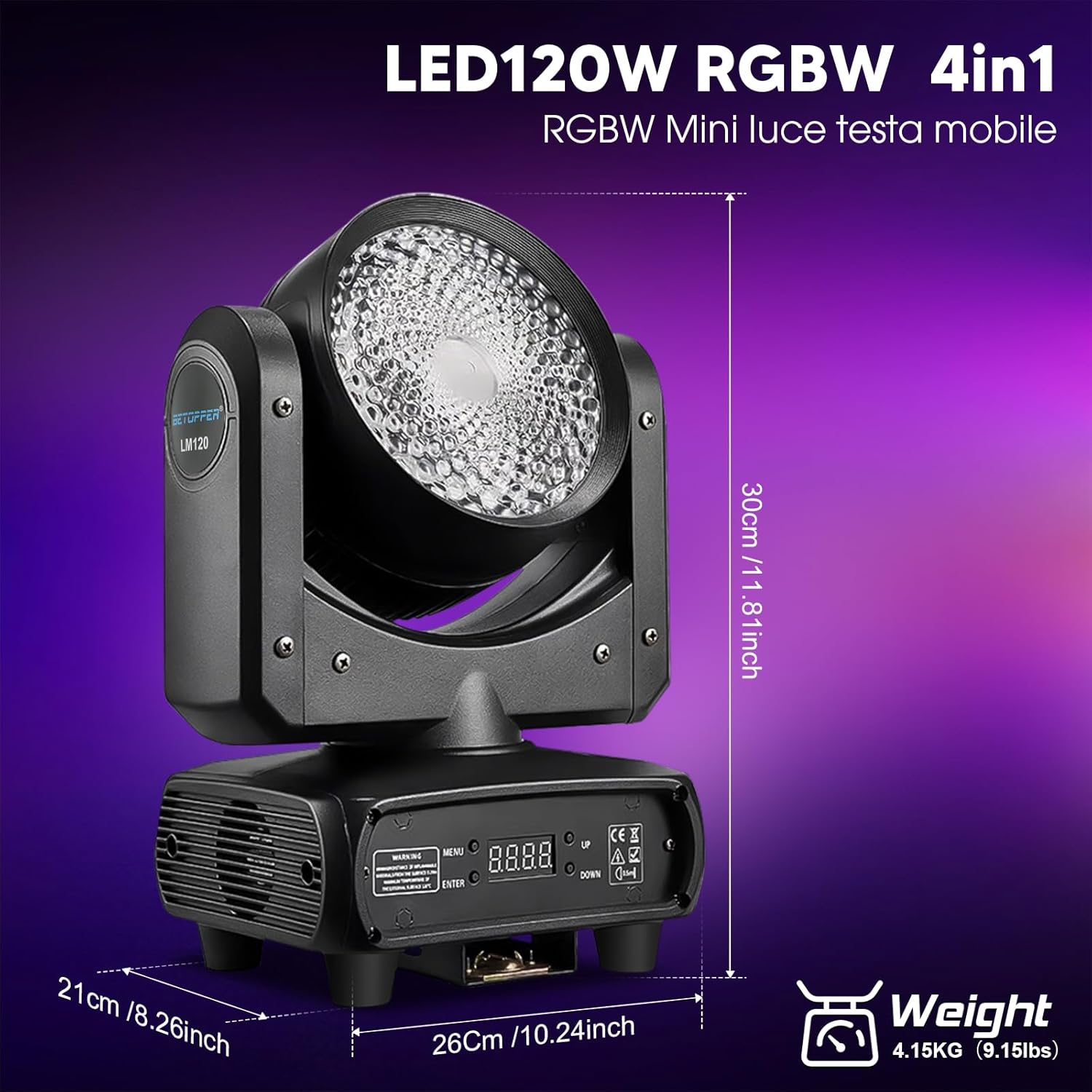
Figure 8.1: Detailed dimensions and weight of the BETOPPER LM120.
9. Warranty and Support
The BETOPPER 120 Watt RGBW Moving Head Light is designed for durability and a long operational life, with LEDs rated for up to 100,000 hours. For specific warranty terms and conditions, please refer to the warranty card included with your product or contact BETOPPER customer service directly.
If you require technical assistance, have questions about operation, or need to report a defect, please contact BETOPPER customer support through the retailer's platform or the official BETOPPER website. When contacting support, please have your product model number (LM120) and purchase information ready.